
Introduction
The dual write problem shows up every time an application needs to perform two writes to different systems — usually a database and a message broker — and treat those two operations as if they were a single thing. If I save the order to the database and then publish an event to Azure Service Bus as a separate call, I have created an inconsistency window. If the application fails or the network drops between those two operations, the system ends up in a state nobody planned: the data exists but the event never went out, or the event was published but the database commit never happened.
This problem is not theoretical. I have seen event queues announcing orders that did not actually exist in the database, because the local transaction failed after publication. And I have seen the opposite: orders created without any audit or notification event, because the application crashed halfway before it could publish. This article is the second part of the series on event architecture without chaos in C#, and here I focus specifically on the Transactional Outbox Pattern: what it solves, how to implement it in C# with PostgreSQL, and how it applies to a real case of transactional auditing publishing to Azure Service Bus.
Prerequisites
To follow the examples, it helps to have basic knowledge of ACID transactions in a relational database, Entity Framework Core or Npgsql, and some familiarity with messaging queues or topics (Azure Service Bus, RabbitMQ or Kafka follow the same reasoning). The complete code example is part of the same event lab used in the first article of the series, available at BlogSamples/Messaging/EventDriven/.
The dual write problem
Every time a business operation needs to persist a local state and notify another system about that state, there are two physically separate writes: a COMMIT in the database and a network call to the broker. Relational databases guarantee atomicity within their own transactions, but that guarantee does not extend to an external system. There is no real distributed transaction between PostgreSQL and Azure Service Bus without a protocol such as two-phase commit, which in practice almost no modern messaging system supports and which introduces latency and coupling most teams do not want to pay for.
The result is that any “save then publish” or “publish then save” combination has a window where one of the two operations can fail on its own:
- If I save to the database and the application crashes before publishing, the event never existed and no consumer will be notified.
- If I publish first and the database commit fails afterward, the consumer receives an event about data that was never persisted.
⚠️ Warning: a naive retry does not solve the dual write problem on its own. If I simply try again after a failure, I risk publishing the same event twice or never reconciling the state when the failure is permanent (application restarted, process killed, deployment in the middle of the flow).
Why database transactions alone do not solve it
The most common attempt at a fix is to wrap both operations in a transaction and hope everything works. That does not work because the database transaction only controls resources the database itself manages. An HTTP or AMQP call to Azure Service Bus does not take part in the PostgreSQL or SQL Server commit protocol. If I run an INSERT in the database, call the Service Bus SDK inside the same try block, and then COMMIT, there are still failure scenarios:
- The local
COMMITmay succeed, but the broker’s acknowledgement never arrives because of a network timeout — the application does not know whether the message was delivered. - The broker may confirm delivery, but the subsequent
COMMITin the database fails because of a deadlock or a constraint violation — the event has already been published, but the data never became consistent.
That is exactly why I need to turn both operations into a single local transaction, and treat the actual publication as an asynchronous, decoupled step.
The solution: Transactional Outbox Pattern
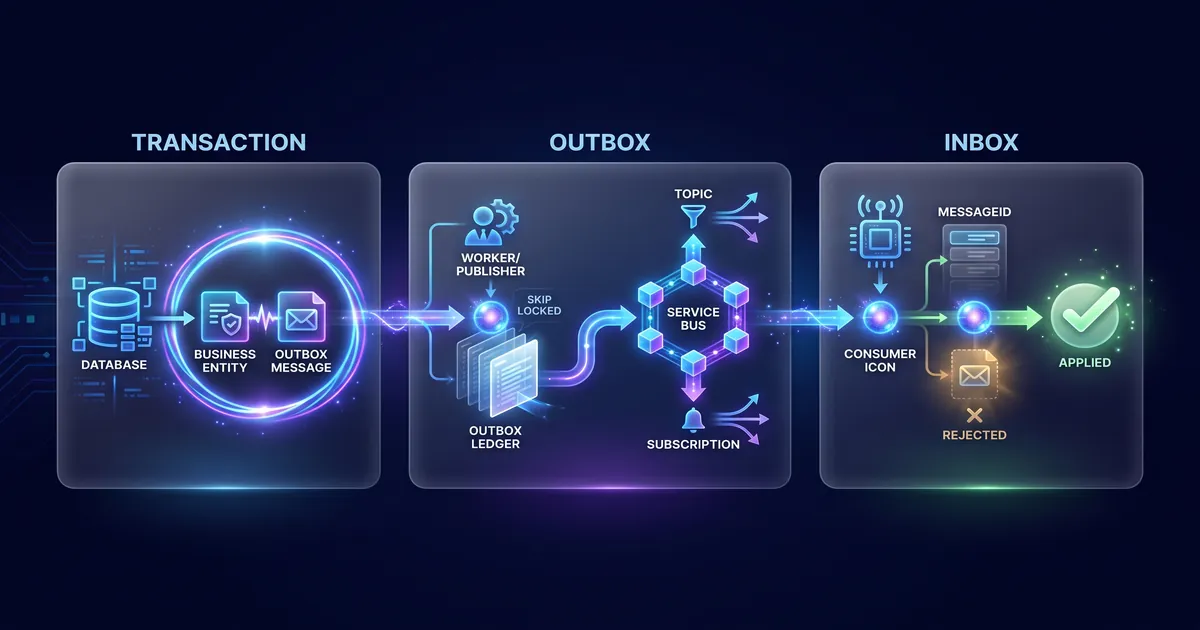
The Transactional Outbox Pattern solves the dual write problem by removing the need for a distributed transaction. Instead of publishing directly to the broker, the application writes the business data and the intended event to an “outbox” table within the same atomic database transaction. Since both writes happen in the same database and the same local transaction, they are atomic by definition: either both are persisted, or neither is.
| |
📂 Source Code: The complete Outbox, Inbox and Saga example is available in the blog’s sample repository:
BlogSamples/Messaging/EventDriven/
If CommitAsync succeeds, I have the guarantee that the order and the intent to publish the event exist together in the database. If it fails, neither was persisted. The scenario in which one was saved and the other was not no longer exists.
Consuming the events: the asynchronous publisher
Saving the event in the outbox table solves atomicity, but the step that actually delivers the message to the broker is still missing. That responsibility belongs to a separate process — usually a worker or BackgroundService — that reads the pending records from the outbox and publishes them to Azure Service Bus asynchronously, marking each message as published only after the broker confirms it.
| |
⚠️ Note: this block is simplified to focus on the idea of the flow. In production, selecting pending messages should use a lock/lease mechanism in the database — for example
FOR UPDATE SKIP LOCKEDin PostgreSQL or an equivalent — to ensure that multiple worker instances do not publish the same batch.
This design creates a latency window between the local COMMIT and the actual publication — usually from milliseconds to a few seconds —, but it never loses the atomicity guarantee between data and event. If the worker crashes after SendMessageAsync and before SaveChangesAsync, the message may be published again on the next run. That is expected and is handled on the consumer side, not on the publisher.
Real case: transactional auditing in an inventory management system
A concrete example of this pattern in production is the audit outbox of an inventory management system, which publishes events to Azure Service Bus with at-least-once semantics. The publisher claims available messages through a SQL lease — a mechanism equivalent to the SKIP LOCKED of the previous example, but implemented as an optimistic lock with a lease timeout —, sends the versioned envelope to the configured topic and only marks the message as Published after the broker confirms it.
This flow reinforces a central point of the Transactional Outbox Pattern: the publisher’s responsibility ends at the delivery confirmation. It never assumes that a message sent once is guaranteed to arrive exactly once on the other side. That is why the relevant obligations move to the consumer.
⚠️ Warning: the Transactional Outbox solves the inconsistency between the local transaction and the publication of the event intent, but it does not create a distributed transaction between the application database and any external system the consumer touches afterward. When the consumer calls another API, writes to another database or sends an email, real consistency becomes a matter of idempotency, retry and compensation, not global atomicity.
Consumer obligations: idempotency and ordering
Since delivery is at-least-once, every consumer of a transactional outbox needs to treat duplication as a normal part of the flow, not as an exception:
- Idempotency by
MessageId. The consumer must keep an Inbox or an equivalent constraint on(consumer, messageId)before applying any side effect. If the same message arrives twice, the second processing must be recognized and discarded without repeating the business action. - PeekLock without auto-complete. Processing in
PeekLockmode withAutoCompleteMessagesdisabled is mandatory. The message should only be completed after the local persistence or the external effect has been confirmed — never before. - Duplicates are expected, not a bug. If the API publishes to Service Bus and fails before marking the message as
Published, the same message may be resent with the sameMessageId. The consumer needs to be prepared for that from the initial design. SessionIdfor per-aggregate ordering. When the subscription requires sequential processing, usingSessionIdas a per-aggregate ordering key — in theDomain:EntityType:EntityIdformat — ensures that events of the same order, for example, are processed in the correct order without blocking other aggregates.- DLQ only after exhausting attempts. Send to the Dead Letter Queue only after exhausting the consumer’s attempts, recording the error in a sanitized way, without sensitive payload in the logs.
- Retries decoupled between outbox and consumer. The outbox controls publication; the consumer controls its own processing. Mixing those two retry policies creates unnecessary coupling and makes it harder to diagnose which side is failing.
| |
ℹ️ Info: the Outbox (producer) + Inbox (consumer) pair reduces the problem to a tractable model: the outbox preserves the event intent and the inbox prevents the same side effect from being applied more than once.
How to know whether you need the Outbox Pattern
The Transactional Outbox Pattern solves a specific problem: consistency between a local write and an external notification. It is not needed everywhere.
| Situation | Recommendation |
|---|---|
| Single, synchronous operation with no dependent external system | keep a simple database transaction |
| Persist data and reliably notify another service/domain | use Transactional Outbox |
| Only write performance, with no distributed consistency concern | not the problem the Outbox solves |
| Auditing, event replication or asynchronous integration between systems | Outbox is the recommended foundation |
Tips and Good Practices
- Always write the business data and the outbox record in the same local transaction — never in separate calls, even if they seem close in time.
- Mark the message as published only after the broker confirms it, never before or optimistically.
- Use a stable
MessageId(usually the ID of the outbox record itself) to allow deduplication in the consumer. - Treat message duplication as expected system behavior, not as a bug to be eliminated.
- Separate the publisher’s retry policy from the consumer’s retry policy; each has different failures and responsibilities.
- Use
SKIP LOCKEDor an optimistic lease in the publisher to allow multiple worker instances without duplicating work. - Never put sensitive payload in error or DLQ logs; sanitize before recording.
Objective Summary
- Dual write problem — occurs when an application writes to a database and publishes to a broker as two separate operations, with no atomicity guarantee between them.
- Transactional Outbox Pattern — writes the business data and the intended event in the same local transaction, eliminating the inconsistency between the two writes.
- At-least-once semantics — the publisher guarantees the message is not lost, but it may be delivered more than once to the consumer.
- MessageId — the key the consumer uses for deduplication through the Inbox pattern, with a constraint on
(consumer, messageId). - PeekLock without auto-complete — a processing mode that only confirms the message after the side effect has been persisted.
- SessionId — the per-aggregate ordering key (
Domain:EntityType:EntityId) used when the subscription requires sequential processing. - Azure Service Bus — the broker used in the real inventory management system case to publish audit events from the transactional outbox.
Read Also
- Event Architecture without Chaos in C#: Practical Guide
- Worker and BackgroundService: High Volume
- Database Bottlenecks: Messaging and Pagination
- Software Architecture: GoF, Patterns and Microservices
References
- Transactional Outbox Pattern — microservices.io — canonical description of the pattern and of the dual write problem.
- Azure Service Bus messaging documentation — official documentation on topics, subscriptions and sessions.
- Azure Service Bus PeekLock and AutoComplete — behavior of locks and message acknowledgement.
- PostgreSQL SKIP LOCKED — optimistic locking for concurrent publishers.
- Entity Framework Core Transactions — official documentation on transactions in EF Core.
By commenting, you agree to our Privacy Policy, Terms of Use, Data Deletion Policy.