Introduction
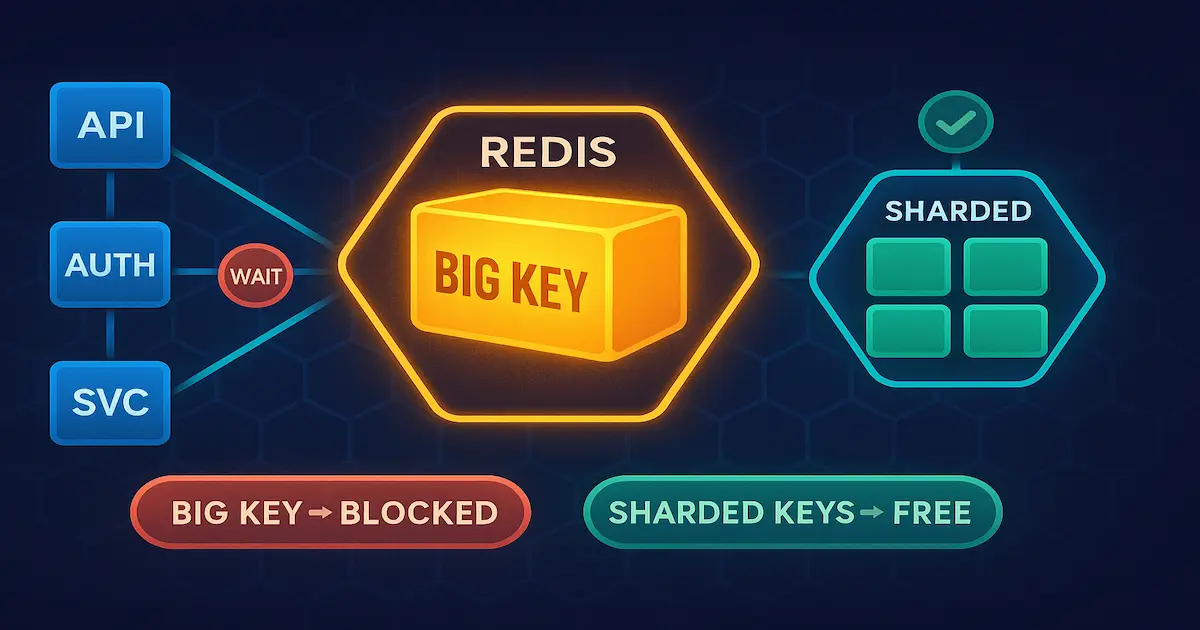
If you use Redis in a shared environment — whether an instance used by multiple microservices, multiple teams or multiple tenants — a single big key can degrade the performance of every other consumer at the same time. This is no exaggeration: it is how Redis works internally, and ignoring this behavior in production is expensive.
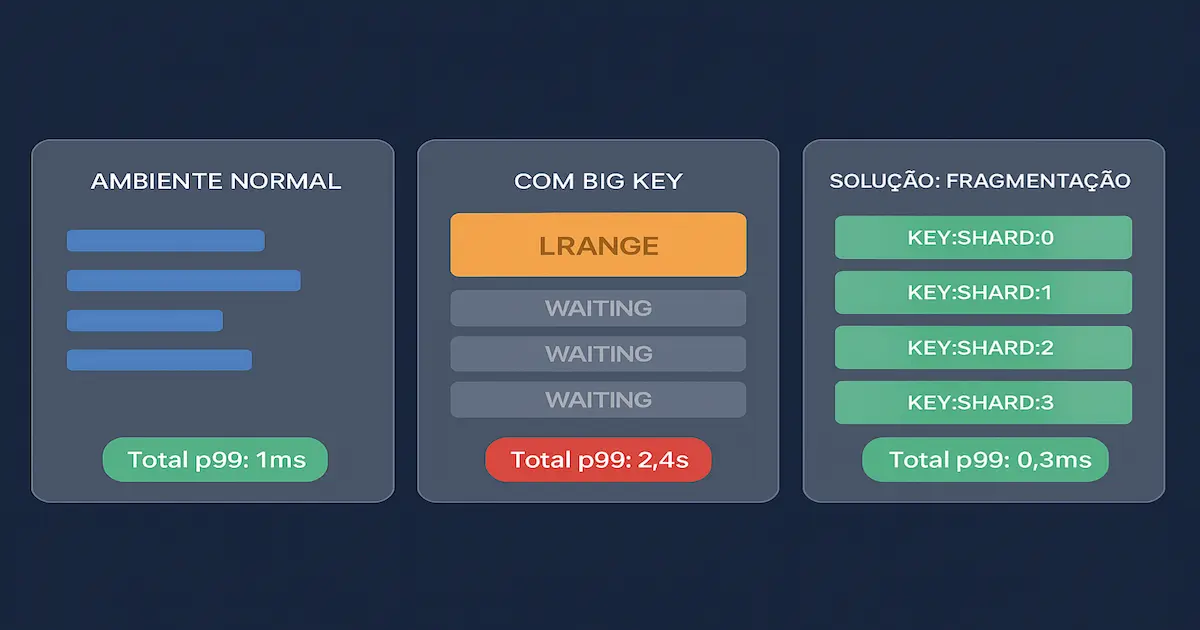
The problem of big keys in Redis exists because the server is single-threaded for data operations. When a command accesses or manipulates a key containing hundreds of megabytes — be it a list with 500 thousand elements, a hash with 200 thousand fields or a 50 MB binary string — the entire event loop is blocked processing that operation. All other clients, from completely different services, wait in the queue. In shared environments this is fatal.
In this article I will show what characterizes a big key in Redis, why the impact is amplified in multi-tenant environments, how to detect big keys in production, and the concrete strategies to eliminate or mitigate the problem — with C# examples using StackExchange.Redis.
What Is a “Big Key” in Redis
Redis has no fixed limit that defines when a key is “big”. The community and the official documentation use the term big key to describe keys whose processing or memory cost is disproportionate to the overall workload of the instance.
In practice, the limits that usually come up as a reference are:
| Data Type | Considered “big” from |
|---|---|
| String / Binary | > 5 MB |
| List | > 10,000 elements or > 10 MB |
| Hash | > 10,000 fields |
| Set | > 10,000 members |
| Sorted Set | > 10,000 members |
| Stream | > 10,000 pending messages |
These numbers are not absolute — they depend on the hardware, the Redis version and the access pattern. But they are solid references for monitoring alerts.
ℹ️ Info: Redis 7.0+ introduced improvements to internal data structures (such as Listpack replacing ZipList), which slightly changed the thresholds at which structures are “promoted” to larger representations. The big key concept, however, remains the same.
Difference between a big key and a hot key
It is common to confuse a big key with a hot key. They are different problems:
- Big key: a key with a large volume of data — the problem is the CPU/memory cost of processing the data.
- Hot key: a key accessed at a very high frequency — the problem is contention on the hash slot (relevant in Redis Cluster).
A key can have both problems at the same time, but the solutions are distinct. This article focuses on big keys.
How Redis Processes Commands (and why it matters)
To understand the impact of big keys, you need to understand how Redis executes commands. Redis uses a single-threaded event loop to process data operations. This means:
- The server receives a command from a client.
- The event loop executes the command to completion before processing any other.
- Only then is the next command in the queue processed.
This architecture is one of the reasons Redis is so fast for simple operations: no locks, no context switching between threads. The cost is that a slow operation blocks everything.
| |
⚠️ Warning: Commands such as
LRANGE key 0 -1,SMEMBERS key,HGETALL keyandKEYS *are O(N) — the cost grows linearly with the size of the structure. On a key with 500 thousand elements, this can take seconds.
Redis I/O is non-blocking — but processing is not
It is important to separate two concepts:
- I/O: Redis uses I/O multiplexing (epoll/kqueue), so accepting connections and reading network data is non-blocking.
- Command processing: executing the command itself is single-threaded and blocking for the other clients.
Redis 6.0 introduced I/O threads for network reads and writes, but command execution is still single-threaded on the main thread. The big key problem was not solved by this change.
Impact on Shared Environments
In an environment where a single Redis instance serves multiple microservices or multiple tenants of a SaaS, the impact of a big key is amplified because:
1. Latency affects everyone, not just the culprit
If the reporting service reads a key with 300 thousand records every hour, it introduces latency spikes for the authentication service, the notification service and any other that shares the same instance — even if those services are working perfectly.
2. Memory consumption is contended
Redis keeps all data in memory. A big key that takes 500 MB squeezes the space available to all other tenants. When Redis reaches maxmemory, it starts the eviction policy (removing keys), which can discard critical data from other services.
3. Snapshot and replication operations get slower
When Redis generates an RDB snapshot (persistence) or replicates data to a replica, big keys increase the fork() time and the file size. In cloud instances (AWS ElastiCache, Azure Cache for Redis), this can cause replication failures or performance penalties during synchronization.
4. Difficult debugging and traceability
In a shared environment, identifying who created the big key and which service is responsible requires careful instrumentation. Without proper key namespacing, tracing the origin of the problem can take hours.
How to Detect Big Keys in Production
Redis offers native tools to detect big keys. Here are the main approaches:
redis-cli –bigkeys
The simplest command for an initial scan:
| |
The output shows the largest keys by data type. The problem is that this command uses SCAN internally and can take a while on large instances. In production, prefer to run it during low-load hours.
MEMORY USAGE — spot check
To check the size of a specific key:
| |
SCAN + MEMORY USAGE — automated scan in C#
For programmatic monitoring with StackExchange.Redis:
| |
📂 Source Code: The complete example is available in the blog’s samples repository:
BlogSamples/Cache/Redis/
📝 Example: In an environment with 2 million keys, a scan with
pageSize = 500andpattern = "relatorio:*"limits the scope to the problematic namespace only, reducing scan time from hours to minutes.
Redis Latency Monitoring
To detect the impact in real time, enable latency monitoring:
| |
Strategies to Avoid Big Keys
Detecting the problem is the first step. Solving it is more interesting. There are four main approaches:
1. Data fragmentation (Sharding)
Instead of a single big key, distribute the data across multiple smaller keys using a partitioning field:
| |
2. Efficient serialization with compression
One of the biggest culprits for large strings is naive serialization of complex objects. Swapping JSON for a binary format + compression dramatically reduces the size:
| |
💡 Tip: Typical GZip compression reduces JSON payloads by 60–80%. A 5 MB object can drop to 800 KB — which moves it from the “big key” classification to a manageable size. But be careful: compression has a CPU cost, so evaluate the trade-off for frequently accessed data.
3. Mandatory TTL for cache keys
Keys without TTL in shared environments tend to accumulate data indefinitely. Implement a mandatory TTL policy:
| |
4. Namespacing and per-tenant segregation
In multi-tenant environments, use mandatory prefixes to identify the origin of keys. This makes diagnosis easier and enables selective cleanup policies:
| |
Practical Example
I will show a real scenario: a reporting service that loaded all of the month’s transaction records into a single Redis key for “caching” — and was bringing down the performance of the other services in the same cluster.
The original problem
| |
This code creates a key that can reach 80 MB in Redis, without TTL, and it is read in full on every access. Each read blocks the event loop for hundreds of milliseconds.
The refactored solution
| |
With this approach, each key goes from 80 MB to ~30 KB. The event loop is released in microseconds, and the other shared services stop suffering latency because of the reporting service.
Tips and Good Practices
Define alert thresholds in CI/CD: before a deploy, check whether new key patterns respect the size limits. A load-testing pipeline with
redis-cli --bigkeyscan prevent the problem before it reaches production.Use TTL on absolutely every key: in shared environments, a key without TTL is a key that will grow indefinitely. Configure
maxmemory-policy allkeys-lruin Redis so that, even if some key escapes without TTL, Redis can discard it when necessary.Never use
KEYS *in production: theKEYScommand blocks Redis while it scans the entire keyspace. Always useSCANwithMATCHandCOUNTfor iterative, non-blocking scans.StackExchange.Redisexposes this behavior throughIServer.KeysAsync().Monitor
redis-cli --latency-history: recurring latencies above 50ms are a sign of big keys or hot keys. Configure latency alerts in Redis and correlate them with the key patterns being accessed at that moment.Separate workloads into distinct instances when possible: if a reporting service inevitably needs big keys, isolate it in a dedicated Redis instance. The cost of an extra instance is much lower than the latency impact on the critical services of a shared environment.
Prefer native Redis structures over large JSON strings: a
HASHwith 1,000 fields is more efficient than aSTRINGwith a 1,000-property JSON. Redis can access individual hash fields without deserializing the whole structure, saving CPU and memory.Review the design when using Redis as a database: Redis is excellent as a short-lived cache, for pub/sub and counters. When it starts receiving complete entity collections for “temporary persistence”, that is a sign the design needs review — a relational or document database is probably the right tool for that data.
Objective Summary
- Big key in Redis — a key whose data volume is disproportionate to the workload; practical limits are 5 MB for strings and 10,000 elements for lists/hashes/sets. Beyond these values, O(N) operations block the event loop for hundreds of milliseconds.
- Single-threaded event loop — Redis processes one command at a time on the main thread (even in Redis 6.0+ with I/O threads). A big key blocks every other client of the instance while it is being processed.
- Shared environments — in Redis instances used by multiple microservices or tenants, a big key created by a single service introduces latency for all others, regardless of their behavior.
- Dangerous O(N) commands —
LRANGE key 0 -1,SMEMBERS key,HGETALL key,KEYS *andSUNIONSTOREare the main blocking vectors when applied to big keys. Prefer paginated variants such asHSCAN,SSCANandZSCAN. - Detection in production —
redis-cli --bigkeysperforms a scan by type;MEMORY USAGE key SAMPLES Nreturns the exact size in bytes including overhead;LATENCY LATESTidentifies commands with anomalous latency. - Fragmentation as a solution — splitting a big key into multiple smaller keys using per-field sharding eliminates blocking and enables parallel reads. A hash with 100,000 fields can be split into 16 shards of ~6,250 fields each.
- Mandatory TTL — every key in a shared environment must have an expiration. The absence of TTL is the main cause of big key accumulation in production. Configure
maxmemory-policy allkeys-lruas a safety net.
Read Also
- Database Bottlenecks: Messaging and Pagination — strategies to solve write and read bottlenecks with messaging and efficient pagination in EF Core 8+.
- .NET Worker and Background Service: High Volume — how to process large volumes of data in the background without overloading the main services.
- Asynchronous Programming in C#: async/await and Threads — fundamentals of asynchronous programming in C# to avoid blocking in I/O operations, including cache access.
- REST API Pagination with C# and EF Core: Practical Guide — pagination patterns to avoid returning large volumes of data at once.
References
- Redis Big Keys — Official Documentation — data type specifications and internal Redis behavior by version.
- Redis Memory Optimization — Best Practices — official guide to memory optimization in Redis, covering internal encoding of data structures.
- StackExchange.Redis — Documentation — documentation of the .NET client library for Redis, including the use of SCAN and MEMORY USAGE.
- Redis Latency Problems — Troubleshooting Guide — official guide to diagnosing latency in Redis, focusing on blocking commands.
- Anti-Patterns in Redis Usage — Redis Labs Blog — common Redis usage anti-patterns identified by the Redis Ltd. team, including big keys and hot keys.
- Redis SCAN command — documentation of the SCAN command with examples of non-blocking scans for production use.
By commenting, you agree to our Privacy Policy, Terms of Use, Data Deletion Policy.