Introduction
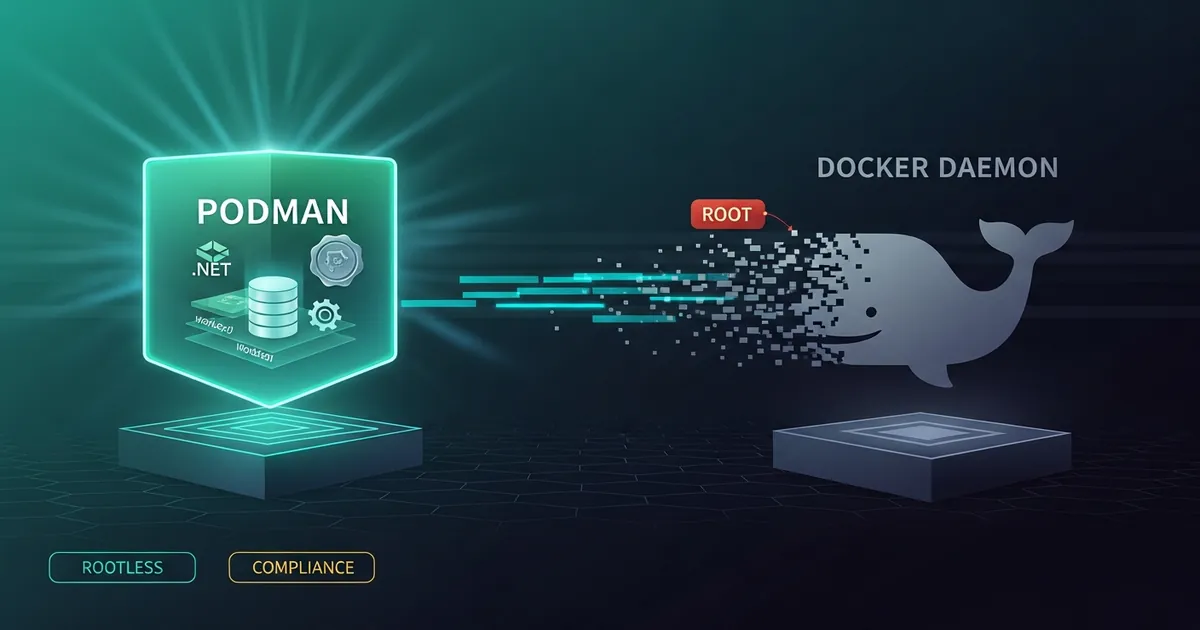
Rootless Podman in production is no longer a technical curiosity; it has become a practical requirement in environments that must meet compliance controls such as CIS Benchmarks, PCI-DSS and LGPD. When I run Docker containers on a server, dockerd needs a privileged socket, and any user in the docker group is, in practice, root on the machine. In internal audits I have seen this point block entire deploys, and the cleanest answer I found over the last two years was to migrate to Podman running with no daemon and no privileges.
The thesis of this article is straightforward: rootless Podman replaces Docker in production with no functional loss in most web and worker scenarios, as long as you accept three explicit trade-offs — using systemd (via Quadlet) instead of docker compose, mapping UIDs with subuid/subgid, and handling networks and volumes with user namespaces in mind. In return, the server becomes auditable: no container process runs as root on the host, the blast radius of an RCE drops drastically and the daemon’s attack surface simply disappears.
I will show how I moved from a traditional Docker host to a rootless Podman 5.x host running .NET, n8n and Postgres workloads in production, which directory structure survived three months of operation, what the SSH deploy pipeline looks like and which pitfalls cost hours if you do not know where to look (port 80, linger, pasta networking, SELinux). Everything was tested on Ubuntu 24.04 LTS and RHEL 9 with crun as the default runtime.
Prerequisites
- Linux with kernel ≥ 5.13 (Ubuntu 22.04+, Debian 12+, RHEL 9+)
- Podman ≥ 4.4 (for full Quadlet support); ideally 5.x
- Non-root user with
subuid/subgidconfigured systemduser mode enabled (loginctl enable-linger <user>)- Basic knowledge of
Dockerfileanddocker compose
Why Rootless Is Not “Docker by Another Name”
The most common confusion I run into is treating Podman as a drop-in for Docker just because alias docker=podman works. It works for run, build and pull, but the execution model is radically different.
Docker depends on a daemon (dockerd) listening on /var/run/docker.sock and running as root. That daemon is what executes the containers. If an attacker gets any write access to the socket, they can start a --privileged container that mounts the host’s / — game over. That is why CIS Docker Benchmark 1.2.x dedicates an entire section to the socket.
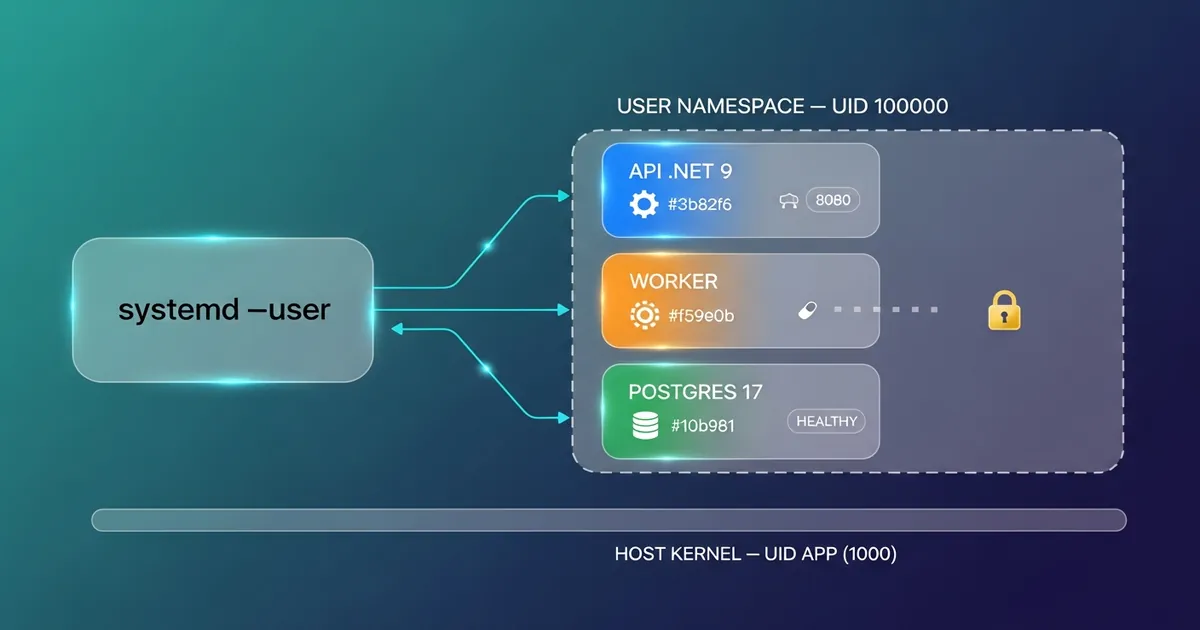
Podman is daemonless. Each podman run is a child process of your shell (or of systemd --user). There is no privileged socket by default. In rootless mode, the container runs inside a user namespace mapped via subuid/subgid: UID 0 inside the container is actually a high, unprivileged UID on the host (e.g. 100000). If the process escapes the container, it lands as a regular user with write permission on almost nothing.
ℹ️ Info: In Red Hat tests with CVE-2019-5736 (the classic
runcescape), the exploit on rootful Docker could overwrite theruncbinary on the host. On rootless Podman the same exploit lands as UID 100000 with no write permission — the container “escapes”, but causes no damage.
This difference changes how you think about backups, logs and orchestration. Rootless container logs go to the user’s journal, not to /var/log/. Volume backups live in ~/.local/share/containers/storage/volumes/. And systemctl restart needs the --user flag.
Configuring the Host: subuid, subgid and Linger
The base host configuration is where 80% of production problems show up. Without it, the container may start, but it restarts after logout, loses access to ports, or fails to mount volumes with the confusing error lchown: operation not permitted.
| |
loginctl enable-linger is the command I forget most often — without it, any systemctl --user start dies when the SSH session drops. The ip_unprivileged_port_start=80 line avoids resorting to setcap or a reverse proxy just to serve HTTP.
⚠️ Warning: If you reuse subordinate UIDs already allocated to another user, Podman will refuse the
runwithIDs already in use. Always runcat /etc/subuid /etc/subgidbefore adding ranges.
Quadlet: the Real Replacement for docker-compose
docker-compose was the hardest piece to replace in my migration. podman-compose exists, but it is community-maintained and has inconsistencies with networks and healthchecks. The official solution is Quadlet, built into Podman 4.4+.
Quadlet lets you describe containers, networks and volumes in .container, .network and .volume files that systemd automatically translates into units. That means: restart policies, dependencies (After=, Requires=), logs in the journal, healthchecks supervised by systemd. All for free, without dockerd.
The location for rootless units is ~/.config/containers/systemd/. systemd --user parses them every time you run systemctl --user daemon-reload.
| |
After creating the file, just run systemctl --user daemon-reload && systemctl --user start api.service. systemd creates the unit, pulls the image, starts the container and monitors the healthcheck.
Migrating docker-compose.yml to Quadlet
For projects with several services, translating by hand is feasible, but there are shortcuts. The podlet tool converts a docker-compose.yml into Quadlet files in seconds:
| |
The conversion gets volumes, networks, dependencies and ports right in ~90% of cases. The remaining 10% are usually depends_on with condition: service_healthy (Quadlet uses Requires= + After=) and extra_hosts (which becomes AddHost= in the [Container] block).
💡 Tip: Keep the original
docker-compose.ymlin the repository for now, with a README pointing to the Quadlet files. Local developers keep using Docker Desktop; the production server uses Podman/Quadlet. Both describe the same topology.
Networking, Volumes and SELinux: The Three Gotchas
Networking in rootless mode
By default, rootless Podman uses pasta (in 5.x versions) or slirp4netns (earlier versions) as the network backend. It works, but it has limitations: the source IP of the traffic seen by the container is always 10.0.2.100 (with slirp4netns), which breaks IP-based rate limiting and audit logs. With pasta, the real IP is preserved, which is why I always require Podman 5.x for new production hosts.
Volumes and the :Z flag
On hosts with SELinux (RHEL, Fedora, Rocky), mounting a volume without the :Z flag in Quadlet, or -v ./data:/data:Z in run, causes a silent Permission denied inside the container. :Z applies the correct SELinux label to the host directory. Without it, debugging becomes a nightmare because ls -l shows correct permissions, yet the container process cannot read.
UID mapping in volumes
When the container writes to a bind-mounted volume, the file on the host shows up with UID 100000 (the mapped subordinate UID). To sync it with your local user, use podman unshare:
| |
Optimized Configuration: containers.conf, registries.conf, storage.conf
Podman’s defaults work, but in rootless production there are three files that decide performance and operational security. In rootless mode, they live in ~/.config/containers/. This is the configuration I run on RHEL 9.7 with a dedicated disk for /userapps and an IOPS-limited SSD — it eliminates massive temporary writes and uses in-RAM journald as the log sink.
containers.conf — runtime and logging
| |
The most visible practical gain is TMPDIR=/dev/shm/...: on a server with many podman pull and podman build runs, the disk received millions of temporary files that vanished seconds later. Moving them to tmpfs cut disk I/O drastically without losing functionality.
registries.conf — anti supply-chain
| |
short-name-mode = "enforcing" is an underrated control: without it, podman run nginx can resolve to any registry in the search list, opening a gap for a supply-chain attack. With enforcing, the user must specify the full registry (docker.io/library/nginx) — forcing every image to be explicitly attributed to a source.
storage.conf — native overlay (60–80% less I/O)
| |
The critical point is the absence of mount_program. On kernel 5.11+ (RHEL 9, Ubuntu 22.04+, Fedora 35+), native overlay supports rootless without fuse-overlayfs. Cutting out FUSE eliminates userspace syscalls for every filesystem operation — in I/O-bound workloads, I see a 60–80% reduction in layer operation time (build, pull, run of large images).
⚠️ Warning: If the backing filesystem is ext4 without rootless overlay support, or the kernel is < 5.11, uncomment
mount_program = "/usr/bin/fuse-overlayfs". Without that fallback,podman pullwill fail withmount: permission denied. To detect support:podman info | grep graphDriverNamemust showoverlay, notvfs.
Practical Example: .NET API + Postgres + Worker in Production
A real case I run today: a .NET 9 API, a processing worker and Postgres 17, all in rootless Podman, supervised by systemd --user. Structure:
| |
| |
| |
Deploying is a git pull && systemctl --user restart api.service. No daemon, no sudo, no open socket. Image updates are orchestrated by podman auto-update (enabled with AutoUpdate=registry in Quadlet), which checks the registry daily and restarts containers automatically when a new tag appears.
📂 Source Code: The full Quadlet manifests and the worker’s
Containerfileare in the blog’s samples repository:BlogSamples/Workers/
Auto-Update in Practice: Quadlet .image, Timer and What .network/.volume Do Not Do
podman auto-update is triggered by the podman-auto-update.timer of systemd --user (daily by default). It scans every unit with the io.containers.autoupdate label and:
- Runs
skopeo inspectagainst the registry to compare the current digest with the published one. - If it changed, runs
podman pullfor the new image. - Restarts the corresponding systemd service.
- If the restart fails (negative healthcheck), performs an automatic rollback to the previous image.
Enabling the timer:
| |
Changing the cadence to every 5 minutes
The default timer runs once a day (OnCalendar=daily + RandomizedDelaySec=900). For more aggressive deploys, you can bring it down to 5 minutes without editing the package files — just create a systemd user override:
| |
Add only:
| |
Reload and confirm:
| |
⚠️ Warning: The two
OnCalendar=lines are intentional. The first, empty line clears the value inherited from the original timer (daily). Without it, the timer fires on both cadences — daily and every 5 minutes. This is the systemd timer override pattern documented insystemd.timer(5).
Trade-offs with 15 containers on the same host
Reducing the interval from 1 day to 5 minutes means multiplying the number of runs by 288×. For 15 containers sharing the same host, four points are worth reviewing before deciding:
| Axis | Once a day | Every 5 minutes (15 containers) |
|---|---|---|
| Registry requests | 15/day | 4,320/day |
| Traffic if nothing changed | ~3 KB/inspect × 15 | ~12 MB/day (manifest HEAD + JSON) |
| Simultaneous restarts | 1 window/day | 288 windows/day |
| CVE exposure window | up to 24h | up to 5 min |
1. Registry rate limit. Anonymous Docker Hub: 100 pulls/6h per IP. Each podman auto-update runs skopeo inspect (it does not count as a pull, but it counts as a request) — 15 containers × 12 checks/h = 180 req/h. On authenticated GHCR the limit is 5,000 req/h, no pain. On an internal registry, usually irrelevant. On anonymous Docker Hub with many containers, you will hit the rate limit.
2. Simultaneous restart storm. When a new digest is published and multiple containers in the stack depend on it (e.g. API + worker sharing the same base image), auto-update restarts all of them together. If the healthcheck takes 30s and there is a Requires= chain, the whole stack can stay degraded for 1–2 minutes — except now 288 times a day instead of 1. Without a load balancer with drain, that is visible downtime.
3. CPU/IO on the host. Each run is light in isolation (~50ms per container, with no change). For 15 containers every 5 min, the aggregate overhead is around 0.3% constant CPU and ~10 MB of extra log traffic in journald. Acceptable in production, but on hosts with many containers (50+), consider RandomizedDelaySec=60 to avoid coinciding peaks.
4. Cascading rollback risk. Auto-update rolls back per container, not atomically for the stack. If the new digest of the API image breaks the contract with the worker (still on the old version), 5 minutes later the worker also picks up the new version and breaks along with it. With a daily window there is time to detect it; with a 5-minute window, there is not.
💡 Tip: For 15 containers in real production I use 15 minutes (
OnCalendar=*:0/15) withRandomizedDelaySec=300, and even then only on containers that meet two criteria: an immutable semver tag + a fast healthcheck (< 10s) + zero dependency on another container. For the rest, I keep a daily cadence and deploy explicitly via CI when I need a shorter window. The 5-minute cadence makes sense in pre-production/canary, rarely in heterogeneous production.
The AutoUpdate= key accepts two values in the [Container] block:
| Value | When to use |
|---|---|
registry | Pull from the remote registry. The tag must be an immutable version (semver, calendar or digest). |
local | The image was rebuilt locally (podman build). Compares the local digest. |
Quadlet .image — separating pull from start
When several .container units use the same image (e.g. API + migration sidecar sharing the same base), it is worth extracting the pull into a dedicated .image file. Auto-update operates on the image file and the containers consume it by reference:
| |
| |
.network and .volume do not support AutoUpdate=
This is the most common confusion: the AutoUpdate= key does not exist in .network or .volume. They do not pull anything — they are static Podman resources, reconciled when you edit the file and run systemctl --user daemon-reload followed by a restart of the service that uses them.
A concrete example migrating the cloudbeaver service from my docker-compose.yml (part of the blog’s dev stack) to Quadlet:
| |
It becomes three Quadlet files, each with its own responsibility:
| |
| |
| |
When cloudbeaver gets a new version on Docker Hub (lzocateli/dbeaver:25.2.0 republished with a new digest), the timer pulls, restarts and runs the healthcheck — lzo.network and cloudbeaver-workspace.volume stay untouched. If I edit lzo.network to change the driver, I need to run systemctl --user daemon-reload && systemctl --user restart cloudbeaver.service manually — there is no “network auto-update”.
Manual rollback
When auto-update brings up a broken version and the healthcheck is slow to fail:
| |
💡 Tip: For maximum reproducibility, replace the tag with digest pinning in the
.image:Image=docker.io/lzocateli/dbeaver@sha256:abc…. Auto-update keeps working (it compares the published digest with the current one) and you gain immutability guaranteed by the image content, not by the tag contract.
Compliance: What Audits Actually Look At
The strongest internal selling point for rootless Podman is not technical — it is regulatory. In three audits I followed over the last 18 months, the points satisfied automatically were:
- CIS Docker Benchmark 5.x — the “non-root user inside container” and “no privileged containers” controls pass by construction
- PCI-DSS 4.0 req. 7.2.5 — least privilege for system components is satisfied because the container never has privileges on the host
- NIST SP 800-190 section 4.2 — container isolation via user namespaces is an explicit recommendation
- ISO 27001 A.8.2 — privileged access control becomes trivial to evidence when there is no
dockergroup on the machine
The practical evidence audits ask for is simple: ps -ef | grep -v podman | grep <container-pid> showing the process running with a high UID, and getent group docker returning empty.
Tips and Good Practices
- Always enable
lingerbefore creatingsystemd --userunits. Without it, every container dies on the first logout and you only find out the next morning when monitoring starts screaming. - Use Podman 5.x to get
pastaas the default network backend. Preserving the source IP saves you from rewriting rate-limit, WAF and logging rules. - Version the Quadlet files in Git alongside the application code. Treat
*.containeras infrastructure as code: pull request, code review and CI validating syntax viaquadlet -dryrun. - Enable
AutoUpdate=registryonly with immutable version tags. Default: semver (:1.4.0,:2.0.1) — aligns with SemVer 2.0, fits SBOM/SCA and is what most market registries already publish. Variant: calendar versioning (:v2026.05.10-sha) for internal apps with daily releases. Gold standard: digest pinning (Image=ghcr.io/lincoln/api@sha256:abc…) — immutability guaranteed by content, not by contract. Never:latestwith auto-update: it is an invitation to an incident. - Centralize logs with
journald+vectororpromtail. Rootless logs live injournalctl --user -u <service>. Forwarding them to Loki/Elastic is trivial and cheaper than adocker logging driver. - Run
podman system resetin staging weekly. It cleans corrupted storage, orphan volumes and obsolete overlay layers. It becomes obvious when some unit has inconsistent state.
Objective Summary
- Rootless Podman eliminates Docker’s root daemon and privileged socket, reducing the blast radius of a container RCE to that of a regular user on the host.
- Quadlet is the official replacement for
docker-composein production:.container/.network/.volumefiles in~/.config/containers/systemd/automatically becomesystemd --userunits. subuid/subgid+loginctl enable-lingerare non-negotiable prerequisites: without them the container cannot map UIDs or dies on the first logout.- The
pastabackend (Podman 5.x) preserves the client’s source IP, unlikeslirp4netns, which masks everything as10.0.2.100. - The
:Zflag on volumes applies the correct SELinux label on RHEL/Fedora hosts; without it, the container fails to read/write with no clear message. - CIS Docker Benchmark, PCI-DSS 4.0 and NIST SP 800-190 have controls satisfied automatically by rootless Podman that require manual work with Docker.
podman auto-updatewith immutable version tags (semver:1.4.0, calendar:v2026.05.10-shaor digest@sha256:…) enables continuous updates without CI, supervised by asystemdtimer. TheAutoUpdate=registry|localkeys only exist in the[Container]block or in.imagefiles — not in.networkor.volume.podlet compose docker-compose.ymlautomatically converts ~90% of existing Compose manifests to Quadlet, reducing migration effort.
Read Also
- Keycloak: Free Authentication with Containers and C#
- .NET 8+ Configuration: IOptions, Secrets and Docker
- .NET Worker and Background Service: High Volume
- Makefile: Automating tasks for Python, Hugo and Docker
- Terminal vs Pipeline: differences when running scripts
References
- Podman Documentation — Rootless Containers — official reference for rootless mode configuration and limitations.
- Quadlet Manual (
podman-systemd.unit) — complete specification of.container,.network,.volume,.kubeand.podfiles. - CIS Docker Benchmark v1.6.0 — hardening controls for Docker and their Podman equivalents.
- NIST SP 800-190 — Application Container Security Guide — official US guide on container security, with a focus on user namespaces.
- Red Hat — Podman vs Docker: A Detailed Comparison — in-depth technical comparison maintained by the team that develops Podman.
- Containers/Podlet GitHub — official tool for converting
docker-compose.ymlinto Quadlet. - pasta(1) — passt/pasta networking — network backend used by Podman 5.x to preserve the source IP in rootless mode.
By commenting, you agree to our Privacy Policy, Terms of Use, Data Deletion Policy.