
Introduction
Every .NET application needs configuration — connection strings, API keys, feature flags, URLs of external services. What many developers don’t realize is that .NET 8+ has a sophisticated internal configuration pipeline, where multiple providers are loaded in a specific order, and the last one to register a value wins. Understanding this order is the difference between an application that works “by luck” and one that works by design.
In this article, I will explore how WebApplication.CreateBuilder() assembles the configuration pipeline, the exact order of the Add... calls in the ConfigurationBuilder, how Docker and Podman secrets integrate with .NET without additional code, and how IOptions<T>, IOptionsSnapshot<T> and IOptionsMonitor<T> react to configuration changes at runtime. If you have ever had a bug caused by an environment variable that overrode your appsettings.json — or the other way around — this article will definitively clarify what happens under the hood.
💡 Tip: This article uses .NET 8+ as a reference, but the configuration pipeline has been fundamentally the same since .NET 6. The new features in .NET 8 are refinements, not structural changes.
What Happens in WebApplication.CreateBuilder()
When you call WebApplication.CreateBuilder(args), .NET internally performs a precise sequence of registrations in the ConfigurationBuilder. This is the default order of the configuration providers:
| |
ℹ️ Info: The rule is simple — the last provider to register a value overrides the previous ones. That is why environment variables win over
appsettings.json, and command-line arguments win over everything.
The Complete Order and Why
| Order | Provider | reloadOnChange | When it is registered |
|---|---|---|---|
| 1 | ChainedConfigurationSource | — | Configuration inherited from the host (rarely manipulated) |
| 2 | appsettings.json | ✅ Yes | Always — the application’s default values |
| 3 | appsettings.{Environment}.json | ✅ Yes | Always — overrides values per environment |
| 4 | User Secrets (secrets.json) | ❌ No | Only when ASPNETCORE_ENVIRONMENT=Development |
| 5 | Environment Variables | ❌ No | Always — system/container variables |
| 6 | Command-line arguments | ❌ No | Always — arguments passed via CLI |
This hierarchy is intentional: safer and more specific values have priority. appsettings.json holds the defaults; the environment (Development, Staging, Production) refines them; secrets protect sensitive data in dev; and environment variables are the standard in containers.
appsettings.json and Environments
appsettings.json is the starting point — it holds the application’s default values. The environment file (appsettings.{Environment}.json) does not need to contain every key — only the ones you want to override:
| |
| |
⚠️ Warning:
appsettings.Production.jsonmust never contain production connection strings or secrets. Those values must come from environment variables (containers) or key vaults (cloud). The production file only serves to adjust behaviors such as log level, pagination and flags.
How .NET Determines the Environment
The ASPNETCORE_ENVIRONMENT variable (or DOTNET_ENVIRONMENT for non-web applications) defines which appsettings.{Environment}.json will be loaded. The conventional values are:
| |
| |
dotnet user-secrets — Protecting Data in Development
The User Secrets mechanism solves a real problem: developers who commit appsettings.json with database connection strings, API keys or credentials. Secrets are stored outside the repository, in the operating system user’s profile.
How It Works
| |
Where They Are Stored
| Operating System | Path |
|---|---|
| Windows | %APPDATA%\Microsoft\UserSecrets\<UserSecretsId>\secrets.json |
| Linux/macOS | ~/.microsoft/usersecrets/<UserSecretsId>/secrets.json |
The UserSecretsId is a GUID generated automatically in the .csproj:
| |
💡 Tip:
secrets.jsonhas the same format asappsettings.json. Internally, .NET registers aJsonConfigurationProviderpointing to that file — which is why any key inappsettings.jsoncan be overridden through a secret. To understand how User Secrets integrate with EF Core Migrations in multi-layer projects, see EF Core Migrations: Multi-Project, Secrets and Scaffolding.
User Secrets DO NOT Work in Production
The User Secrets provider is registered only when the environment is Development:
| |
In production, values must come from environment variables (containers), key vaults (Azure Key Vault, AWS Secrets Manager) or Docker/Podman secrets.
Environment Variables — The Standard in Containers
Environment variables are the most important provider in containerized environments. They override both appsettings.json and appsettings.{Environment}.json.
Naming Convention
.NET converts the hierarchical separator : to __ (double underscore) in environment variables:
| |
| |
| |
⚠️ Warning: On Linux, environment variables are case-sensitive.
ConnectionStrings__Defaultis different fromCONNECTIONSTRINGS__DEFAULT. .NET handles both correctly thanks to the Environment Variables provider, but keep the PascalCase convention with__for consistency.
Prefix for Filtering
In shared environments, use a prefix to avoid collisions:
| |
Docker and Podman Secrets — The Secure Approach for Containers
Environment variables solve many scenarios, but they have a security limitation: they are visible through docker inspect, podman inspect, /proc/*/environ and debug logs. For truly sensitive data (database passwords, API keys, certificates), Docker and Podman offer secrets — files mounted in memory (tmpfs) inside the container.
How Secrets Work in Docker and Podman
Secrets are stored on the host and mounted as read-only files in the container, at /run/secrets/<name>:
| |
| |
| |
Integrating Docker/Podman Secrets with .NET
.NET does not have a native provider for /run/secrets/. The integration is done through the key-per-file provider — a configuration provider that reads each file in a directory as a key-value pair, where the file name is the key and the content is the value:
| |
With this configuration, a file /run/secrets/ConnectionStrings__Default with the content Host=db;Database=prod;Password=S3nh@! will be mapped to Configuration["ConnectionStrings:Default"].
ℹ️ Info:
AddKeyPerFileapplies the__→:convention automatically, just like environment variables. So a file namedApp__Email__SmtpHostwill be accessible asConfiguration["App:Email:SmtpHost"].
Naming Convention for Secrets
To keep compatibility with the .NET hierarchy:
| Secret (file name) | Key in Configuration | File content |
|---|---|---|
ConnectionStrings__Default | ConnectionStrings:Default | Host=db;Database=prod;Password=S3nh@! |
App__Email__SmtpHost | App:Email:SmtpHost | smtp.sendgrid.net |
App__JwtSecretKey | App:JwtSecretKey | minha-chave-jwt-super-secreta-256bits |
Podman Secrets vs Docker Secrets
| Feature | Docker Secrets | Podman Secrets |
|---|---|---|
| Requirement | Docker Swarm mode | Works without Swarm (rootless) |
| Storage | Raft log (encrypted) | Local directory (encryptable) |
| Mount | /run/secrets/ (tmpfs) | /run/secrets/ (tmpfs) |
| Visible in inspect? | ❌ No | ❌ No |
| Visible in /proc? | ❌ No | ❌ No |
| CLI | docker secret create | podman secret create |
| Compose | docker compose with secrets: | podman-compose with secrets: |
💡 Tip: If your application runs on Podman rootless (as described in this blog’s deploy), prefer Podman secrets with
AddKeyPerFile. They are not exposed in logs, inspect or environment variables — an extra security layer without additional complexity.
The Complete Final Order (with Docker Secrets)
When you add all the providers, including Docker/Podman secrets, the complete pipeline order becomes:
| |
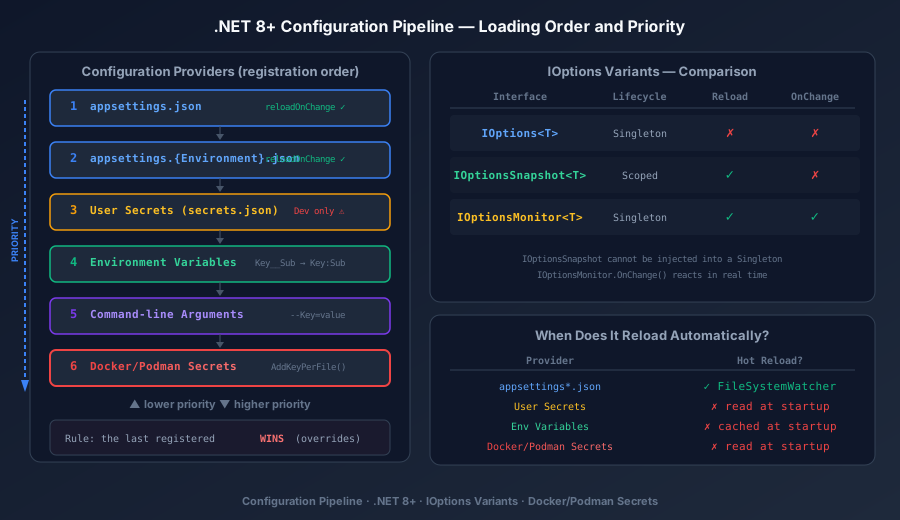
⚠️ Warning: The position where you call
AddKeyPerFiledefines its priority. If you want environment variables to have priority over Docker secrets, registerAddKeyPerFilebeforeAddEnvironmentVariables. The rule is always: the last one registered wins.
IOptions<T> and Its Variants
With the pipeline assembled, the next step is to consume the configuration in a typed way. .NET offers three interfaces in the Microsoft.Extensions.Options namespace, and each one behaves differently regarding lifetime and reloading:
Registering Typed Configuration
| |
| |
IOptions<T> — Singleton, No Reload
| |
| Feature | Behavior |
|---|---|
| Lifetime | Singleton (Value is computed once and cached forever) |
| Reloading | ❌ Does not reload — if appsettings.json changes, Value keeps the original value |
| When to use | Configuration that never changes during the application’s lifetime |
| Registration | services.Configure<T>(section) |
IOptionsSnapshot<T> — Scoped, Reload per Request
| |
| Feature | Behavior |
|---|---|
| Lifetime | Scoped (new value for each HTTP request / DI scope) |
| Reloading | ✅ Reloads — if appsettings.json changes, the next request already sees the new value |
| When to use | APIs and web apps where configuration can change without a restart |
| Restriction | ⚠️ Cannot be injected into Singleton services |
| Registration | services.Configure<T>(section) (same registration) |
IOptionsMonitor<T> — Singleton with Notification
| |
| Feature | Behavior |
|---|---|
| Lifetime | Singleton (can be injected into any service) |
| Reloading | ✅ Reloads — CurrentValue always returns the latest value |
| Notification | ✅ OnChange() lets you react to changes in real time |
| When to use | Singleton services that need to react to configuration changes |
| Registration | services.Configure<T>(section) (same registration) |
Quick Comparison
| Interface | Lifetime | Reload | Notification | Use in Singleton? |
|---|---|---|---|---|
IOptions<T> | Singleton | ❌ | ❌ | ✅ |
IOptionsSnapshot<T> | Scoped | ✅ (per request) | ❌ | ❌ |
IOptionsMonitor<T> | Singleton | ✅ (in real time) | ✅ OnChange() | ✅ |
Named Options — Multiple Instances of the Same Configuration
When you have multiple configurations of the same type (e.g., several email providers, multiple databases):
| |
| |
Configuration Validation at Startup
A common mistake is for the application to start with invalid configuration (empty connection string, zero port) and only fail when the first request arrives. .NET 8 lets you validate at startup:
| |
| |
ℹ️ Info:
ValidateOnStart()makes the application fail fast if the configuration is invalid — instead of failing mysteriously on the first request. This is especially important in containers, where a fast startup with a clear error is better than a “running” container that fails on every request.
When .NET Reloads Configuration Automatically
Not every provider supports automatic reload. Knowing which ones reload (and which don’t) avoids subtle bugs:
Providers with reloadOnChange: true
File-based providers are the only ones that support automatic reloading:
| |
When you edit appsettings.json or appsettings.Production.json while the application is running, .NET:
- Detects the change via
FileSystemWatcher - Reloads the affected configuration provider
- Emits a change token (
IChangeToken) IOptionsSnapshot<T>will return the new value on the next requestIOptionsMonitor<T>fires theOnChange()callback immediatelyIOptions<T>is not affected — it keeps the original value
Providers That DO NOT Reload
| Provider | Reloads? | Reason |
|---|---|---|
appsettings.json | ✅ | reloadOnChange: true (default) |
appsettings.{Env}.json | ✅ | reloadOnChange: true (default) |
User Secrets (secrets.json) | ❌ | Registered without reloadOnChange |
| Environment Variables | ❌ | Variables are read at startup and cached |
| Command-line args | ❌ | Passed once at startup |
AddKeyPerFile (Docker secrets) | ❌ | Read at startup (file in tmpfs) |
Forcing Reload with reloadOnChange
If you need other JSON files to reload as well:
| |
⚠️ Warning: In Docker/Podman containers,
reloadOnChangewithFileSystemWatchermay not work depending on the type of mounted volume.bind mountvolumes usually work, but named volumes (docker volume) ortmpfsmay not emit the necessary filesystem events. Always test in your specific scenario.
Customizing the Configuration Pipeline
When the default providers are not enough, you can customize the pipeline completely:
Adding Custom Providers
| |
Replacing the Pipeline Completely
In rare scenarios where you need to control 100% of the order:
| |
Tips and Good Practices
Never commit secrets in
appsettings.json— usedotnet user-secretsin development and environment variables or Docker/Podman secrets in production. If a secret leaks into Git, consider it compromised immediately.Use
ValidateOnStart()for all critical configuration — connection strings, API keys, service URLs. Failing at startup is always better than failing on the first request at 3 a.m.Prefer
IOptionsMonitor<T>in Singleton services — if the service needs to react to configuration changes. UseIOptionsSnapshot<T>only in Scoped services (controllers, per-request services).Name your container secrets with
__— useConnectionStrings__Defaultas the secret file name to keep compatibility with the .NET configuration hierarchy.Be careful with
reloadOnChangein containers —FileSystemWatchermay not work with every volume type. Test the behavior in your environment before relying on automatic reload.Use a prefix for shared environment variables —
builder.Configuration.AddEnvironmentVariables(prefix: "MEUAPP_")avoids collisions with system variables and with other services on the same host.Don’t mix configuration and code — the configuration POCO class should be simple (getters/setters). Business logic based on configuration belongs in the service that consumes
IOptions<T>, never in the configuration class.Document the order of your pipeline — in projects with many providers (Key Vault, Feature Flags, Docker secrets), explicitly document the priority order for the team.
Conclusion
The .NET 8+ configuration pipeline is a powerful and extensible system that follows a simple rule: the last registered provider wins. Understanding this order — from appsettings.json (lowest priority) to Docker/Podman secrets or command-line arguments (highest priority) — is fundamental to avoiding subtle configuration bugs that only show up in production.
The trio IOptions<T>, IOptionsSnapshot<T> and IOptionsMonitor<T> covers every consumption scenario: static configuration (Singleton), per-request configuration (Scoped) and reactive configuration with notification (Singleton with reload). Combined with ValidateOnStart(), it ensures your application fails fast with a clear message, instead of failing mysteriously at runtime.
For Docker and Podman containers, AddKeyPerFile("/run/secrets") is the bridge between the container engine’s secrets and the .NET configuration system — secure, simple and without dependency on external packages. This fits perfectly with a deploy architecture using Podman rootless and secrets managed through a pipeline.
The natural next step is to ensure your domain entities and data access are equally decoupled — and for that, EF Core 8 with Fluent API is the ideal complement to this article.
Read Also
- EF Core 8 Fluent API: Mapping, ORM and Decoupling — decoupling in data access with the same externalized configuration pattern.
- EF Core Migrations: Multi-Project, Secrets and Scaffolding — how
dotnet user-secretsintegrates with EF Core Migrations in multi-layer projects. - Authentication & Authorization: JWT, OAuth2, OpenID Connect — security configuration that depends directly on the configuration pipeline.
- BFF Backend For Frontend: Security in SPAs — how tokens and secrets are managed in the BFF pattern.
- REST API Design: HTTP Verbs and Parameter Binding — API architecture that consumes configuration via DI.
References
- Configuration in ASP.NET Core — Microsoft Learn — official documentation of the .NET configuration system, including all providers and the loading order.
- Options pattern in ASP.NET Core — Microsoft Learn — complete reference for
IOptions<T>,IOptionsSnapshot<T>,IOptionsMonitor<T>and Named Options. - Safe storage of app secrets in development — Microsoft Learn — official guide to
dotnet user-secretsfor protecting sensitive data in development. - Use multiple environments in ASP.NET Core — Microsoft Learn — how
ASPNETCORE_ENVIRONMENTcontrols loading configuration per environment. - Key-per-file configuration provider — Microsoft Learn — documentation for
AddKeyPerFilefor integration with Docker/Podman secrets. - Docker Secrets — Docker Docs — official reference for secrets in Docker Swarm and Docker Compose.
- Podman Secrets — Podman Docs — official reference for secrets management in Podman (rootless).
- .NET Generic Host — Microsoft Learn — how the .NET generic host configures the configuration, logging and DI pipeline.
- WebApplicationBuilder Source Code — GitHub — source code of
WebApplicationBuildershowing the exact order of the registered providers.
By commenting, you agree to our Privacy Policy, Terms of Use, Data Deletion Policy.