Introduction#
Paginating results looks simple: add .Skip(offset).Take(pageSize) and you are done. But when the table has 10 million records, the user is on page 5,000, the database is Oracle 11g, or the client demands infinite scroll without duplicates — that simplicity disappears quickly.
Pagination is one of the most impactful architectural decisions in REST APIs, and the wrong choice can mean 8-second queries, inconsistent results or a backend that locks up under load. There are at least five distinct strategies, each with clear trade-offs: Offset, Keyset (Seek), Database cursor, Opaque token and Time-based. Each database — SQL Server, Oracle and PostgreSQL — implements these strategies with slightly different syntax and behavior.
In this article you will understand in depth when to use each strategy, how each database implements it, and how to code everything with EF Core 8.0+ in C#. If you want a broader view of read and write bottlenecks in databases, also read the article Database Bottlenecks: Messaging and Pagination.
Prerequisites: intermediate C#, basic EF Core, familiarity with SQL. The article on asynchronous programming with C# is also recommended.
📦 Source code: The complete implementation of this article is in the blog-zocateli-sample repository on GitHub. Clone it, explore it and adapt it to your context.
Before looking at the strategies, it is worth understanding what happens internally in each database when you paginate:
The Deep OFFSET Problem#
1
2
3
4
| -- SQL Server: page 5000 with 20 items per page
SELECT Id, Nome, Valor FROM Pedidos
ORDER BY DataCriacao
OFFSET 99980 ROWS FETCH NEXT 20 ROWS ONLY;
|
The database does not magically “jump” to row 99,981. It needs to:
- Sort (or use the sort index)
- Scan 99,980 rows and discard them
- Return the next 20
The cost grows linearly with the offset. For OFFSET 0 the cost is almost zero; for OFFSET 1,000,000 the cost can be seconds. This is the late pagination problem, and it shows up in any database.
Why Stable Ordering Is Mandatory#
1
2
3
4
5
6
7
8
9
| // ❌ WITHOUT OrderBy — non-deterministic result
var dados = await context.Pedidos.Skip(40).Take(20).ToListAsync();
// ✅ WITH OrderBy — deterministic result + index can be used
var dados = await context.Pedidos
.OrderBy(p => p.DataCriacao)
.ThenBy(p => p.Id) // Tie-break by the unique field guarantees stability
.Skip(40).Take(20)
.ToListAsync();
|
Without OrderBy, the database can return the 20 items in any order, and you risk seeing the same records on different pages or skipping records. This is especially critical in Oracle, which has less predictable ordering behavior than SQL Server by default.
When to Use#
- UIs with visible page numbers (page 1, 2, 3…)
- Reports that require exact totals
- Small or medium volumes (up to ~100k records in the table)
- When the user needs to jump directly to any page
The SQL per Database#
 1
 2
 3
 4
 5
 6
 7
 8
 9
10
11
12
13
14
15
16
17
18
19
20
21
22
23
24
25
26
27
28
29
| -- SQL Server (2012+)
SELECT Id, ClienteId, Valor, DataCriacao
FROM Pedidos
ORDER BY DataCriacao, Id
OFFSET 40 ROWS FETCH NEXT 20 ROWS ONLY;
-- Oracle 12c+
SELECT Id, ClienteId, Valor, DataCriacao
FROM Pedidos
ORDER BY DataCriacao, Id
OFFSET 40 ROWS FETCH NEXT 20 ROWS ONLY;
-- Oracle 11g (no native support — ROW_NUMBER workaround)
SELECT * FROM (
SELECT p.*, ROWNUM AS rn
FROM (
SELECT Id, ClienteId, Valor, DataCriacao
FROM Pedidos
ORDER BY DataCriacao, Id
) p
WHERE ROWNUM <= 60
)
WHERE rn > 40;
-- PostgreSQL
SELECT Id, ClienteId, Valor, DataCriacao
FROM Pedidos
ORDER BY DataCriacao, Id
LIMIT 20 OFFSET 40;
|
💡 Tip: The Oracle.EntityFrameworkCore provider automatically detects the Oracle version and generates the correct syntax (with FETCH FIRST for 12c+ or ROWNUM for 11g). You don’t need to write raw SQL for that.
Implementation with EF Core 8#
 1
 2
 3
 4
 5
 6
 7
 8
 9
10
11
12
13
14
15
16
17
18
19
20
21
22
23
24
25
26
27
28
29
30
31
32
33
34
35
36
37
38
39
40
41
42
43
44
45
46
47
48
49
50
| // Reusable models for the whole API
public record PaginacaoRequest(
int Pagina = 1,
int TamanhoPagina = 20)
{
public int TamanhoSeguro => Math.Clamp(TamanhoPagina, 1, 100);
public int OffsetSeguro => (Math.Max(Pagina, 1) - 1) * TamanhoSeguro;
}
public record PaginaResultado<T>(
IReadOnlyList<T> Dados,
int PaginaAtual,
int TamanhoPagina,
long TotalRegistros,
int TotalPaginas,
bool TemProxima,
bool TemAnterior);
public class PedidoOffsetService(AppDbContext context)
{
public async Task<PaginaResultado<PedidoDto>> ListarAsync(
PaginacaoRequest req,
CancellationToken ct = default)
{
var query = context.Pedidos
.AsNoTracking()
.OrderBy(p => p.DataCriacao)
.ThenBy(p => p.Id);
// EF Core 8: separate ExecuteCount() without materializing the collection
var total = await query.LongCountAsync(ct);
var dados = await query
.Skip(req.OffsetSeguro)
.Take(req.TamanhoSeguro)
.Select(p => new PedidoDto(p.Id, p.ClienteId, p.Valor, p.DataCriacao, p.Status))
.ToListAsync(ct);
var totalPaginas = (int)Math.Ceiling(total / (double)req.TamanhoSeguro);
return new PaginaResultado<PedidoDto>(
Dados: dados,
PaginaAtual: req.Pagina,
TamanhoPagina: req.TamanhoSeguro,
TotalRegistros: total,
TotalPaginas: totalPaginas,
TemProxima: req.Pagina < totalPaginas,
TemAnterior: req.Pagina > 1);
}
}
|
⚠️ Warning: For tables with more than 500k rows, LongCountAsync() by itself can be slow (table scan). A common strategy is to cache the total for 30–60 seconds, or use a materialized count column.
When to Use#
- REST APIs with infinite scroll or a “next page” token
- Tables with millions of records where OFFSET degrades
- Real-time data feeds where new items are inserted constantly
- Asynchronous export of large volumes
How It Works#
Instead of saying “skip N rows”, you say “give me the records after this reference point”. The database uses the index directly to position itself at the cursor, without scanning the previous records.
1
2
3
4
5
6
| -- SQL Server / Oracle 12c+ / PostgreSQL — keyset with composite key
SELECT TOP(21) Id, ClienteId, Valor, DataCriacao
FROM Pedidos
WHERE DataCriacao > '2025-06-01T12:00:00'
OR (DataCriacao = '2025-06-01T12:00:00' AND Id > 'abc-def-123')
ORDER BY DataCriacao ASC, Id ASC;
|
The TOP 21 (or LIMIT 21) is intentional: one extra record is fetched to know whether there is a next page, without running a COUNT.
Required Index for Keyset#
 1
 2
 3
 4
 5
 6
 7
 8
 9
10
11
| -- SQL Server — covering index for the keyset query
CREATE INDEX IX_Pedidos_Keyset
ON Pedidos (DataCriacao ASC, Id ASC)
INCLUDE (ClienteId, Valor, Status);
-- Oracle
CREATE INDEX IX_Pedidos_Keyset ON Pedidos (DataCriacao ASC, Id ASC);
-- PostgreSQL
CREATE INDEX IX_Pedidos_Keyset ON Pedidos (DataCriacao ASC, Id ASC)
INCLUDE (ClienteId, Valor, Status);
|
Without this index, the database falls back to a full scan even with the keyset WHERE clause.
Implementation with EF Core 8#
 1
 2
 3
 4
 5
 6
 7
 8
 9
10
11
12
13
14
15
16
17
18
19
20
21
22
23
24
25
26
27
28
29
30
31
32
33
34
35
36
37
38
39
40
41
42
43
44
45
46
47
48
49
50
51
52
53
54
55
56
57
58
59
60
61
62
63
| // Cursor token — serialized in Base64 for the client (opaque)
public record KeysetCursor(Guid UltimoId, DateTime UltimaData)
{
public string Encode() =>
Convert.ToBase64String(
JsonSerializer.SerializeToUtf8Bytes(this));
public static KeysetCursor? Decode(string? token)
{
if (string.IsNullOrEmpty(token)) return null;
try
{
return JsonSerializer.Deserialize<KeysetCursor>(
Convert.FromBase64String(token));
}
catch { return null; }
}
}
public record KeysetResultado<T>(
IReadOnlyList<T> Dados,
bool TemProximaPagina,
string? ProximoToken); // Opaque token for the client
public class PedidoKeysetService(AppDbContext context)
{
public async Task<KeysetResultado<PedidoDto>> ListarAsync(
string? token,
int limite = 20,
CancellationToken ct = default)
{
limite = Math.Clamp(limite, 1, 100);
var cursor = KeysetCursor.Decode(token);
// Keyset expression — works without a cursor (first page)
// and with a cursor (following pages)
var query = context.Pedidos
.AsNoTracking()
.Where(p =>
cursor == null ||
p.DataCriacao > cursor.UltimaData ||
(p.DataCriacao == cursor.UltimaData &&
p.Id.CompareTo(cursor.UltimoId) > 0))
.OrderBy(p => p.DataCriacao)
.ThenBy(p => p.Id)
.Select(p => new PedidoDto(p.Id, p.ClienteId, p.Valor, p.DataCriacao, p.Status));
// Fetch limit+1 to detect whether there is a next page
var dados = await query.Take(limite + 1).ToListAsync(ct);
var temProxima = dados.Count > limite;
if (temProxima) dados.RemoveAt(dados.Count - 1);
string? proximoToken = null;
if (temProxima && dados.Count > 0)
{
var ultimo = dados[^1];
proximoToken = new KeysetCursor(ultimo.Id, ultimo.DataCriacao).Encode();
}
return new KeysetResultado<PedidoDto>(dados, temProxima, proximoToken);
}
}
|
The generated token is opaque to the client — it doesn’t know what is inside, it just passes it on to the next call. This lets you change the internal implementation without breaking clients.
Strategy 3: Database Cursor (Server-Side Cursor)#
What a Database Cursor Is and When to Use It#
A database cursor is different from the keyset cursor. Here, the database itself keeps a read position open between calls. The server reserves resources (memory, locks or a snapshot) for that result set while the client fetches blocks.
It is the ideal strategy for:
- Long exports where the client consumes data in blocks over seconds or minutes
- ETL processing row by row without loading everything into memory
- Data streaming via WebSocket or Server-Sent Events
- Situations where the result set cannot change during reading (snapshot consistency)
⚠️ Warning: Database cursors consume server resources while they are open. In SQL Server and Oracle, poorly managed cursors (left open) cause memory pressure and even blocking. PostgreSQL handles cursors inside transactions better, but it still requires care.
PostgreSQL: DECLARE CURSOR (the most complete)#
PostgreSQL has the richest support for server-side cursors. To use them with EF Core, you need to run raw SQL inside a transaction, because PostgreSQL cursors only exist within the scope of a transaction:
 1
 2
 3
 4
 5
 6
 7
 8
 9
10
11
12
13
14
15
16
17
18
19
20
21
22
23
24
25
26
27
28
29
30
31
32
33
34
35
36
37
38
39
40
41
42
43
44
45
46
| // dotnet add package Npgsql.EntityFrameworkCore.PostgreSQL
public class PedidoCursorService(AppDbContext context)
{
public async IAsyncEnumerable<PedidoDto> StreamAsync(
int blocoPorFetch = 500,
[EnumeratorCancellation] CancellationToken ct = default)
{
// A PG cursor requires an active transaction during the whole read
await using var transaction = await context.Database
.BeginTransactionAsync(ct);
// DECLARE opens the cursor on the server
await context.Database.ExecuteSqlRawAsync(
"DECLARE pedidos_cursor NO SCROLL CURSOR FOR " +
"SELECT p.\"Id\", p.\"ClienteId\", p.\"Valor\", p.\"DataCriacao\", p.\"Status\" " +
"FROM \"Pedidos\" p ORDER BY p.\"DataCriacao\", p.\"Id\"",
ct);
try
{
while (!ct.IsCancellationRequested)
{
// FETCH gets one block at a time — never everything in memory
var bloco = await context.Database
.SqlQueryRaw<PedidoDto>(
$"FETCH {blocoPorFetch} FROM pedidos_cursor")
.ToListAsync(ct);
if (bloco.Count == 0) break; // End of cursor
foreach (var item in bloco)
yield return item;
if (bloco.Count < blocoPorFetch) break; // Last partial block
}
}
finally
{
// CLOSE releases server resources — ALWAYS run it
await context.Database.ExecuteSqlRawAsync(
"CLOSE pedidos_cursor", CancellationToken.None);
await transaction.CommitAsync(CancellationToken.None);
}
}
}
|
SQL Server: FAST_FORWARD Cursor via Raw SQL#
SQL Server supports T-SQL cursors, but for REST APIs the most efficient pattern is to use IAsyncEnumerable with EF Core’s AsAsyncEnumerable() or a cursor via ADO.NET directly:
 1
 2
 3
 4
 5
 6
 7
 8
 9
10
11
12
13
14
15
16
17
18
19
20
21
22
23
| // SQL Server: streaming with EF Core 8 IAsyncEnumerable
// Internally uses a DataReader that consumes row by row
public class PedidoStreamService(AppDbContext context)
{
public async IAsyncEnumerable<PedidoDto> StreamComEfCoreAsync(
DateTime? dataInicio = null,
[EnumeratorCancellation] CancellationToken ct = default)
{
// AsAsyncEnumerable() does not materialize the collection —
// it keeps the DataReader open and reads on demand
var query = context.Pedidos
.AsNoTracking()
.Where(p => dataInicio == null || p.DataCriacao >= dataInicio)
.OrderBy(p => p.DataCriacao)
.ThenBy(p => p.Id)
.Select(p => new PedidoDto(p.Id, p.ClienteId, p.Valor, p.DataCriacao, p.Status));
await foreach (var item in query.AsAsyncEnumerable().WithCancellation(ct))
{
yield return item;
}
}
}
|
💡 Tip: AsAsyncEnumerable() in EF Core is implemented as a DataReader that stays open while the IAsyncEnumerable is being consumed. Internally, it works like an implicit database cursor. The difference from an explicit SQL cursor is that the DataReader does not let you pause reading and resume it later on a new connection.
Oracle: REF CURSOR and SYS_REFCURSOR#
In Oracle, the equivalent is the REF CURSOR, usually exposed via a stored procedure. With the Oracle.EntityFrameworkCore provider, you can execute it like this:
 1
 2
 3
 4
 5
 6
 7
 8
 9
10
11
12
13
14
15
16
17
18
19
20
21
22
23
24
25
26
27
28
29
30
31
32
33
34
35
36
37
38
| // Oracle: REF CURSOR via stored procedure
// The procedure returns a SYS_REFCURSOR as an OUT parameter
public class PedidoOracleService(AppDbContext context)
{
public async Task<List<PedidoDto>> BuscarViaCursorAsync(
DateTime dataInicio,
int quantidade,
CancellationToken ct = default)
{
var param_dataInicio = new OracleParameter("p_data", OracleDbType.Date)
{ Value = dataInicio };
var param_qtd = new OracleParameter("p_qtd", OracleDbType.Int32)
{ Value = quantidade };
var param_cursor = new OracleParameter("p_cursor", OracleDbType.RefCursor)
{ Direction = ParameterDirection.Output };
// Calls the stored procedure that runs OPEN cursor FOR SELECT ...
await context.Database.ExecuteSqlRawAsync(
"BEGIN PKG_PEDIDOS.BUSCAR_PAGINADO(:p_data, :p_qtd, :p_cursor); END;",
param_dataInicio, param_qtd, param_cursor, ct);
// Reads the REF CURSOR returned by Oracle
var refCursor = (OracleRefCursor)param_cursor.Value;
using var reader = refCursor.GetDataReader();
var resultado = new List<PedidoDto>();
while (await reader.ReadAsync(ct))
{
resultado.Add(new PedidoDto(
Id: reader.GetGuid(0),
ClienteId: reader.GetString(1),
Valor: reader.GetDecimal(2),
DataCriacao: reader.GetDateTime(3),
Status: reader.GetString(4)));
}
return resultado;
}
}
|
When to Use#
- Data with a natural time dimension (logs, events, transactions)
- Audit or history APIs with time-window filters
- When the client wants data from a specific hour (e.g. “yesterday’s orders”)
- Integration with streaming systems (Kafka, Event Sourcing)
Implementation#
Time-based pagination is a specialized form of keyset, with the date column as the primary cursor. The difference is that the client chooses the time window explicitly:
 1
 2
 3
 4
 5
 6
 7
 8
 9
10
11
12
13
14
15
16
17
18
19
20
21
22
23
24
25
26
27
28
29
30
31
32
33
34
35
36
37
38
39
40
41
42
43
44
| public record TimePaginacaoRequest(
DateTime DataInicio,
DateTime DataFim,
DateTime? UltimaDataVista = null, // Cursor within the window
Guid? UltimoIdVisto = null,
int Limite = 50);
public class PedidoTimeService(AppDbContext context)
{
public async Task<KeysetResultado<PedidoDto>> ListarPorJanelaAsync(
TimePaginacaoRequest req,
CancellationToken ct = default)
{
var limite = Math.Clamp(req.Limite, 1, 200);
var query = context.Pedidos
.AsNoTracking()
// Fixed time window — keeps the set stable
.Where(p => p.DataCriacao >= req.DataInicio &&
p.DataCriacao < req.DataFim)
// Cursor within the window (for sequential pagination)
.Where(p =>
req.UltimaDataVista == null ||
p.DataCriacao > req.UltimaDataVista ||
(p.DataCriacao == req.UltimaDataVista &&
p.Id.CompareTo(req.UltimoIdVisto!.Value) > 0))
.OrderBy(p => p.DataCriacao)
.ThenBy(p => p.Id)
.Select(p => new PedidoDto(p.Id, p.ClienteId, p.Valor, p.DataCriacao, p.Status));
var dados = await query.Take(limite + 1).ToListAsync(ct);
var temProxima = dados.Count > limite;
if (temProxima) dados.RemoveAt(dados.Count - 1);
string? proximoToken = null;
if (temProxima && dados.Count > 0)
{
var ultimo = dados[^1];
proximoToken = new KeysetCursor(ultimo.Id, ultimo.DataCriacao).Encode();
}
return new KeysetResultado<PedidoDto>(dados, temProxima, proximoToken);
}
}
|
💡 Tip: The great advantage of time-based pagination over pure keyset is that the client can choose immutable windows (e.g. “the whole day of 2025-01-01”), which allows aggressive caching of those windows on the server, since the content no longer changes once the window closes.
Strategy 5: Opaque Token and HATEOAS Links#
When to Use#
- Public APIs where you don’t want to expose implementation details to the client
- When the pagination strategy may change without breaking clients
- APIs that need HATEOAS (next/previous page links in the response)
The opaque token encapsulates any cursor strategy internally:
 1
 2
 3
 4
 5
 6
 7
 8
 9
10
11
12
13
14
15
16
17
18
19
20
21
22
23
24
25
26
27
28
29
30
31
32
33
34
35
36
37
38
39
40
41
42
| // HATEOAS-style response with navigation links
public record PaginacaoHateoasResultado<T>(
IReadOnlyList<T> Dados,
PaginacaoLinks Links,
PaginacaoMeta Meta);
public record PaginacaoLinks(
string? Primeiro,
string? Anterior,
string? Proximo,
string? Ultimo);
public record PaginacaoMeta(
int Limite,
long TotalRegistros,
bool TemProxima);
// Endpoint that builds the HATEOAS response
app.MapGet("/api/v1/pedidos", async (
HttpContext httpCtx,
[FromQuery] string? cursor,
[FromQuery] int limite = 20,
PedidoKeysetService service,
CancellationToken ct) =>
{
var resultado = await service.ListarAsync(cursor, limite, ct);
var baseUrl = $"{httpCtx.Request.Scheme}://{httpCtx.Request.Host}/api/v1/pedidos";
return Results.Ok(new PaginacaoHateoasResultado<PedidoDto>(
Dados: resultado.Dados,
Links: new PaginacaoLinks(
Primeiro: $"{baseUrl}?limite={limite}",
Anterior: null, // Keyset can't go back without history
Proximo: resultado.TemProximaPagina
? $"{baseUrl}?cursor={resultado.ProximoToken}&limite={limite}"
: null,
Ultimo: null),
Meta: new PaginacaoMeta(
Limite: limite,
TotalRegistros: -1, // Keyset doesn't compute the total
TemProxima: resultado.TemProximaPagina)));
});
|
Comparison: Which Strategy to Use in Each Situation#
| Criterion | Offset | Keyset / Seek | Server-Side Cursor | Time-based | Opaque Token |
|---|
| Total record count | ✅ Yes | ❌ No | ❌ No | ⚠️ Per window | ❌ No |
| Page jumping | ✅ Direct | ❌ Sequential only | ❌ Sequential only | ✅ Per window | ❌ Sequential only |
| Performance on late pages | ❌ Degrades | ✅ Constant | ✅ Constant | ✅ Constant | ✅ Constant |
| New records between pages | ❌ Drift | ✅ Consistent | ✅ Snapshot | ✅ Fixed window | ✅ Consistent |
| Implementation complexity | ⭐ Simple | ⭐⭐ Medium | ⭐⭐⭐ High | ⭐⭐ Medium | ⭐⭐ Medium |
| Server resources | Low | Low | 🔴 High (open cursor) | Low | Low |
| Native EF Core support | ✅ Complete | ✅ With custom Where | ⚠️ Raw SQL / ADO | ✅ With custom Where | ✅ On top of keyset |
| SQL Server | ✅ OFFSET FETCH | ✅ WHERE seek | ✅ FAST_FORWARD cursor | ✅ WHERE range | ✅ |
| Oracle | ✅ 12c+ / ROWNUM 11g | ✅ WHERE seek | ✅ REF CURSOR | ✅ WHERE range | ✅ |
| PostgreSQL | ✅ LIMIT OFFSET | ✅ WHERE seek | ✅ DECLARE CURSOR | ✅ WHERE range | ✅ |
| Best for | Classic UI | APIs / mobile | ETL / streaming | Audit / logs | Public APIs |
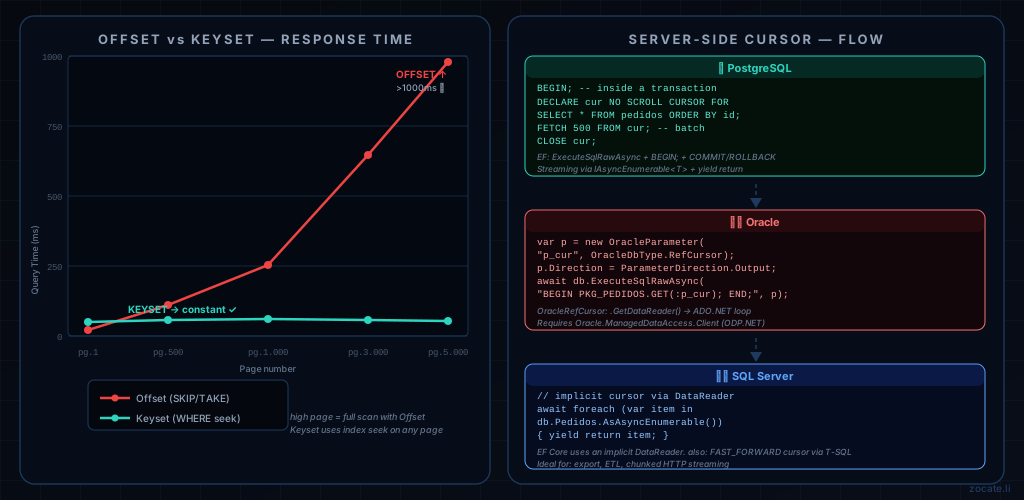
No pagination strategy works well without the right indexes. For each database:
 1
 2
 3
 4
 5
 6
 7
 8
 9
10
11
12
13
14
15
16
17
18
19
20
21
22
23
24
25
26
27
28
29
30
31
32
33
34
| -- ============================================
-- SQL Server — Pagination indexes
-- ============================================
-- For Offset by DataCriacao
CREATE INDEX IX_Pedidos_DataCriacao
ON Pedidos (DataCriacao ASC, Id ASC)
INCLUDE (ClienteId, Valor, Status);
-- For frequent filters + pagination
CREATE INDEX IX_Pedidos_ClienteId_Data
ON Pedidos (ClienteId ASC, DataCriacao ASC, Id ASC)
INCLUDE (Valor, Status);
-- ============================================
-- Oracle — Equivalents
-- ============================================
CREATE INDEX IX_Pedidos_DataCriacao
ON Pedidos (DataCriacao ASC, Id ASC);
-- Oracle: important statistics for the optimizer
EXECUTE DBMS_STATS.GATHER_TABLE_STATS('SCHEMA', 'PEDIDOS');
-- ============================================
-- PostgreSQL — With optional partial index
-- ============================================
CREATE INDEX IX_Pedidos_DataCriacao
ON Pedidos (DataCriacao ASC, Id ASC)
INCLUDE (ClienteId, Valor, Status);
-- Partial index for a frequent status (e.g. only active orders)
CREATE INDEX IX_Pedidos_Ativos
ON Pedidos (DataCriacao ASC, Id ASC)
WHERE Status = 'Ativo';
|
⚠️ Oracle warning: Oracle does not support INCLUDE columns in regular indexes (unlike SQL Server and PostgreSQL). For covering indexes in Oracle, use Composite Indexes or Index-Organized Tables (IOT) for high-read-volume tables.
For REST APIs with multiple endpoints, creating a pagination middleware avoids duplication:
 1
 2
 3
 4
 5
 6
 7
 8
 9
10
11
12
13
14
15
16
17
18
19
20
21
22
23
24
25
26
27
28
29
30
31
32
33
34
35
36
37
38
39
40
41
42
| // Extensions to register services and configure the default response
public static class PaginacaoExtensions
{
// Standard pagination header (common in REST APIs)
public static IEndpointConventionBuilder ComPaginacao(
this IEndpointConventionBuilder builder)
{
// Adds documentation headers to OpenAPI
builder.WithOpenApi(op =>
{
op.Parameters.Add(new OpenApiParameter
{
Name = "cursor",
In = ParameterLocation.Query,
Required = false,
Schema = new OpenApiSchema { Type = "string" },
Description = "Cursor token for the next page (keyset pagination)"
});
op.Parameters.Add(new OpenApiParameter
{
Name = "limite",
In = ParameterLocation.Query,
Required = false,
Schema = new OpenApiSchema { Type = "integer", Default = new OpenApiInteger(20) }
});
return op;
});
return builder;
}
// Adds the standard RFC 5988 HTTP Link header
public static void AdicionarLinkHeader<T>(
this HttpContext ctx,
KeysetResultado<T> resultado,
string baseUrl)
{
if (resultado.ProximoToken != null)
ctx.Response.Headers.Append(
"Link",
$"<{baseUrl}?cursor={resultado.ProximoToken}>; rel=\"next\"");
}
}
|
Tips and Good Practices#
- Never return without Take/Limit: Always apply a maximum limit in the service layer, regardless of what the client sent. Expose it through request validation.
- Keyset requires a stable composite key: Always use
(sort_column, unique_id) as a composite cursor. The sort column alone may have duplicates; the Id guarantees uniqueness and stability. - Database cursor: always close it: For server-side cursors (PostgreSQL
DECLARE, Oracle REF CURSOR), use try/finally to guarantee the CLOSE. A cursor left open in Oracle or SQL Server consumes server resources indefinitely. - Document the pagination type in OpenAPI: Indicate in Swagger which strategy each endpoint uses — clients need to know whether they can jump pages or only move forward sequentially.
- Version the pagination strategy: If you switch from Offset to Keyset on an existing endpoint, version the API (
/v2/pedidos) so you don’t break clients that depend on the totalPaginas field. - Monitor slow queries: Enable Query Store (SQL Server), AWR (Oracle) or
pg_stat_statements (PostgreSQL) to capture pagination queries that exceed SLAs. - Prefer projections with Select(): Never return the full entity in listing endpoints. Select only the fields you need to reduce I/O and memory allocation.
Conclusion#
Paginating data in REST APIs with C# and EF Core 8 goes far beyond .Skip().Take(). Each strategy — Offset, Keyset, Server-side cursor, Time-based and Opaque token — exists for a reason and serves different scenarios. The wrong choice results in slow queries, data inconsistencies or unnecessary consumption of database resources.
The safest path is: start with Offset for simple UIs with controlled volumes, migrate to Keyset as the table grows and the offset starts to degrade, use a Server-side cursor only for streaming and ETL with careful lifecycle management, and Time-based for data with a natural time dimension.
SQL Server, Oracle and PostgreSQL support all of these strategies — the differences lie in syntax and implementation details, but EF Core 8 abstracts most of them. What EF Core doesn’t do for you is create the right indexes: that is always your responsibility.
If you got here trying to understand how database bottlenecks affect not only reads but also bulk writes, continue with the article Database Bottlenecks: Messaging and Pagination, which covers the messaging-based solution (RabbitMQ and Azure Service Bus) for the write side.
Read Also#
References#

By commenting, you agree to our Privacy Policy, Terms of Use, Data Deletion Policy.