Introduction
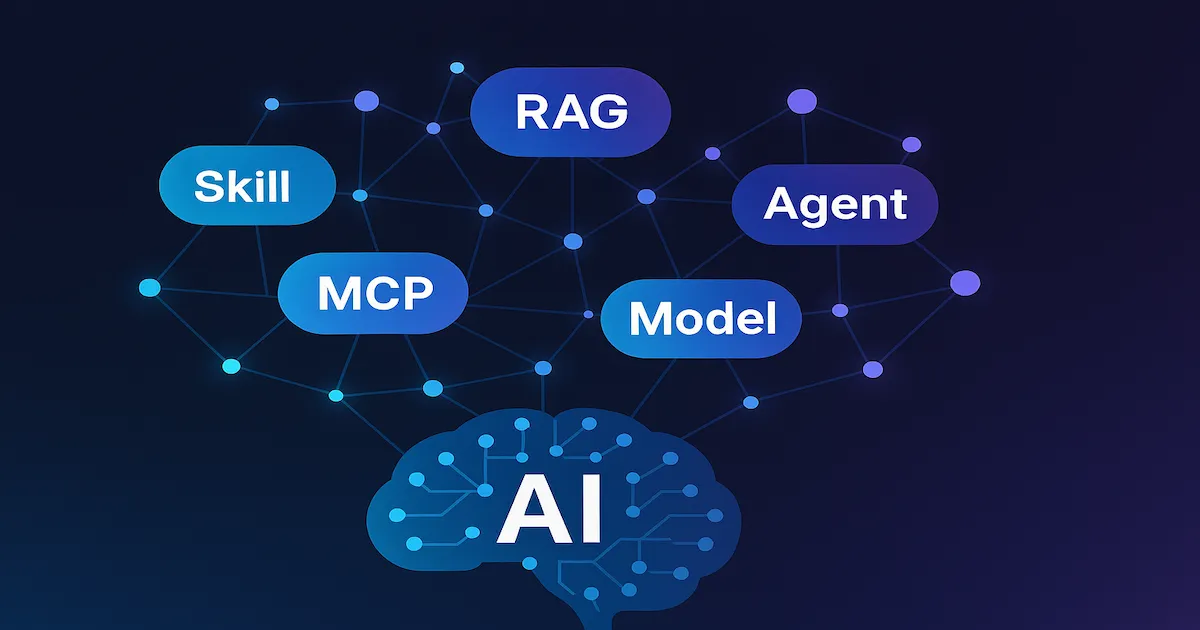
If you work with technology, you have already noticed: a new acronym appears in the artificial intelligence universe every day. LLM, RAG, MCP, Agent, Skill, Model — the list grows faster than any professional can keep up with. And the worst part is not the number of terms. The worst part is that these terms show up in meetings, in architecture decisions, in job descriptions and in product roadmaps — and often nobody stops to explain what each one really means.
This article exists to solve that. It was written for IT professionals who already have experience with development, infrastructure or management, but who have not had the time (or the opportunity) to dive into the fundamental concepts of modern AI. It is not an implementation tutorial. It is a conceptual map — a reference you can consult whenever you need to understand what each piece is and how they fit together.
By the end of the reading, you will understand:
- What AI is, and how it is divided into layers (Machine Learning, Deep Learning, Generative AI)
- What an AI Model is and what it means to have 7 billion or 405 billion parameters
- What an LLM is and why it is the engine behind tools such as ChatGPT, Copilot and Claude
- What RAG is and why it solves one of the biggest problems of LLMs
- What an AI Agent is and how it differs from a chatbot
- What a Skill is and how it differs from a tool
- What MCP is and why it is being called “the USB of artificial intelligence”
- Who the main market players are and where each one stands out
Let’s get straight to the point.
Prerequisites
- Basic familiarity with software development or IT infrastructure
- No prior knowledge of AI is required — the article starts from scratch
What Is Artificial Intelligence
Artificial Intelligence (AI) is a field of computer science dedicated to creating systems capable of performing tasks that would normally require human intelligence. Recognizing patterns in images, understanding natural language, making data-driven decisions, generating text and code — all of this fits under the AI umbrella.
But AI is a broad term. Think of it as a Russian nesting doll — inside it there are progressively more specific subfields:
| |
- Machine Learning (ML): Systems that learn from data, without being explicitly programmed for each situation. Example: a fraud detection model that learns patterns from historical transactions.
- Deep Learning (DL): A subset of ML that uses neural networks with many layers (“deep” ones). It is the foundation of recent advances in image, voice and language recognition.
- Generative AI (GenAI): A subset of Deep Learning specialized in creating new content — text, images, code, audio, video. This is where ChatGPT, Copilot, Claude and Gemini live.
💡 Tip: When someone says “AI” in today’s corporate context, they are most often referring to Generative AI — specifically language models (LLMs). It is important to know that AI is much more than that, but the current hype is concentrated in this layer.
The practical difference between traditional AI and modern AI is simple: traditional AI works with predefined rules (if X, then Y). Modern AI learns patterns from data and generalizes to situations it has never seen before. Both approaches coexist — and each has its place.
What Is an AI Model
When someone mentions a “model” in the context of AI, they are talking about a mathematical artifact that was trained on data to recognize patterns and make predictions. In practice, a model is a file (or set of files) containing weights — numbers that were adjusted during the training process so that the model produces useful answers.
An analogy that works well: think of the model as a brain trained for a specific task. Just as a radiologist trained for years by reading thousands of exams to identify anomalies, an AI model was “trained” by processing millions (or billions) of examples to learn patterns.
Types of models
| Type | What it does | Examples |
|---|---|---|
| Language | Generates and understands text, code, reasoning | GPT-4o, Claude, Llama |
| Image | Generates, edits or classifies images | DALL-E, Midjourney, Stable Diffusion |
| Audio | Generates speech, transcribes audio, clones voices | Whisper, ElevenLabs, Bark |
| Multimodal | Combines text, image, audio and/or video | GPT-4o, Gemini 2.0, Claude 3.5 |
What parameters are
You have probably seen references such as “a 7B model” or “a 405B model”. The B stands for billions. Parameters are the model’s internal weights — the more parameters, the greater the model’s capacity to capture nuances and complex patterns.
ℹ️ Info: More parameters does not necessarily mean better. A well-trained and optimized 70B model can outperform a 405B one on specific tasks. What matters is the combination of architecture, training data, optimization technique and alignment.
In practice, larger models (hundreds of billions of parameters) are more expensive to run, slower to respond and require robust infrastructure. Smaller models (7B to 14B) can run locally on a consumer GPU and are ideal for specific tasks when fine-tuned for a domain.
Training vs. Inference
- Training: The process of feeding the model with data so that it learns patterns. It is expensive, time-consuming and done by large companies (OpenAI, Google, Meta). It can take weeks running on thousands of GPUs.
- Inference: The process of using the already-trained model to generate answers. It is what happens when you send a message to ChatGPT — the model performs inference to produce the answer.
When you use an AI API (OpenAI, Anthropic, Google), you are paying for inference. The cost is measured in tokens — units of text processed by the model.
What Is an LLM (Large Language Model)
An LLM (Large Language Model) is a specific type of AI model trained on enormous volumes of text. The central idea is simple: the model has learned to predict the next word (more precisely, the next token) in a sequence of text.
It seems trivial, but this ability to predict the next token in a sophisticated way is what allows an LLM to:
- Generate coherent text — articles, summaries, emails, documentation
- Write and explain code — in dozens of languages
- Translate between languages
- Reason about problems — logical analysis, mathematics, planning
- Follow instructions — answer questions, perform complex tasks via prompt
How it works (simplified)
When you send a question to an LLM, the model does not “understand” the question in the human sense. Based on the patterns learned during training, it calculates which sequence of tokens is most likely to be a good continuation of the text you sent.
| |
That is why LLMs sometimes “hallucinate” — that is, they generate information that looks correct but is made up. The model is optimized to generate plausible text, not necessarily true text. It does not consult a database of facts — it generates text based on statistical patterns.
Important limitations
| Limitation | Explanation |
|---|---|
| Hallucination | Makes up information that looks true. Cites sources that do not exist, generates fictitious data. |
| Knowledge cutoff | The model only knows what existed up to the final date of training. It has no access to current information. |
| No persistent memory | Each conversation starts from scratch (unless there is an external context mechanism). |
| Bias | Reflects biases present in the training data. |
| Context window | There is a limit to the number of tokens the model can process at once (4K, 128K, 200K, 1M — varies by model). |
⚠️ Warning: One of the most common traps for people who start using LLMs is trusting the answer too much. The model does not “know” — it generates text that sounds like it knows. Always validate critical information against primary sources.
Main LLMs on the market
| Model | Company | Highlights |
|---|---|---|
| GPT-4o, o1, o3 | OpenAI | Most popular, excellent for general use and code |
| Claude 3.5 Opus/Sonnet | Anthropic | Strong in long reasoning, safety and coding |
| Gemini 2.0 | Natively multimodal, huge context window | |
| Llama 3.3 | Meta | Leading open-source model, runs locally |
| DeepSeek V3, R1 | DeepSeek | Open-source, excellent cost-benefit |
What Is RAG (Retrieval-Augmented Generation)
You have just learned that LLMs have a fundamental problem: they do not know your data. The model was trained on public internet data, books and open-source code — but it knows nothing about your company’s internal documentation, your team’s wiki, your contracts, your logs, your tickets.
RAG (Retrieval-Augmented Generation) is the technique that solves this problem without needing to retrain the model.
How it works
The idea is elegant: before sending the question to the LLM, you search for relevant information in your database and inject it into the prompt as additional context. The model then generates the answer based on that context — not only on what it learned during training.
| |
Why RAG and not fine-tuning?
| Approach | Advantage | Disadvantage |
|---|---|---|
| RAG | Always up-to-date data, no training cost, more transparent | Depends on the quality of the search |
| Fine-tuning | The model internalizes the knowledge, lower latency | Expensive, data becomes outdated, hard to maintain |
💡 Tip: For most corporate use cases, RAG is the first option. Fine-tuning only makes sense when you need the model to internalize a style or a very specific vocabulary, or when the search latency is unacceptable.
When to use RAG
- Corporate chatbots that answer questions about internal documentation
- Code assistants that know your company’s codebase
- Support systems that consult manuals and FAQs
- Any scenario where the LLM needs information it does not have by default
The key to RAG is vector search — a technique that turns text into numerical vectors (embeddings) and finds documents semantically similar to the question, even if they use different words.
What Is an AI Agent
An AI Agent is an LLM with superpowers: besides generating text, it can use tools, make decisions and execute actions autonomously or semi-autonomously.
The difference between a chatbot and an agent is the same as the difference between someone who gives advice and someone who makes things happen:
| Chatbot (pure LLM) | AI Agent |
|---|---|
| “You should create a branch and open a PR.” | Creates the branch, writes the code, opens the PR and asks for your review. |
| “The SQL query for that would be SELECT…” | Runs the query, analyzes the results and presents a report. |
| “You can fix the bug by changing line 42.” | Changes line 42, runs the tests, confirms they pass and commits. |
The Agent loop
An AI agent works in a continuous cycle:
| |
Real examples of Agents
- GitHub Copilot Coding Agent: Receives an issue, creates a branch, implements the solution, runs tests and opens a PR — all automatically.
- CI/CD Agents: Analyze pipeline failures, identify the root cause and suggest (or apply) fixes.
- Research agents: Receive a complex question, search multiple sources, synthesize and deliver a consolidated report.
- Data agents: Receive a natural language question, translate it into SQL, execute it, analyze it and present visual results.
⚠️ Warning: Agents are powerful, but they bring risks. An agent with permission to run commands in the terminal can cause real damage if misconfigured. Autonomy without supervision is the main risk. That is why patterns such as human-in-the-loop (human approval before critical actions) are fundamental in production environments.
What an Agent needs
To work, an agent needs:
- An LLM as its “brain” (GPT-4o, Claude, Gemini, etc.)
- Tools it can invoke (APIs, CLI, search engines, databases)
- Context (instructions, documentation, conversation history)
- Controlled permissions (what it can and cannot do)
- A protocol to connect everything (this is where MCP comes in — which we will see later)
What Is a Skill
In the agent ecosystem, a Skill is a block of specialized knowledge or instructions that an agent can consult to perform a task more accurately.
Think of it this way: if the agent is a generalist professional, the skill is the reference manual it consults when it needs specific knowledge about a domain.
Skill vs. Tool — what is the difference?
This distinction is important because the two terms often appear together:
| Concept | What it is | Analogy |
|---|---|---|
| Skill | Knowledge, instructions, good practices | A reference manual, a style guide |
| Tool | An action the agent can execute | A hammer, a screwdriver, an API |
A concrete example in GitHub Copilot:
- An Azure deploy Skill contains instructions on how to structure Bicep files, which conventions to follow and which mistakes to avoid. The agent reads these instructions to make better decisions.
- A terminal Tool allows the agent to execute commands in the shell. It can use the Azure skill to know what to execute and the terminal tool to actually execute it.
Examples of Skills
- Project instructions: An
.instructions.mdfile that teaches Copilot the conventions of your repository (commit style, directory structure, code patterns). - Specialized domains: Security skills (
azure-security), deploy skills (azure-deploy), agent evaluation skills (evaluation). - Corporate knowledge: Business rules, compliance policies and internal architecture standards that the agent must follow.
💡 Tip: Skills are the most accessible way to customize an agent without changing the model. Instead of fine-tuning (expensive and complex), you write clear instructions and the agent follows them. It is the difference between training a new employee from scratch and handing them a well-written manual to consult.
What Is MCP (Model Context Protocol)
The Model Context Protocol (MCP) is an open protocol created by Anthropic that standardizes the way AI models connect to external tools, data and services.
The problem MCP solves
Before MCP, each AI tool had its own way of integrating. If you wanted Claude to access your database, you needed a Claude-specific integration. If you wanted GPT to access the same database, you needed another integration. It was as if every electronics manufacturer had its own connector type — no standard, no interoperability.
The USB analogy
MCP does for AI what USB did for electronic devices: it defines a universal connection standard.
| |
With MCP, you create one server that exposes the tools, and any MCP-compatible client can use it. Build once, connect anywhere.
MCP components
| Component | Function | Example |
|---|---|---|
| MCP Server | Exposes tools and data through a standardized protocol | A server that provides access to GitHub issues |
| MCP Client | Consumes the tools exposed by the server | VS Code, Claude Desktop, Cursor |
| Protocol | JSON-RPC communication between client and server | Based on JSON-RPC 2.0 |
Practical example
Imagine your company creates an MCP Server that exposes:
- Queries on Jira tickets
- Search in the internal documentation (wiki)
- Reading Grafana metrics
Once this MCP Server exists, any MCP-compatible AI agent can use these tools — whether Copilot in VS Code, Claude Desktop or a custom agent from your company.
Who is adopting it
MCP was created by Anthropic, but its fast adoption surprised even its creators:
- Microsoft: Integrated MCP into VS Code, GitHub Copilot and Azure AI
- Google: Support in Gemini and Google Cloud tools
- Cursor: Native support for MCP Servers
- Community: Hundreds of open-source MCP servers (GitHub, Postgres, Slack, Notion, etc.)
ℹ️ Info: MCP is open-source and the specification is publicly available. Anyone can create an MCP Server to expose tools and data, or an MCP Client to consume them. That is what makes the protocol so powerful — it is an open standard, not a proprietary one.
Main AI Players on the Market
Now that you understand the concepts, let’s map who does what in the AI ecosystem. Each company has different strengths — knowing this helps you choose the right tool for each scenario.
| Player | Main Models | Highlight | Business model |
|---|---|---|---|
| OpenAI | GPT-4o, o1, o3, DALL-E | Pioneer of the generative AI hype. ChatGPT is the most popular AI product in the world. Strong in code generation and general use. | Paid API (per token), ChatGPT Plus ($20/month) |
| Anthropic | Claude Opus, Sonnet, Haiku | Focus on safety and alignment. Claude stands out in long reasoning, analysis of extensive documents and coding. Creator of MCP. | Paid API, Claude Pro ($20/month) |
| Gemini 2.0, Gemma | Natively multimodal (text + image + video + audio). Huge context window (up to 2M tokens). Integration with the Google ecosystem. | Paid API, Gemini Advanced ($20/month) | |
| Meta | Llama 3.1, 3.3, 4 | Leader in open-source models. Llama can be downloaded and run locally, without depending on an API. Ideal for those who want full control. | Open-source (free to use) |
| Microsoft | Copilot, Azure OpenAI | Does not build its own frontier models (it uses OpenAI), but leads in enterprise integration. Copilot is in VS Code, GitHub, Office 365 and Azure. | Corporate licenses, Azure pay-as-you-go |
| DeepSeek | DeepSeek V3, R1 | A Chinese company that surprised the market with very high-quality open-source models at a very low cost. Stands out in reasoning and code. | Open-source + API at very aggressive prices |
| Mistral | Mistral Large, Codestral | A French company. Open-weight models focused on efficiency. A good balance between quality and cost. Strong in code. | Open-weight + paid API |
| xAI | Grok 2, Grok 3 | Elon Musk’s company. Integrated into X (formerly Twitter). Focus on reasoning and real-time analysis. | Paid API, integrated into X Premium |
| Amazon | Nova, Bedrock | Amazon Bedrock is a multi-model hub (accesses Claude, Llama and Mistral through the same API). Nova is Amazon’s own model. | AWS pay-as-you-go |
How to choose
The choice of player (and model) depends on your scenario:
- General use and productivity: OpenAI (ChatGPT) or Google (Gemini) — the most accessible and versatile.
- Software development: Anthropic (Claude Sonnet) or OpenAI (GPT-4o) — they dominate coding and technical reasoning.
- Privacy and control: Meta (Llama) or Mistral — open-source models that run on your infrastructure.
- Aggressive cost: DeepSeek — competitive quality at prices far below the market.
- Enterprise and integration: Microsoft (Azure OpenAI + Copilot) or Amazon (Bedrock) — when the corporate ecosystem matters more than the model itself.
- Advanced multimodal: Google (Gemini) — best at combined processing of text, images and video.
📝 Example: If you need an internal chatbot to answer questions about company documentation (a RAG scenario), the most pragmatic choice would be: Claude Sonnet (best cost-benefit in reasoning) via Azure OpenAI or Bedrock (if you already use AWS/Azure) with an MCP Server to access your data sources.
How It All Connects
Now that you know each piece, see how they fit into the modern ecosystem:
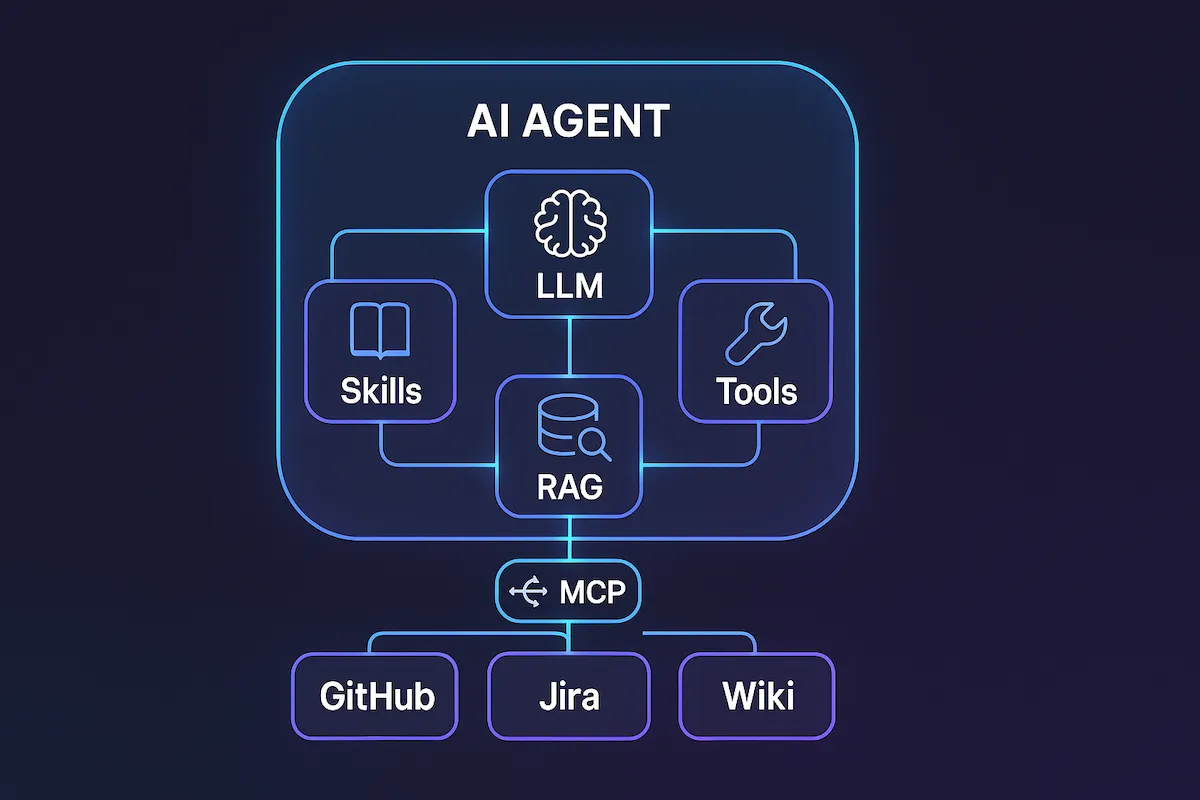
The LLM is the brain. Skills provide specialized knowledge. RAG supplies up-to-date data. Tools enable real actions. MCP connects everything with a standardized protocol. And the Agent orchestrates each piece to complete complex tasks autonomously.
Tips and Good Practices
If you are starting to work with AI in your professional day-to-day, here are some practical recommendations:
Start with what solves a real problem. Do not adopt AI because of hype. Identify a concrete pain point for your team — outdated documentation, repetitive support answers, slow code reviews — and apply AI at that specific point.
Do not blindly trust LLM outputs. Treat the model’s output as a draft from a competent intern: usually useful, sometimes brilliant, but it always needs review by someone who understands the subject.
Understand the cost before integrating. AI APIs charge per token. A poorly designed integration can generate high bills quickly. Monitor consumption, set limits and use smaller models when the task allows.
RAG before fine-tuning. If the problem is that the LLM does not know your data, start with RAG. Fine-tuning is expensive, hard to maintain and rarely necessary for corporate use cases.
Adopt MCP for integrations. If you are going to connect an agent to internal tools, use MCP. Creating proprietary integrations is technical debt — the standardized protocol eases maintenance and lets you swap the model without redoing the integrations.
Skills are cheap and powerful. Before investing in complex customization solutions, try writing clear instructions (skills) for the agent. A good prompt with well-defined context solves more than a poorly done fine-tuning.
Agent autonomy requires governance. Before giving an agent write permissions (running commands, modifying files, opening PRs), define approval policies and clear limits. Human-in-the-loop is not bureaucracy — it is security.
Conclusion
The AI alphabet soup may seem intimidating, but each concept has a clear and well-defined role. AI is the broad field. Models are the trained brains. LLMs are the language models that generate text and code. RAG solves the problem of data the LLM does not know. Agents add autonomy and the ability to act. Skills provide specialized knowledge. And MCP connects everything with an open, standardized protocol.
The AI ecosystem is no longer a lab experiment — it is a reality that is already present in tools IT professionals use daily (Copilot, ChatGPT, Claude, Gemini). Understanding the fundamental concepts is not optional: it is what separates those who use the tool from those who understand the tool. And those who understand it use it better.
My recommendation: do not try to learn everything at once. Pick one concept from this article that applies to your work right now — maybe RAG for an internal chatbot, maybe MCP to standardize integrations, maybe simply a better understanding of how the LLM you already use works under the hood — and go deep on it. Practical knowledge is built one piece at a time.
If you want to dig deeper into how AI is specifically impacting developers’ careers, I recommend reading the article below. And if you have questions or want to discuss any concept, the comments are open.
Read Also
- Will AI Replace Developers? An Honest Opinion — A detailed analysis of the real impact of generative AI on developers’ careers.
- GitHub Copilot: AI Agents, Models and Complete Guide — Everything about GitHub Copilot’s AI agents and models: which ones exist, when to use each one and how token consumption works.
References
- OpenAI — GPT-4o Documentation — Official documentation for OpenAI models, including capabilities and limits.
- Anthropic — Claude Model Card — Technical specifications, context windows and differences between Opus, Sonnet and Haiku.
- Model Context Protocol — Specification — The official MCP specification, with implementation guides for servers and clients.
- Google — Gemini API Documentation — Gemini documentation, including multimodal features and token limits.
- Meta — Llama Models — Official page for the Llama models, with download links and usage documentation.
- Microsoft — Azure AI Services — Documentation for Microsoft’s AI ecosystem, including Azure OpenAI and the Copilot Stack.
- Lewis, P. et al. — Retrieval-Augmented Generation for Knowledge-Intensive NLP Tasks (2020) — The original paper that introduced the concept of RAG.
By commenting, you agree to our Privacy Policy, Terms of Use, Data Deletion Policy.