
Introduction
Every .NET developer who works with medium or large applications has run into at least one of these scenarios: a nightly routine that needs to write 50 thousand orders to the database, a report query that brings 300 thousand records at once and freezes the application, or an API that takes 8 seconds to respond because EF Core is executing 10 thousand individual INSERT statements in sequence.
SQL Server and Oracle are robust and mature databases, but neither was designed to receive thousands of writes in a burst, nor to return hundreds of thousands of rows at once at no cost. In most cases, the problem is not the database — it is the way the C# application interacts with it.
In this article I explore both faces of the bottleneck: bulk writes and reading large volumes. For each one, you will see the root cause, the particularities of SQL Server and Oracle with EF Core 8.0+, and the practical solution — messaging for writes and efficient pagination for reads. All the code is production-ready and compatible with .NET 8/9.
Prerequisites: Basic knowledge of C# and EF Core. I recommend reading the article on asynchronous programming with C# before continuing.
📦 Source code: The complete implementation of this article is in the blog-zocateli-sample repository on GitHub. Clone it, explore it and adapt it to your context.
The Write Bottleneck: Why Writing Thousands of Records Hurts
The Real Cost of Each INSERT
When you save a list of entities with EF Core in the most common way, something like this happens:
| |
Each SaveChangesAsync() inside the loop represents:
- A transaction opened → committed → closed in the database
- A network roundtrip (1–5ms latency per call)
- The database log being written for each operation
- Row locks being allocated and released 50 thousand times
For 50,000 orders with 2ms of latency per roundtrip, that means 100 seconds of pure I/O processing. And that is the best-case scenario, with no contention.
Particularities: SQL Server vs Oracle
Even though the solution is similar in both databases, there are important differences:
| Aspect | SQL Server | Oracle |
|---|---|---|
| Native bulk insert | BULK INSERT / SqlBulkCopy | ODP.NET BulkCopy / INSERT ALL |
| Default maximum batch size | 1,000 rows per INSERT | Depends on ArrayBindCount |
| Sequences / Identity | IDENTITY or SEQUENCE | Only SEQUENCE (mandatory) |
| Bulk rollback | Can be minimally logged | Always logged (redo log) |
| EF Core provider | Microsoft.EntityFrameworkCore.SqlServer | Oracle.EntityFrameworkCore |
In Oracle, a critical detail is that the official provider (Oracle.EntityFrameworkCore 8.x) requires you to configure key generation via SEQUENCE + TRIGGER (or GENERATED ALWAYS AS IDENTITY in Oracle 12c+). Ignoring this in bulk writes will generate N extra calls to the database just to obtain the IDs.
| |
The Immediate Solution: Batched SaveChanges with EF Core 8
Before introducing queues, the first optimization is to move SaveChangesAsync() out of the loop and use chunks so as not to overload the context:
| |
💡 Tip: The Chunk() method was introduced in .NET 6. Combined with ChangeTracker.Clear(), it prevents the EF Core context from growing indefinitely while tracking tens of thousands of entities.
ExecuteInsertAsync and BulkInsert in EF Core 8
EF Core 7 brought ExecuteUpdateAsync and ExecuteDeleteAsync. EF Core 8 improved support for bulk operations. For extremely high-performance scenarios, use the EFCore.BulkExtensions library:
| |
With BulkInsert, 50,000 records that took 100 seconds with individual SaveChanges are written in 2–4 seconds on SQL Server, and in 3–6 seconds on Oracle.
Messaging: The Architectural Solution for Bulk Writes
Optimizing the INSERT itself treats the symptom, but not the root cause. The real problem is that the application is trying to process a huge volume synchronously, blocking the thread and the request while it writes. The correct architectural solution is to decouple reception from writing using a message queue.
How Messaging Solves the Problem
Instead of writing directly to the database when it receives the data, the application:
- Publishes the records to a queue (RabbitMQ, Azure Service Bus, etc.) — a fast operation (~1ms per message)
- Returns immediately to the client with
202 Accepted - A separate Consumer reads the queue in batches and writes to the database with bulk insert
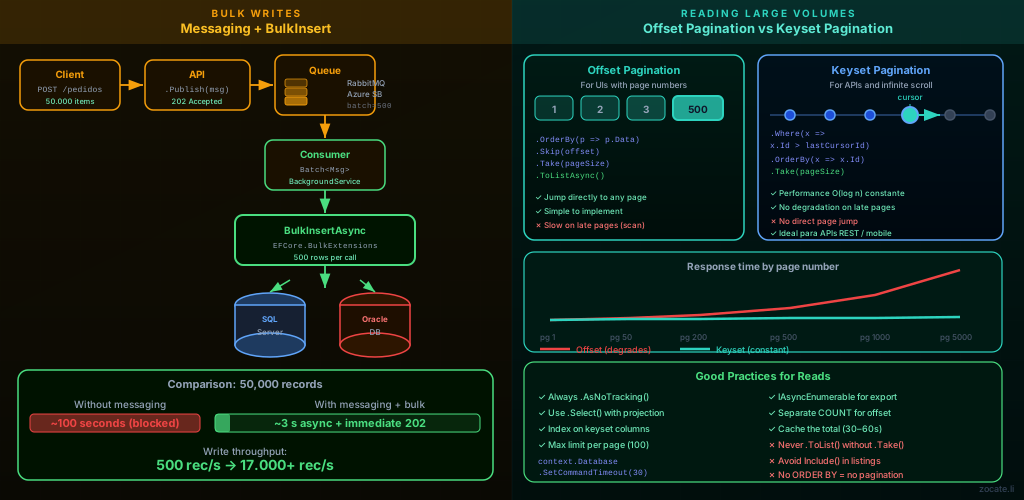
This separation brings benefits beyond performance:
- Resilience: if the database goes down temporarily, the messages stay in the queue. There is no data loss.
- Flow control: the consumer can process at the speed the database supports
- Natural backpressure: the queue absorbs load spikes
- Observability: you can monitor the queue size and know exactly the pending backlog
Implementation with RabbitMQ.Client
The official RabbitMQ.Client library is 100% open source (Apache 2.0) and provides direct access to the AMQP protocol. Combined with .NET’s BackgroundService, I implement a consumer that accumulates messages in a batch and writes everything at once with BulkInsert.
| |
Registering in Program.cs
| |
⚠️ Warning: On Oracle, EFCore.BulkExtensions’ BulkInsert requires the Oracle Data Provider for .NET (ODP.NET). Make sure you register the correct provider and that the sequences were configured correctly in the model, or the bulk insert will fail with a primary key constraint error.
RabbitMQ vs Azure Service Bus: Which One to Choose?
Both options solve the same problem — decoupling message production and consumption — but with very different operational and economic models. The choice depends on your context: self-hosted infrastructure vs managed cloud, variable vs fixed cost, and the degree of control you want.
| Criterion | RabbitMQ | Azure Service Bus |
|---|---|---|
| Type | Open source (MPL 2.0), self-hosted | PaaS managed by Microsoft |
| Protocol | AMQP 0-9-1 (native), AMQP 1.0, MQTT, STOMP | AMQP 1.0 |
| Hosting | Your own container, VM, Kubernetes | Azure (no infra to manage) |
| Cost | Infrastructure + operation (your team) | Pay-per-use (~$0.10/million ops) |
| Queues | Queues, Exchanges, Bindings | Queues and Topics/Subscriptions |
| Maximum message size | 128 MB (default) | 256 KB (Standard) / 100 MB (Premium) |
| Message retention | Until the disk fills up / configurable TTL | 14 days (maximum) |
| Dead-letter queue | ✅ Configurable | ✅ Native |
| Sessions (guaranteed ordering) | ✅ Via x-single-active-consumer | ✅ Service Bus Sessions |
| Automatic retry | Manual (Dead-letter + requeue) | Native (MaxDeliveryCount) |
| Horizontal scalability | Manual (Erlang cluster) | Automatic |
| .NET library | RabbitMQ.Client (Apache 2.0) | Azure.Messaging.ServiceBus (MIT) |
| Best for | On-premises, multi-cloud, controlled cost | Azure ecosystem, small team, guaranteed SLA |
Equivalent Implementation with Azure Service Bus
To migrate from RabbitMQ to Azure Service Bus in an Azure environment, the producer/consumer pattern is similar, using Azure.Messaging.ServiceBus:
| |
💡 Tip: In production on Azure, prefer authentication via Managed Identity instead of a connection string, using new ServiceBusClient("meu-namespace.servicebus.windows.net", new DefaultAzureCredential()). This eliminates secrets from the configuration.
The Read Bottleneck: Why Bringing Everything at Once Is Dangerous
The Problem of the Unbounded Query
| |
This seemingly innocent query can:
- Consume gigabytes of RAM on the application server
- Block the database with a long-running table scan
- Generate timeouts in high-concurrency environments
- Saturate the network between the application and the database with unnecessary traffic
- Choke the .NET GC with large objects that must go to the LOH (Large Object Heap)
On Oracle, an additional aspect is the use of ROWNUM (Oracle 11g) vs FETCH FIRST … ROWS ONLY (Oracle 12c+), which affects how pagination is expressed in SQL. The Oracle.EntityFrameworkCore provider abstracts this, but it is important to understand what is being generated.
Pagination Types: Offset vs Keyset (Cursor)
📖 Dedicated article: For a complete guide to every pagination strategy (Offset, Keyset, Server-Side Cursor, Time-based and Opaque Token) with SQL Server, Oracle and PostgreSQL — including EF Core 8+ code for each combination —, see: REST API Pagination with C# and EF Core: Practical Guide. This section presents the essential concepts; the linked article goes deeper into when and why to use each approach.
There are two main pagination strategies, and each has distinct use cases:
| Characteristic | Offset Pagination | Keyset (Cursor) Pagination |
|---|---|---|
| Generated SQL | OFFSET N ROWS FETCH NEXT M | WHERE id > :lastId |
| Performance on early pages | ✅ Fast | ✅ Fast |
| Performance on late pages | ❌ Slow (scan grows) | ✅ Constant |
| Page jump support | ✅ Direct | ❌ Sequential only |
| New records between pages | ❌ May duplicate/omit | ✅ Consistent |
| Ideal use case | UI with page numbers | Infinite scroll / APIs |
Offset Pagination: Simple and Suitable for UIs
Offset pagination is the most familiar one, and EF Core generates it correctly for SQL Server and Oracle:
| |
💡 Tip: Always use .Select() with a projection (DTO or record); never return the full entity in listing queries. This reduces the volume of data transferred and avoids loading unnecessary navigations.
Generated SQL: SQL Server vs Oracle
EF Core 8 generates correct and optimized SQL for both databases:
| |
⚠️ Warning: For Oracle 11g (without FETCH FIRST), the provider generates a query with nested ROWNUM, which may have additional cost on very large tables. Consider migrating to Oracle 12c+ or using materialized views for heavy reports.
Keyset Pagination: High Performance for Infinite Scroll and APIs
When the user navigates to page 500 of a result with 10 thousand items, the database needs to perform a scan of 10,000 rows just to skip the first 9,980. With keyset pagination, you use the value of the last fetched row as the starting point of the next query:
| |
This pattern keeps constant performance regardless of the page number, because the generated SQL uses a simple indexed WHERE instead of OFFSET.
| |
💡 Tip: Create a composite index on the keyset columns to guarantee that the query uses an index seek instead of a table scan:
| |
Putting It All Together: The Complete Architecture
With both solutions combined, the application architecture looks like this:
- Writes: the API receives → publishes to the queue → returns
202 Accepted→ the Consumer processes in batches with BulkInsert - Reads: the API receives a paginated request → runs the query with Skip/Take (offset) or WHERE (keyset) → returns only the necessary data
| |
Tips and Good Practices
- Proper indexes: Every column used in
OrderBy,Whereor a keyset cursor must have an index. On Oracle, use function-based indexes for columns with transformations (e.g.,UPPER(nome)). - AsNoTracking always for reads: It disables the Change Tracker for read queries, reducing memory and CPU usage by up to 30%.
- Avoid
Count()on large tables: For keyset pagination, you don’t need the total number of records. For offset, consider caching the total for a few seconds. - Set explicit timeouts: Configure
context.Database.SetCommandTimeout(30)or useWithTimeoutper query to prevent long queries from blocking the application indefinitely. - Monitor the queue size: Configure alerts for when the queue exceeds N messages — it is the signal that the consumer can’t keep up with the volume.
- Use
IAsyncEnumerablefor streaming: For CSV exports or processing large volumes that don’t need pagination, useAsAsyncEnumerable()to process row by row without loading everything into memory:
| |
- Explicit transactions for consistency: When using BulkInsert with multiple tables (e.g., writing
PedidoandItensPedidotogether), wrap the operation in an explicit transaction to guarantee atomicity.
Conclusion
Database bottlenecks with EF Core are rarely the fault of the database itself. In the overwhelming majority of cases, the problem lies in how the application interacts with it: inserting one record at a time instead of in batches, and bringing the whole result instead of paginating.
The combination of messaging (RabbitMQ or Azure Service Bus) to decouple bulk writes and efficient pagination (offset for UIs, keyset for APIs and infinite scroll) solves both bottlenecks in an elegant, scalable and resilient way. With EF Core 8.0+ and the techniques presented here, you can support much larger volumes without changing the database structure, just by adjusting how the application communicates with it.
The natural next step is observability: instrumenting slow queries with Application Performance Monitoring (APM), creating alerts for queries above N seconds, and mapping missing indexes via Query Store (SQL Server) or AWR (Oracle).
Read Also
- EF Core 8 Fluent API: Mapping, ORM and Decoupling
- EF Core Migrations: Multi-Project, Secrets and Scaffolding
- Full-Text Search in REST APIs: C#, SQL Server and PostgreSQL
- Software Architecture: GoF, Patterns and Microservices
- REST API Design: HTTP Verbs and Parameter Binding
- REST API Pagination with C# and EF Core: Practical Guide
- Asynchronous Programming in C#: async/await and Threads
- Parallelism in C#: Parallel, PLINQ and Tasks in Practice
- .NET Worker and Background Service: High Volume
References
- EF Core — Bulk Operations (Microsoft Docs) — Official strategies for efficient updating with EF Core
- EFCore.BulkExtensions — GitHub — Open-source library for bulk insert/update/delete in EF Core
- RabbitMQ.Client — NuGet / GitHub — Official .NET library for RabbitMQ (Apache 2.0)
- Azure.Messaging.ServiceBus — Documentation — Official Azure Service Bus guide with .NET
- RabbitMQ vs Azure Service Bus — Comparison — Overview of Azure Service Bus and when to use it
- Oracle EF Core Provider — GitHub — Official samples for the Oracle provider for EF Core
- Use the query store (SQL Server) — Monitoring slow queries in SQL Server via Query Store
- blog-zocateli-sample repository — Messaging — Complete source code for the examples in this article
By commenting, you agree to our Privacy Policy, Terms of Use, Data Deletion Policy.