
Introduction
If you have ever configured EF Core Migrations in a simple project with a single csproj, you know it is reasonably straightforward: dotnet ef migrations add, dotnet ef database update and you’re done. But the reality of enterprise projects is different. Your solution has multiple projects — API, Domain, IoC, Infra.Data.PostgreSQL, Infra.Bus, Infra.Http, Infra.Dto — and the DbContext doesn’t live in the same project as the entry point. Now add dotnet secrets to manage connection strings securely, the need to scaffold legacy databases that already exist, and a team with 5 or 10 developers creating migrations at the same time.
In this article, I will solve each of these problems in practice. I will configure migrations in a real multi-layer solution, use dotnet user-secrets for connection strings (no passwords in appsettings.json), reverse engineer existing databases with Scaffold-DbContext, and establish concrete strategies to avoid migration conflicts in large teams. If you are not yet familiar with the advanced Fluent API mapping that generates these migrations, I recommend first reading EF Core 8 Fluent API: Mapping, ORM and Decoupling.
📦 Source code: The complete implementation of this article is in the blog-zocateli-sample repository on GitHub. Clone it, explore it and adapt it to your context.
Multi-Layer Project Structure
Before talking about migrations, it is essential to understand the project structure. It is a .NET 8 solution with separation of responsibilities across multiple csproj files:
| |
Critical point: The DbContext lives in Infra.Data.PostgreSQL, but the entry point (Program.cs) lives in Api. The EF Core CLI needs both to work — it needs the DbContext to generate migrations and the entry point to resolve connection strings and dependencies.
ℹ️ Info: This structure follows the Layered Architecture / Clean Architecture pattern where the Domain has no dependency on infrastructure. If you want to understand the architectural patterns behind this organization, see Software Architecture: GoF, Patterns and Microservices.
Prerequisites
- .NET 8.0 SDK or later
- dotnet-ef tool (EF Core CLI):
| |
- NuGet packages in the
Infra.Data.PostgreSQLproject:
| |
⚠️ Warning: The
Microsoft.EntityFrameworkCore.Designpackage is required for the EF Core CLI to work. It can be added to the data project OR to the startup project. If it is only in the startup project, use--startup-projectwhen running the commands.
Configuring Migrations in a Multi-Project Solution
The Problem
When you run dotnet ef migrations add without additional configuration, the CLI tries to find the DbContext and its dependencies in the current project. In a multi-layer project, this fails with errors like:
| |
The CLI needs two pieces of information:
- Where the DbContext is (
--project) — inInfra.Data.PostgreSQL - Where the entry point is (
--startup-project) — inApi(to resolve DI and the connection string)
Solution 1: CLI Parameters (Quick)
| |
It works, but it is verbose. For every migration you need to remember the paths.
Solution 2: IDesignTimeDbContextFactory (Recommended)
Create a factory in the Infra.Data.PostgreSQL project that the CLI uses at design time — without depending on the API’s Program.cs:
| |
With this factory, the CLI finds the DbContext directly:
| |
💡 Tip:
IDesignTimeDbContextFactoryis used only by the EF Core CLI (at design time). At runtime, theDbContextis still resolved by the dependency injection configured in the IoC project. Both paths coexist without conflict.
dotnet user-secrets for Connection Strings
Never put connection strings with passwords in appsettings.json (which goes to Git). Use dotnet user-secrets to store sensitive data locally.
Initial Setup
| |
In the Api project (entry point), do the same:
| |
In appsettings.json — No Password
The appsettings.json versioned in Git stays free of sensitive data:
| |
At runtime, ASP.NET Core’s builder.Configuration loads user-secrets automatically when IsDevelopment() is true. In production, use environment variables or Azure Key Vault.
Running Migrations with Secrets
With IDesignTimeDbContextFactory configured to read AddUserSecrets, the EF Core CLI commands work directly:
| |
⚠️ Warning: Each developer on the team must run
dotnet user-secrets seton their own machine with the local database credentials. User-secrets are stored in%APPDATA%\Microsoft\UserSecrets\(Windows) or~/.microsoft/usersecrets/(Linux/macOS) and never go to Git.
Scaffolding: Existing Database (Reverse Engineering)
When you need to integrate with an existing database (legacy), EF Core can automatically generate the entities and configurations from the existing schema. This is called scaffolding or reverse engineering.
Basic Command
| |
Essential Scaffold Options
| Parameter | Description |
|---|---|
--output-dir Entities | Where to generate the entity classes |
--context-dir . | Where to generate the DbContext |
--context LegadoDbContext | Name of the DbContext class |
--schema public | Scaffold only the tables of a specific schema |
--table produtos --table categorias | Scaffold only specific tables |
--no-onconfiguring | Doesn’t generate OnConfiguring with the hardcoded connection string |
--data-annotations | Uses Data Annotations (the default is Fluent API — we want Fluent API!) |
--force | Overwrites existing files |
--no-pluralize | Doesn’t pluralize DbSet names |
Scaffold with Fluent API (Recommended)
By default, scaffold already uses Fluent API (not Data Annotations). For maximum control:
| |
💡 Tip: After scaffolding, move the generated entities to the Domain project and adjust the namespaces. Scaffold generates everything in the data project, but following clean architecture, entities belong to the Domain. The Fluent API configurations stay in the data project.
Partial Scaffold (Specific Tables)
For large databases, scaffold only the tables you need:
| |
Providers for Scaffold
The provider in the scaffold command corresponds to the target database:
| Database | NuGet Provider |
|---|---|
| PostgreSQL | Npgsql.EntityFrameworkCore.PostgreSQL |
| SQL Server | Microsoft.EntityFrameworkCore.SqlServer |
| Oracle | Oracle.EntityFrameworkCore |
| MySQL | Pomelo.EntityFrameworkCore.MySql |
| SQLite | Microsoft.EntityFrameworkCore.Sqlite |
Managing Migrations in Teams with Multiple Developers
This is one of the biggest practical challenges of EF Core in enterprise projects. When 3, 5 or 10 developers create migrations at the same time, conflicts are inevitable if there is no clear process.
The Problem: Migration Conflicts
Imagine two developers working on separate branches:
| |
Both migrations have the same snapshot as their base (after Migration_001). When Dev B merges after Dev A, EF Core detects that the snapshot is inconsistent and fails.
Strategy 1: Rebase the Migration (Recommended)
When there is a conflict, remove the conflicting migration and recreate it on top of the current state:
| |
Strategy 2: Merging the Model Snapshot
The AppDbContextModelSnapshot.cs file is what causes most merge conflicts. Handle it like this:
| |
Strategy 3: Naming Convention with Timestamp
Use migration names with a timestamp to avoid collisions:
| |
Golden Rules for the Team
Never edit a migration already applied to the production/staging database — create a new migration to fix it.
Merge
maininto your branch BEFORE creating the migration — this guarantees the snapshot is up to date.One feature, one migration — avoid multiple migrations per PR. If you need adjustments, remove it, adjust the entity and recreate it.
Review migrations in the Pull Request — the generated SQL (
dotnet ef migrations script) must be reviewed like any other code.Keep the snapshot in Git —
AppDbContextModelSnapshot.csMUST be versioned. Never add it to.gitignore.Use
--idempotentfor production scripts — it generates SQL withIF NOT EXISTS, safe to run multiple times:
| |
- Communicate in the team channel before creating migrations — a simple message like “I’m going to create a migration for table X” avoids duplicated work.
⚠️ Warning: In larger teams (8+ devs), consider designating an integration branch where all migrations are consolidated before going to
main. This drastically reduces snapshot conflicts.
Complete Flow: From the Entity to the Database
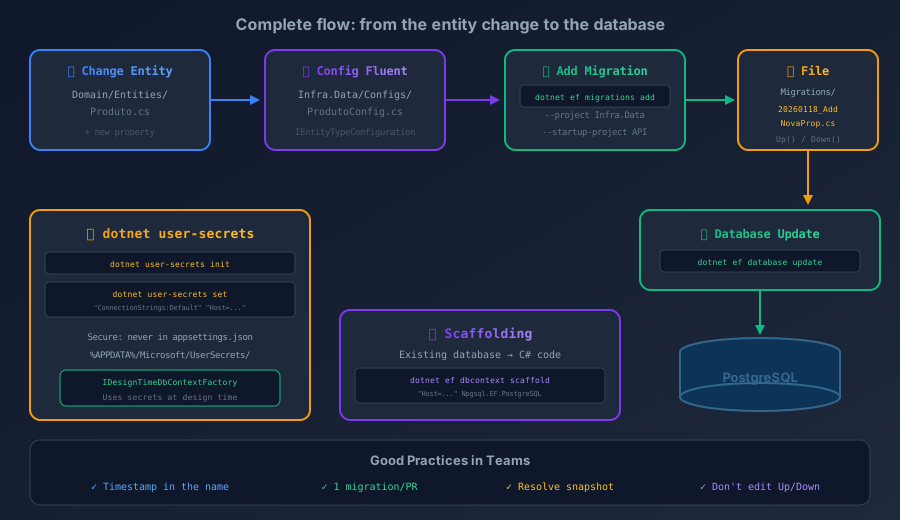
To consolidate everything, here is the complete flow in a multi-layer project:
| |
Essential Reference Commands
| Action | Command |
|---|---|
| Create migration | dotnet ef migrations add Nome --project Infra.Data |
| Apply migrations | dotnet ef database update --project Infra.Data |
| Remove last migration | dotnet ef migrations remove --project Infra.Data |
| List migrations | dotnet ef migrations list --project Infra.Data |
| Generate SQL script | dotnet ef migrations script --idempotent --project Infra.Data |
| Script between migrations | dotnet ef migrations script MigA MigB --project Infra.Data |
| Revert migration | dotnet ef database update NomeMigAnterior --project Infra.Data |
| Scaffold existing database | dotnet ef dbcontext scaffold "connstr" Provider --project Infra.Data |
| Check pending | dotnet ef migrations list --project Infra.Data (shows Pending) |
Tips and Good Practices
Always generate the SQL script before applying to production — never use
dotnet ef database updatedirectly in production. Generate it with--idempotent, review it and apply it via the DBA or a pipeline.Use
IDesignTimeDbContextFactory— it removes the dependency on the startup project and lets each developer use their own secrets.Separate migrations per provider — if your application supports PostgreSQL and SQL Server, keep separate migrations with
MigrationsAssembly()pointing to different projects.Don’t ignore the snapshot —
AppDbContextModelSnapshot.csis the “current state” of the model for the EF Core CLI. Without it, the CLI can’t compute the diff for the next migration.Automate with a Makefile or scripts — create shortcuts for the most used commands. To learn more about automation with Makefile, see Makefile: Automating tasks for Python, Hugo and Docker.
Review the generated SQL in PRs — add the output of
dotnet ef migrations scriptas a comment on the PR so the team can review the DDL.Use
HasData()with caution — seed data viaHasData()generates migrations. For large or dynamic data, prefer separate SQL scripts.Configure retry for
database update— in CI/CD, the database may not be ready yet. Use:
| |
Conclusion
Managing EF Core Migrations in multi-layer projects requires specific configuration, but the reward is an organized, secure and sustainable codebase. IDesignTimeDbContextFactory solves the design-time problem in solutions with multiple csproj files. dotnet user-secrets keeps connection strings out of versioned code. Scaffolding lets you integrate legacy databases without rewriting the schema by hand. And with clear naming conventions, migration rebasing and communication within the team, it is possible to scale to large teams without constant conflicts.
The EF Core CLI is powerful, but it demands discipline. Establish the team rules from the start of the project, document the migration creation flow in the README, and review the generated SQL in every Pull Request. To understand how advanced Fluent API mapping generates these migrations correctly, check out EF Core 8 Fluent API: Mapping, ORM and Decoupling.
Read Also
- EF Core 8 Fluent API: Mapping, ORM and Decoupling — advanced mapping with Fluent API, every relationship type, inheritance and advanced EF Core 8+ features.
- .NET 8+ Configuration Pipeline: IOptions, Secrets and Docker — how
appsettings.json,dotnet user-secrets, environment variables and Docker/Podman secrets fit together in the .NET 8+ configuration pipeline. - Database Bottlenecks: Messaging and Pagination — how to solve write and read bottlenecks in EF Core projects.
- REST API Pagination with C# and EF Core: Practical Guide — every type of pagination with EF Core for different databases.
- Makefile: Automating tasks for Python, Hugo and Docker — automate repetitive tasks such as migrations with a Makefile.
- REST API Design: HTTP Verbs and Parameter Binding — good practices for the API layer that consumes EF Core.
References
- EF Core — Migrations Overview — official documentation on creating and applying migrations in EF Core.
- EF Core — Design-time DbContext Creation — how the EF Core CLI finds the DbContext, including
IDesignTimeDbContextFactory. - EF Core — Reverse Engineering (Scaffold) — official documentation on scaffolding existing databases to generate entities and configurations.
- ASP.NET Core — Safe storage of secrets — official
dotnet user-secretsdocumentation for securely storing sensitive settings. - EF Core — Applying Migrations — strategies for applying migrations in production (scripts, bundles, runtime).
- EF Core — Managing Migrations — managing existing migrations (remove, rebase, squash).
- EF Core CLI Reference — complete reference of every
dotnet efcommand. - Npgsql — EF Core Provider for PostgreSQL — documentation for the PostgreSQL provider for EF Core.
- blog-zocateli-sample repository — Migrations — Complete source code for the examples in this article
By commenting, you agree to our Privacy Policy, Terms of Use, Data Deletion Policy.