
Introduction
If you develop with .NET, at some point you had to decide how your application would talk to the database. Write raw SQL? Use a micro ORM like Dapper? Or adopt a full ORM like Entity Framework Core? This decision goes far beyond performance — it directly affects the maintainability, the testability and, above all, the coupling of your application to the database.
In this article, I explore EF Core 8+ using Fluent API exclusively for entity mapping — never Data Annotations. I explain what an ORM is, compare the best-known ones on the market, show why EF Core offers a tactical and strategic advantage over micro ORMs like Dapper, and implement every possible relationship type with complete examples in C# 12. If you already work with EF Core and want to go deeper into advanced mapping, or if you are evaluating which data access strategy to adopt in your project, this guide is for you. To understand how EF Core behaves in high-load scenarios, also see Database Bottlenecks: Messaging and Pagination.
📦 Source code: The complete implementation of this article is in the blog-zocateli-sample repository on GitHub. Clone it, explore it and adapt it to your context.
What an ORM Is and Which Ones Are Best Known
ORM (Object-Relational Mapping) is a technique that maps objects of your programming language to tables in a relational database. Instead of writing SQL by hand, you manipulate objects and the ORM takes care of translating those operations into SQL commands — INSERT, UPDATE, DELETE, SELECT — transparently.
The concept emerged to solve the so-called impedance mismatch: the fundamental difference between the object-oriented model (with inheritance, polymorphism, encapsulation) and the relational model (with tables, columns, foreign keys). An ORM bridges that gap automatically.
Full ORMs vs Micro ORMs
ORMs fall into two categories with very different philosophies:
| Type | Characteristics | Examples |
|---|---|---|
| Full ORM | Change tracking, migrations, LINQ, lazy loading, automatic relationship mapping | EF Core, Hibernate, NHibernate, SQLAlchemy, Django ORM |
| Micro ORM | Simple query → object mapping, no tracking, no migrations, manual SQL | Dapper, PetaPoco, Massive |
Main ORMs on the Market
| ORM | Language/Platform | Note |
|---|---|---|
| Entity Framework Core | C# / .NET | Microsoft’s official ORM. Open source, cross-platform, supports multiple databases |
| Hibernate | Java | The most mature ORM in the Java ecosystem. Inspiration for NHibernate |
| NHibernate | C# / .NET | Port of Hibernate to .NET. Robust, but with a more verbose API than EF Core |
| Dapper | C# / .NET | Micro ORM created by Stack Overflow. Fast, lightweight, raw SQL |
| SQLAlchemy | Python | The most popular Python ORM. Supports Core (low level) and ORM (high level) |
| Django ORM | Python | Integrated into Django. Simplicity and productivity |
| ActiveRecord | Ruby | Integrated into Rails. Convention over configuration |
| Sequelize | Node.js | ORM for Node.js with support for PostgreSQL, MySQL, SQLite |
| Prisma | Node.js / TypeScript | Modern ORM with a declarative schema and type safety |
| TypeORM | TypeScript | Supports decorators and Active Record/Data Mapper |
| GORM | Go | The most popular ORM in the Go ecosystem |
💡 Tip: EF Core is the most widely used ORM in the .NET ecosystem and is actively maintained by Microsoft. In the Stack Overflow Developer Survey, it consistently appears among the most popular ORMs globally.
EF Core vs Mini ORMs: Beyond Performance
When people compare EF Core with Dapper, the conversation almost always revolves around performance: “Dapper is faster”. And it’s true — Dapper has less overhead because it is essentially a thin wrapper over ADO.NET. But focusing only on microseconds per query means losing sight of what really matters in a corporate software project.
What EF Core Offers That Dapper Doesn’t
| Feature | EF Core | Dapper |
|---|---|---|
| Change Tracking | Automatic — detects what changed and generates UPDATE only for the modified columns | Manual — you write the full UPDATE |
| Migrations | Built-in database schema versioning | Nonexistent — you manage DDL by hand |
| LINQ | Typed queries checked at compile time | SQL as a string — errors only at runtime |
| Relationships | .Include() / .ThenInclude() — automatic joins | You write the JOIN and map it manually |
| Projections | .Select(x => new { ... }) — generates optimized SQL | You write the projection in SQL |
| Transactions | SaveChanges() is transactional by default | You manage IDbTransaction manually |
| Interceptors | Cross-cutting hooks (audit, soft delete, multi-tenancy) | Nonexistent |
| Database abstraction | Switch providers without changing application code | Rewrite EVERY SQL query |
Total Decoupling: Tactical and Strategic Advantage
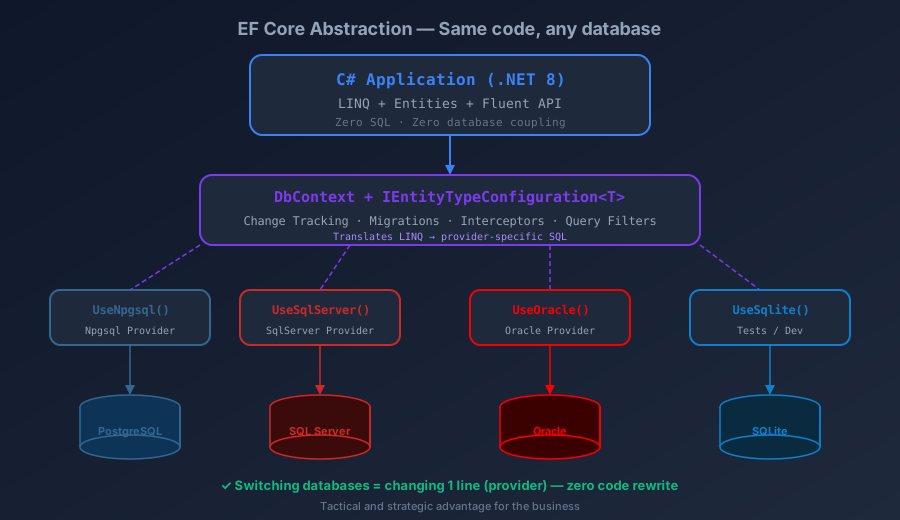
This is the most underestimated and most important point. With EF Core, your application doesn’t know SQL. It knows LINQ and entities. The EF Core provider translates LINQ into the database-specific SQL. This means that:
Tactical scenario (short term): Your company uses SQL Server in production. Licensing costs have grown. Management decides to migrate to PostgreSQL. With EF Core, you switch the provider (UseSqlServer → UseNpgsql), adjust the migrations and you’re done. With Dapper, you rewrite hundreds or thousands of SQL queries that use SQL Server-specific syntax (TOP, NOLOCK, CROSS APPLY, etc.).
Strategic scenario (long term): The company is going to expand to multi-cloud. Some customers require Oracle, others PostgreSQL. With EF Core, the same application code runs on both — just configure the provider per tenant. With Dapper, you maintain two SQL codebases or use a limited subset of ANSI SQL that no database fully implements.
| |
ℹ️ Info: Database decoupling is not a technical luxury — it is a business decision. Companies that couple their application to the database’s SQL become hostages of licensing, vendor lock-in and migration costs. With EF Core, switching databases is a configuration decision, not a rewrite. To see how EF Core works with different databases in practice, check out REST API Pagination with C# and EF Core: Practical Guide.
Why Fluent API and Never Data Annotations
EF Core offers two ways to configure the mapping between entities and tables: Data Annotations (attributes decorating the classes) and Fluent API (configuration in separate classes). This article uses Fluent API exclusively, and here is why:
Data Annotations — The Problem
| |
The problem is clear: your domain entity is contaminated with infrastructure details. The Produto class now depends on System.ComponentModel.DataAnnotations and System.ComponentModel.DataAnnotations.Schema — namespaces that are the responsibility of the data layer, not the domain. This violates the Separation of Concerns (SoC) principle and makes it impossible to have a truly independent Domain project.
Fluent API — The Solution
| |
The configuration lives in a separate class, in the infrastructure project:
| |
⚠️ Warning: Data Annotations have real technical limitations: they don’t support configuring composite indexes, global filters, value converters, shadow properties, owned types and several other advanced features. Fluent API is the only way to access 100% of EF Core’s functionality.
Advantages of Fluent API
- Clean domain — entities are pure POCOs with no dependency on EF Core
- Separation of concerns — mapping lives in the infra project, not in the domain
- Full power — access to every EF Core feature
- Organization — one
IEntityTypeConfiguration<T>class per entity - Testability — entities can be instantiated without mocking EF Core
- Open/closed principle — adding configuration doesn’t change the entity
Configuring the DbContext
The DbContext is the central point of EF Core. It represents the session with the database and coordinates Change Tracking, queries and SaveChanges. With Fluent API, the DbContext automatically applies all configurations via ApplyConfigurationsFromAssembly:
| |
💡 Tip: Use the C# 12 primary constructor (
public class AppDbContext(DbContextOptions<AppDbContext> options)) to simplify the constructor. And preferDbSet<T> Produtos => Set<T>();instead ofDbSet<T> Produtos { get; set; }— it is cleaner and safer.
Every Relationship Type with Fluent API
I use an e-commerce domain to demonstrate every relationship type. First, the domain entities (Domain project — no reference to EF Core):
| |
One-to-Many Relationship (1:N)
The most common relationship. A Categoria has many Produtos:
| |
One-to-One Relationship (1:1)
A Produto has one ProdutoDetalhe (and vice versa):
| |
Many-to-Many Relationship (N:N)
A Produto can have several Tags, and a Tag can be on several Produtos. Since EF Core 5, N:N works without an explicit join table. In EF Core 8+, you can configure it via Fluent API to have full control:
| |
💡 Tip: If you need additional properties in the join table (such as
DataAssociacao), create an explicit entity instead of usingDictionary<string, object>. EF Core 8+ supports this natively withUsingEntity<ProdutoTag>().
Self-Referencing
A Comentario can be a reply to another Comentario — it is a 1:N relationship with itself:
| |
Inheritance in EF Core 8+: TPH, TPT and TPC
EF Core supports three strategies to map inheritance hierarchies to tables:
Domain Entities (Inheritance)
| |
Table Per Hierarchy (TPH) — One Table for the Whole Hierarchy
All classes in the same table. EF Core uses a discriminator column to know which type each row is:
| |
Table Per Type (TPT) — One Table per Class
Each class has its own table. The base table contains the common properties, and each derived table contains only the specific properties + an FK to the base table:
| |
Table Per Concrete Type (TPC) — EF Core 7+
Each concrete class has its own complete table (no base table). Each table contains all the columns — both from the base and from the derived class:
| |
| Strategy | Pros | Cons | When to use |
|---|---|---|---|
| TPH | Performance (1 table, no JOINs) | Nullable columns for derived types | Few types, frequent access |
| TPT | Normalized schema | JOIN for every query + worse performance | A clean schema matters more than performance |
| TPC | No JOINs, no nullable columns | Columns duplicated across tables, UNION for polymorphic queries | Types rarely queried together |
⚠️ Warning: For most scenarios, TPH is the choice recommended by Microsoft and the community. TPT has known performance problems because it requires JOINs in every query. TPC (EF Core 7+) is useful when each concrete type is queried independently.
Advanced Features of EF Core 8+
Value Converters
They let you transform values between C# and the database. Useful for persisting enums as strings, encrypting fields or converting complex types:
| |
Global Query Filters
They automatically apply filters to every query of an entity. Ideal for soft delete and multi-tenancy:
| |
JSON Columns (EF Core 7+)
EF Core 7+ lets you map complex objects as JSON columns in the database. Ideal for semi-structured data:
| |
Primitive Type Collections (EF Core 8+)
EF Core 8 introduced native support for collections of primitive types — with no need for a separate table or a Value Converter:
| |
ℹ️ Info: EF Core 8+ primitive type collections are stored as native JSON arrays. On PostgreSQL, use
jsonbfor efficient indexing. On SQL Server, EF Core automatically serializes tonvarchar(max).
Tips and Good Practices
One
IEntityTypeConfiguration<T>per entity — never configure multiple entities inOnModelCreating. UseApplyConfigurationsFromAssembly()for automatic discovery.Always configure
OnDeleteexplicitly — the default behavior varies across providers. Be explicit withDeleteBehavior.Restrict,.Cascadeor.SetNullto avoid surprises.Use
private set;in entities — protect the internal state. Domain entities should be modified only by business methods, not by public setters.Configure indexes for FKs and search columns — EF Core does NOT automatically create indexes for foreign keys in every provider. Use
builder.HasIndex(p => p.CategoriaId).Prefer
AsNoTracking()for read queries — if you are not going to modify the data, disable Change Tracking for a significant performance gain.Never expose the
DbContextdirectly in the API — use the Repository pattern or intermediate services. TheDbContextis infrastructure.Always set
HasMaxLength()— withoutHasMaxLength, EF Core createsnvarchar(max)/textcolumns, which hurt performance and prevent indexing.Configure
HasDefaultValueSql()for date columns — use database expressions (NOW(),GETUTCDATE()) so dates are generated by the server, not by the application.
Conclusion
Entity Framework Core 8+ with Fluent API offers much more than simple object-relational mapping. It delivers total decoupling from the database — an advantage that transcends the technical and directly impacts the business. While micro ORMs like Dapper tie you to vendor-specific SQL, EF Core lets your application speak LINQ and leaves the provider to translate it into the database’s dialect.
By using Fluent API exclusively with IEntityTypeConfiguration<T>, your domain entities stay clean, testable and free of any infrastructure dependency. The relationships (1:1, 1:N, N:N, self-referencing), the inheritance strategies (TPH, TPT, TPC) and the advanced features (Value Converters, Global Query Filters, JSON columns, primitive collections) make EF Core a complete tool for any data access scenario.
To go deeper into managing Migrations in multi-layer projects with dotnet secrets and scaffolding of existing databases, check out the dedicated article EF Core Migrations: Multi-Project, Secrets and Scaffolding. And if performance is your concern, see how EF Core behaves in high-load scenarios in Database Bottlenecks: Messaging and Pagination.
Read Also
- EF Core Migrations: Multi-Project, Secrets and Scaffolding — managing migrations in projects with multiple csproj, dotnet secrets and scaffolding of existing databases.
- Full-Text Search in REST APIs: C#, SQL Server and PostgreSQL — a practical example of
FromSqlRawas a bridge between EF Core and each database’s native features. - Database Bottlenecks: Messaging and Pagination — how to eliminate write and read bottlenecks with messaging and efficient pagination.
- REST API Pagination with C# and EF Core: Practical Guide — every pagination type for SQL Server, Oracle and PostgreSQL.
- REST API Design: HTTP Verbs and Parameter Binding — good practices for designing the API layer that consumes EF Core.
- Software Architecture: GoF, Patterns and Microservices — architectural patterns that complement the use of EF Core in corporate applications.
References
- Entity Framework Core — Official Microsoft documentation — complete EF Core documentation including Fluent API, migrations, providers and advanced features.
- EF Core — Fluent API Configuration — detailed reference of every configuration option via Fluent API.
- EF Core — Relationships — official documentation on relationship mapping (1:1, 1:N, N:N).
- EF Core — Inheritance (TPH, TPT, TPC) — inheritance mapping strategies in EF Core.
- EF Core 8 — What’s New — what’s new in EF Core 8, including complex types, primitive collections and JSON columns.
- EF Core — Value Converters — value converters for transforming between C# and the database.
- EF Core — Global Query Filters — automatic filters on queries (soft delete, multi-tenancy).
- Dapper — GitHub Repository — official repository of the Dapper micro ORM for comparison.
- Martin Fowler — ORM Hate — an analysis of ORM trade-offs by Martin Fowler.
- blog-zocateli-sample repository — FluentApi — Complete source code for the examples in this article
By commenting, you agree to our Privacy Policy, Terms of Use, Data Deletion Policy.