Introduction

If you work with .NET and EF Core in enterprise applications, you have already run into scenarios where you need to write, update or remove thousands of records at once. Standard EF Core runs one SQL operation for each entity in the ChangeTracker β€” for 10,000 records, that means 10,000 roundtrips to the database. In medium and large applications, that is unacceptable.

The EFCore.BulkExtensions library solves this problem elegantly, using each database’s native operations (such as MERGE in SQL Server or INSERT ... ON CONFLICT in PostgreSQL) to process thousands of records in a single operation.

In this article, you will learn:

  • Who maintains the project and its relationship with the .NET ecosystem
  • The classic tracking error that 90% of developers make (and blame on EF Core)
  • Why EF Core behaves this way β€” and why it is correct
  • All 8 methods of the library with real examples
  • Integration with Azure Service Bus for high-volume processing

Prerequisites: Familiarity with C# and EF Core. I recommend reading the articles on Fluent API e mapeamento com EF Core and Database Bottlenecks: Messaging and Pagination before continuing.

πŸ“¦ Source code: The complete implementation for this article is in the blog-zocateli-sample repository on GitHub. Clone it, explore it and adapt it to your context.


The EFCore.BulkExtensions Project

History and Maintenance

EFCore.BulkExtensions is maintained by Boris Djurdjevic (@borisdj), a senior software engineer from Serbia who specializes in data access and database performance. The project was created in 2017 and quickly became the most popular bulk operations library in the .NET ecosystem.

Project figures (March 2026):

MetricValue
⭐ GitHub stars3,700+
πŸ“¦ NuGet downloads30 million+
πŸ§‘β€πŸ’» Contributors70+
πŸ“‹ Issues resolved900+
πŸ”„ Releases100+
πŸ“„ LicenseMIT

Relationship with the EF Core Team and the .NET Foundation

It is important to be clear: Boris Djurdjevic is not a member of Microsoft’s Entity Framework Core team, and EFCore.BulkExtensions is not an official .NET Foundation project. It is an independent open-source community project, licensed under MIT.

Even so, the project maintains strict compatibility with each EF Core version (3.x, 5.x, 6.x, 7.x, 8.x) and is widely recognized by Microsoft itself in discussions about performance. Several contributors to the repository have professional experience with SQL Server, PostgreSQL and Oracle β€” which explains the quality of its multi-provider support.

Supported Database Providers

ProviderBulk Strategy
SQL ServerSqlBulkCopy + MERGE (best performance)
PostgreSQLCOPY + INSERT ... ON CONFLICT
MySQLLOAD DATA + INSERT ... ON DUPLICATE KEY
SQLiteINSERT OR REPLACE
OracleVia an adapted provider

The library automatically detects the provider configured in the DbContext and uses the most efficient native strategy.


The Classic Error: Delete β†’ ReInsert and the ChangeTracker

Diagram of the classic ChangeTracker error: Delete β†’ ReInsert causes InvalidOperationException, fixed with ChangeTracker.Clear() or BulkInsertOrUpdate

The Scenario

An extremely common scenario in enterprise applications: you need to synchronize data from an external source (CSV, API, another system). The “intuitive” approach of many developers is:

  1. Fetch all existing records
  2. Remove them all
  3. Insert the new ones
 1
 2
 3
 4
 5
 6
 7
 8
 9
10
11
12
13
14
15
16
// ❌ WRONG β€” The classic "delete everything and insert again"
public async Task SincronizarRegistrosAsync(
    List<RegistroApp> registrosNovos,
    CancellationToken ct)
{
    // 1. Fetch the existing ones (ChangeTracker starts tracking)
    var existentes = await context.RegistrosApps.ToListAsync(ct);

    // 2. Remove them all
    context.RegistrosApps.RemoveRange(existentes);
    await context.SaveChangesAsync(ct);

    // 3. Insert the new ones β€” πŸ’₯ BOOM!
    await context.RegistrosApps.AddRangeAsync(registrosNovos, ct);
    await context.SaveChangesAsync(ct); // InvalidOperationException!
}

The Error

1
2
3
4
5
System.InvalidOperationException:
The instance of entity type 'RegistroApp' cannot be tracked because
another instance with the same key value for {'Id'} is already being tracked.
When attaching existing entities, ensure that only one entity instance
with a given key value is attached.

Why It Happens

EF Core’s ChangeTracker is an in-memory identity map. When you call ToListAsync(), every returned entity is tracked with the Unchanged state. When you call RemoveRange(), the state changes to Deleted. When SaveChangesAsync runs, the entities are removed from the database, but the ChangeTracker still holds references to those entities with the same Id.

If any new record has the same Id as a record that was just removed, EF Core detects the collision and throws the exception. Even though the record has already been deleted from the database, the in-memory identity still exists in the context.

The Solution with Plain EF Core

 1
 2
 3
 4
 5
 6
 7
 8
 9
10
11
12
13
14
15
16
17
// βœ… CORRECT β€” Clear the ChangeTracker between operations
public async Task SincronizarRegistrosAsync(
    List<RegistroApp> registrosNovos,
    CancellationToken ct)
{
    // 1. Remove the existing ones
    var existentes = await context.RegistrosApps.ToListAsync(ct);
    context.RegistrosApps.RemoveRange(existentes);
    await context.SaveChangesAsync(ct);

    // 2. Clear the identity map β€” ESSENTIAL
    context.ChangeTracker.Clear();

    // 3. Now it can insert without conflict
    await context.RegistrosApps.AddRangeAsync(registrosNovos, ct);
    await context.SaveChangesAsync(ct);
}

ChangeTracker.Clear() discards all tracked references, allowing new entities with the same Ids to be added without conflict.


EF Core Was Not Designed for This

Before blaming EF Core, understand who is behind the tool. The team that maintains Entity Framework Core is not made up only of developers β€” they are data engineers, database architects and specialists with direct experience at vendors such as Oracle, SQL Server and PostgreSQL. Names such as Arthur Vickers, Shay Rojansky (maintainer of Npgsql) and Brice Lambson contributed directly to EF Core with decades of experience in database engines.

If EF Core behaves a certain way by default β€” such as keeping tracking enabled and preventing two instances with the same Id from coexisting in the same context β€” it is not a bug. It is an architectural decision grounded in principles of data integrity and optimistic concurrency.

The Purpose of EF Core

EF Core was designed to be a transactional ORM focused on:

  • Unit of Work: groups related changes into an atomic transaction
  • Identity Map: guarantees that each database record has at most one in-memory representation
  • Optimistic concurrency: detects conflicts between concurrent operations
  • OLTP (transactional processing): inserts, updates and removes individual records or small batches with transactional safety

EF Core’s default is to track entities because most scenarios (REST APIs, CRUD, e-commerce) operate on dozens of records per request, not thousands.

The Right Approach for Bulk Synchronization

When the scenario requires processing thousands of records β€” inventory synchronization, CSV imports, ingesting data from queues β€” you are outside the scope of standard EF Core. This is where EFCore.BulkExtensions comes in.

Instead of Delete + ReInsert, the right approach is an UPSERT (INSERT or UPDATE):

 1
 2
 3
 4
 5
 6
 7
 8
 9
10
11
12
13
14
15
16
17
18
19
20
21
22
// βœ… CORRECT β€” Bulk UPSERT with BulkExtensions
public async Task SincronizarRegistrosAsync(
    List<RegistroApp> registrosAtuais,
    CancellationToken ct)
{
    var bulkConfig = new BulkConfig
    {
        UpdateByProperties = [
            nameof(RegistroApp.NomeProjeto),
            nameof(RegistroApp.Repositorio)
        ],
        PropertiesToExcludeOnUpdate = [
            nameof(RegistroApp.Id),
            nameof(RegistroApp.CriadoEm)
        ],
        TrackingEntities = false,
        BatchSize = 1000
    };

    // A single operation: inserts new ones, updates existing ones
    await context.BulkInsertOrUpdateAsync(registrosAtuais, bulkConfig, cancellationToken: ct);
}

This approach:

  • Does not need to fetch the existing records first
  • Does not touch the ChangeTracker
  • Runs a native MERGE in SQL Server (or INSERT ... ON CONFLICT in PostgreSQL)
  • Processes 10,000 records in ~2 seconds (vs. ~100 seconds with plain EF Core)

If you need more than an UPSERT β€” removing records that no longer exist in the source β€” use BulkInsertOrUpdateOrDeleteAsync (section 5 below).


Installation and Configuration

Installing via NuGet

1
dotnet add package EFCore.BulkExtensions

The library automatically detects the configured EF Core provider. For SQL Server, no additional configuration is required. For PostgreSQL, make sure Npgsql is installed.

1
2
3
<!-- .csproj β€” Required packages -->
<PackageReference Include="Microsoft.EntityFrameworkCore.SqlServer" Version="8.0.13" />
<PackageReference Include="EFCore.BulkExtensions" Version="8.1.3" />

Compatibility

EF CoreBulkExtensions.NET
8.x8.x.NET 8+
7.x7.x.NET 7+
6.x6.x.NET 6+

Tip: Always use the same major version of EFCore.BulkExtensions as your EF Core. Example: EF Core 8.0.13 β†’ BulkExtensions 8.1.3.

Namespace

1
using EFCore.BulkExtensions;

All methods are extension methods on DbContext β€” there is no need to inherit from any special class.


All Methods with Real Examples
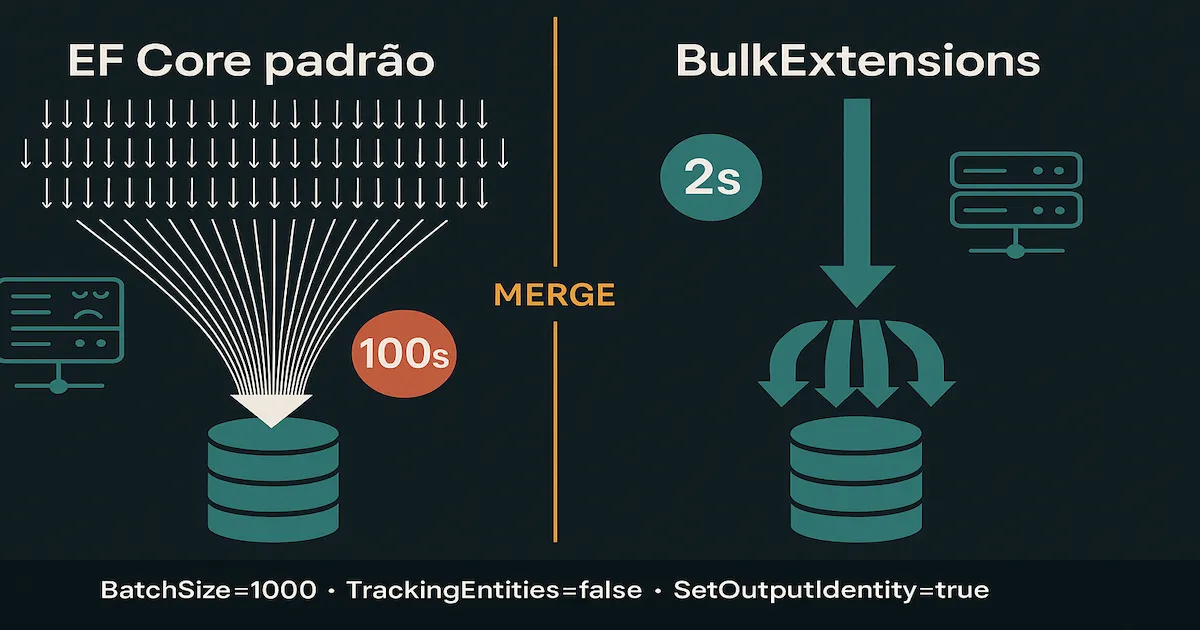
Performance comparison: standard EF Core (100s with 10,000 individual INSERTs) vs BulkExtensions (2s with BatchSize=1000)

Below are the library’s 8 main methods with real examples using the RegistroApp, ClienteApp and ConfiguracaoSegura entities from the blog-zocateli-sample repository.

1. BulkInsertAsync β€” Bulk INSERT

Inserts thousands of records using SqlBulkCopy (SQL Server) or COPY (PostgreSQL). Zero interaction with the ChangeTracker.

 1
 2
 3
 4
 5
 6
 7
 8
 9
10
11
12
13
14
15
16
17
public async Task<int> InserirEmMassaAsync(
    List<RegistroApp> registros,
    CancellationToken ct = default)
{
    if (registros.Count == 0)
        return 0;

    var bulkConfig = new BulkConfig
    {
        BatchSize = 1000,
        SetOutputIdentity = true,   // Returns database-generated IDs
        PreserveInsertOrder = true  // Keeps the original list order
    };

    await dbContext.BulkInsertAsync(registros, bulkConfig, cancellationToken: ct);
    return registros.Count;
}

When to use: Initial data loads, CSV imports, data obtained from a different database, event ingestion.


2. BulkUpdateAsync β€” Bulk UPDATE

Updates existing records by primary key. You can choose which properties to update.

 1
 2
 3
 4
 5
 6
 7
 8
 9
10
11
12
13
14
15
16
17
18
19
20
21
22
23
24
public async Task<int> AtualizarEmMassaAsync(
    List<RegistroApp> registros,
    CancellationToken ct = default)
{
    if (registros.Count == 0)
        return 0;

    var bulkConfig = new BulkConfig
    {
        BatchSize = 1000,
        PropertiesToIncludeOnUpdate =
        [
            nameof(RegistroApp.Linguagem),
            nameof(RegistroApp.VersaoFramework),
            nameof(RegistroApp.Legado),
            nameof(RegistroApp.Desativado),
            nameof(RegistroApp.AtualizadoEm)
        ],
        TrackingEntities = false
    };

    await dbContext.BulkUpdateAsync(registros, bulkConfig, cancellationToken: ct);
    return registros.Count;
}

When to use: Updating statuses in batches, processing flags, calculated fields.


3. BulkDeleteAsync β€” Bulk DELETE

Removes records by primary key without loading the entities first.

 1
 2
 3
 4
 5
 6
 7
 8
 9
10
public async Task<int> RemoverEmMassaAsync(
    List<RegistroApp> registros,
    CancellationToken ct = default)
{
    if (registros.Count == 0)
        return 0;

    await dbContext.BulkDeleteAsync(registros, cancellationToken: ct);
    return registros.Count;
}

When to use: Periodic deletion of expired data, cleaning up orphan records, purging old data.


4. BulkInsertOrUpdateAsync β€” UPSERT (MERGE)

The most powerful method in the library. It runs a MERGE in SQL Server β€” inserting new records and updating existing ones in a single operation.

 1
 2
 3
 4
 5
 6
 7
 8
 9
10
11
12
13
14
15
16
17
18
19
20
21
22
23
24
25
26
public async Task<int> InserirOuAtualizarAsync(
    List<RegistroApp> registros,
    IReadOnlyCollection<string> propriedadesExcluirNoUpdate,
    CancellationToken ct = default)
{
    if (registros.Count == 0)
        return 0;

    var bulkConfig = new BulkConfig
    {
        SetOutputIdentity = true,
        PreserveInsertOrder = true,
        UpdateByProperties =
        [
            nameof(RegistroApp.NomeProjeto),
            nameof(RegistroApp.Repositorio)
        ],
        PropertiesToExcludeOnUpdate = [.. propriedadesExcluirNoUpdate],
        SqlBulkCopyOptions = EFCore.BulkExtensions.SqlBulkCopyOptions.Default,
        TrackingEntities = false,
        BatchSize = 1000
    };

    await dbContext.BulkInsertOrUpdateAsync(registros, bulkConfig, cancellationToken: ct);
    return registros.Count;
}

When to use: Synchronization with an external source (API, CSV, Azure DevOps, data from another database), ingesting messages from queues.


5. BulkInsertOrUpdateOrDeleteAsync β€” Full Synchronization

It does everything UPSERT does, but also removes records that exist in the database and do not exist in the provided list. It is a complete delta synchronization.

 1
 2
 3
 4
 5
 6
 7
 8
 9
10
11
12
13
14
15
16
17
18
19
20
21
22
23
24
25
26
27
28
29
public async Task<int> SincronizarAsync(
    List<RegistroApp> registrosAtuais,
    CancellationToken ct = default)
{
    if (registrosAtuais.Count == 0)
        return 0;

    var bulkConfig = new BulkConfig
    {
        SetOutputIdentity = true,
        UpdateByProperties =
        [
            nameof(RegistroApp.NomeProjeto),
            nameof(RegistroApp.Repositorio)
        ],
        PropertiesToExcludeOnUpdate =
        [
            nameof(RegistroApp.Id),
            nameof(RegistroApp.CriadoEm)
        ],
        TrackingEntities = false,
        BatchSize = 1000
    };

    await dbContext.BulkInsertOrUpdateOrDeleteAsync(
        registrosAtuais, bulkConfig, cancellationToken: ct);

    return registrosAtuais.Count;
}

When to use: Full sync with a master system, catalog mirroring, mirroring Azure DevOps repositories.

⚠️ Caution: This method removes from the database everything that is not in the list. Use it wisely and always in a transactional context.


6. BulkSaveChangesAsync β€” A Replacement for SaveChangesAsync

If you already use the Add/Update/Remove pattern with the ChangeTracker, you can simply swap SaveChangesAsync() for BulkSaveChangesAsync() to gain performance without changing the logic.

 1
 2
 3
 4
 5
 6
 7
 8
 9
10
11
12
public async Task SalvarAlteracoesBulkAsync(CancellationToken ct = default)
{
    var bulkConfig = new BulkConfig
    {
        BatchSize = 500,
        TrackingEntities = false
    };

    // Analyzes the ChangeTracker and applies bulk operations
    // for Add, Update and Delete automatically
    await dbContext.BulkSaveChangesAsync(bulkConfig, cancellationToken: ct);
}

When to use: Gradual migration of existing code β€” swap SaveChangesAsync for BulkSaveChangesAsync without refactoring.


7. BulkReadAsync β€” Batch Read by Key

Loads records in bulk by primary key or composite key. It avoids N+1 queries when you need to fetch entities before a batch update.

 1
 2
 3
 4
 5
 6
 7
 8
 9
10
11
12
13
14
15
16
17
18
19
20
21
22
public async Task<List<RegistroApp>> LerEmMassaAsync(
    List<RegistroApp> registrosComChave,
    CancellationToken ct = default)
{
    if (registrosComChave.Count == 0)
        return [];

    var bulkConfig = new BulkConfig
    {
        UpdateByProperties =
        [
            nameof(RegistroApp.NomeProjeto),
            nameof(RegistroApp.Repositorio)
        ],
        TrackingEntities = false
    };

    // Fills the records with data from the database
    // using the properties defined as the lookup key
    await dbContext.BulkReadAsync(registrosComChave, bulkConfig, cancellationToken: ct);
    return registrosComChave;
}

When to use: Preloading entities for comparison before a selective update, validating existence in batches.


8. TruncateAsync β€” TRUNCATE TABLE

Runs a native TRUNCATE TABLE. Unlike DELETE without a WHERE, truncate:

  • Does not generate a transaction log entry per record (minimal logging)
  • Resets identity/sequence to its initial value
  • Is significantly faster than delete on large tables
1
2
3
4
public async Task TruncarTabelaAsync(CancellationToken ct = default)
{
    await dbContext.TruncateAsync<RegistroApp>(ct);
}

When to use: Cleaning staging tables, resetting test data, fully reloading a cache stored in the database.

⚠️ Caution: TRUNCATE cannot be filtered and does not fire triggers. Use it only on tables that can be cleared completely.


BulkConfig: The Heart of the Library

BulkConfig is the configuration class that controls the behavior of every bulk operation. Here are the most important properties:

PropertyTypeDescription
BatchSizeintRecords per SQL batch. Default: 2000. Recommended: 500-2000.
SetOutputIdentityboolReturns database-generated IDs (identity/sequence) on the objects in the list.
PreserveInsertOrderboolGuarantees that the order of the original list is respected on INSERT.
UpdateByPropertiesList<string>Properties used as the key for the Match in the MERGE/UPSERT.
PropertiesToIncludeOnUpdateList<string>Whitelist: only these properties will be updated.
PropertiesToExcludeOnUpdateList<string>Blacklist: these properties will not be updated.
TrackingEntitiesboolIf false, it does not update the ChangeTracker after the operation. Always use false for performance.
UseTempDBboolSQL Server: uses tempdb for staging. Useful when there are permission restrictions.
SqlBulkCopyOptionsSqlBulkCopyOptionsNative SqlBulkCopy options (e.g. KeepIdentity, CheckConstraints).

Complete BulkConfig Example (Real Scenario)

This is the pattern used in production to synchronize application inventory records β€” based on a real enterprise inventory management project:

 1
 2
 3
 4
 5
 6
 7
 8
 9
10
11
12
13
14
15
16
17
18
19
20
21
22
23
24
25
26
27
var bulkConfig = new BulkConfig
{
    // Performance
    BatchSize = 1000,
    TrackingEntities = false,

    // Identity and order
    SetOutputIdentity = true,
    PreserveInsertOrder = true,

    // Composite key for the MERGE (which field identifies the record?)
    UpdateByProperties =
    [
        nameof(RegistroApp.NomeProjeto),
        nameof(RegistroApp.Repositorio)
    ],

    // Protects fields that must not be overwritten on UPDATE
    PropertiesToExcludeOnUpdate =
    [
        nameof(RegistroApp.Id),       // Preserves the original Id
        nameof(RegistroApp.CriadoEm)  // Preserves the creation date
    ],

    // SQL Server: native BulkCopy options
    SqlBulkCopyOptions = EFCore.BulkExtensions.SqlBulkCopyOptions.Default
};

Real Example: Application Inventory

To demonstrate the library’s power in an enterprise scenario, let’s see how an enterprise inventory system uses BulkInsertOrUpdateAsync to synchronize data from hundreds of Azure DevOps repositories.

The Scenario

A company needs to keep an up-to-date inventory of all its applications: projects, repositories, languages, framework versions and Azure Key Vault secrets. A Worker Service runs periodically to:

  1. Query the Azure DevOps API and list every repository
  2. Extract metadata (language, framework, etc.) for each repository
  3. Synchronize the database via BulkInsertOrUpdateAsync

The Repository

 1
 2
 3
 4
 5
 6
 7
 8
 9
10
11
12
13
14
15
16
17
18
19
20
21
22
23
24
25
26
27
28
29
30
31
32
33
34
35
36
37
public class RegistroAppRepository(
    BulkDbContext dbContext,
    ILogger<RegistroAppRepository> logger)
{
    public async Task<int> InserirOuAtualizarAsync(
        List<RegistroApp> registros,
        IReadOnlyCollection<string> propriedadesExcluirNoUpdate,
        CancellationToken ct = default)
    {
        if (registros.Count == 0)
            return 0;

        var bulkConfig = new BulkConfig
        {
            SetOutputIdentity = true,
            PreserveInsertOrder = true,
            UpdateByProperties =
            [
                nameof(RegistroApp.NomeProjeto),
                nameof(RegistroApp.Repositorio)
            ],
            PropertiesToExcludeOnUpdate = [.. propriedadesExcluirNoUpdate],
            SqlBulkCopyOptions = EFCore.BulkExtensions.SqlBulkCopyOptions.Default,
            TrackingEntities = false,
            BatchSize = 1000
        };

        await dbContext.BulkInsertOrUpdateAsync(
            registros, bulkConfig, cancellationToken: ct);

        logger.LogInformation(
            "BulkInsertOrUpdate concluΓ­do: {Count} registros processados",
            registros.Count);

        return registros.Count;
    }
}

The Same Pattern for Secrets

 1
 2
 3
 4
 5
 6
 7
 8
 9
10
11
12
13
14
15
16
17
18
19
20
21
22
23
24
25
26
27
28
29
30
31
32
33
34
35
36
37
38
public class ConfiguracaoSeguraRepository(
    BulkDbContext dbContext,
    ILogger<ConfiguracaoSeguraRepository> logger)
{
    public async Task<int> SincronizarSecretsAsync(
        List<ConfiguracaoSegura> secrets,
        CancellationToken ct = default)
    {
        if (secrets.Count == 0)
            return 0;

        var bulkConfig = new BulkConfig
        {
            SetOutputIdentity = true,
            PreserveInsertOrder = true,
            UpdateByProperties =
            [
                nameof(ConfiguracaoSegura.Nome),
                nameof(ConfiguracaoSegura.NomeVault)
            ],
            PropertiesToExcludeOnUpdate =
            [
                nameof(ConfiguracaoSegura.Id),
                nameof(ConfiguracaoSegura.CriadoEm)
            ],
            TrackingEntities = false,
            BatchSize = 1000
        };

        await dbContext.BulkInsertOrUpdateAsync(
            secrets, bulkConfig, cancellationToken: ct);

        logger.LogInformation(
            "Secrets sincronizados: {Count} registros", secrets.Count);

        return secrets.Count;
    }
}

Notice that the pattern is identical for different entities β€” what changes are the UpdateByProperties properties (the composite key for the MERGE) and PropertiesToExcludeOnUpdate (the protected fields).


Integration with Azure Service Bus for High Volume

When the data volume is really high β€” tens of thousands of records arriving in bursts β€” the best practice is to combine messaging with bulk operations. As I explored in detail in the article Database Bottlenecks: Messaging and Pagination, messaging (Azure Service Bus or RabbitMQ) acts as a buffer between the data producer and the database, allowing the Worker to consume in optimized batches.

The Pattern: Service Bus + BulkInsertOrUpdate

The flow is:

1
[Fonte de Dados]  β†’  [Azure Service Bus (fila)]  β†’  [Worker Service]  β†’  [BulkInsertOrUpdate]  β†’  [SQL Server]
  1. The producer sends messages to the queue (one per record)
  2. The Worker consumes up to N messages at a time (ReceiveMessagesAsync)
  3. It converts the messages into domain entities
  4. It persists them in bulk via BulkInsertOrUpdateAsync
  5. It acknowledges the processed messages with CompleteMessageAsync

Implementation

  1
  2
  3
  4
  5
  6
  7
  8
  9
 10
 11
 12
 13
 14
 15
 16
 17
 18
 19
 20
 21
 22
 23
 24
 25
 26
 27
 28
 29
 30
 31
 32
 33
 34
 35
 36
 37
 38
 39
 40
 41
 42
 43
 44
 45
 46
 47
 48
 49
 50
 51
 52
 53
 54
 55
 56
 57
 58
 59
 60
 61
 62
 63
 64
 65
 66
 67
 68
 69
 70
 71
 72
 73
 74
 75
 76
 77
 78
 79
 80
 81
 82
 83
 84
 85
 86
 87
 88
 89
 90
 91
 92
 93
 94
 95
 96
 97
 98
 99
100
101
102
103
104
105
106
107
108
109
110
111
112
113
114
public class RegistroAppBulkProcessor(
    ServiceBusClient serviceBusClient,
    IServiceScopeFactory scopeFactory,
    ILogger<RegistroAppBulkProcessor> logger) : BackgroundService
{
    private const string QueueName = "registro-app-sync";
    private const int TamanhoLote = 1000;
    private const int TimeoutSegundos = 30;

    protected override async Task ExecuteAsync(CancellationToken ct)
    {
        var receiver = serviceBusClient.CreateReceiver(QueueName,
            new ServiceBusReceiverOptions
            {
                ReceiveMode = ServiceBusReceiveMode.PeekLock,
                PrefetchCount = TamanhoLote
            });

        while (!ct.IsCancellationRequested)
        {
            try
            {
                await ProcessarLoteAsync(receiver, ct);
            }
            catch (OperationCanceledException) when (ct.IsCancellationRequested)
            {
                break;
            }
            catch (Exception ex)
            {
                logger.LogError(ex,
                    "Erro no ciclo de processamento. Retry em 5s");
                await Task.Delay(TimeSpan.FromSeconds(5), ct);
            }
        }

        await receiver.DisposeAsync();
    }

    private async Task ProcessarLoteAsync(
        ServiceBusReceiver receiver, CancellationToken ct)
    {
        // 1. Receive up to TamanhoLote messages
        var mensagens = await receiver.ReceiveMessagesAsync(
            TamanhoLote,
            TimeSpan.FromSeconds(TimeoutSegundos), ct);

        if (mensagens.Count == 0)
            return;

        // 2. Convert messages β†’ domain entities
        var registros = new List<RegistroApp>(mensagens.Count);
        var mensagensValidas = new List<ServiceBusReceivedMessage>();

        foreach (var msg in mensagens)
        {
            var dto = JsonSerializer.Deserialize<RegistroAppMessage>(msg.Body);
            if (dto is null)
            {
                await receiver.DeadLetterMessageAsync(msg,
                    "InvalidBody",
                    "Corpo da mensagem invΓ‘lido", ct);
                continue;
            }

            registros.Add(new RegistroApp
            {
                NomeProjeto     = dto.NomeProjeto,
                Repositorio     = dto.Repositorio,
                Linguagem       = dto.Linguagem,
                Plataforma      = dto.Plataforma,
                TipoAplicacao   = dto.TipoAplicacao,
                VersaoFramework = dto.VersaoFramework,
                Legado          = dto.Legado
            });

            mensagensValidas.Add(msg);
        }

        // 3. Persist in bulk via BulkInsertOrUpdate
        using var scope = scopeFactory.CreateScope();
        var dbContext = scope.ServiceProvider
                            .GetRequiredService<BulkDbContext>();

        var bulkConfig = new BulkConfig
        {
            SetOutputIdentity = true,
            PreserveInsertOrder = true,
            UpdateByProperties =
            [
                nameof(RegistroApp.NomeProjeto),
                nameof(RegistroApp.Repositorio)
            ],
            PropertiesToExcludeOnUpdate =
            [
                nameof(RegistroApp.Id),
                nameof(RegistroApp.CriadoEm)
            ],
            TrackingEntities = false,
            BatchSize = 1000
        };

        await dbContext.BulkInsertOrUpdateAsync(
            registros, bulkConfig, cancellationToken: ct);

        // 4. Acknowledge all processed messages
        var completeTasks = mensagensValidas
            .Select(msg => receiver.CompleteMessageAsync(msg, ct));
        await Task.WhenAll(completeTasks);

        logger.LogInformation(
            "Lote processado: {Count} registros persistidos", registros.Count);
    }
}

Why It Works at High Volume

Without BulkExtensionsWith BulkExtensions
10,000 individual INSERTs1 BulkInsertOrUpdate with BatchSize = 1000
~100s (10ms Γ— 10,000)~2-3s
10,000 transactions10 transactions (10 batches of 1,000)
ChangeTracker with 10,000 entitiesZero ChangeTracker

To dig deeper into Workers and Background Services for high volume, read the article .NET Worker and Background Service: High Volume.


When to Use (and When Not to Use) BulkExtensions

βœ… Use It When

  • Initial data loads (seed, migration, ETL)
  • Periodic synchronization with an external API (Azure DevOps, SAP, other databases, etc.)
  • Queue processing (Azure Service Bus, RabbitMQ) at high volume
  • CSV/Excel imports with thousands of rows
  • Batch status updates (flags, calculated fields)
  • Periodic cleanup of expired data

❌ Do Not Use It When

  • Simple CRUD with few records per request (standard EF Core is enough)
  • Operations that need individual validation per record with complex business rules
  • Scenarios where the ChangeTracker is required for auditing or domain events
  • Tables with complex triggers that must fire per record

Native EF Core 8+ Alternatives

EF Core 8 introduced ExecuteUpdate and ExecuteDelete, which run directly against the database without going through the ChangeTracker:

 1
 2
 3
 4
 5
 6
 7
 8
 9
10
11
// Native EF Core 8+ β€” updates without loading entities
await context.RegistrosApps
    .Where(r => r.Legado)
    .ExecuteUpdateAsync(s => s
        .SetProperty(r => r.Desativado, true)
        .SetProperty(r => r.AtualizadoEm, DateTime.UtcNow));

// Native EF Core 8+ β€” deletes without loading entities
await context.RegistrosApps
    .Where(r => r.Desativado && r.AtualizadoEm < limiteData)
    .ExecuteDeleteAsync();

These alternatives are good for conditional updates/deletes, but they do not replace BulkInsertAsync, BulkInsertOrUpdateAsync or BulkReadAsync β€” operations that native EF Core does not offer.


Conclusion

EFCore.BulkExtensions is, without a doubt, one of the most important libraries in the .NET ecosystem. With more than 30 million downloads and a consistent API, it fills a real gap in EF Core: bulk operations with native database performance.

Before blaming EF Core for tracking or performance errors, understand the purpose of the tool β€” it was built by data engineers with deep knowledge of SQL Server, PostgreSQL and Oracle. If the default behavior looks “wrong”, the scenario is probably outside its scope.

Key points:

  1. The tracking error (delete + reinsert) is the developer’s, not EF Core’s β€” use ChangeTracker.Clear() or, better, BulkInsertOrUpdateAsync
  2. TrackingEntities = false should be the default in bulk operations
  3. UpdateByProperties defines the logical key of the MERGE β€” it does not need to be the PK
  4. PropertiesToExcludeOnUpdate protects fields such as Id and CriadoEm from being overwritten
  5. Combined with Azure Service Bus, the pattern of batch consumption + bulk persistence is unbeatable for high volume

πŸ“¦ Source code: blog-zocateli-sample β€” DataAccess/BulkOperations