Introduction

In enterprise applications with high processing volume, not everything can β€” or should β€” happen inside an HTTP request. Massive imports, consuming messaging queues, periodic synchronizations, sending notifications in batches, processing domain events β€” these scenarios require background processes that run continuously, independently of requests, and that survive restarts in a controlled way.

.NET 8+ offers a robust infrastructure for this: Worker Services and the BackgroundService class. Built on the Generic Host (IHost), they share the same dependency injection, configuration and logging pipeline as Web APIs β€” but without the overhead of Kestrel and the HTTP middleware. This means everything you already know about IOptions<T>, ILogger<T>, IServiceProvider and DI lifetimes applies directly to Workers.

In this article, I will explore the types of Workers, how the Singleton, Scoped and Transient lifetimes behave in this context (with pitfalls that catch many developers by surprise), and how Workers integrate natively with pagination of large volumes, messaging for decoupling, parallelism with Parallel and Tasks and asynchronous programming with async/await.

πŸ’‘ Tip: If your application currently uses a Task.Run() inside a controller to “process in the background”, this article will show the correct, production-ready approach for that scenario.

πŸ“¦ Source code: The full implementation of this article is in the blog-zocateli-sample repository on GitHub. Clone it, explore it and adapt it to your context.


What Is a .NET Worker Service

A Worker Service is a .NET application without a web interface, designed to run background tasks continuously or periodically. It uses the Generic Host β€” the same infrastructure a Web API uses internally β€” but without the HTTP server (Kestrel).

Creating a Worker Service

1
2
3
4
5
6
7
8
9
# Create a new Worker project
dotnet new worker -n MeuWorker -o src/MeuWorker

# Generated structure:
# src/MeuWorker/
# β”œβ”€β”€ Program.cs           ← host and DI registration
# β”œβ”€β”€ Worker.cs            ← BackgroundService class
# β”œβ”€β”€ appsettings.json     ← configuration (same pipeline as Web APIs)
# └── MeuWorker.csproj
 1
 2
 3
 4
 5
 6
 7
 8
 9
10
11
12
// Program.cs β€” Worker entry point
var builder = Host.CreateApplicationBuilder(args);

// Same configuration as a Web API:
// appsettings.json β†’ appsettings.{Env}.json β†’ User Secrets β†’ Env Vars β†’ CLI args
// For details on the configuration pipeline, see:
// /en/posts/2026/pipeline-configuracao-dotnet8-ioptions-secrets-docker/

builder.Services.AddHostedService<MeuWorker>();

var host = builder.Build();
host.Run();
 1
 2
 3
 4
 5
 6
 7
 8
 9
10
11
12
// Worker.cs β€” default BackgroundService
public class MeuWorker(ILogger<MeuWorker> logger) : BackgroundService
{
    protected override async Task ExecuteAsync(CancellationToken stoppingToken)
    {
        while (!stoppingToken.IsCancellationRequested)
        {
            logger.LogInformation("Worker running at: {Time}", DateTimeOffset.Now);
            await Task.Delay(TimeSpan.FromSeconds(30), stoppingToken);
        }
    }
}

Generic Host vs WebApplication

AspectHost.CreateApplicationBuilderWebApplication.CreateBuilder
Configuration pipelineβœ… Identicalβœ… Identical
Dependency injectionβœ… Identicalβœ… Identical
Loggingβœ… Identicalβœ… Identical
IOptionsβœ… Identicalβœ… Identical
HTTP server (Kestrel)❌ Not includedβœ… Included
Middleware pipeline❌ Not applicableβœ… Included
Endpoints / Controllers❌ Not applicableβœ… Included
Typical useBackground processing, queuesHTTP APIs, web apps

ℹ️ Info: Since the configuration pipeline is identical, everything explained in .NET 8+ Configuration Pipeline β€” provider order, IOptions<T>, Docker secrets, AddKeyPerFile β€” applies directly to Workers.


IHostedService vs BackgroundService

.NET offers two abstractions for background services. Understanding the difference is essential:

IHostedService β€” Full Control

 1
 2
 3
 4
 5
 6
 7
 8
 9
10
11
12
13
14
15
16
17
18
19
20
21
22
23
24
25
26
27
28
29
30
31
32
public class MeuServicoHosted : IHostedService, IDisposable
{
    private Timer? _timer;

    public Task StartAsync(CancellationToken cancellationToken)
    {
        // Executed ONCE when the host starts
        _timer = new Timer(
            callback: ExecutarTarefa,
            state: null,
            dueTime: TimeSpan.Zero,
            period: TimeSpan.FromMinutes(5));

        return Task.CompletedTask;
    }

    private void ExecutarTarefa(object? state)
    {
        // Logic executed every 5 minutes
        // ⚠️ CAREFUL: this callback runs on a ThreadPool thread,
        // not in an async context β€” avoid long blocking operations
    }

    public Task StopAsync(CancellationToken cancellationToken)
    {
        // Executed ONCE when the host is stopping
        _timer?.Change(Timeout.Infinite, 0);
        return Task.CompletedTask;
    }

    public void Dispose() => _timer?.Dispose();
}

BackgroundService β€” Simplified Abstraction

 1
 2
 3
 4
 5
 6
 7
 8
 9
10
11
12
13
14
15
16
17
18
19
public class MeuWorker(ILogger<MeuWorker> logger) : BackgroundService
{
    protected override async Task ExecuteAsync(CancellationToken stoppingToken)
    {
        // Runs in a loop while the application is active
        // The CancellationToken is fired automatically on shutdown
        while (!stoppingToken.IsCancellationRequested)
        {
            await ProcessarAsync(stoppingToken);
            await Task.Delay(TimeSpan.FromMinutes(5), stoppingToken);
        }
    }

    private async Task ProcessarAsync(CancellationToken ct)
    {
        logger.LogInformation("Processing...");
        // Asynchronous logic here
    }
}
AspectIHostedServiceBackgroundService
ControlManual StartAsync + StopAsyncExecuteAsync with automatic loop
Timer/PollingImplement manually with TimerUse Task.Delay inside the loop
Ideal scenarioComplex initialization/cleanupContinuous processing loops
CancellationTokenReceived in StartAsync/StopAsyncReceived in ExecuteAsync
Inherits fromInterface (IHostedService)Abstract class (BackgroundService)

⚠️ Warning: The BackgroundService’s ExecuteAsync runs in the background. If it threw an unhandled exception before .NET 8, the host kept running silently with the worker dead. Starting with .NET 8, unhandled exceptions in ExecuteAsync stop the entire host by default (behavior configurable via HostOptions.BackgroundServiceExceptionBehavior).


Types of Workers and Their Use Cases

In enterprise practice, Workers fall into recurring patterns. Choosing the right type for each scenario avoids unnecessary complexity:

1. Timer Worker (Polling)

Runs a task at regular intervals. Ideal for periodic synchronizations, cleanup of expired data and health checks:

 1
 2
 3
 4
 5
 6
 7
 8
 9
10
11
12
13
14
15
16
17
18
19
20
21
22
23
24
25
public class SincronizacaoWorker(
    ILogger<SincronizacaoWorker> logger,
    IServiceScopeFactory scopeFactory) : BackgroundService
{
    protected override async Task ExecuteAsync(CancellationToken stoppingToken)
    {
        while (!stoppingToken.IsCancellationRequested)
        {
            try
            {
                using var scope = scopeFactory.CreateScope();
                var servico = scope.ServiceProvider
                    .GetRequiredService<ISincronizacaoService>();

                await servico.SincronizarAsync(stoppingToken);
            }
            catch (Exception ex) when (ex is not OperationCanceledException)
            {
                logger.LogError(ex, "Error in periodic synchronization");
            }

            await Task.Delay(TimeSpan.FromMinutes(10), stoppingToken);
        }
    }
}

2. Queue Worker (Messaging)

Consumes messages from a queue (RabbitMQ, Azure Service Bus, Amazon SQS) in a continuous loop. This is the most common pattern for decoupling services β€” exactly the scenario described in Database Bottlenecks: Messaging and Pagination:

 1
 2
 3
 4
 5
 6
 7
 8
 9
10
11
12
13
14
15
16
17
18
19
20
21
22
23
24
25
26
27
28
29
30
31
32
33
34
35
36
37
38
39
40
41
42
43
44
45
46
47
48
49
50
51
52
public class FilaPedidosWorker(
    ILogger<FilaPedidosWorker> logger,
    IServiceScopeFactory scopeFactory,
    IConnection rabbitConnection) : BackgroundService
{
    protected override async Task ExecuteAsync(CancellationToken stoppingToken)
    {
        using var channel = await rabbitConnection.CreateChannelAsync(
            cancellationToken: stoppingToken);

        await channel.QueueDeclareAsync(
            queue: "pedidos-processamento",
            durable: true,
            exclusive: false,
            autoDelete: false,
            cancellationToken: stoppingToken);

        var consumer = new AsyncEventingBasicConsumer(channel);
        consumer.ReceivedAsync += async (_, ea) =>
        {
            try
            {
                using var scope = scopeFactory.CreateScope();
                var processador = scope.ServiceProvider
                    .GetRequiredService<IProcessadorPedido>();

                var pedido = JsonSerializer.Deserialize<PedidoEvento>(
                    ea.Body.Span);

                await processador.ProcessarAsync(pedido!, stoppingToken);

                await channel.BasicAckAsync(ea.DeliveryTag, false,
                    stoppingToken);
            }
            catch (Exception ex)
            {
                logger.LogError(ex, "Error processing order");
                await channel.BasicNackAsync(ea.DeliveryTag, false, true,
                    stoppingToken);
            }
        };

        await channel.BasicConsumeAsync(
            queue: "pedidos-processamento",
            autoAck: false,
            consumer: consumer,
            cancellationToken: stoppingToken);

        // Keep the worker running until it is canceled
        await Task.Delay(Timeout.Infinite, stoppingToken);
    }
}

3. Batch Processing Worker

Processes large volumes of data in paginated batches, avoiding loading everything into memory. It combines naturally with Keyset pagination to process millions of records efficiently:

 1
 2
 3
 4
 5
 6
 7
 8
 9
10
11
12
13
14
15
16
17
18
19
20
21
22
23
24
25
26
27
28
29
30
31
32
33
34
35
36
37
38
39
40
41
42
43
44
45
46
public class ProcessamentoLoteWorker(
    ILogger<ProcessamentoLoteWorker> logger,
    IServiceScopeFactory scopeFactory) : BackgroundService
{
    private const int TamanhoPagina = 500;

    protected override async Task ExecuteAsync(CancellationToken stoppingToken)
    {
        while (!stoppingToken.IsCancellationRequested)
        {
            var processados = await ProcessarLoteAsync(stoppingToken);

            if (processados == 0)
            {
                // No pending items β€” wait before checking again
                await Task.Delay(TimeSpan.FromSeconds(30), stoppingToken);
            }
        }
    }

    private async Task<int> ProcessarLoteAsync(CancellationToken ct)
    {
        using var scope = scopeFactory.CreateScope();
        var dbContext = scope.ServiceProvider.GetRequiredService<AppDbContext>();

        // Keyset pagination β€” efficient for large volumes
        var pendentes = await dbContext.Pedidos
            .Where(p => p.Status == StatusPedido.Pendente)
            .OrderBy(p => p.Id)
            .Take(TamanhoPagina)
            .ToListAsync(ct);

        if (pendentes.Count == 0) return 0;

        foreach (var pedido in pendentes)
        {
            pedido.Status = StatusPedido.Processado;
            pedido.ProcessadoEm = DateTimeOffset.UtcNow;
        }

        await dbContext.SaveChangesAsync(ct);
        logger.LogInformation("Processed {Count} orders", pendentes.Count);

        return pendentes.Count;
    }
}

4. Worker with Parallelism

For scenarios where individual processing is slow (HTTP calls, heavy calculations), the Worker can use controlled parallelism. This connects directly with the concepts in Parallelism in C#: Parallel, PLINQ and Tasks in Practice:

 1
 2
 3
 4
 5
 6
 7
 8
 9
10
11
12
13
14
15
16
17
18
19
20
21
22
23
24
25
26
27
28
29
30
31
32
33
34
35
36
37
38
39
40
41
42
43
44
45
46
47
48
49
50
51
52
public class ProcessamentoParaleloWorker(
    ILogger<ProcessamentoParaleloWorker> logger,
    IServiceScopeFactory scopeFactory,
    IOptions<WorkerConfig> options) : BackgroundService
{
    private readonly int _maxParallelism = options.Value.MaxParallelism;

    protected override async Task ExecuteAsync(CancellationToken stoppingToken)
    {
        while (!stoppingToken.IsCancellationRequested)
        {
            using var scope = scopeFactory.CreateScope();
            var dbContext = scope.ServiceProvider
                .GetRequiredService<AppDbContext>();

            var itens = await dbContext.FilaProcessamento
                .Where(f => f.Status == StatusFila.Aguardando)
                .OrderBy(f => f.CriadoEm)
                .Take(100)
                .ToListAsync(stoppingToken);

            if (itens.Count == 0)
            {
                await Task.Delay(TimeSpan.FromSeconds(10), stoppingToken);
                continue;
            }

            // Process with controlled parallelism via SemaphoreSlim
            using var semaphore = new SemaphoreSlim(_maxParallelism);
            var tasks = itens.Select(async item =>
            {
                await semaphore.WaitAsync(stoppingToken);
                try
                {
                    // Each item is processed in its own scope
                    using var itemScope = scopeFactory.CreateScope();
                    var processador = itemScope.ServiceProvider
                        .GetRequiredService<IProcessadorItem>();

                    await processador.ProcessarAsync(item, stoppingToken);
                }
                finally
                {
                    semaphore.Release();
                }
            });

            await Task.WhenAll(tasks);
            logger.LogInformation("Batch processed: {Count} items", itens.Count);
        }
    }
}

πŸ’‘ Tip: Note the SemaphoreSlim + Task.WhenAll pattern β€” it enables controlled parallelism without overloading resources. Each item uses its own DI scope (CreateScope), ensuring that DbContext and other Scoped services are independent across tasks. For more details on controlled parallelism, see Parallelism in C#.


Lifetimes in a Worker Service

This is the most important section of the article β€” and the one that causes the most bugs in production. DI lifetimes (Singleton, Scoped, Transient) behave differently in Workers compared to Web APIs, because there is no “HTTP request” concept to create scopes automatically.

The Problem: Workers Are Singleton

BackgroundService is registered as a Singleton by AddHostedService<T>(). This means all of its dependencies injected through the constructor also need to be Singleton β€” or you will have problems:

 1
 2
 3
 4
 5
 6
 7
 8
 9
10
11
12
13
14
15
// ❌ WRONG β€” DbContext is Scoped, Worker is Singleton
public class WorkerErrado(
    ILogger<WorkerErrado> logger,
    AppDbContext dbContext) : BackgroundService  // ⚠️ Will throw InvalidOperationException!
{
    protected override async Task ExecuteAsync(CancellationToken stoppingToken)
    {
        // This code NEVER runs β€” DI fails on resolution
        var itens = await dbContext.Pedidos.ToListAsync(stoppingToken);
    }
}

// Runtime error:
// InvalidOperationException: Cannot consume scoped service 'AppDbContext'
// from singleton 'WorkerErrado'.

The Solution: IServiceScopeFactory

The correct pattern is to inject IServiceScopeFactory (which is Singleton) and create scopes manually:

 1
 2
 3
 4
 5
 6
 7
 8
 9
10
11
12
13
14
15
16
17
18
19
20
21
22
23
24
25
26
27
// βœ… CORRECT β€” creates a manual scope for Scoped services
public class WorkerCorreto(
    ILogger<WorkerCorreto> logger,
    IServiceScopeFactory scopeFactory) : BackgroundService
{
    protected override async Task ExecuteAsync(CancellationToken stoppingToken)
    {
        while (!stoppingToken.IsCancellationRequested)
        {
            // Each iteration creates a new scope β€” like a "virtual request"
            using (var scope = scopeFactory.CreateScope())
            {
                var dbContext = scope.ServiceProvider
                    .GetRequiredService<AppDbContext>();

                var servico = scope.ServiceProvider
                    .GetRequiredService<IProcessadorPedido>();

                await servico.ProcessarPendentesAsync(stoppingToken);
            }
            // The scope is disposed here β€” DbContext is released,
            // connections are returned to the pool

            await Task.Delay(TimeSpan.FromSeconds(30), stoppingToken);
        }
    }
}

Lifetime Behavior in Workers

LifetimeInject into the Worker constructor?Via CreateScope?Behavior
Singletonβœ… Yesβœ… YesSame instance for the host’s whole life
Scoped❌ InvalidOperationExceptionβœ… Yes (required)New instance per manually created scope
Transient⚠️ Works, but dangerousβœ… Yes (recommended)New instance on every resolution β€” without a scope, it leaks memory

Why Transient in the Constructor Is Dangerous

 1
 2
 3
 4
 5
 6
 7
 8
 9
10
11
12
13
14
15
16
17
18
19
20
21
22
23
24
25
26
27
28
// ⚠️ DANGEROUS β€” Transient in a Singleton constructor
public class WorkerPerigoso(
    ILogger<WorkerPerigoso> logger,
    IServiceScopeFactory scopeFactory,
    HttpClient httpClient) : BackgroundService  // HttpClient is Transient...
{
    // httpClient is created ONCE and never disposed
    // β†’ memory leak (connection pool exhausted)
    // β†’ stale DNS (does not respect DNS TTL)
}

// βœ… CORRECT β€” use IHttpClientFactory (Singleton-safe)
public class WorkerSeguro(
    ILogger<WorkerSeguro> logger,
    IServiceScopeFactory scopeFactory,
    IHttpClientFactory httpClientFactory) : BackgroundService
{
    protected override async Task ExecuteAsync(CancellationToken stoppingToken)
    {
        while (!stoppingToken.IsCancellationRequested)
        {
            // Creates an HttpClient with a managed pool (Singleton-safe)
            using var client = httpClientFactory.CreateClient("meu-servico");
            var response = await client.GetAsync("/api/status", stoppingToken);
            // ...
        }
    }
}

⚠️ Warning: In Web APIs, ASP.NET Core creates scopes automatically for each HTTP request. In Workers, you are responsible for creating scopes manually whenever you need Scoped or Transient services. Forgetting to create the scope is the #1 cause of memory leaks and connection pool exhaustion in Workers.

Diagram: DI Scope in Web API vs Worker
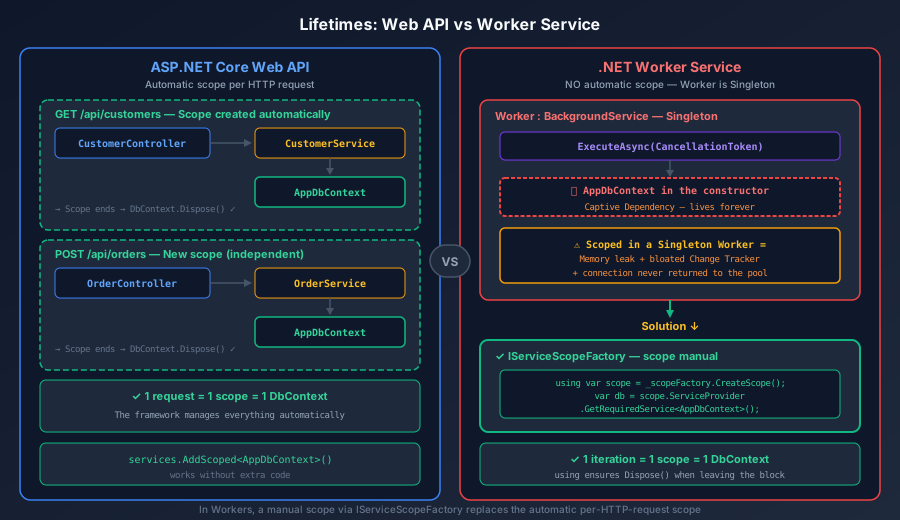
Diagram comparing DI lifetime behavior (Singleton, Scoped, Transient) between a Web API with automatic per-request scope and a Worker Service with manual scope via IServiceScopeFactory

In a Web API, each HTTP request automatically creates a DI scope. In the Worker, ExecuteAsync runs in a single Singleton scope β€” that is why you need to create scopes manually with IServiceScopeFactory.CreateScope() to simulate the same isolation.


Workers in Enterprise Practice

Worker as a Messaging Consumer

The most powerful Worker pattern in enterprise environments is consuming messaging queues. Instead of processing everything synchronously inside the API, the API publishes an event to the queue and the Worker consumes and processes it in the background β€” exactly the pattern described in Database Bottlenecks: Messaging and Pagination:

 1
 2
 3
 4
 5
 6
 7
 8
 9
10
11
12
13
14
15
16
17
18
19
20
21
22
23
24
25
26
27
28
29
30
31
32
33
// Program.cs β€” full registration of a Worker with messaging
var builder = Host.CreateApplicationBuilder(args);

// Typed configuration
builder.Services.Configure<RabbitMqConfig>(
    builder.Configuration.GetSection("RabbitMq"));

// RabbitMQ connection (Singleton)
builder.Services.AddSingleton<IConnection>(sp =>
{
    var config = sp.GetRequiredService<IOptions<RabbitMqConfig>>().Value;
    var factory = new ConnectionFactory
    {
        HostName = config.Host,
        Port = config.Port,
        UserName = config.Username,
        Password = config.Password,
        DispatchConsumersAsync = true  // Required for AsyncEventingBasicConsumer
    };
    return factory.CreateConnectionAsync().GetAwaiter().GetResult();
});

// Domain services (Scoped β€” resolved via CreateScope in the Worker)
builder.Services.AddScoped<IProcessadorPedido, ProcessadorPedido>();
builder.Services.AddDbContext<AppDbContext>(options =>
    options.UseNpgsql(builder.Configuration
        .GetConnectionString("Default")));

// Worker (Singleton)
builder.Services.AddHostedService<FilaPedidosWorker>();

var host = builder.Build();
host.Run();

Worker for Processing Large Volumes with Pagination

When you need to process millions of records (data migration, balance recalculation, reindexing), the Worker combines with Keyset pagination to process in blocks without overloading memory:

 1
 2
 3
 4
 5
 6
 7
 8
 9
10
11
12
13
14
15
16
17
18
19
20
21
22
23
24
25
26
27
28
29
30
31
32
33
34
35
36
37
38
39
40
41
42
43
44
45
46
47
48
49
50
51
52
53
54
public class MigracaoWorker(
    ILogger<MigracaoWorker> logger,
    IServiceScopeFactory scopeFactory) : BackgroundService
{
    private const int TamanhoPagina = 1000;

    protected override async Task ExecuteAsync(CancellationToken stoppingToken)
    {
        long ultimoId = 0;
        var totalProcessados = 0;

        while (!stoppingToken.IsCancellationRequested)
        {
            using var scope = scopeFactory.CreateScope();
            var dbContext = scope.ServiceProvider
                .GetRequiredService<AppDbContext>();

            // Keyset pagination β€” no OFFSET, constant performance
            // See: /en/posts/2026/paginacao-api-rest-csharp-efcore-sqlserver-oracle-postgres/
            var lote = await dbContext.Clientes
                .Where(c => c.Id > ultimoId && !c.Migrado)
                .OrderBy(c => c.Id)
                .Take(TamanhoPagina)
                .ToListAsync(stoppingToken);

            if (lote.Count == 0)
            {
                logger.LogInformation(
                    "Migration completed. Total: {Total}", totalProcessados);
                return; // Worker stops when there is no more data
            }

            foreach (var cliente in lote)
            {
                cliente.NovoFormatoCpf = FormatarCpf(cliente.Cpf);
                cliente.Migrado = true;
            }

            await dbContext.SaveChangesAsync(stoppingToken);

            ultimoId = lote[^1].Id; // Last ID of the batch for the next page
            totalProcessados += lote.Count;

            logger.LogInformation(
                "Batch processed: {Count} | Total: {Total} | Last ID: {Id}",
                lote.Count, totalProcessados, ultimoId);
        }
    }

    private static string FormatarCpf(string cpf) =>
        cpf.Length == 11
            ? $"{cpf[..3]}.{cpf[3..6]}.{cpf[6..9]}-{cpf[9..]}"
            : cpf;
}

Worker with Async/Await and CancellationToken

The CancellationToken is the Worker’s graceful shutdown contract. When the host receives a stop signal (SIGTERM on Linux, Ctrl+C, docker stop), it fires the token β€” and the Worker has a limited time to finish what it is doing. This mechanism connects directly with the concepts in Asynchronous Programming with async/await:

 1
 2
 3
 4
 5
 6
 7
 8
 9
10
11
12
13
14
15
16
17
18
19
20
21
22
23
24
25
26
27
28
29
30
31
32
33
34
35
36
37
public class WorkerGraceful(
    ILogger<WorkerGraceful> logger,
    IServiceScopeFactory scopeFactory) : BackgroundService
{
    protected override async Task ExecuteAsync(CancellationToken stoppingToken)
    {
        logger.LogInformation("Worker starting...");

        // Register a shutdown callback
        stoppingToken.Register(() =>
            logger.LogWarning("Shutdown requested β€” finishing current operation"));

        while (!stoppingToken.IsCancellationRequested)
        {
            try
            {
                using var scope = scopeFactory.CreateScope();
                var processador = scope.ServiceProvider
                    .GetRequiredService<IProcessadorRelatorio>();

                // Propagate the CancellationToken to ALL async operations
                await processador.GerarRelatorioAsync(stoppingToken);
            }
            catch (OperationCanceledException) when (stoppingToken.IsCancellationRequested)
            {
                // Graceful shutdown β€” not an error
                logger.LogInformation("Worker finished gracefully");
                break;
            }
            catch (Exception ex)
            {
                logger.LogError(ex, "Processing error β€” retrying in 30s");
                await Task.Delay(TimeSpan.FromSeconds(30), stoppingToken);
            }
        }
    }
}
 1
 2
 3
 4
 5
 6
 7
 8
 9
10
11
12
13
14
// Program.cs β€” configure shutdown timeout
var builder = Host.CreateApplicationBuilder(args);

builder.Services.Configure<HostOptions>(options =>
{
    // Time the host waits for ExecuteAsync to finish after
    // the CancellationToken is fired. Default: 30s.
    // For heavy processes, increase it to avoid a forced kill.
    options.ShutdownTimeout = TimeSpan.FromMinutes(2);

    // .NET 8: behavior when ExecuteAsync throws an exception
    options.BackgroundServiceExceptionBehavior =
        BackgroundServiceExceptionBehavior.StopHost; // default in .NET 8
});

ℹ️ Info: In Docker/Podman containers, docker stop sends SIGTERM and waits 10 seconds by default before sending SIGKILL. If your Worker needs more time for a graceful shutdown, configure ShutdownTimeout in code and --stop-timeout on the container.


Multiple Workers in the Same Host

An application can register several Workers in the same host β€” each one runs in its own Task:

 1
 2
 3
 4
 5
 6
 7
 8
 9
10
11
var builder = Host.CreateApplicationBuilder(args);

// Each Worker runs in parallel in the same process
builder.Services.AddHostedService<ImportacaoWorker>();
builder.Services.AddHostedService<NotificacaoWorker>();
builder.Services.AddHostedService<LimpezaWorker>();
builder.Services.AddHostedService<SincronizacaoWorker>();

// All share: IConfiguration, ILogger, IServiceProvider
var host = builder.Build();
host.Run();

⚠️ Warning: Workers start in the order in which they were registered, but they run in parallel. Each one’s StartAsync is called sequentially (in registration order), but the BackgroundService’s ExecuteAsync runs in the background immediately. If one Worker depends on another already running, use IHostApplicationLifetime for coordination.

When to Split into Separate Processes vs the Same Host

ScenarioSame HostSeparate Processes
Lightweight Workers (timers, health checks)βœ… RecommendedUnnecessary overhead
Workers with different scaling requirementsβŒβœ… Scale independently
Workers with conflicting dependenciesβŒβœ… Dependency isolation
Workers consuming different queuesDepends on the volumeβœ… Scale per queue
Deploy on KubernetesβŒβœ… One Deployment per Worker
Deploy on VPS/VMβœ… (systemd services)Complex management

Running Workers as an Operating System Service

In production, Workers run as services managed by the operating system:

Linux β€” systemd

 1
 2
 3
 4
 5
 6
 7
 8
 9
10
11
12
13
14
15
16
17
18
19
20
21
22
23
24
25
26
27
28
29
30
31
32
33
34
# Publish the Worker
dotnet publish src/MeuWorker -c Release -o /opt/meu-worker

# Create the systemd service file
sudo tee /etc/systemd/system/meu-worker.service > /dev/null << 'EOF'
[Unit]
Description=MeuWorker Background Service
After=network.target

[Service]
Type=notify
ExecStart=/opt/meu-worker/MeuWorker
WorkingDirectory=/opt/meu-worker
Environment=DOTNET_ENVIRONMENT=Production
Environment=ConnectionStrings__Default=Host=db;Database=prod;Password=S3cret!
Restart=always
RestartSec=10
User=workeruser
Group=workergroup

# Graceful shutdown
TimeoutStopSec=120

[Install]
WantedBy=multi-user.target
EOF

# Enable and start
sudo systemctl daemon-reload
sudo systemctl enable meu-worker
sudo systemctl start meu-worker

# Check logs
journalctl -u meu-worker -f

Docker / Podman

 1
 2
 3
 4
 5
 6
 7
 8
 9
10
11
12
13
14
15
# Dockerfile β€” multi-stage build
FROM mcr.microsoft.com/dotnet/sdk:8.0 AS build
WORKDIR /src
COPY ["src/MeuWorker/MeuWorker.csproj", "MeuWorker/"]
RUN dotnet restore "MeuWorker/MeuWorker.csproj"
COPY src/MeuWorker/ MeuWorker/
RUN dotnet publish "MeuWorker/MeuWorker.csproj" -c Release -o /app/publish

FROM mcr.microsoft.com/dotnet/aspnet:8.0 AS runtime
WORKDIR /app
COPY --from=build /app/publish .

# Run as non-root (security)
USER app
ENTRYPOINT ["dotnet", "MeuWorker.dll"]
 1
 2
 3
 4
 5
 6
 7
 8
 9
10
11
12
13
14
15
16
17
# docker-compose.yml / podman-compose.yml
services:
  meu-worker:
    build: .
    restart: always
    environment:
      - DOTNET_ENVIRONMENT=Production
      - ConnectionStrings__Default=Host=db;Database=prod;Password=${DB_PASSWORD}
    secrets:
      - db_password
    depends_on:
      db:
        condition: service_healthy

secrets:
  db_password:
    file: ./secrets/db_password.txt

Tips and Good Practices

  1. Always use IServiceScopeFactory for Scoped services β€” never inject DbContext, repositories or Scoped services directly into the Worker’s constructor. Create scopes manually inside the loop.

  2. Propagate the CancellationToken to all async operations β€” from ExecuteAsync all the way to the database call, the messaging queue and the HttpClient. A Worker that ignores the token takes a long time to stop and can lose data on shutdown.

  3. Handle exceptions inside the loop β€” in .NET 8, unhandled exceptions in ExecuteAsync stop the host. Use try/catch with retry and logging to prevent a transient error from killing the Worker.

  4. Configure HostOptions.ShutdownTimeout appropriately β€” the 30-second default may be insufficient for Workers that process large batches. Align it with Docker/Podman’s --stop-timeout.

  5. Use IHttpClientFactory instead of new HttpClient() β€” in Singleton services such as Workers, instantiating HttpClient directly causes socket leaks and stale DNS. IHttpClientFactory manages the handler pool.

  6. Prefer Keyset pagination for batch processing β€” avoid Skip/Take with OFFSET for large datasets. Keyset (WHERE Id > lastId) keeps performance constant regardless of volume.

  7. Split Workers by responsibility β€” a Worker should do one thing well. “Swiss army knife” Workers with multiple responsibilities are hard to scale, monitor and debug.

  8. Add health checks to the Worker β€” use IHealthCheck and expose a minimal HTTP endpoint (with MapHealthChecks) so that orchestrators (Kubernetes, Docker) can check whether the Worker is healthy.


Conclusion

.NET Workers and Background Services are .NET’s native solution for background processing β€” no hacks with Task.Run() inside controllers, no third-party libraries for scenarios the framework already handles. The Generic Host provides the same configuration, DI and logging infrastructure as Web APIs, allowing teams to share patterns and knowledge between HTTP projects and Workers.

The most critical point β€” and the one that generates the most bugs in production β€” is understanding that Workers are Singleton. This fundamentally changes how you deal with DbContext, repositories and any Scoped service. The IServiceScopeFactory.CreateScope() pattern is not optional: it is the foundation of every Worker that accesses a database or stateful services.

For high-volume enterprise applications, combining Workers with messaging for decoupling, Keyset pagination for batch processing, controlled parallelism with SemaphoreSlim and async/await with CancellationToken forms a complete arsenal for building systems that process millions of records reliably, without locking up the API and without losing data on shutdown.


Read Also


References