Introduction
When I think about native binaries with .NET, many devs immediately picture compact executables, ultra-fast at startup, ready for serverless. Reality is more nuanced. Native AOT (Ahead-Of-Time compilation) is powerful — but it is not always the answer. You can compile C# to native code, yes. But what is the real price? How does it work internally? And in which scenarios does it really make sense to invest compile time, accept reflection limitations and ship larger binaries?
I created this article because I saw many devs trying to use Native AOT without measuring the full trade-off. In this guide, I will walk through the compilation stack from the C# code processed by Roslyn to the native code emitted by the ILC and show which constraints need to be part of the decision. Part 2 of this series complements the concepts with reproducible measurements of build, size, startup, throughput and memory.
Prerequisites
- C# and .NET knowledge: experience with .NET 8+ and familiarity with concepts such as assemblies, IL (Intermediate Language) and garbage collection.
- .NET SDK 9.0+: the article focuses on .NET 9 and .NET 10 (LTS).
- Compilation basics: understanding the differences between JIT (Just-In-Time) and ahead-of-time compilation helps, but I will explain the concepts as needed.
- Familiarity with performance: interpreting basic startup, memory footprint and throughput metrics.
What Native AOT is
Native AOT means compiling your C# code into a native binary before running it, not during execution. Contrast this with the traditional model:
JIT (Just-In-Time):
- You write C# and compile it to IL (Intermediate Language)
- When the app starts, the JIT takes the IL
- The JIT turns IL into machine code dynamically as the code runs
- The .NET runtime (including the JIT, the GC and all libraries) runs in memory
Native AOT:
- You write C# and compile it to IL
- On the build machine, the NativeAOT toolchain takes the IL, performs static analysis and removes unnecessary code (trimming)
- It turns everything into native machine code (x86-64, ARM, etc.) before you run it
- The result is a self-contained executable — no JIT and no need for a prior .NET installation, but with the required parts of the runtime
💡 Tip: Native AOT includes a reduced version of the required parts of CoreCLR and the libraries, such as the GC and the allocator. “No installed runtime” is correct; “no runtime” is not.
Compilation Variations
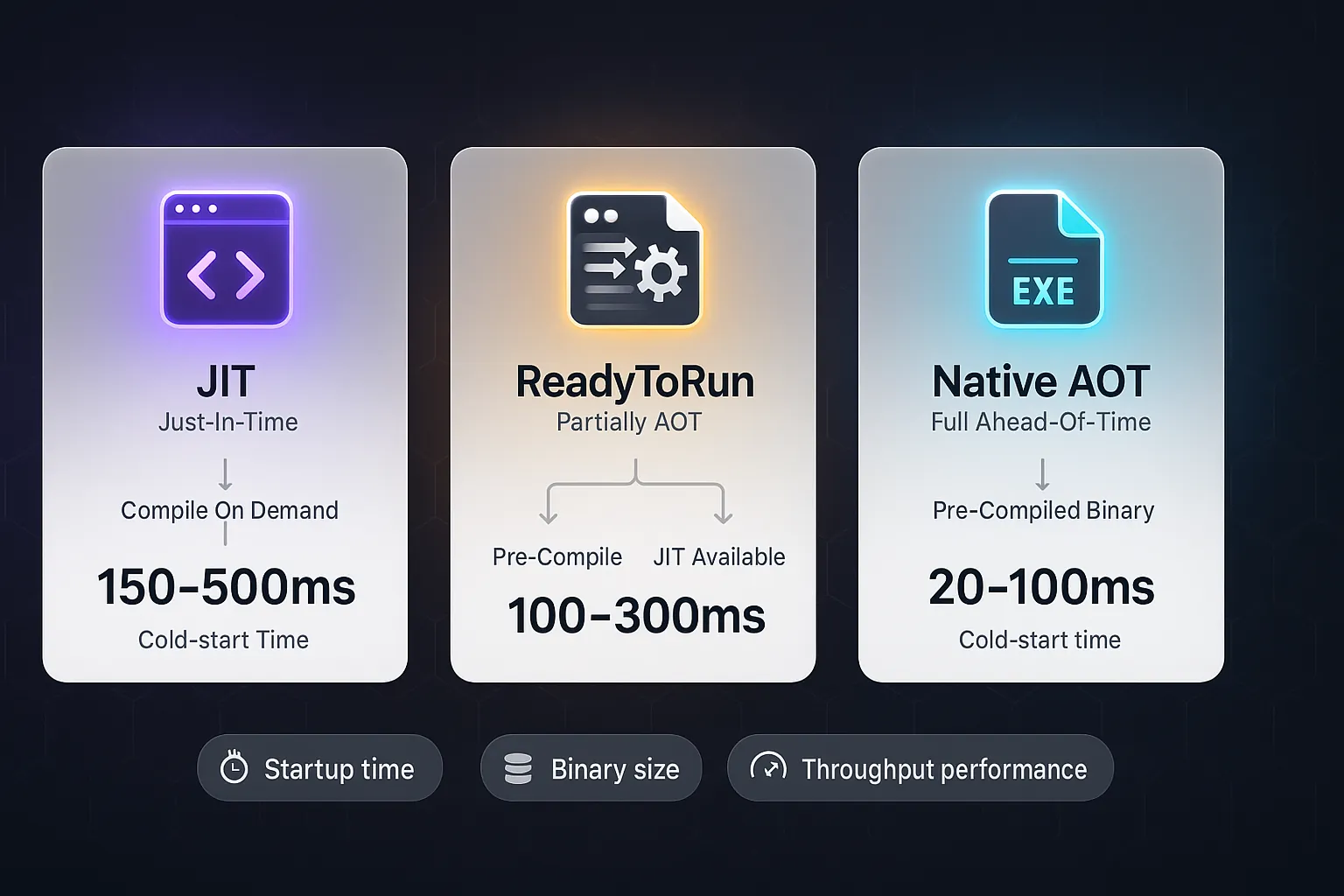
There is a spectrum between pure JIT and pure AOT:
- Default JIT (Tier 0): compiles everything at startup; later optimizes with Tier 1 according to usage
- ReadyToRun (R2R): partial ahead-of-time compilation; still needs the runtime, and the JIT is available for code that was not precompiled
- Full Native AOT: everything precompiled; no JIT (constrained by trimming and static analysis)
Native AOT is the most aggressive in trade-offs: extreme startup gains, but strict reflection constraints.
Compilation Stack: From Roslyn to Native Binary
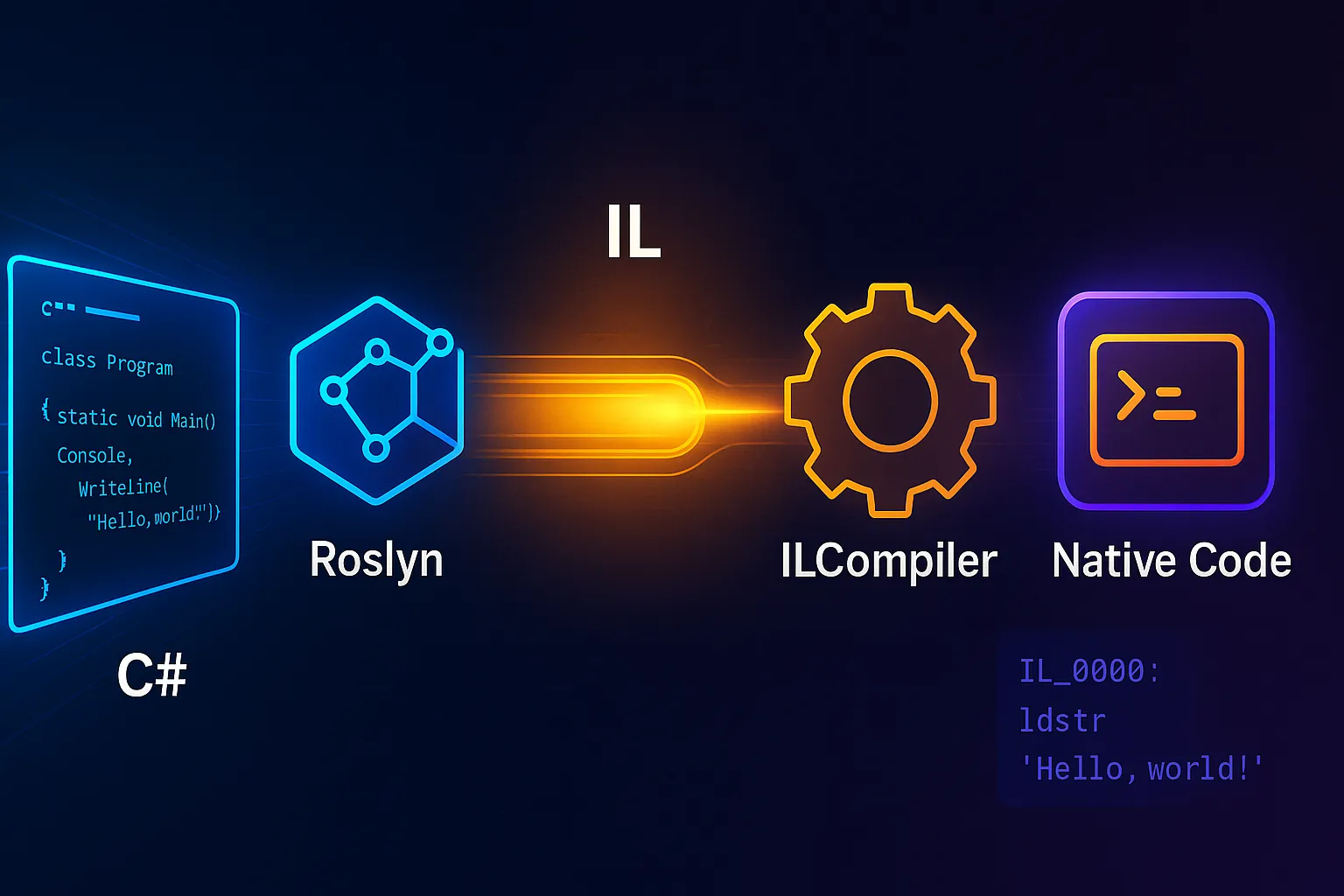
This is the technical heart of the topic. I will describe exactly what happens when you run dotnet publish -c Release --self-contained -r win-x64 /p:PublishAot=true.
1. Static Analysis with Roslyn
Roslyn is Microsoft’s C# compiler. It:
- Reads
.csfiles - Builds a syntax tree (AST)
- Resolves types, namespaces and symbols
- Generates IL (Intermediate Language) — platform-agnostic pseudocode
For Native AOT, Roslyn does nothing special at this stage — the IL emission is identical. The “magic” happens later.
2. IL (Intermediate Language)
IL is like the “universal bytecode” of .NET. A simple example:
| |
Becomes IL like this:
| |
This is platform-agnostic. Any processor can execute these instructions (with a VM or a compiler).
3. ILCompiler & Trimming (Reachability Analysis)
ILCompiler is the core of the Native AOT magic. It:
- Reads the IL generated by Roslyn
- Analyzes reachability: it starts at the entry point (Main) and follows every call and every accessed field. “If Main calls Foo(), and Foo() calls Bar(), then Bar() is reachable.”
- Removes unnecessary code — tree-shaking. If MetodoX is never called, it is deleted from the final executable.
- Detects problematic reflection: if you write
Type.GetType("MinhaClasse"), the compiler cannot know statically which type you want. That is a problem. - Emits native code with the ILC using the RyuJIT backend
4. ILC and the RyuJIT backend
The ILC drives the Native AOT compilation and uses the RyuJIT backend to turn IL into native code for x86-64, ARM64 and other compatible architectures. crossgen2 belongs to the pipeline most associated with ReadyToRun and is not a step of the Native AOT publish described here.
It is not the traditional JIT (which runs at execution time). It is an offline compiler, with more time for optimization.
Output: .obj files (native objects), later linked into the final executable.
5. Linking & Final Executable
The .obj files are linked with:
- Runtime libraries (.NET GC, allocators, etc.)
- Linked standard library (Collections, I/O, etc.)
- Your compiled code
Result: app.exe on Windows or an executable without an extension on Linux. The publish is self-contained: it does not require a prior .NET installation, but it includes the required parts of the runtime and may depend on native operating system libraries.
Complete Visual Flow
| |
📝 Example: A simple “Hello World” app with JIT takes ~100MB (runtime + libs). With AOT, the executable alone is ~5MB.
Trimming and Static Analysis: The Big Obstacle
Trimming is where Native AOT shines — and where it breaks.
The Reflection Problem
Reflection lets code discover types, fields and methods at runtime:
| |
Why does this break AOT? The static compiler cannot know at build time which type you will request in Type.GetType(). So, to be safe, it either:
- Compiles all types (increasing the binary)
- Or fails at runtime (crash)
Solution: TrimmerRootAssembly and Attributes
Microsoft provides MSBuild configuration and attributes to tell the trimmer which members must be preserved:
| |
| |
These mechanisms do not make any code automatically AOT-compatible. They make explicit the parts of the graph that static analysis could not infer, and they still require testing the published artifact.
Conservative vs Aggressive Analysis
- Conservative: the trimmer assumes any Type.GetType() may be used and keeps everything (larger binary, but safe)
- Aggressive: the trimmer removes everything not proven reachable (smaller binary, but it may break at runtime)
Articles about Native AOT always recommend “test a lot” — and rightly so.
Performance Trade-offs
Native AOT is not a silver bullet. These are the real trade-offs:
1. Startup: a frequent Native AOT advantage
Native AOT removes JIT compilation during execution and often reduces the time to the first response. In the Part 2 lab, the median was 63.794 ms for Native AOT and 587.644 ms for framework-dependent JIT over 30 processes. These values describe a specific workload, hardware and environment; in managed serverless, the cold start also includes provider decisions, sandbox, networking and configuration.
⚠️ Warning: AOT puts all the compilation time on the build machine, not on the client. If it takes 15 minutes to compile your app with AOT, well… there are trade-offs.
2. Memory and distribution size
A framework-dependent JIT publish can have few files because it assumes a compatible runtime installed outside the artifact. Self-contained JIT, self-contained ReadyToRun and Native AOT include the required runtime, so the comparison must use equivalent units. In the Part 2 lab, Native AOT took 28.3 MB uncompressed and a 41 MB median maximum working set; JIT FDD took 165.7 KB of artifact, not counting the installed runtime, and a 103 MB median maximum working set.
These numbers do not establish a universal ratio. Dependencies, generics, resources, symbols, code preserved for reflection and the pages actually touched change both the size and the resident memory.
3. Throughput and Optimization
| Aspect | JIT | AOT |
|---|---|---|
| Tiering | Yes (Tier 0 → 1 optimization) | No (fixed) |
| Profiling | The JIT adjusts according to usage | Static (no profiling) |
| Hot path | Improves over time | Fixed (no warm-up) |
The JIT has an adaptation advantage in long-running processes because tiered compilation and dynamic PGO can observe hot types and paths and recompile methods. That does not guarantee a win: Native AOT can tie or beat the JIT in specific, stable workloads. Throughput, tail latency, CPU and memory must be measured in the real application.
Summary: When to Use It?
- First response and short-lived processes: compare Native AOT and ReadyToRun, also measuring publish, distribution and compatibility.
- Warm throughput and latency: compare JIT with tiering/dynamic PGO and Native AOT under the same load.
- Density and operations: include RSS/working set, shared runtime, observability, plugins and update frequency.
Practical Example: CLI Tool with Native AOT
I will show a real example: a String Analyzer CLI that counts character frequency in files.
The reason for choosing a CLI: minimal reflection, pure I/O, ideal for AOT.
Project Structure
| |
.csproj File with AOT Enabled
| |
Highlights:
PublishAot=trueenables the Native AOT compilerTrimMode=linkenables aggressive trimmingRuntimeIdentifierslists the target platforms- The project does not add external dependencies
Example Code: Program.cs
| |
Why this is AOT-friendly:
- Explicit parsing with standard library APIs
- No dynamic assembly loading or code emission
- Simple I/O, no advanced patterns
Build and Run
| |
📂 Source Code: The complete example is available in the blog’s samples repository:
BlogSamples/NativeAot/CliExample/
Tips and Good Practices
Prefer explicit parsing or a library validated for AOT The example uses only standard library APIs. When adopting a CLI library, publish and test the Native AOT artifact to detect dynamic reflection or trimming warnings.
Minimize reflection; use source generators when possible If you need serialization, use
System.Text.Jsonwith source generators (JsonSourceGenerationContext). AvoidNewtonsoft.Jsonor pure reflection with AOT.Check AOT warnings during development Build with
dotnet buildand check the warnings. Do not wait to discover problems in production. Use-Werrorto turn warnings into errors in CI.Measure the distribution size Compare the published directory and the compressed artifact, stating whether the runtime is included. Sometimes removing a dependency saves more than changing the compilation mode.
Consider ReadyToRun as an alternative If you want fast startup but cannot give up reflection,
ReadyToRunis a middle ground. Build withPublishReadyToRun=trueinstead ofPublishAot=true.Test in production-like environments An AOT binary compiled on Windows may not run on Linux (object files link differently). Always build and test for the specific target runtime.
Compare equivalent units A framework-dependent IL assembly excludes the installed runtime, while Native AOT is self-contained. For edge, IoT or frequent updates, compare the bytes actually transferred and the total storage.
Document AOT compatibility of dependencies If you use third-party libraries, explicitly confirm that they are AOT-compatible. Keep that in your deployment README.
Objective Summary
Native AOT — ahead-of-time compilation of C# into native code for a specific RID, removing the JIT at runtime and including the required parts of the runtime without requiring a prior .NET installation.
Compilation stack — Roslyn generates IL; the ILC analyzes reachability and compatibility, uses the RyuJIT backend to emit native code and hands objects to the platform linker.
Trimming — automatic removal of unreachable code (tree-shaking); it breaks with dynamic reflection (
Type.GetType()) and requiresTrimmerRootAssemblyandDynamicallyAccessedMembersto inform the compiler.Startup time — Native AOT removes JIT work at runtime, but the gain must be measured on the real hardware and hosting environment.
Throughput — JIT with tiering and dynamic PGO adapts hot code at runtime; Native AOT can tie or win in specific workloads, so there is no universal result.
Metrics-driven decision — first response, p95/p99, throughput, CPU, resident memory, distribution size, compatibility and build time must come before labels such as CLI or server.
Trade-offs — startup, memory, size, throughput, compatibility and build time vary with the workload; the decision requires measuring equivalent distributions.
Read Also
- .NET Native AOT: Part 2 — JIT, R2R and AOT Benchmarks
- Async/Await in .NET: Asynchronous Programming Fundamentals (Portuguese)
- Performance in .NET: Profiling, Benchmarking and Optimization (Portuguese)
- Microservices in .NET: Patterns, Communication and Resilience (Portuguese)
References
- Microsoft Docs — Native AOT — official documentation, configuration and limitations
- RyuJIT and Native Code Generation — source code of the JIT/AOT compiler
- Roslyn — C# Compiler — analysis and code generation
- IL Compiler & Trimming — NativeAOT toolchain
- System.CommandLine — AOT-Compatible CLI — library for arguments without reflection
- Trimming .NET Applications — trimming and troubleshooting guide
By commenting, you agree to our Privacy Policy, Terms of Use, Data Deletion Policy.