
Introduction
When I see a CORS error in the browser console, I almost always see the same reflex in the team a few minutes later: someone sets Access-Control-Allow-Origin: *, disables some protection in the development browser and declares the task done. That solves nothing. It only masks the security rule that is preventing an arbitrary site from reading sensitive responses from your API.
CORS is not a whim of Chrome, Firefox or Edge. It is the mechanism the server uses to tell the browser which origins may read a cross-origin response. The browser enforces the rule, but the decision comes from the backend or the edge layer. If I configure it loosely, I do not just remove the visual error from the console: I widen my application’s attack surface.
This is the fifth article in the Security for Devs series. In the article on JWT, OAuth2 and OpenID Connect, I covered identity and tokens. In the article on BFF, I showed how to get tokens out of the browser. In the article on API Gateway, I discussed centralized security policy at the edge. Now I close a gap that shows up in practically every SPA, admin portal and web integration: how to configure CORS without turning an important protection into decoration.
By the end of this article, I will show what CORS actually protects, how the Same-Origin Policy works, when the browser sends an OPTIONS preflight, what each header does, which mistakes I find most often in pentests and code reviews, and how to configure CORS correctly in NGINX and ASP.NET Core. I will also untangle a common confusion: CORS does not replace authentication, authorization or CSRF protection.
⚠️ Warning: Turning off CORS because it gets in the way is like removing your seat belt because it is tight. The discomfort is a sign that the protection is still working.
Prerequisites
To follow the examples in a real context, I recommend:
- Basic knowledge of HTTP, headers and methods such as
GET,POST,PUTandOPTIONS. - Minimal familiarity with the browser, DevTools and
fetchrequests. - On the backend, some experience with ASP.NET Core and the middleware pipeline.
- At the edge layer, basic reading of NGINX configuration.
It also helps to have read at least the previous articles in the series, because I will refer to authorization, HttpOnly cookies, BFF and gateway several times. Even so, this text is self-contained and answers the main question directly: why CORS exists and how I configure it securely.
The Problem CORS Solves: Same-Origin Policy
Before talking about headers, I need to talk about origin. An origin is the combination of scheme + host + port. For the browser, https://app.com and http://app.com are not the same thing. Neither are https://app.com and https://api.app.com. The table below summarizes the most common cases:
| Request URL | Page origin | Same-origin? | Reason |
|---|---|---|---|
https://app.com/api | https://app.com | Yes | same scheme, host and port |
http://app.com/api | https://app.com | No | different scheme |
https://api.app.com | https://app.com | No | different host |
https://app.com:8443 | https://app.com | No | different port |
From this definition comes the Same-Origin Policy, or SOP. This browser policy prevents a script loaded from one origin from freely reading responses coming from another. The key point here is the verb read. The browser may even allow some cross-origin requests to be sent, but it does not hand the response to the page’s JavaScript if the policy is not satisfied.
Without SOP, a malicious site opened by the victim could send a fetch to their webmail, internet banking or admin panel where they are already authenticated, reusing cookies the browser sends automatically. If the response came back freely to the attacker’s JavaScript, it would be enough to parse the JSON or HTML and exfiltrate everything. SOP exists precisely to break that path.
And where does CORS come in? CORS is the controlled exception to this rule. The target server states, through HTTP headers, which origins may read its response. The browser receives the response, checks those headers and decides whether or not to release the content to the page’s JavaScript.
This detail explains a confusion I see every week: curl, Postman, Insomnia and backend-to-backend calls have no CORS problem because there is no browser enforcing SOP. If the endpoint returns 200 in Postman and fails in the browser, the problem is not “the API is broken”. The problem is that the browser requires an explicit policy for that cross-origin read.
ℹ️ Info: The
Originheader comes from the browser and cannot be overwritten by the page’s JavaScript. That is why the server can make a policy decision based on it within a browser context.
Anatomy of a CORS Request: Simple vs Preflight
Not every cross-origin request goes through the same flow. The browser splits these calls into simple requests and preflighted requests.
A simple request is one that uses GET, HEAD or POST, with limited headers and a Content-Type restricted to formats such as text/plain, application/x-www-form-urlencoded or multipart/form-data. In these cases, the browser sends the real call with the Origin header and evaluates the response. If the server returns a matching Access-Control-Allow-Origin, the JavaScript can read the result.
When I step outside that envelope and use PUT, DELETE, PATCH, Authorization, Content-Type: application/json or other custom headers, the browser switches to a more cautious mode. Before the real request it sends an OPTIONS called preflight, asking whether the server accepts that combination of origin, method and headers.
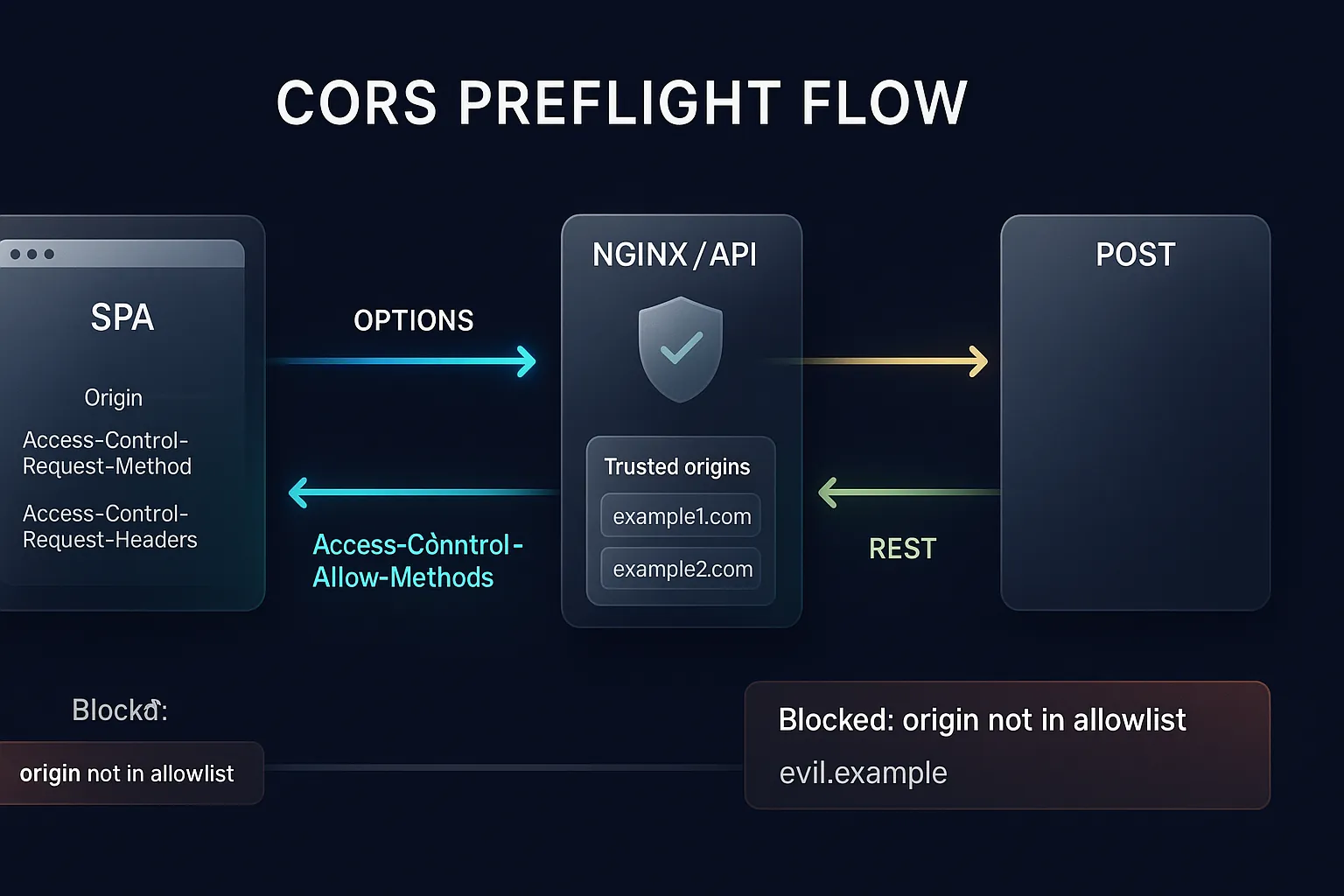
In the flow above, the browser wants to guarantee two things before firing the real call: whether that origin can access the resource and whether the potentially more sensitive elements of the call are allowed. And here I arrive at an important practical rule: if your OPTIONS fails, the real request never even happens.
This is a realistic preflight example:
| |
If this response comes back correct, the browser proceeds with the real call. If it is incomplete, duplicated, has the wrong status or lacks the expected headers, DevTools shows a CORS error and the JavaScript cannot access the response.
💡 Tip:
Access-Control-Max-Agereduces latency because it lets the browser cache the preflight result. Without it, every non-simple call may generate an extraOPTIONSbefore the real request.
The CORS Headers, One by One
When I teach CORS in mentoring sessions, I try to move away from “put anything there until the error stops” toward a literal reading of the headers. They are few, but each has a well-defined role.
| Header | Direction | Function |
|---|---|---|
Origin | Request | identifies the origin of the page that made the call |
Access-Control-Allow-Origin | Response | states which origin may read the response |
Access-Control-Allow-Methods | Response | states which methods are allowed on the resource |
Access-Control-Allow-Headers | Response | states which custom headers may be sent |
Access-Control-Allow-Credentials | Response | allows sending cookies and credentials when true |
Access-Control-Expose-Headers | Response | lets JavaScript read response headers |
Access-Control-Max-Age | Response | sets the preflight cache in seconds |
Access-Control-Request-Method | Request | states which method the real call wants to use |
Access-Control-Request-Headers | Request | states which headers the real call wants to send |
The most famous header is Access-Control-Allow-Origin, but it is also the most misconfigured. If I set *, I am saying any origin can read that response. That may make sense for a fully public resource, such as a static catalog without authentication. In an authenticated API, it is usually a sign of a conceptual error.
There is also a rule that catches many people by surprise: Access-Control-Allow-Origin: * cannot be combined with Access-Control-Allow-Credentials: true. The browser rejects that combination because credentials require an explicit origin. If cookies, a client certificate or Authorization are involved, the server needs to echo a validated origin, not a wildcard.
Another underrated header is Vary: Origin. If my application dynamically reflects the valid origin, intermediate caches and CDNs need to know that the response varies with that header. Without Vary: Origin, I risk serving https://app.zocate.li a cached response built for another origin.
Finally, Access-Control-Expose-Headers comes into play when the backend sends useful metadata in the response, such as X-Total-Count, Location or some correlation id, and I want JavaScript to be able to read them. Without this header, many response headers remain invisible to the page, even if the call was allowed.
ℹ️ Info: CORS trusts
Originas browser metadata. It is not an authentication mechanism. If an endpoint is sensitive, it still needs to validate the token, session, claims and authorization on the backend.
The Classic Mistakes Every Team Makes
After reviewing dozens of APIs, I would say CORS mistakes repeat with an almost industrial pattern. The first is the most obvious: using Access-Control-Allow-Origin: * on an authenticated API. Teams often do this to “unblock the front end” without realizing they are announcing global read access to any page on the internet. If the API depends on cookies or credentials, the browser will still block it in several scenarios. If it does not, the damage may still exist on exposed sensitive resources.
The second mistake is more dangerous because it looks sophisticated: reflecting the received Origin without validation. The code does something like response.Headers["Access-Control-Allow-Origin"] = request.Headers["Origin"] and that is it. This is equivalent to accepting any origin, but with a worse detail: now it works even with credentials. In a pentest, this kind of configuration immediately goes on the list of relevant findings.
The third mistake is loose allowlist validation. I often see endsWith("exemplo.com"), which accepts evil-exemplo.com, and startsWith("https://exemplo.com"), which accepts https://exemplo.com.evil.com. If my policy depends on naive string matching, the protection is compromised from birth.
The fourth mistake is trying to “fix CORS in the frontend”. This shows up as a browser plugin, an improvised proxy that ends up in production, a flag to disable web security or a hack in the dev server masking the absence of the real policy. Locally this may temporarily reduce friction, but it does not fix the backend and it pushes the security decision onto someone who should not make it.
The fifth mistake is confusing CORS with authentication or authorization. If an origin is allowed, it only means the browser will be able to read the response. It does not mean the user is authenticated, that the token is valid or that the resource can be accessed. Permission checks remain the backend’s responsibility.
The sixth mistake, and perhaps the most irritating in production, is making OPTIONS go through authentication or a redirect. If the preflight receives 401, 302 or any response other than what the browser expects, the real call dies right there. Preflight needs to be handled as public, fast and predictable.
⚠️ Warning: Reflecting
Originwithout validation together withAccess-Control-Allow-Credentials: trueturns a configuration problem into a vulnerability for exfiltrating authenticated data. This shows up frequently in OWASP and Burp Suite audits.
CORS is not CSRF (and does not protect against it)
Here is one of the most common confusions in web architecture. CORS and CSRF are not the same problem. CORS regulates whether one origin’s JavaScript can read the response of another origin. CSRF exploits the fact that the browser can send cookies automatically in a cross-origin request, even when the attacker cannot read the response.
Imagine a bank transfer triggered by a simple POST form hosted on a malicious site. The attacker does not need to read the JSON response to cause damage. They only need the victim’s browser to send the session cookies automatically to the legitimate domain. That is CSRF. CORS may even prevent the malicious JavaScript from reading the result, but the action on the server may have happened all the same.
That is why the defense against CSRF is different: anti-CSRF tokens, SameSite cookies, Origin or Referer validation on the server and, in many modern scenarios, the BFF pattern with clear session control. The JWT, OAuth2 and OpenID Connect article helps separate identity from transport, and the API Gateway article shows where cross-cutting policies fit in the architecture.
I like to summarize it like this: CORS decides whether the page can see. CSRF exploits the fact that the browser can send. Different verbs, different risks and different controls.
💡 Tip: CORS relaxes the Same-Origin Policy in a controlled way. CSRF abuses the automatic sending of cookies. Configuring one does not eliminate the other.
Configuring CORS in NGINX
In my stack, NGINX usually appears as a reverse proxy and edge layer. That makes it tempting to solve CORS right there. In many cases it is a good choice, especially for static resources, APIs consolidated behind the same proxy or when I want to centralize edge policy. What I cannot do is answer CORS in NGINX and in the backend at the same time, because duplicate headers usually make the browser reject everything.
The classic anti-pattern is this:
| |
This looks simple, but it is insecure for an API with credentials and insufficient for preflight. The secure version needs an allowlist, a consistent response for OPTIONS, Vary: Origin and always to cover error responses as well.
| |
📂 Source Code: The complete example is available in the blog’s samples repository:
BlogSamples/Security/Cors/
I use map because it helps me keep the allowlist explicit and avoids loose string comparisons scattered across the configuration. if in NGINX needs care, but here it serves to apply the header only when the origin has been validated beforehand. always is important because, without it, several headers do not appear in 4xx and 5xx responses, which complicates diagnosis and can break expected behavior in the browser.
Another relevant detail: OPTIONS should not require authentication. The preflight needs to be answered before the real call. If I redirect to login or pass OPTIONS through auth middleware without an exception, the browser never reaches the business endpoint.
And I need to repeat the most important rule of this section: choose one layer to answer CORS. If NGINX adds Access-Control-Allow-Origin and ASP.NET Core does the same, the frequent result is a response that is invalid from the browser’s point of view.
⚠️ Warning: Two
Access-Control-Allow-Originheaders in the same response usually invalidate the entire policy. If the edge answers CORS, the backend must stop answering the same block.
Configuring CORS in ASP.NET Core
In ASP.NET Core, I prefer to work with named policies. They make the intent of each group of endpoints explicit and reduce the temptation to scatter AllowAnyOrigin() across the whole application. For this article’s sample, I created a policy called FrontendSpa with a closed allowlist, AllowCredentials() and a ten-minute preflight cache.
| |
📂 Source Code: The complete example is available in the blog’s samples repository:
BlogSamples/Security/Cors/
This model has three advantages. The first is clarity: I can look at the policy name and know which context it applies to. The second is security: when I use AllowCredentials(), the framework pushes me toward explicit origins or a well-thought-out dynamic validation. The third is maintenance: I can apply a different policy for BlazorWasm, for a public read endpoint or for an authenticated SPA without mixing scenarios.
There is also an interesting protection from the framework itself: AllowAnyOrigin().AllowCredentials() throws an exception at runtime. That is good. ASP.NET Core is preventing a combination the browser does not accept and that almost always signals an insecure decision.
Another critical point is middleware order. When I use UseCors, it needs to come before endpoint mapping and, in more complex pipelines, before the authorization of the resource that depends on the preflight. If the OPTIONS response gets blocked by another layer, the policy is never applied.
In the article’s sample I also left two different behaviors to keep it didactic: a public endpoint that accepts only GET with AllowAnyOrigin() and a private endpoint that keeps returning 401 if a demo header is missing. The goal is to show that approved CORS is not the same as authorized access.
Tips and Good Practices
Use an explicit allowlist for authenticated APIs. I prefer to list each trusted origin or validate against a closed set. This avoids accidental wildcards and reduces room for validation bypass.
Choose a single layer to answer CORS. Either NGINX answers or the backend answers. When both try to help at the same time, the browser usually interprets it as an error.
Always send
Vary: Originwhen reflecting a validated origin. Without it, proxies and CDNs may serve the wrong response to another origin and open a bug that is hard to trace.Keep the preflight public, fast and predictable.
OPTIONSshould answer204or200without redirecting to login. If the preflight fails, the real call never starts.Do not treat CORS as authorization. The backend remains responsible for token, session, claims and permission policies. CORS only defines what the browser lets you read.
Test malicious origins automatically. I like to include at least one
Origin: https://evil.examplein the integration test and verify that the API neither echoes the origin nor releases credentials.
Practical Example
Let’s put everything together in an end-to-end scenario. Imagine an SPA at https://app.zocate.li consuming a protected API at https://api.zocate.li behind NGINX. The frontend sends cookies or credentials and needs to query a private endpoint.
In the browser, the call can look like this:
| |
If the FrontendSpa policy is correct, the browser sends Origin: https://app.zocate.li, receives Access-Control-Allow-Origin: https://app.zocate.li and proceeds normally. If I change the origin to https://evil.example, the request may even reach the server in some scenarios, but the browser does not hand the response to the JavaScript because the policy does not authorize it.
In the article’s sample, I created an integration test exactly for this:
| |
📂 Source Code: The complete example is available in the blog’s samples repository:
BlogSamples/Security/Cors/
I also like to test the preflight, because that is where a lot of configuration fails on details. In the sample, the OPTIONS for /api/security/cors/pedidos validates Origin, Access-Control-Request-Method and Access-Control-Request-Headers, and the test confirms that the expected response headers appear with status 204 No Content.
The expected behavior in DevTools is simple:
- allowed origin:
OPTIONSreturns204, the real call happens and the frontend reads the response. - disallowed origin: the request may appear in the Network tab, but the console logs a CORS error and the page cannot access the response.
- missing credential or invalid token: CORS passes, but the backend returns
401or403normally.
This last case is the most important one to close the concept: CORS is a read filter in the browser; authorization remains a business and security rule of the server.
Objective Summary
- CORS is the mechanism that lets the server relax the Same-Origin Policy in the browser, defining through headers which origins can read a cross-origin response.
- Same-Origin Policy compares scheme, host and port; changing any of these elements turns the call into cross-origin for the browser.
- Preflight is an
OPTIONSrequest sent before non-simple calls, such asPUT,DELETE,AuthorizationorContent-Type: application/json. Access-Control-Allow-Origin: *cannot be combined withAccess-Control-Allow-Credentials: true; credentials require an explicit, validated origin.- Reflecting
Originwithout validation is equivalent to accepting any site and can allow exfiltration of authenticated data when combined with credentials. - NGINX should answer CORS with an allowlist,
alwaysandVary: Originwhen it is the chosen layer; duplicating headers with the backend breaks the response in the browser. - ASP.NET Core offers named policies and blocks the insecure
AllowAnyOrigin().AllowCredentials()combination at runtime. - CORS does not protect against CSRF; CORS regulates reading the response, while CSRF exploits the automatic sending of cookies and requires specific defenses.
Read Also
- API Gateway: The Missing Piece in Your SPA’s Security
- BFF Backend For Frontend: Security in SPAs
- Authentication and Authorization: JWT, OAuth2 and OpenID Connect
- SSL/TLS Certificates: How They Work and How to Validate Them
- REST API Design: HTTP Verbs and Parameter Binding
References
- MDN Web Docs - Cross-Origin Resource Sharing (CORS) — overview of the protocol, examples and browser behavior.
- MDN Web Docs - Same-origin policy — detailed explanation of SOP and the problem it solves.
- WHATWG Fetch Standard - HTTP CORS protocol — normative specification of the CORS flow in the modern web ecosystem.
- OWASP WSTG - Testing Cross Origin Resource Sharing — testing guidance and misconfiguration examples.
- PortSwigger Web Security Academy - CORS misconfiguration — practical examples of exploiting insecure configurations.
- NGINX Docs - ngx_http_headers_module — official documentation of the
add_headerdirective and thealwaysmodifier. - Microsoft Learn - Enable CORS in ASP.NET Core — official recommendations for policies, middleware and endpoints in ASP.NET Core.
By commenting, you agree to our Privacy Policy, Terms of Use, Data Deletion Policy.