
Introduction
Your entire .NET team dreams of leaving JavaScript behind — and Microsoft promised that Blazor WebAssembly would make it possible. Writing C# in the browser, reusing models between frontend and backend, and never dealing with node_modules again. The promise is powerful. But in 2026, after five years of General Availability and three major versions (.NET 8, 9 and 10) with significant improvements — with .NET 10 being the first LTS release with a truly consolidated Blazor WASM — has that promise been fulfilled?
I have followed the .NET ecosystem for years and have seen the enthusiasm — sometimes exaggerated — around Blazor WebAssembly. At the same time, I work with Angular on enterprise projects and know what a mature framework delivers in practice. The question I get most often is always the same: “Can we swap Angular for Blazor WASM in production?”. The answer is more nuanced than most articles are willing to admit.
In this article, I will analyze whether Blazor WebAssembly (client-side) with .NET 10 is already viable for enterprise projects in production, focusing exclusively on the scenario of a SPA consuming an existing REST API — the most common use case in companies. I will not cover Blazor Server or Blazor Hybrid. I will compare it directly with Angular 21 on the criteria that really matter: reactivity, tooling, component ecosystem, bundle size, testability and JavaScript interop.
Throughout the article, you will understand:
- What Blazor WebAssembly is and how it works under the hood
- How Angular 21 positions itself as the enterprise standard in 2026 (stable Signals, Signal Forms, zoneless by default)
- An honest technical comparison with 15+ criteria side by side
- Whether Blazor really replaces JavaScript — spoiler: it is not that simple (but .NET 10 improved interop)
- The component ecosystem of the community (MudBlazor, Radzen, Syncfusion and others)
- The bundle problem — the elephant in the room nobody likes to discuss (and what .NET 10 did to mitigate it)
- When to use and when to avoid Blazor WASM in enterprise production
If you have read my article Logs Without Context Are Noise: Structured Logging in .NET 8, you know I like pragmatic analyses of the .NET ecosystem. This one will be no different.
Let’s start by understanding what Blazor WebAssembly is and how it got here.
What Blazor WebAssembly Is
To assess whether Blazor WebAssembly is ready for production, we first need to understand what it does — and, more importantly, how it does it. The gap between expectation and reality starts here.
A brief history
Blazor was born in 2018 as an experimental project by Steve Sanderson at Microsoft. The idea was revolutionary: use C# and Razor (the same template syntax as ASP.NET) to build interactive web interfaces, eliminating the need for JavaScript. In 2020, with .NET 5, Blazor WebAssembly (client-side) reached General Availability. Since then, every major .NET version has brought significant improvements — AOT compilation in .NET 7, improved trimming in .NET 8, interop improvements in .NET 9, and .NET 10 (Nov 2025, LTS) consolidated Blazor WASM for serious enterprise scenarios with client-side fingerprinting, declarative [PersistentState], advanced validation and new JS interop APIs.
How it works under the hood
Blazor WebAssembly’s execution model is fundamentally different from any JavaScript framework. Instead of compiling code to JavaScript (as TypeScript does), Blazor compiles C# to Intermediate Language (IL) — the same bytecode that runs on the server. That IL is then executed by the Mono runtime, which runs inside the browser via WebAssembly.
In practical terms, this means the browser needs to download:
- The Mono runtime compiled to WebAssembly (~2-4 MB)
- The .NET Base Class Libraries (System., Microsoft., etc.)
- The application assemblies (your project’s .dll files)
- The Blazor framework (routing, rendering, DI)
All DOM access goes through a JavaScript interop bridge — Blazor does not access the DOM directly. When you click a button, the event passes through JS, reaches the .NET runtime in WebAssembly, C# processes the logic, computes the render tree diff and sends the changes back through JS to update the DOM. It is an ingenious architecture, but it has a cost.
ℹ️ Important: Blazor WebAssembly does NOT compile C# natively to WebAssembly (yet). The IL runs interpreted by the Mono runtime inside the WASM sandbox. AOT compilation (available since .NET 7) compiles part of the IL directly to WASM, improving execution performance, but it increases the bundle size.
Blazor Server vs WebAssembly vs Hybrid
To avoid confusion — which is very common — here is the difference between the three models:
| Aspect | Blazor Server | Blazor WebAssembly | Blazor Hybrid |
|---|---|---|---|
| Where it runs | Server (ASP.NET) | Browser (WebAssembly) | Native desktop/mobile |
| Connection | SignalR (WebSocket) | Standalone (no server) | No web server |
| UI latency | Depends on the network | Instant (local) | Instant (local) |
| Offline | ❌ Does not work | ✅ Possible (PWA) | ✅ Native |
| Initial bundle | Minimal (~100 KB) | Large (~5-20 MB) | N/A (installed) |
| Scalability | Limited (connection per user) | Unlimited (client-side) | N/A |
| Deploy | ASP.NET server | Static files (CDN) | App store / sideload |
This article focuses exclusively on Standalone Blazor WebAssembly — the pure SPA, running in the browser with no ASP.NET server behind it, consuming REST APIs. It is the scenario most comparable to Angular.
Angular 21 in 2026 — The Enterprise Standard
For the comparison to be fair, I need to give context on where Angular is today. If you work with enterprise frontends, you have probably crossed paths with it — and if you have not yet, your competitors have.
Angular 21, released in November 2025 (stable v21.2.6), represents the biggest evolution of the framework in years. Signals — which arrived as experimental in Angular 16 — are now fully stable: signal(), computed(), effect(), linkedSignal() and resource() form the native reactivity system that retired the mandatory dependency on RxJS for simple state management. In practice, an Angular component in 2026 is drastically simpler than its 2020 equivalent.
The big news in Angular 21 is Signal Forms (experimental) — a new forms system entirely based on signals. The form() function creates a FieldTree from a signal model, the [formField] directive binds directly to inputs, and validators such as required(), email() and debounce() are signal-based. Each field’s state (valid(), touched(), dirty(), errors()) is also reactive via signals. Traditional Reactive Forms remain stable for existing projects, but Signal Forms signals the future direction.
Another fundamental change: Angular 21 is zoneless by default. Zone.js-based change detection — historically the Achilles’ heel of performance — has been removed by default. The framework is now fully signal-driven, resulting in better performance, a smaller bundle and superior testability. Projects that still need Zone.js can opt in explicitly via provideZoneChangeDetection().
The Angular 21 ecosystem also brought: Angular Aria (a new official accessibility package), Angular MCP Server (an MCP server integrated into the CLI for workflows with AI and coding agents), a signal-based router (lastSuccessfulNavigation is now a signal, experimental Navigation API), TypeScript 5.9 as the minimum, regex in templates, and HTTP improvements (referrerPolicy, HttpResource for declarative data fetching, HTTP services provided in root by default).
Angular has always been a “batteries included” framework — and that philosophy has grown stronger. The CLI generates projects, components, services, guards and interceptors. The router supports granular lazy loading (per route and per component), typed guards, resolvers and conditional redirects. The build system uses esbuild as the default bundler with Vite for the dev server. The result is production builds in seconds, instant hot reload and significantly smaller bundles. An Angular Hello World project produces between 150 and 300 KB in production — orders of magnitude smaller than the Blazor equivalent.
The component ecosystem is massive and mature: PrimeNG with 140+ components, Angular Material maintained by the Google team, AG Grid (the most powerful data grid on the market), NgRx and NgXs for advanced state management, and dozens of other specialized libraries. It is no exaggeration to say that any enterprise UI need has at least 2-3 mature solutions in Angular.
For the scenario we are evaluating — a SPA consuming a REST API — Angular is the absolute reference in the enterprise world. TypeScript compiles to JavaScript, and the developer never needs to touch the DOM directly or write plain JavaScript. The abstraction is complete and transparent. If you want to dig deeper into the JavaScript runtime ecosystem that underpins Angular, I recommend my article on Deno and Bun versus Node.js.
Blazor WebAssembly vs Angular — Technical Comparison
Now that we have put both technologies in context, let’s get to the point: a direct comparison, criterion by criterion. I built this table based on real projects and official documentation — no marketing.
| Criterion | Blazor WASM (.NET 10 LTS) | Angular 21 |
|---|---|---|
| Language | C# | TypeScript |
| Runtime | Mono/.NET in the browser (WASM) | V8/SpiderMonkey (native JS) |
| Component paradigm | Razor Components (.razor) | Standalone Components (.ts) |
| Reactivity | No native system (manual re-render via StateHasChanged()) | Stable Signals (signal, computed, effect, linkedSignal, resource) + RxJS |
| Routing | Built-in (basic: @page, NavigationManager); .NET 10: NotFoundPage + NavigationManager.NotFound | Advanced router (lazy, guards, resolvers, signal-based navigation) |
| HTTP Client | .NET HttpClient (via fetch bridge); .NET 10: response streaming by default | Angular HttpClient (functional interceptors, HttpResource, referrerPolicy) |
| Forms | EditForm + DataAnnotations; .NET 10: [ValidatableType], nested objects, source generator | Signal Forms (experimental) — form(), [formField], signal-based validators + Reactive Forms (stable) |
| State Management | Declarative [PersistentState] (.NET 10) / Cascading Parameters / Fluxor (3rd party) | Native Signals + linkedSignal + resource / NgRx / NgXs |
| Dependency Injection | Built-in (.NET ServiceCollection) | Built-in (hierarchical, provisionable) |
| CLI / Tooling | dotnet CLI (generic, not specialized) | Angular CLI (schematics, generators, migrations) + Angular MCP Server (AI) |
| Production Build | Slow (.NET compilation + WASM linking + trimming); WASM Hot Reload improved in .NET 10 | Fast (esbuild/Vite — seconds) |
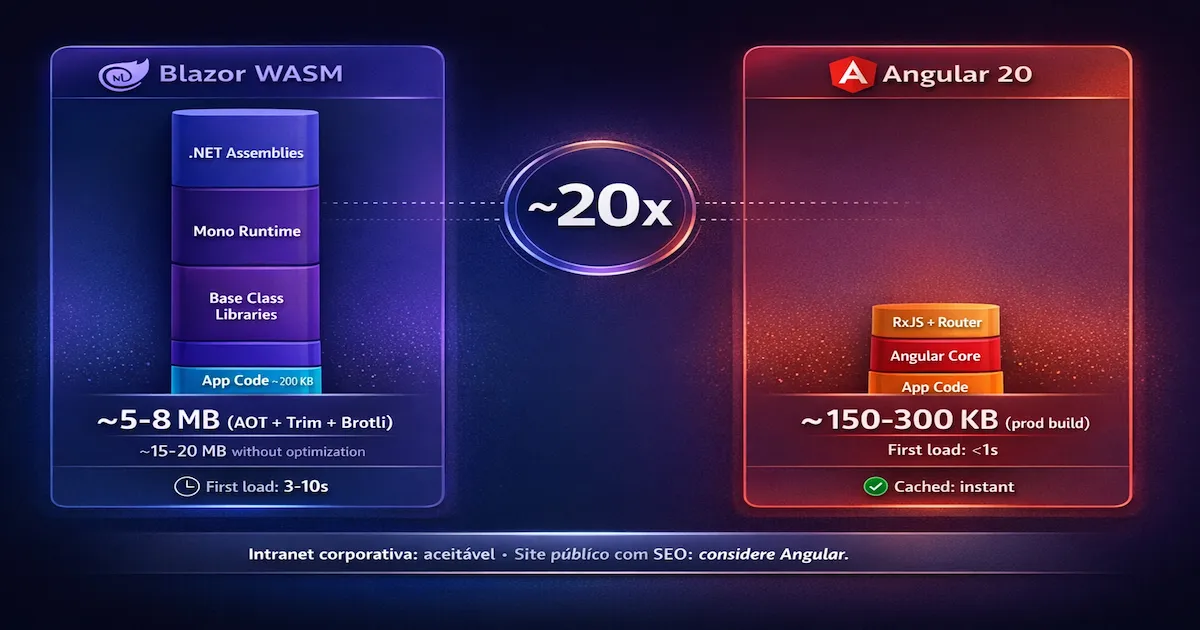
| Bundle Size (Hello World) | ~5-8 MB (AOT + trim + Brotli); .NET 10: fingerprinting + preloaded assets | ~150-300 KB |
| Lazy Loading | Supported (per assembly) | Native (per route and per component) |
| Testing | bUnit (functional, but limited ecosystem) | Jest/Vitest + Testing Library + Cypress (mature); zoneless makes testing easier |
| SSR / Prerendering | Supported (InteractiveWebAssembly mode); .NET 10: NotFoundPage + NavigationManager.NotFound | Native SSR with hydration (Angular v17+) |
| PWA | Template available | @angular/pwa (mature, integrated service worker) |
| Accessibility (a11y) | Depends on the component library | Angular CDK + Angular Material (native WCAG) + Angular Aria (new) |
| Community / Ecosystem | Growing (.NET niche) | Massive (10+ years, millions of devs) |
Where Blazor has the edge
Blazor’s dependency injection is the same as ASP.NET’s — if your team already masters IServiceCollection, AddScoped, AddTransient and the .NET DI pattern, the learning curve is zero. It is the same API, the same concepts, the same patterns. For teams that already build REST APIs in .NET, this is a real productivity advantage.
Sharing code between frontend and backend is another strong point. Models, DTOs, DataAnnotations validations, enums — all of this can live in a .Shared project referenced by both the API and Blazor WASM. With .NET 10, the [ValidatableType] attribute and the validation source generator make sharing even more productive — validation of nested objects and collections works automatically. In Angular, you maintain duplicated models (TypeScript on the frontend + C# on the backend), even when using OpenAPI generators.
Where Angular dominates
Angular 21’s reactivity with stable Signals is incomparably superior. In Blazor, when state changes, you need to call StateHasChanged() manually in many scenarios, or rely on automatic re-rendering that is not always predictable. In Angular, a signal() propagates changes automatically to any computed() or template that consumes it — it is declarative and deterministic. With linkedSignal() and resource(), even complex data fetching and derived state scenarios are solved without RxJS.
Angular 21’s Signal Forms (experimental) also raises the bar — signal-based reactive forms are more intuitive and composable than traditional Reactive Forms. In Blazor, EditForm with DataAnnotations works well for simple CRUD, but lacks comparable granular reactivity.
The build system and the resulting bundle are where the difference is most brutal. Angular compiles and produces the bundle in seconds; Blazor WASM can take minutes. Angular’s bundle is 20-50x smaller. And the Angular CLI tooling is simply more mature — schematics, automatic migrations, specialized generators, and now the Angular MCP Server for integration with AI agents.
Does Blazor Replace JavaScript? The Truth
This is the question every .NET developer asks before adopting Blazor. And the direct answer is: not completely. Understanding why is essential for an informed decision.
The myth of total abstraction
Blazor’s promise is writing C# in the browser. And that is true — your business logic code, models, services and components are written in C#. But every interaction with browser APIs that Blazor does not encapsulate natively must go through JavaScript Interop (JS Interop).
In practice, you will need JS Interop for:
- Clipboard API — copying text to the clipboard
- Geolocation API — accessing the user’s location
- Canvas / WebGL — 2D/3D drawing and rendering
- Web Audio / MediaRecorder — media and audio
- Intersection Observer — visibility-based lazy loading of elements
- Any third-party JavaScript library — charts (Chart.js), maps (Leaflet), rich text editors (CKEditor, TipTap), advanced datepickers
.NET 7+ introduced [JSImport] and [JSExport] as a more modern alternative to IJSRuntime, improving interop ergonomics. .NET 10 went further, adding three new APIs that make interop significantly more type-safe: InvokeConstructorAsync (to create instances of JS objects), GetValueAsync<T> (to read JS properties with strong typing) and SetValueAsync<T> (to modify typed JS properties). These APIs reduce the boilerplate and runtime errors that used to be common in interop. But the need to write or import JavaScript still exists for browser APIs that are not encapsulated.
How it works in practice
Here is an example of how to access the Clipboard API via JS Interop in Blazor:
| |
| |
In the Razor component:
| |
Compare with the Angular equivalent — where the same result is native:
| |
In Angular, TypeScript compiles to JavaScript — the runtime is JavaScript. Access to browser APIs is direct and native. There is no bridge, no overhead, no interop layer. When Angular accesses navigator.clipboard, it is calling the browser API directly.
In Blazor, C# does not compile to JavaScript — it runs in WebAssembly with a bridge to the DOM. When you need JS APIs, interop is explicit, requires separate JavaScript files and adds complexity to the project.
⚠️ Warning: Any JavaScript library (Chart.js, Leaflet, Monaco Editor, TipTap) requires a JS Interop wrapper or a third-party community wrapper. This can be a source of bugs, versioning problems and additional complexity that would not exist in Angular.
The crucial point
The question is not whether Blazor uses JavaScript internally — it does, and always will, to interact with the DOM. The question is whether you, as a developer, need to write JavaScript. And the answer is: it depends on the project. For an enterprise CRUD with forms, grids and dashboards using libraries like MudBlazor, you can work 95% in pure C#. But the moment you need a feature that touches browser APIs or integrates with the JS ecosystem, interop is inevitable.
Community Component Ecosystem
One of the most important factors for production viability is the availability of ready-made components. Nobody wants to implement an advanced DataGrid from scratch. Let’s see what the Blazor community offers in 2026.
The main libraries
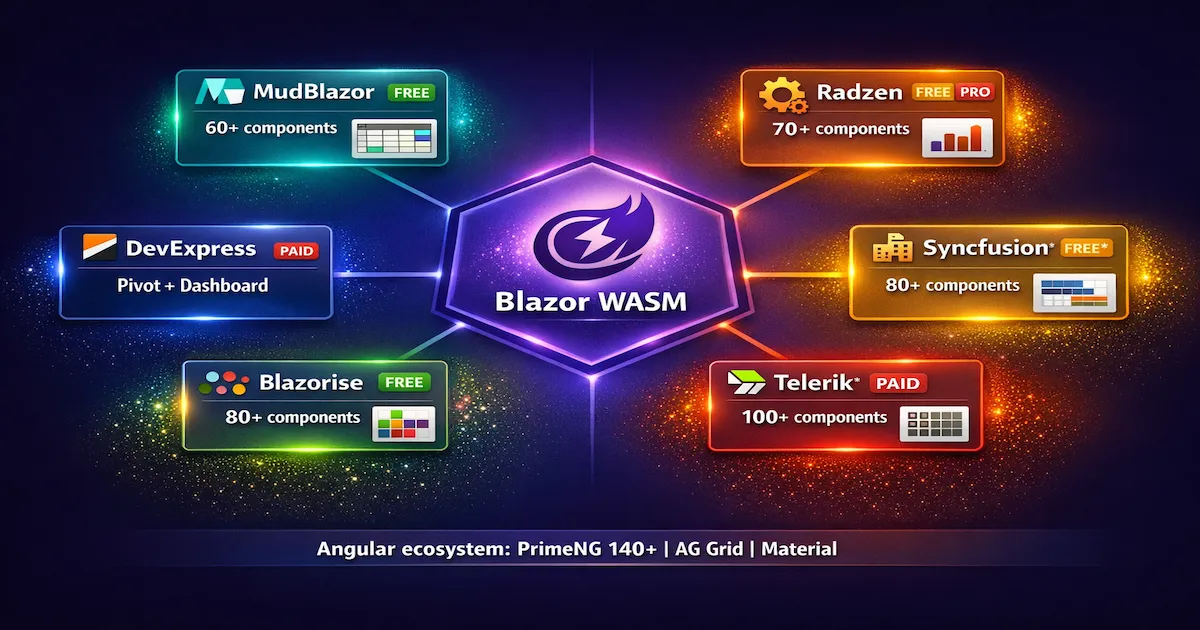
MudBlazor is the open source star of the ecosystem. Inspired by Material Design, it offers 60+ components including a DataGrid with sort, filter and pagination, DatePicker, Autocomplete, Dialog, Snackbar and more. It is completely free, actively maintained (daily commits) and has the largest Blazor community. If you are starting with Blazor, MudBlazor is the first choice.
Radzen Blazor offers ~70 components with a robust open source version and a commercial version with premium features. Radzen’s DataGrid is one of the most complete — advanced filters, grouping, column reorder, export. It includes native charts (no JS dependency), which is a differentiator over MudBlazor.
Syncfusion Blazor is an enterprise suite with 80+ components. Highlights include Gantt Chart, Scheduler, File Manager and a DataGrid that performs with thousands of rows. It offers a free community license for companies with less than USD 1 million in annual revenue — which covers a good share of startups. For larger companies, the license is paid.
Telerik UI for Blazor (Progress/Telerik) is the enterprise-grade option with 100+ components, professional support and the most battle-tested Grid on the market. If your company already uses Telerik for WPF, WinForms or ASP.NET, the integration is natural. Paid license.
Blazorise stands out by supporting multiple CSS frameworks — Bootstrap, Material, Bulma, Tailwind and Ant Design. It has ~80 components that adapt to the design system you already use. Open source with a commercial plan for support.
DevExpress Blazor and Ant Design Blazor complete the picture — the former focused on enterprise grids, pivots and dashboards (paid license), and the latter as an open source port of Ant Design (popular in the React ecosystem).
Quick comparison
| Library | License | Advanced Grid | Native Charts | Components | Maturity |
|---|---|---|---|---|---|
| MudBlazor | Free / OSS | ✅ | ❌ (external) | 60+ | High |
| Radzen | Free + Paid | ✅ | ✅ | 70+ | High |
| Syncfusion | Free* + Paid | ✅ | ✅ | 80+ | Very High |
| Telerik | Paid | ✅ | ✅ | 100+ | Very High |
| Blazorise | Free / OSS | ✅ | ✅ | 80+ | Medium-High |
| DevExpress | Paid | ✅ | ✅ | 50+ | High |
* Syncfusion: free community license for revenue < USD 1M/year.
How does it compare with Angular?
The Angular ecosystem has an undeniable scale advantage. PrimeNG offers 140+ components with ready-made themes. AG Grid is considered the best data grid on the market — period. Angular Material is maintained by the Google team with a focus on WCAG accessibility. And the list goes on with Nebular, NG-ZORRO, DevExtreme and dozens of others.
The difference is not just in quantity. Maturity shows in resolved edge cases, exhaustive documentation and a massive community on Stack Overflow, GitHub and Discord. If you find a bug in the PrimeNG DataGrid, there are thousands of issues and threads to consult. In MudBlazor, the community is active but significantly smaller.
Partial conclusion: The Blazor component ecosystem is mature enough for enterprise CRUD — forms, grids, dashboards and navigation. But if your project requires highly specialized components (complex Gantt charts, interactive maps, diagram editors), Angular still offers more options and more maturity.
The Bundle Problem — The Elephant in the Room
If there is a single factor that can make Blazor WebAssembly unfeasible for your project, this is it. Bundle size is the elephant in the room that enthusiastic articles prefer to downplay — but it directly affects the experience of whoever uses the application.
The real numbers
Let’s be direct with the data:
| Metric | Blazor WASM (.NET 10) | Angular 21 |
|---|---|---|
| Hello World (no optimization) | ~15-20 MB | ~150-300 KB |
| Hello World (AOT + Trim + Brotli) | ~3-5 MB compressed | ~80-150 KB (Brotli) |
| Average enterprise app | ~8-15 MB compressed | ~300-800 KB (Brotli) |
| First load (3G) | 5-15 seconds | <2 seconds |
| First load (4G/Wi-Fi) | 2-5 seconds | <1 second |
| Subsequent loads | Instant (fingerprinted cache) | Instant (cache) |
The difference is 20-50x on the first load. It is not a technical detail — it is a difference the user notices.
Why is it so big?
Blazor WebAssembly needs to send to the browser:
- Mono Runtime (~2-4 MB) — the .NET runtime compiled to WASM
- Base Class Libraries —
System.Text.Json,System.Net.Http,System.Linq, etc. - Blazor framework — routing, rendering engine, DI container
- Application assemblies — your compiled
.dllfiles - Third-party libraries — MudBlazor, for example, adds more assemblies
In Angular, the runtime is the browser’s JavaScript engine (V8, SpiderMonkey) — it is already there, nothing to download. The bundle contains only the framework and application code, tree-shaken and minified.
What Microsoft did to mitigate it
Microsoft invested heavily in optimizations throughout .NET 7, 8, 9 and 10:
IL Trimming removes unused code from the assemblies. Configuration in the .csproj:
| |
AOT Compilation (Ahead-of-Time) compiles IL directly to WebAssembly, eliminating runtime interpretation. It improves execution performance but paradoxically increases the bundle size (native WASM code is larger than IL):
| |
Assembly lazy loading allows modules to be loaded on demand:
| |
Brotli compression is applied automatically on publish, reducing size by ~3x compared with gzip.
Caching — after the first load, the assets stay in the browser cache. Subsequent loads are instant, regardless of the original size.
.NET 10 added four significant bundle and loading optimizations:
Client-side fingerprinting (OverrideHtmlAssetPlaceholders) — all WASM assets get a hash in their file name, eliminating stale cache problems. Blazor’s previous custom cache was completely removed — the browser’s standard cache mechanism is now sufficient.
Preloaded framework static assets — framework assets are loaded with preload hints, starting the download even before JavaScript requests them.
Boot config inlined in dotnet.js — eliminates an extra HTTP configuration request, reducing round-trips on the initial load.
HttpClient response streaming enabled by default — for large JSON payloads, streaming reduces the response time perceived by the user.
Compilation time
Besides bundle size, build time is another friction point. A dotnet publish with AOT + Trimming can take 2-5 minutes for a medium-sized project. The Angular equivalent with esbuild takes 5-15 seconds. .NET 10 improved Hot Reload for WASM (easing the development loop), but the full production build is still significantly slower.
💡 Tip: For the enterprise scenario (intranet, trusted local network), a 3-5 MB compressed bundle is perfectly acceptable — the cached version loads instantly after the first access. For public applications with SEO and first-load performance as requirements, consider Angular or evaluate Blazor Server as an alternative.
Blazor WASM Consuming a REST API — In Practice
The scenario we are evaluating is a SPA that consumes an existing REST API. Let’s see how Blazor WASM behaves in this core use case.
HttpClient in Blazor WebAssembly
The .NET HttpClient works natively in Blazor WASM — internally, it uses the browser’s Fetch API. In .NET 10, response streaming is enabled by default, which significantly improves performance for large JSON payloads. You configure it in Program.cs and inject it into services, exactly as you would in a conventional .NET application:
| |
A service consuming the API with strong typing:
| |
The big advantage here is that the Produto model can come from a .Shared project — the same C# class used in the API is used in the frontend. Zero duplication, zero manual type conversion. With .NET 10, the [PersistentState] attribute allows state to be persisted declaratively during prerendering, eliminating the manual boilerplate that used to be necessary.
Authentication with JWT
For authentication, Blazor WASM supports MSAL (Microsoft.Authentication.WebAssembly.Msal) and JWT bearer tokens. .NET 10 added support for passkeys as an authentication method, aligning with modern security best practices. The common pattern is to use a DelegatingHandler to inject the token into every request:
| |
Registration in DI:
| |
Comparison with Angular
Angular’s HttpClient offers functional interceptors that are more ergonomic and composable. In addition, Angular 21 introduced HttpResource — a declarative, signal-based data fetching API that simplifies common data loading scenarios:
| |
Angular interceptors compose naturally — adding retry, cache, logging or error handling is a matter of chaining functions. referrerPolicy is now natively supported in HttpClient, and HTTP services are provided in root by default. In Blazor, DelegatingHandlers play the same role, but with a more verbose API inherited from server-side .NET.
If you work with SPA security, I recommend checking the articles on JWT, OAuth2 and OpenID Connect and the BFF — Backend For Frontend pattern — both applicable to Blazor as well as Angular.
When to Use Blazor WASM in Enterprise Production
After all the technical analysis, let’s get to what matters most: the practical recommendation. When Blazor WebAssembly makes sense — and when it does not.
Favorable scenarios
A 100% .NET/C# team without frontend expertise. If your team masters C#, ASP.NET and Entity Framework but nobody has deep experience with TypeScript, Angular or React, Blazor WASM drastically reduces the learning curve. The team delivers faster because it already knows the tools.
Enterprise intranet application. On the company’s internal network, a 3-5 MB compressed bundle loads in 1-2 seconds. Once cached, it is instant. SEO is irrelevant (an intranet is not indexed), and the first load only affects the first access of the day. This is Blazor WASM’s sweet spot.
Sharing models between frontend and API. If your API is .NET and your models with DataAnnotations, enums and validations are complex, being able to reuse the same code in the frontend eliminates an entire class of synchronization bugs. With .NET 10, [ValidatableType] and the validation source generator — including support for nested objects and collections — make sharing even more productive and type-safe.
Offline-capable application (PWA) with .NET logic. Blazor WASM as a PWA lets you run complex .NET logic offline — calculations, validations, business rules — that would be hard to replicate in JavaScript.
Rapid prototyping for .NET backend devs. Building a functional frontend prototype without learning an entire JS framework is a real speed gain for validating ideas.
Unfavorable scenarios
Public site with SEO and first-load performance requirements. If your audience arrives via Google, the 3-10 second load time on first access directly impacts Core Web Vitals (LCP, FID). The Blazor WASM bundle is incompatible with aggressive performance targets for the public web.
A team already proficient in Angular, React or Vue. Swapping a productive Angular team for Blazor makes no economic sense. The learning curve inverts — the team needs to learn Blazor’s idiosyncrasies while already mastering a tool that is superior on several criteria. With Angular 21 bringing zoneless by default and Signal Forms, the productivity of the Angular ecosystem has only increased.
Heavy use of browser APIs and JavaScript libraries. If your project needs interactive maps (Leaflet), diagram editors (mxGraph), complex visualizations (D3.js) or any heavy integration with the JS ecosystem, interop wrappers add complexity with no benefit.
A project requiring a bundle smaller than 1 MB. Simply impossible with Blazor WASM — the .NET runtime cannot be compressed below ~2 MB.
Hiring difficulty. In the 2026 job market, developers with professional Blazor experience are significantly rarer than Angular or React developers. In distributed teams with turnover, this is a real risk.
Good Practices for Client-Side Blazor WASM
If you have evaluated the scenarios and decided that Blazor WASM is the right choice for your project, here are the practices that will separate a prototype from a production application.
1. Always enable AOT + IL Trimming + fingerprinting in production. Combining AOT compilation with aggressive trimming is the only way to keep the bundle within acceptable limits. In .NET 10, client-side fingerprinting (OverrideHtmlAssetPlaceholders) eliminates stale cache problems automatically. Configure it in the .csproj and validate the output size with dotnet publish --configuration Release.
2. Use lazy loading for heavy modules. Assemblies for reports, analytical dashboards and rarely accessed features should be loaded on demand. This reduces the initial bundle and improves first-load time.
3. Implement a loading screen during the initial download. Blazor’s wwwroot/index.html file lets you customize the loading screen. Show a progress bar or animation — 5 seconds staring at a white screen is unacceptable.
4. Use HttpClient with DelegatingHandler for cross-cutting concerns. Authentication (token injection), retry with backoff, request logging and global error handling should live in dedicated handlers — not scattered across services.
5. Prefer MudBlazor or Radzen for components. Reimplementing a DataGrid, DatePicker or Dialog is a waste of time. Choose a component library from the start and standardize. MudBlazor for new projects (free, largest community), Radzen if you need native charts.
6. Test with bUnit from the start. bUnit is the testing framework for Blazor components. It is not as mature as Angular’s Jest + Testing Library, but it is functional. Start with tests for critical components and expand gradually.
7. Use .NET 10’s [PersistentState] and [ValidatableType]. The [PersistentState] attribute persists state declaratively during prerendering, with no manual boilerplate. [ValidatableType] with the validation source generator covers nested objects and collections automatically — ideal for complex forms shared with the API.
8. Isolate JS Interop in dedicated services with .NET 10 APIs. Never inject IJSRuntime directly into components. Use the new .NET 10 APIs (InvokeConstructorAsync, GetValueAsync<T>, SetValueAsync<T>) and create services such as ClipboardService, GeolocationService, LocalStorageService — encapsulated, testable and replaceable.
9. Monitor performance with .NET 10 diagnostic counters. .NET 10 added diagnostic counters specific to Blazor WASM, making it possible to monitor render time, interop calls and runtime memory directly in the browser.
Conclusion
Blazor WebAssembly has evolved significantly since GA in 2020. The AOT, trimming and interop improvements in .NET 8 and 9, and the definitive consolidation in .NET 10 (LTS) — with client-side fingerprinting, declarative [PersistentState], advanced validation via [ValidatableType] and a source generator, new JS interop APIs (InvokeConstructorAsync, GetValueAsync<T>, SetValueAsync<T>), NotFoundPage in the router, and HttpClient streaming by default — have turned an experimental technology into something genuinely ready for enterprise production. .NET 10 is the first LTS release that makes Blazor WASM a serious choice.
For pure .NET teams, enterprise intranet scenarios and projects where sharing C# between frontend and backend is a real advantage, Blazor WebAssembly with .NET 10 is already viable in production. The component ecosystem (MudBlazor, Radzen, Syncfusion) covers enterprise CRUD competently. DI is familiar, the component model is productive, and the learning curve for .NET devs is gentle.
For public SPAs with SEO, first-load performance as a requirement, existing full-stack teams with Angular or React expertise, and projects with heavy integration with the JavaScript ecosystem, Angular 21 remains the pragmatic choice. The 20-50x smaller bundle, the reactivity system with stable Signals, Signal Forms (experimental but promising), zoneless by default improving performance and testability, the Angular MCP Server for AI integration, and the massive component ecosystem with 10+ years of maturity make a real difference day to day.
The question you should ask is not “Blazor WebAssembly or Angular?”. The right question is: “What is the context of my project, my team and my company?”. The right technology is the one that solves the real problem — not the one that generates the most hype on Twitter.
Evaluate your project’s context, test with real bundle and performance data, and decide pragmatically. If you choose Blazor WebAssembly with .NET 10, apply the good practices. If you choose Angular 21, apply the good practices. What does not work is choosing based on marketing pamphleteering — from either side.
This is the first article in the Frontend Moderno series. In the next ones, I will dig into specific scenarios such as what’s new in Angular 21 (Signal Forms, zoneless, MCP Server), micro-frontends and Blazor Server for high-performance applications. To follow articles like this one on SPA security and architecture, also check out API Gateway as a security piece.
Read Also
- Authentication and Authorization: JWT, OAuth2 and OpenID Connect — essential security for any SPA, including Blazor and Angular
- BFF Backend For Frontend: Security in SPAs — an architectural pattern for managing tokens in client-side applications
- node_modules Is a Black Hole: Deno and Bun Solved It — the modern JavaScript runtimes that underpin the Angular ecosystem
- EF Core 8 Fluent API: Mapping, ORM and Decoupling — for those working with .NET on the backend who want to understand the complete ecosystem
References
- Official Blazor documentation — ASP.NET Core — complete framework reference
- ASP.NET Core 10.0 Release Notes — what’s new in .NET 10 for Blazor WASM
- Angular — Official documentation — Signals, SSR, Signal Forms, standalone components
- Angular 21 Release Event — Angular 21 announcement and highlights
- Angular Signal Forms — new signal-based forms system (experimental)
- Angular 21 Changelog — complete changelog with all the changes
- MudBlazor — Open source components — the main Blazor component library
- Blazorise — Multi-framework CSS — components adaptable to multiple design systems
- WebAssembly — Official specification — the standard that makes Blazor WASM possible
- Syncfusion Blazor Components — enterprise suite with a community license
- Telerik UI for Blazor — enterprise-grade components from Progress
- .NET Blog — Blazor improvements — official announcements of new features
By commenting, you agree to our Privacy Policy, Terms of Use, Data Deletion Policy.