Introduction#
If you have ever implemented authentication in a SPA (Single Page Application) using tokens directly in the browser, you have probably lived with a constant concern: where do I store the access token safely? localStorage is vulnerable to XSS (Cross-Site Scripting) attacks, sessionStorage has the same weaknesses, and even cookies accessible via JavaScript can be compromised. That is exactly the problem the BFF — Backend For Frontend pattern solves.
The BFF (Backend For Frontend) is an architectural pattern where an intermediate backend server acts as an authentication proxy between the SPA and the identity provider (such as Azure Entra ID or Keycloak — a free, open-source alternative). Instead of the SPA dealing directly with OAuth2 tokens, the BFF receives the tokens, stores them securely on the server and establishes a session with the browser through HttpOnly cookies — which are inaccessible to JavaScript, eliminating XSS attack vectors on credentials.
In this article, you will understand why the BFF became the official IETF recommendation for SPAs, how the architecture works in practice and how to implement it from scratch using Angular 16+ on the front end and ASP.NET Core 8 on the backend with Azure Entra ID. If you are not yet familiar with the fundamentals of authentication and the types of Client ID, I recommend first reading Authentication and Authorization: JWT, OAuth2 and OpenID Connect, where I explain JWT, OAuth2 and OpenID Connect in detail.
📦 Source code: The full implementation of this article is in the blog-zocateli-sample repository on GitHub. See the examples in C# / BFF Server and Angular / BFF SPA.
Why Shouldn’t SPAs Manage Tokens Directly?#
Before understanding the BFF, it is important to understand why the traditional model of tokens in the browser is risky. In a conventional SPA with OAuth2, the flow works like this:
- The SPA redirects the user to the identity provider.
- After login, the SPA receives tokens (access token, ID token, refresh token).
- The SPA stores the tokens in the browser and sends them in API requests.
The problem is in step 3. Any storage location accessible to JavaScript is vulnerable:
| Storage location | Vulnerable to XSS? | Vulnerable to CSRF? | Note |
|---|
localStorage | Yes | No | Any malicious script can read tokens |
sessionStorage | Yes | No | Same vulnerability, scoped per tab |
| Cookie (no HttpOnly) | Yes | Yes | Worst case — vulnerable to both |
| HttpOnly cookie | No | Yes (mitigable) | Not accessible to JS + CSRF protection possible |
⚠️ Warning: A single successful XSS attack on a SPA that stores tokens in localStorage can compromise all of the user’s credentials, including refresh tokens that grant prolonged access. Unlike a stolen session cookie (which expires), a refresh token can be used for days or weeks.
The IETF recommendation for OAuth 2.0 in browser-based applications is clear: SPAs should use a backend component (BFF) to manage tokens, instead of handling them directly in the browser.
The Concrete Risks#
- XSS (Cross-Site Scripting): if an attacker manages to inject JavaScript into the page (via a compromised dependency, unsanitized input, etc.), they can read tokens from
localStorage/sessionStorage and exfiltrate them to an external server. - Supply chain attacks: compromised npm/yarn libraries may include malicious code that reads tokens from browser storage.
- Token replay: captured tokens can be used anywhere, since they are not bound to a specific browser or IP.
What Is the BFF (Backend For Frontend) Pattern?#
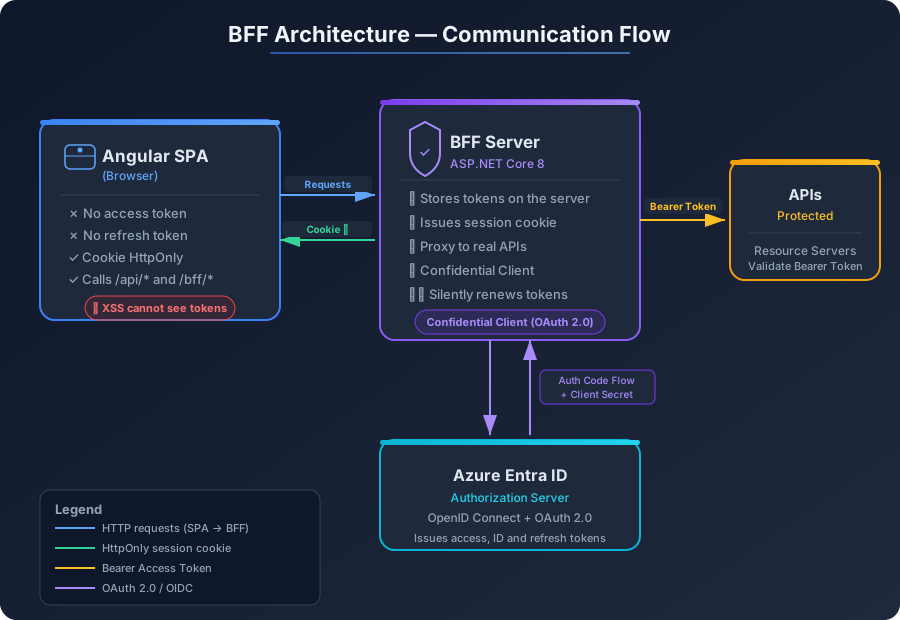
The BFF (Backend For Frontend) is an architectural pattern where a dedicated backend server acts as an intermediary between the front end (SPA) and the identity services/protected APIs. The concept was popularized by Sam Newman and adapted specifically for SPA security by the OAuth community.
How the BFF Architecture Works#
Step-by-Step Flow#
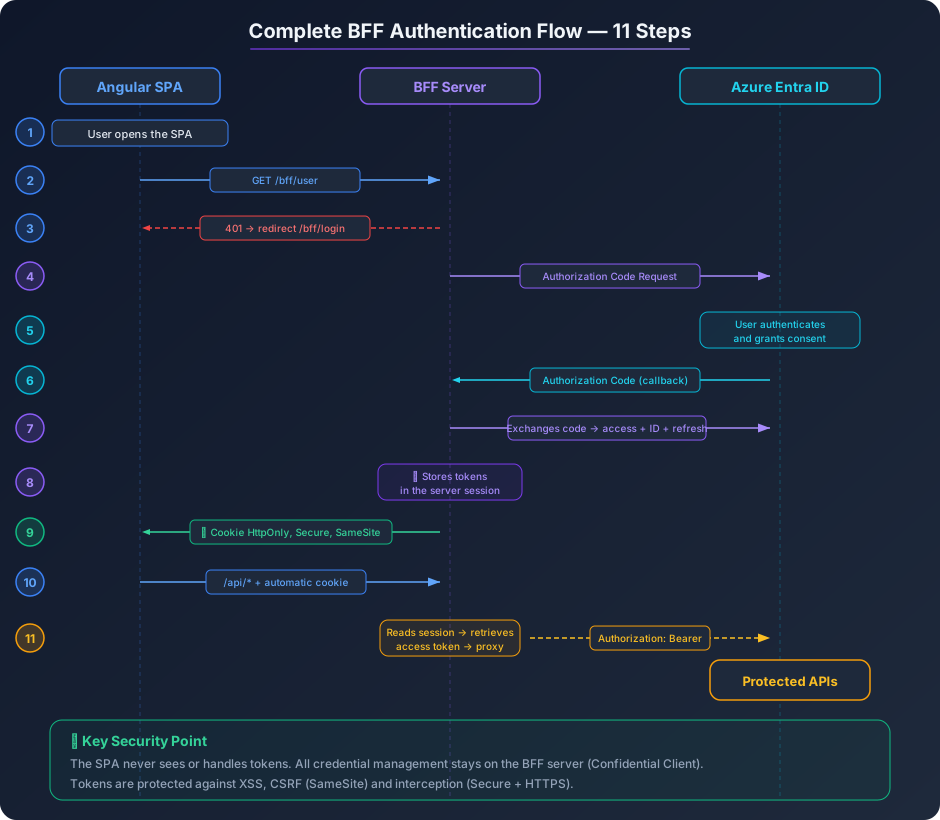
- The user opens the Angular SPA in the browser.
- The SPA checks whether there is an active session by calling
GET /bff/user on the BFF. - If not authenticated, the SPA redirects the browser to
GET /bff/login. - The BFF starts the OAuth 2.0 Authorization Code flow (with Client Secret) against Azure Entra ID.
- The user authenticates in Azure Entra ID and grants consent.
- Azure Entra ID returns the authorization code to the BFF (callback).
- The BFF exchanges the code for an access token, ID token and refresh token.
- The BFF stores the tokens in the server session (memory, Redis, database, etc.).
- The BFF issues an HttpOnly, Secure, SameSite=Strict session cookie to the browser.
- The SPA makes requests to the APIs via the BFF (
/api/*), automatically sending the cookie. - The BFF reads the session, retrieves the access token and proxies the request to the real API, including the token in the
Authorization: Bearer header.
ℹ️ Info: Note that the SPA never sees or handles tokens. All credential management stays on the BFF server, which is a controlled and secure environment — a Confidential Client in OAuth 2.0.
Advantages of the BFF#
| Aspect | Traditional SPA (tokens in browser) | BFF (tokens on server) |
|---|
| Tokens in browser | Yes (localStorage/sessionStorage) | No — they stay on the server |
| Vulnerable to XSS | Yes — tokens can be stolen | No — HttpOnly cookie inaccessible |
| OAuth Client type | Public Client | Confidential Client (more secure) |
| Client Secret | Cannot use | Yes — safe on the server |
| Refresh tokens | In the browser (risk) | On the server (safe) |
| CSRF | Not applicable | Mitigable with SameSite + tokens |
| Complexity | Lower (everything in the front end) | Higher (additional server) |
| IETF recommendation | Not recommended for new projects | Recommended |
Implementing the BFF with ASP.NET Core 8#
Let’s build the BFF step by step. The ASP.NET Core project will act simultaneously as authentication server (OpenID Connect), session manager and reverse proxy for the protected APIs.
Project Structure#
 1
 2
 3
 4
 5
 6
 7
 8
 9
10
11
| MinhaSPA.Bff/
├── Program.cs # Main BFF configuration
├── appsettings.json # Azure Entra ID and proxy settings
├── Endpoints/
│ └── BffEndpoints.cs # Endpoints /bff/login, /bff/logout, /bff/user
├── Properties/
│ └── launchSettings.json
├── MinhaSPA.Bff.csproj
nginx/
├── nginx.conf # NGINX configuration as reverse proxy
└── Dockerfile # NGINX container for production
|
Project Creation and Dependencies#
1
2
3
4
5
6
| # Create ASP.NET Core 8 project (empty — no MVC/API template)
dotnet new web -n MinhaSPA.Bff --framework net8.0
cd MinhaSPA.Bff
# OpenID Connect authentication packages
dotnet add package Microsoft.AspNetCore.Authentication.OpenIdConnect
|
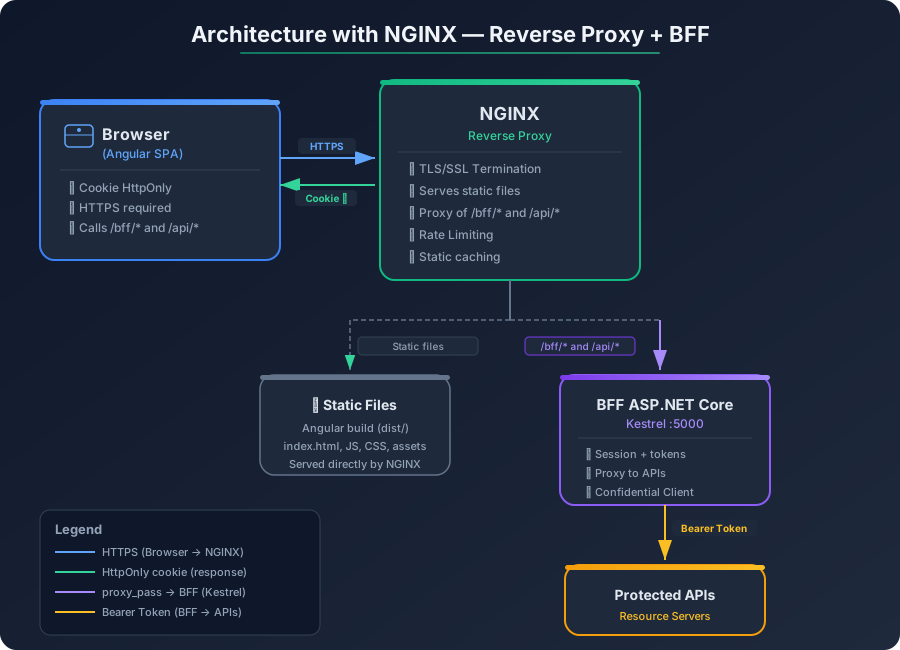
ℹ️ Info: In this architecture, NGINX acts as a reverse proxy in front of the BFF, serving the Angular static files and forwarding /bff/* and /api/* requests to ASP.NET Core. The BFF, in turn, proxies /api/* calls to the protected APIs via HttpClient, injecting the access token.
Configuration (appsettings.json)#
 1
 2
 3
 4
 5
 6
 7
 8
 9
10
11
12
13
14
15
16
17
18
19
| {
"AzureAd": {
"Instance": "https://login.microsoftonline.com/",
"TenantId": "seu-tenant-id",
"ClientId": "seu-client-id-do-bff",
"ClientSecret": "seu-client-secret",
"CallbackPath": "/signin-oidc",
"SignedOutCallbackPath": "/signout-callback-oidc"
},
"ApiProxy": {
"BaseUrl": "https://api.seudominio.com",
"TimeoutSeconds": 30
},
"Logging": {
"LogLevel": {
"Default": "Information"
}
}
}
|
Main Configuration (Program.cs)#
  1
  2
  3
  4
  5
  6
  7
  8
  9
 10
 11
 12
 13
 14
 15
 16
 17
 18
 19
 20
 21
 22
 23
 24
 25
 26
 27
 28
 29
 30
 31
 32
 33
 34
 35
 36
 37
 38
 39
 40
 41
 42
 43
 44
 45
 46
 47
 48
 49
 50
 51
 52
 53
 54
 55
 56
 57
 58
 59
 60
 61
 62
 63
 64
 65
 66
 67
 68
 69
 70
 71
 72
 73
 74
 75
 76
 77
 78
 79
 80
 81
 82
 83
 84
 85
 86
 87
 88
 89
 90
 91
 92
 93
 94
 95
 96
 97
 98
 99
100
101
102
103
104
105
106
107
108
109
110
111
112
113
114
115
116
117
118
119
120
121
122
123
124
125
126
127
128
129
130
131
132
133
134
135
136
137
138
139
140
141
142
143
144
145
146
147
148
149
150
151
152
153
154
155
156
157
158
159
160
161
162
163
164
165
166
167
168
169
170
171
172
173
174
175
176
177
178
179
180
181
182
183
184
185
186
187
188
189
190
191
192
193
194
195
196
197
198
199
200
201
202
203
204
205
206
207
208
209
210
211
212
213
214
215
216
217
218
| // Program.cs — BFF with OpenID Connect authentication, HttpOnly session and proxy via HttpClient
using System.Net.Http.Headers;
using Microsoft.AspNetCore.Authentication;
using Microsoft.AspNetCore.Authentication.Cookies;
using Microsoft.AspNetCore.Authentication.OpenIdConnect;
using Microsoft.IdentityModel.Protocols.OpenIdConnect;
var builder = WebApplication.CreateBuilder(args);
// ===== 1. SESSION AND COOKIES =====
// Configure HttpOnly, Secure, SameSite session cookie
builder.Services.AddAuthentication(options =>
{
options.DefaultScheme = CookieAuthenticationDefaults.AuthenticationScheme;
options.DefaultChallengeScheme = OpenIdConnectDefaults.AuthenticationScheme;
})
.AddCookie(CookieAuthenticationDefaults.AuthenticationScheme, options =>
{
options.Cookie.Name = "MinhaSPA.Session";
options.Cookie.HttpOnly = true; // JavaScript CANNOT access this cookie
options.Cookie.SecurePolicy = CookieSecurePolicy.Always; // HTTPS only
options.Cookie.SameSite = SameSiteMode.Strict; // CSRF protection
options.ExpireTimeSpan = TimeSpan.FromHours(8); // 8-hour session
options.SlidingExpiration = true; // Automatic renewal
// Return 401 instead of redirecting to login on AJAX calls
options.Events.OnRedirectToLogin = context =>
{
if (context.Request.Path.StartsWithSegments("/api") ||
context.Request.Path.StartsWithSegments("/bff"))
{
context.Response.StatusCode = 401;
return Task.CompletedTask;
}
context.Response.Redirect(context.RedirectUri);
return Task.CompletedTask;
};
})
// ===== 2. OPENID CONNECT WITH AZURE ENTRA ID =====
.AddOpenIdConnect(OpenIdConnectDefaults.AuthenticationScheme, options =>
{
var azureAd = builder.Configuration.GetSection("AzureAd");
options.Authority = $"{azureAd["Instance"]}{azureAd["TenantId"]}/v2.0";
options.ClientId = azureAd["ClientId"];
options.ClientSecret = azureAd["ClientSecret"]; // Confidential Client — secure!
options.CallbackPath = azureAd["CallbackPath"];
options.SignedOutCallbackPath = azureAd["SignedOutCallbackPath"];
options.ResponseType = OpenIdConnectResponseType.Code; // Authorization Code Flow
options.SaveTokens = true; // Save tokens in the session (server-side!)
options.GetClaimsFromUserInfoEndpoint = true;
options.MapInboundClaims = false; // Keep original Azure Entra claims
// Scopes: openid + profile + email + your API scopes
options.Scope.Clear();
options.Scope.Add("openid");
options.Scope.Add("profile");
options.Scope.Add("email");
options.Scope.Add("offline_access"); // Refresh token for silent renewal
options.Scope.Add("api://sua-api-client-id/User.Read");
// Event: renew expired access token using refresh token
options.Events = new OpenIdConnectEvents
{
OnTokenValidated = async context =>
{
// Here you can add custom claims, load roles from the database, etc.
var nome = context.Principal?.FindFirst("name")?.Value;
Console.WriteLine($"Authenticated user: {nome}");
}
};
});
builder.Services.AddAuthorization();
// ===== 3. HTTPCLIENT FOR API PROXY =====
// Named HttpClient to proxy /api/* requests to the real API
var apiBaseUrl = builder.Configuration["ApiProxy:BaseUrl"] ?? "https://api.seudominio.com";
var timeoutSeconds = builder.Configuration.GetValue<int>("ApiProxy:TimeoutSeconds", 30);
builder.Services.AddHttpClient("ApiProxy", client =>
{
client.BaseAddress = new Uri(apiBaseUrl);
client.Timeout = TimeSpan.FromSeconds(timeoutSeconds);
client.DefaultRequestHeaders.Accept.Add(
new MediaTypeWithQualityHeaderValue("application/json"));
});
// ===== 4. CORS (for local development) =====
builder.Services.AddCors(options =>
{
options.AddPolicy("PermitirAngular", corsBuilder =>
{
corsBuilder
.WithOrigins("http://localhost:4200")
.AllowAnyHeader()
.AllowAnyMethod()
.AllowCredentials(); // Required for cross-origin cookies in dev
});
});
// ===== 5. ANTIFORGERY (CSRF protection) =====
builder.Services.AddAntiforgery(options =>
{
options.HeaderName = "X-XSRF-TOKEN"; // Header that Angular will send
options.Cookie.Name = "XSRF-TOKEN"; // Cookie that Angular will read
options.Cookie.HttpOnly = false; // Angular needs to read this cookie (CSRF only)
options.Cookie.SameSite = SameSiteMode.Strict;
options.Cookie.SecurePolicy = CookieSecurePolicy.Always;
});
var app = builder.Build();
app.UseHttpsRedirection();
app.UseCors("PermitirAngular");
app.UseAuthentication();
app.UseAuthorization();
// ===== 6. BFF ENDPOINTS =====
// Endpoint: check the user's authentication state
app.MapGet("/bff/user", (HttpContext ctx) =>
{
if (ctx.User.Identity?.IsAuthenticated != true)
{
return Results.Unauthorized();
}
// Return user claims (from the ID Token, stored in the session)
var claims = ctx.User.Claims.Select(c => new { c.Type, c.Value }).ToList();
return Results.Ok(new
{
IsAuthenticated = true,
Nome = ctx.User.FindFirst("name")?.Value,
Email = ctx.User.FindFirst("email")?.Value,
Claims = claims
});
}).RequireAuthorization();
// Endpoint: start login via OpenID Connect
app.MapGet("/bff/login", (HttpContext ctx, string? returnUrl) =>
{
var redirectUri = returnUrl ?? "/";
return Results.Challenge(
new AuthenticationProperties { RedirectUri = redirectUri },
[OpenIdConnectDefaults.AuthenticationScheme]
);
});
// Endpoint: logout — clears the local session and redirects to Azure Entra
app.MapGet("/bff/logout", async (HttpContext ctx) =>
{
await ctx.SignOutAsync(CookieAuthenticationDefaults.AuthenticationScheme);
await ctx.SignOutAsync(OpenIdConnectDefaults.AuthenticationScheme,
new AuthenticationProperties { RedirectUri = "/" });
});
// ===== 7. API PROXY — /api/* are proxied to the real API with access token =====
app.MapMethods("/api/{**remainder}", new[] { "GET", "POST", "PUT", "DELETE", "PATCH" },
async (HttpContext ctx, IHttpClientFactory httpClientFactory, string remainder) =>
{
// Retrieve the access token from the user session
var accessToken = await ctx.GetTokenAsync("access_token");
if (string.IsNullOrEmpty(accessToken))
{
return Results.Unauthorized();
}
// Create request to the real API
var client = httpClientFactory.CreateClient("ApiProxy");
var targetPath = $"/{remainder}{ctx.Request.QueryString}";
using var requestMessage = new HttpRequestMessage(
new HttpMethod(ctx.Request.Method), targetPath);
// Inject the access token into the Authorization header
requestMessage.Headers.Authorization =
new AuthenticationHeaderValue("Bearer", accessToken);
// Copy the body for requests with a body (POST, PUT, PATCH)
if (ctx.Request.ContentLength > 0 || ctx.Request.ContentType != null)
{
requestMessage.Content = new StreamContent(ctx.Request.Body);
if (ctx.Request.ContentType != null)
{
requestMessage.Content.Headers.ContentType =
System.Net.Http.Headers.MediaTypeHeaderValue.Parse(ctx.Request.ContentType);
}
}
// Forward relevant headers
foreach (var header in new[] { "Accept", "Accept-Language", "X-Request-ID" })
{
if (ctx.Request.Headers.TryGetValue(header, out var value))
{
requestMessage.Headers.TryAddWithoutValidation(header, value.ToString());
}
}
// Send request to the real API
var response = await client.SendAsync(requestMessage);
// Return the API response to Angular
ctx.Response.StatusCode = (int)response.StatusCode;
ctx.Response.ContentType = response.Content.Headers.ContentType?.ToString() ?? "application/json";
await response.Content.CopyToAsync(ctx.Response.Body);
}).RequireAuthorization();
// ===== 8. FALLBACK (development only, without NGINX) =====
if (app.Environment.IsDevelopment())
{
app.UseDefaultFiles();
app.UseStaticFiles();
app.MapFallbackToFile("index.html");
}
app.Run();
|
💡 Tip: SaveTokens = true makes the tokens be stored in the session cookie encrypted by ASP.NET Core Data Protection. In production, to avoid very large cookies, consider using distributed session storage with Redis or SQL Server.
Configuring NGINX as a Reverse Proxy#
In production, NGINX sits in front of the whole architecture. It is responsible for serving the Angular static files (removing that responsibility from ASP.NET Core), forwarding /bff/* and /api/* requests to the BFF, managing TLS/SSL and applying rate limiting and caching efficiently.
Architecture Diagram with NGINX#
NGINX Configuration (nginx/nginx.conf)#
  1
  2
  3
  4
  5
  6
  7
  8
  9
 10
 11
 12
 13
 14
 15
 16
 17
 18
 19
 20
 21
 22
 23
 24
 25
 26
 27
 28
 29
 30
 31
 32
 33
 34
 35
 36
 37
 38
 39
 40
 41
 42
 43
 44
 45
 46
 47
 48
 49
 50
 51
 52
 53
 54
 55
 56
 57
 58
 59
 60
 61
 62
 63
 64
 65
 66
 67
 68
 69
 70
 71
 72
 73
 74
 75
 76
 77
 78
 79
 80
 81
 82
 83
 84
 85
 86
 87
 88
 89
 90
 91
 92
 93
 94
 95
 96
 97
 98
 99
100
101
102
103
104
105
106
107
108
109
110
111
112
113
114
115
116
117
118
119
120
121
| # nginx.conf — Reverse proxy for BFF + Angular SPA
worker_processes auto;
events {
worker_connections 1024;
}
http {
include mime.types;
default_type application/octet-stream;
sendfile on;
keepalive_timeout 65;
# ===== RATE LIMITING =====
# Abuse protection — limit requests per IP
limit_req_zone $binary_remote_addr zone=bff_limit:10m rate=30r/s;
limit_req_zone $binary_remote_addr zone=api_limit:10m rate=60r/s;
# ===== GZIP =====
gzip on;
gzip_types text/plain text/css application/json application/javascript text/xml;
gzip_min_length 256;
# ===== UPSTREAM — BFF ASP.NET Core =====
upstream bff_backend {
server bff:5000; # Docker container name or BFF IP
keepalive 32; # Persistent connections for better performance
}
server {
listen 80;
server_name app.seudominio.com;
# Redirect HTTP to HTTPS
return 301 https://$server_name$request_uri;
}
server {
listen 443 ssl http2;
server_name app.seudominio.com;
# ===== TLS/SSL =====
ssl_certificate /etc/nginx/ssl/fullchain.pem;
ssl_certificate_key /etc/nginx/ssl/privkey.pem;
ssl_protocols TLSv1.2 TLSv1.3;
ssl_ciphers HIGH:!aNULL:!MD5;
ssl_prefer_server_ciphers on;
# ===== SECURITY HEADERS =====
add_header X-Frame-Options "DENY" always;
add_header X-Content-Type-Options "nosniff" always;
add_header X-XSS-Protection "1; mode=block" always;
add_header Referrer-Policy "strict-origin-when-cross-origin" always;
add_header Content-Security-Policy "default-src 'self'; script-src 'self'; style-src 'self' 'unsafe-inline'; img-src 'self' data:; connect-src 'self' https://login.microsoftonline.com" always;
add_header Strict-Transport-Security "max-age=31536000; includeSubDomains" always;
# ===== /bff/* ROUTES — Proxy to the BFF (authentication) =====
location /bff/ {
limit_req zone=bff_limit burst=10 nodelay;
proxy_pass http://bff_backend;
proxy_set_header Host $host;
proxy_set_header X-Real-IP $remote_addr;
proxy_set_header X-Forwarded-For $proxy_add_x_forwarded_for;
proxy_set_header X-Forwarded-Proto $scheme;
# Important: forward cookies to the BFF
proxy_pass_request_headers on;
proxy_cookie_path / /;
}
# ===== /api/* ROUTES — Proxy to the BFF (which proxies to the real API) =====
location /api/ {
limit_req zone=api_limit burst=20 nodelay;
proxy_pass http://bff_backend;
proxy_set_header Host $host;
proxy_set_header X-Real-IP $remote_addr;
proxy_set_header X-Forwarded-For $proxy_add_x_forwarded_for;
proxy_set_header X-Forwarded-Proto $scheme;
# Forward cookies (BFF session)
proxy_pass_request_headers on;
proxy_cookie_path / /;
# Timeouts to avoid blocking on slow APIs
proxy_connect_timeout 10s;
proxy_send_timeout 30s;
proxy_read_timeout 30s;
}
# ===== OPENID CONNECT CALLBACKS =====
location /signin-oidc {
proxy_pass http://bff_backend;
proxy_set_header Host $host;
proxy_set_header X-Forwarded-For $proxy_add_x_forwarded_for;
proxy_set_header X-Forwarded-Proto $scheme;
proxy_pass_request_headers on;
}
location /signout-callback-oidc {
proxy_pass http://bff_backend;
proxy_set_header Host $host;
proxy_set_header X-Forwarded-For $proxy_add_x_forwarded_for;
proxy_set_header X-Forwarded-Proto $scheme;
proxy_pass_request_headers on;
}
# ===== ANGULAR SPA — Static files =====
location / {
root /usr/share/nginx/html; # Angular build (ng build)
index index.html;
try_files $uri $uri/ /index.html; # SPA fallback — Angular routing
# Aggressive caching for static assets
location ~* \.(js|css|png|jpg|jpeg|gif|ico|svg|woff2?)$ {
expires 1y;
add_header Cache-Control "public, immutable";
}
}
}
}
|
Docker Compose for NGINX + BFF#
To simplify deployment, use Docker Compose to orchestrate NGINX and the BFF:
 1
 2
 3
 4
 5
 6
 7
 8
 9
10
11
12
13
14
15
16
17
18
19
20
21
22
23
24
25
26
27
28
29
| # docker-compose.yml — NGINX + BFF ASP.NET Core
version: "3.8"
services:
nginx:
image: nginx:alpine
ports:
- "80:80"
- "443:443"
volumes:
- ./nginx/nginx.conf:/etc/nginx/nginx.conf:ro
- ./nginx/ssl:/etc/nginx/ssl:ro
- ./dist/minha-spa:/usr/share/nginx/html:ro # Angular build
depends_on:
- bff
restart: unless-stopped
bff:
build:
context: ./MinhaSPA.Bff
dockerfile: Dockerfile
environment:
- ASPNETCORE_URLS=http://+:5000
- AzureAd__TenantId=${AZURE_TENANT_ID}
- AzureAd__ClientId=${AZURE_CLIENT_ID}
- AzureAd__ClientSecret=${AZURE_CLIENT_SECRET}
expose:
- "5000" # Only accessible internally by NGINX
restart: unless-stopped
|
💡 Tip: In local development, you can use Angular’s ng serve with a proxy to the BFF (via proxy.conf.json) without needing NGINX. NGINX only comes into play in staging and production environments, where performance, TLS and security headers are essential.
Automatic Token Renewal in the BFF#
A critical aspect of the BFF is the silent renewal of access tokens using the refresh token. The access token is short-lived (typically 1 hour in Azure Entra ID), but the refresh token allows obtaining new tokens without the user needing to log in again.
Add this middleware to Program.cs to renew tokens automatically:
 1
 2
 3
 4
 5
 6
 7
 8
 9
10
11
12
13
14
15
16
17
18
19
20
21
22
23
24
25
26
27
28
29
30
31
32
33
34
35
36
37
38
39
40
41
42
43
44
45
46
47
48
49
50
51
52
53
54
55
56
57
58
59
60
61
62
63
64
65
66
67
68
69
70
71
72
| // Automatic token renewal middleware — add BEFORE UseAuthorization()
app.Use(async (context, next) =>
{
if (context.User.Identity?.IsAuthenticated == true)
{
var expiresAt = await context.GetTokenAsync("expires_at");
if (DateTimeOffset.TryParse(expiresAt, out var expiracao) &&
expiracao < DateTimeOffset.UtcNow.AddMinutes(5)) // Renew 5 min before expiration
{
var refreshToken = await context.GetTokenAsync("refresh_token");
if (!string.IsNullOrEmpty(refreshToken))
{
try
{
// Build the renewal request to Azure Entra ID
var config = context.RequestServices
.GetRequiredService<IConfiguration>();
var azureAd = config.GetSection("AzureAd");
using var httpClient = new HttpClient();
var tokenEndpoint = $"{azureAd["Instance"]}{azureAd["TenantId"]}/oauth2/v2.0/token";
var tokenRequest = new FormUrlEncodedContent(new Dictionary<string, string>
{
["grant_type"] = "refresh_token",
["client_id"] = azureAd["ClientId"]!,
["client_secret"] = azureAd["ClientSecret"]!,
["refresh_token"] = refreshToken,
["scope"] = "openid profile email offline_access api://sua-api-client-id/User.Read"
});
var response = await httpClient.PostAsync(tokenEndpoint, tokenRequest);
if (response.IsSuccessStatusCode)
{
var payload = await response.Content
.ReadFromJsonAsync<Dictionary<string, object>>();
// Update tokens in the session
var authInfo = await context.AuthenticateAsync();
authInfo.Properties?.UpdateTokenValue(
"access_token", payload!["access_token"].ToString()!);
authInfo.Properties?.UpdateTokenValue(
"refresh_token", payload["refresh_token"].ToString()!);
authInfo.Properties?.UpdateTokenValue(
"expires_at",
DateTimeOffset.UtcNow
.AddSeconds(Convert.ToDouble(payload["expires_in"]))
.ToString("o"));
// Re-issue the session cookie with the new tokens
await context.SignInAsync(
CookieAuthenticationDefaults.AuthenticationScheme,
context.User,
authInfo.Properties);
}
}
catch (Exception ex)
{
// Log the error — do not interrupt the request
var logger = context.RequestServices
.GetRequiredService<ILogger<Program>>();
logger.LogWarning(ex, "Failed to renew access token");
}
}
}
}
await next(context);
});
|
⚠️ Warning: In production applications with multiple instances, token renewal needs special care to avoid race conditions (multiple instances renewing simultaneously). Use a distributed lock (Redis, for example) or delegate the renewal to a single worker.
Implementing Angular 16+ with the BFF#
The big advantage of the BFF for the front end is simplicity: the Angular SPA does not need any authentication library (such as MSAL). It just makes normal HTTP requests and the session cookie is sent automatically by the browser.
Authentication Service (auth.service.ts)#
 1
 2
 3
 4
 5
 6
 7
 8
 9
10
11
12
13
14
15
16
17
18
19
20
21
22
23
24
25
26
27
28
29
30
31
32
33
34
35
36
37
38
39
40
41
42
43
44
45
46
47
48
49
50
51
52
53
54
55
56
57
58
59
60
61
62
63
64
| // src/app/auth/auth.service.ts — Authentication service via BFF (no MSAL!)
import { Injectable, inject } from "@angular/core";
import { HttpClient } from "@angular/common/http";
import { BehaviorSubject, Observable, catchError, of, tap } from "rxjs";
// Interface representing the authenticated user
export interface UsuarioBff {
isAuthenticated: boolean;
nome: string;
email: string;
claims: { type: string; value: string }[];
}
@Injectable({ providedIn: "root" })
export class AuthService {
private http = inject(HttpClient);
// Reactive user state
private usuarioSubject = new BehaviorSubject<UsuarioBff | null>(null);
public usuario$ = this.usuarioSubject.asObservable();
/**
* Checks whether the user is authenticated by querying the BFF.
* The HttpOnly cookie is sent automatically by the browser.
*/
verificarAutenticacao(): Observable<UsuarioBff | null> {
return this.http
.get<UsuarioBff>("/bff/user", { withCredentials: true })
.pipe(
tap((usuario) => this.usuarioSubject.next(usuario)),
catchError(() => {
// 401 = not authenticated — expected behavior
this.usuarioSubject.next(null);
return of(null);
})
);
}
/**
* Redirects the browser to the BFF login endpoint.
* The BFF will start the OAuth2 Authorization Code flow with Azure Entra ID.
*/
login(returnUrl: string = "/"): void {
window.location.href = `/bff/login?returnUrl=${encodeURIComponent(returnUrl)}`;
}
/**
* Redirects to the BFF logout endpoint.
* The BFF clears the local session and redirects to Azure Entra for global logout.
*/
logout(): void {
window.location.href = "/bff/logout";
}
/** Returns true if the user is authenticated. */
get isAutenticado(): boolean {
return this.usuarioSubject.value?.isAuthenticated === true;
}
/** Returns the authenticated user's name. */
get nomeUsuario(): string {
return this.usuarioSubject.value?.nome ?? "";
}
}
|
Authentication Guard (auth.guard.ts)#
 1
 2
 3
 4
 5
 6
 7
 8
 9
10
11
12
13
14
15
16
17
18
19
20
21
22
| // src/app/auth/auth.guard.ts — Guard to protect routes (Angular 16+ functional guard)
import { inject } from "@angular/core";
import { CanActivateFn, Router } from "@angular/router";
import { AuthService } from "./auth.service";
import { map, take } from "rxjs";
export const authGuard: CanActivateFn = () => {
const authService = inject(AuthService);
const router = inject(Router);
return authService.verificarAutenticacao().pipe(
take(1),
map((usuario) => {
if (usuario?.isAuthenticated) {
return true;
}
// Redirect to login on the BFF, passing the current URL as returnUrl
authService.login(window.location.pathname);
return false;
})
);
};
|
CSRF Interceptor (csrf.interceptor.ts)#
 1
 2
 3
 4
 5
 6
 7
 8
 9
10
11
12
13
14
15
16
17
18
19
20
21
22
23
24
25
26
27
28
29
30
31
32
33
34
| // src/app/auth/csrf.interceptor.ts — Interceptor that sends the CSRF token to the BFF
import { HttpInterceptorFn } from "@angular/common/http";
/**
* Functional interceptor (Angular 16+) that reads the XSRF-TOKEN cookie
* and sends it in the X-XSRF-TOKEN header on mutating requests (POST, PUT, DELETE).
*
* Angular HttpClient with withXsrfConfiguration already does this automatically
* for same-origin requests, but this interceptor guarantees the explicit
* behavior and works with custom configurations.
*/
export const csrfInterceptor: HttpInterceptorFn = (req, next) => {
// Only requests that modify data need the CSRF token
const metodosMutaveis = ["POST", "PUT", "DELETE", "PATCH"];
if (metodosMutaveis.includes(req.method.toUpperCase())) {
// Read the XSRF-TOKEN cookie (set by the BFF with HttpOnly=false)
const csrfToken = obterCookie("XSRF-TOKEN");
if (csrfToken) {
req = req.clone({
setHeaders: { "X-XSRF-TOKEN": csrfToken },
});
}
}
return next(req);
};
/** Utility to read a cookie by name. */
function obterCookie(nome: string): string | null {
const match = document.cookie.match(new RegExp(`(^| )${nome}=([^;]+)`));
return match ? decodeURIComponent(match[2]) : null;
}
|
Application Configuration (app.config.ts)#
 1
 2
 3
 4
 5
 6
 7
 8
 9
10
11
12
13
14
15
16
17
18
19
20
21
22
23
24
25
| // src/app/app.config.ts — Angular 16+ standalone configuration with BFF
import { ApplicationConfig } from "@angular/core";
import { provideRouter } from "@angular/router";
import {
provideHttpClient,
withInterceptors,
withXsrfConfiguration,
} from "@angular/common/http";
import { routes } from "./app.routes";
import { csrfInterceptor } from "./auth/csrf.interceptor";
export const appConfig: ApplicationConfig = {
providers: [
provideRouter(routes),
provideHttpClient(
// Angular native XSRF configuration (security redundancy)
withXsrfConfiguration({
cookieName: "XSRF-TOKEN",
headerName: "X-XSRF-TOKEN",
}),
// Custom CSRF interceptor for explicit control
withInterceptors([csrfInterceptor])
),
],
};
|
Protected Routes (app.routes.ts)#
 1
 2
 3
 4
 5
 6
 7
 8
 9
10
11
12
13
14
15
16
17
18
19
20
21
22
23
| // src/app/app.routes.ts — Routes with authentication guard via BFF
import { Routes } from "@angular/router";
import { authGuard } from "./auth/auth.guard";
export const routes: Routes = [
{
path: "",
loadComponent: () =>
import("./home/home.component").then((m) => m.HomeComponent),
},
{
path: "dashboard",
loadComponent: () =>
import("./dashboard/dashboard.component").then((m) => m.DashboardComponent),
canActivate: [authGuard], // Protected — requires authentication via BFF
},
{
path: "admin",
loadComponent: () =>
import("./admin/admin.component").then((m) => m.AdminComponent),
canActivate: [authGuard],
},
];
|
Component Consuming the API (dashboard.component.ts)#
 1
 2
 3
 4
 5
 6
 7
 8
 9
10
11
12
13
14
15
16
17
18
19
20
21
22
23
24
25
26
27
28
29
30
31
32
33
34
35
36
37
38
39
40
41
42
43
44
45
46
47
48
49
50
51
52
53
54
55
56
57
58
| // src/app/dashboard/dashboard.component.ts — Consuming a protected API via BFF proxy
import { Component, OnInit, inject } from "@angular/core";
import { CommonModule } from "@angular/common";
import { HttpClient } from "@angular/common/http";
import { AuthService } from "../auth/auth.service";
@Component({
selector: "app-dashboard",
standalone: true,
imports: [CommonModule],
template: `
<h2>Dashboard</h2>
<p>Hello, {{ auth.nomeUsuario }}!</p>
<button (click)="carregarDados()">Load API Data</button>
<button (click)="auth.logout()">Logout</button>
<div *ngIf="dados">
<h3>API response:</h3>
<pre>{{ dados | json }}</pre>
</div>
<div *ngIf="erro" class="erro">
<p>Error: {{ erro }}</p>
</div>
`,
})
export class DashboardComponent implements OnInit {
auth = inject(AuthService);
private http = inject(HttpClient);
dados: any = null;
erro: string | null = null;
ngOnInit(): void {
this.carregarDados();
}
carregarDados(): void {
// The request goes to /api/dados on the BFF (same domain)
// The BFF proxies to the real API, injecting the access token
// The session cookie is sent automatically by the browser
this.http
.get("/api/dados", { withCredentials: true })
.subscribe({
next: (data) => {
this.dados = data;
this.erro = null;
},
error: (err) => {
this.erro = `Failed to load data: ${err.status} ${err.statusText}`;
if (err.status === 401) {
this.auth.login(window.location.pathname); // Session expired
}
},
});
}
}
|
ℹ️ Info: Notice that Angular uses no authentication library (no MSAL, no angular-oauth2-oidc). The requests are plain HTTP with HttpClient. The session cookie is sent automatically by the browser, and the BFF handles the whole OAuth2 flow behind the scenes.
BFF vs. Traditional SPA: Detailed Comparison#
To understand when to use each approach, see this side-by-side comparison:
| Aspect | Traditional SPA (MSAL in the browser) | SPA with BFF (tokens on the server) |
|---|
| Front-end library | @azure/msal-angular | None — just HttpClient |
| Where tokens live | localStorage / sessionStorage | Server session (memory, Redis) |
| Cookie type | Not used (or JS-accessible cookie) | HttpOnly + Secure + SameSite=Strict |
| OAuth Client Type | Public Client (no secret) | Confidential Client (with secret) |
| OAuth flow | Auth Code + PKCE (in the browser) | Auth Code + Secret (on the server) |
| Vulnerable to XSS | Yes — tokens accessible to JS | No — tokens inaccessible to JS |
| Front-end complexity | Higher (MSAL config, interceptors, guards) | Lower (plain HTTP, no auth config) |
| Back-end complexity | Lower (API only validates tokens) | Higher (BFF manages session, proxy, renewal) |
| Token renewal | MSAL does it silently via iframe | BFF renews on the server via refresh token |
| Suitable for | MVPs, internal apps, low risk | Production, public apps, sensitive data |
| IETF recommendation | Acceptable with PKCE | Recommended for new projects |
CSRF Protection in the BFF#
Because the BFF uses cookies for authentication, it is potentially vulnerable to CSRF (Cross-Site Request Forgery). A malicious site could try to send requests to the BFF using the victim’s cookies. To mitigate this, I use three layers of protection:
1. SameSite=Strict Cookie#
1
2
| // Already configured in Program.cs
options.Cookie.SameSite = SameSiteMode.Strict;
|
The SameSite=Strict attribute instructs the browser not to send the cookie in requests originating from other domains. This blocks most CSRF attacks in modern browsers.
2. Anti-Forgery Token (Double Submit Cookie)#
ASP.NET Core Antiforgery issues an XSRF-TOKEN cookie readable by JavaScript and expects Angular to send the value in the X-XSRF-TOKEN header. An attacking site cannot read cookies from another domain, so it cannot forge that header.
3. Origin/Referer Validation#
In high-security scenarios, add validation of the Origin or Referer header:
 1
 2
 3
 4
 5
 6
 7
 8
 9
10
11
12
13
14
15
16
17
18
19
20
21
22
23
24
25
| // Origin validation middleware — add before the endpoints
app.Use(async (context, next) =>
{
var method = context.Request.Method;
var metodosMutaveis = new[] { "POST", "PUT", "DELETE", "PATCH" };
if (metodosMutaveis.Contains(method, StringComparer.OrdinalIgnoreCase))
{
var origin = context.Request.Headers.Origin.FirstOrDefault();
var originsPermitidas = new[] { "https://app.seudominio.com", "http://localhost:4200" };
if (!string.IsNullOrEmpty(origin) && !originsPermitidas.Contains(origin))
{
context.Response.StatusCode = 403;
await context.Response.WriteAsJsonAsync(new
{
Erro = "Origin not allowed",
Origin = origin
});
return;
}
}
await next(context);
});
|
Tips and Good Practices#
Use a distributed session in production: storing sessions only in memory does not work when you have multiple BFF instances. Use Redis or SQL Server for distributed session storage, ensuring that any instance can serve any request.
Implement health checks in the BFF: the BFF is a critical point of the architecture. If it goes down, the whole SPA is left without authentication. Configure health checks, monitoring and redundancy. Consider running at least 2 replicas in production.
Separate the BFF from the business API: the BFF should do only proxying and session management. Do not put business logic in the BFF — keep it lightweight with a single responsibility. The protected APIs (Resource Servers) must validate access tokens independently.
Configure proper timeouts in NGINX and HttpClient: in NGINX, set proxy_connect_timeout, proxy_send_timeout and proxy_read_timeout to prevent slow APIs from blocking the BFF. In ASP.NET Core, the named HttpClient already has a timeout configured via appsettings.json.
Do not expose internal endpoints: make sure only /bff/* and /api/* are accessible externally. Diagnostics, metrics and health check endpoints should be protected or accessible only internally.
Monitor the session cookie size: with SaveTokens = true, tokens are stored inside the cookie encrypted by ASP.NET Core. Azure Entra ID tokens can be large (1-3KB). If the session cookie exceeds 4KB, browsers may reject it. In that case, migrate to a server-side session with Redis.
Test for XSS regularly: although the BFF protects tokens against XSS, an XSS attack can still hijack the user’s session (sending authenticated requests on their behalf). Keep input sanitization, CSP (Content-Security-Policy) and audit npm dependencies with npm audit.
⚠️ Warning: The BFF does not eliminate the need to protect the SPA against XSS. It eliminates the possibility of token theft, but an active XSS can send authenticated requests while the session is active. Combine the BFF with CSP headers, input sanitization and regular dependency audits.
Conclusion#
The BFF (Backend For Frontend) pattern is today the most secure approach for authentication in Single Page Applications, being the official IETF recommendation for browser-based applications. By moving token management to an intermediate server and using HttpOnly cookies to communicate with the browser, we eliminate the main attack vector — JavaScript access to sensitive credentials.
In this article, I implemented a complete BFF with ASP.NET Core 8 that acts as a Confidential Client in OAuth 2.0, manages secure sessions and renews tokens automatically. I used NGINX as a reverse proxy in front of the architecture — serving the Angular static files, forwarding requests to the BFF, managing TLS/SSL and applying security headers and rate limiting. On the front-end side, I built an Angular 16+ SPA that benefits from the simplicity of the BFF — no need for authentication libraries, guards based on HTTP calls and CSRF protection in multiple layers.
The conscious trade-off of this pattern is additional complexity in the backend in exchange for significantly greater security. For applications that deal with sensitive data, authenticate real users and seek compliance with security best practices, the BFF is the recommended path. If you don’t know the fundamentals of OAuth2, JWT and OpenID Connect yet, check out Authentication and Authorization: JWT, OAuth2 and OpenID Connect. If you need a free, self-hosted identity provider compatible with the BFF, see Keycloak: Free Authentication with Containers and C# — because it implements OAuth 2.0 and OpenID Connect, Keycloak works as an Identity Provider for the BFF without any change to the architecture. And to automate the build and deployment of this stack, see Makefile: Automating tasks for Python, Hugo and Docker.
Read Also#
References#

By commenting, you agree to our Privacy Policy, Terms of Use, Data Deletion Policy.