
Introduction
If you build applications with C# and .NET, you have already run into async, await, Task and CancellationToken scattered all over the code — especially in ASP.NET Core APIs. But do you really understand what happens when you mark a method as async? And more importantly: is asynchronous programming the same thing as parallelism? The short answer is no, and confusing these two concepts is one of the most common mistakes among developers.
In this article, I demystify asynchronous programming in C# in a practical, hands-on way. You will understand the fundamental difference between asynchronous and parallel code, how threads work (including what it means to be thread-safe), the real benefits of using async/await correctly, and why CancellationToken is essential for building responsive, resilient applications — including in ASP.NET Core controllers. By the end, you will have complete examples you can copy, paste and run to feel the difference between synchronous and asynchronous in practice.
This content is aimed at back-end and full-stack developers who work with .NET and want to write correct, performant and safe asynchronous code. If you already master API security concepts, such as Authentication & Authorization: JWT, OAuth2, OpenID Connect, or use automation in your daily work as described in Makefile: Automating tasks for Python, Hugo and Docker, understanding asynchronous programming will raise the quality of your code even further.
📦 Source code: The complete implementation for this article is in the blog-zocateli-sample repository on GitHub. Clone it, explore it and adapt it to your context.
Asynchronous Is Not Parallelism
This is the most important point of this article, and it needs to be clear from the start: asynchronous programming and parallelism are different concepts. Many developers use the terms as synonyms, but they solve different problems.
What Is Asynchronous Programming?
Asynchronous programming is about not blocking the current thread while waiting for a slow operation to finish. When you make an HTTP call, read a file from disk or query a database, those operations involve I/O (input/output) — and the processor sits idle waiting for the response. With asynchronous code, the thread is released to do other things while the I/O operation happens.
What Is Parallelism?
Parallelism is about running multiple tasks simultaneously, using multiple processor cores. It is useful for CPU-bound operations — tasks that really need heavy processing, such as mathematical calculations, image compression or data processing.
The Restaurant Analogy
Imagine a restaurant with one waiter (the thread):
- Synchronous: The waiter takes a table’s order, goes to the kitchen, stands still waiting for the dish to be ready, comes back and delivers it. Only then does he serve the next table. If the dish takes 20 minutes, the waiter stands still for 20 minutes.
- Asynchronous: The waiter takes the order, hands it to the kitchen and goes to serve other tables while the dish is being prepared. When the dish is ready, he picks it up and delivers it. A single waiter serves several tables.
- Parallel: The restaurant hires several waiters (several threads) to serve tables at the same time. Each waiter works independently.
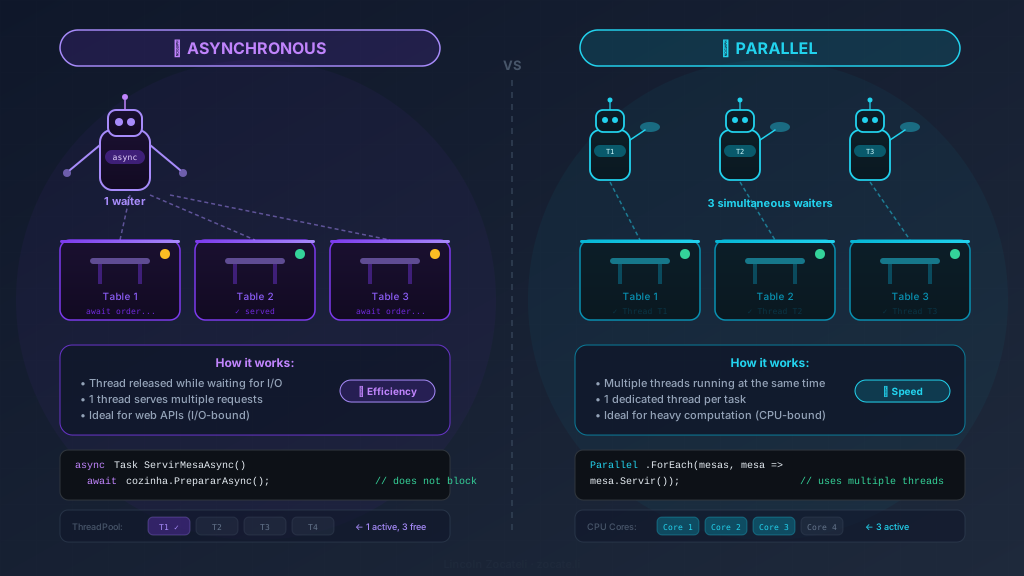
ℹ️ Info: Asynchronous is about efficiency — doing more with fewer resources. Parallelism is about speed — doing more things at the same time using more resources. In web APIs, asynchronous is almost always what you want; parallelism is for specific heavy-processing scenarios.
Direct Comparison
| Aspect | Asynchronous | Parallel |
|---|---|---|
| Problem it solves | I/O operations (network, disk, database) | Heavy processing (CPU) |
| Threads | Releases the thread while waiting | Uses multiple threads simultaneously |
| Main feature | async/await, Task | Parallel.ForEach, Task.Run, PLINQ |
| Example | HTTP call, file read | Hash calculation, image compression |
| When to use | Web APIs, I/O-bound | Batch processing, CPU-bound |
How Threads Work in C#
To understand asynchronous programming, it is fundamental to understand what threads are and how .NET manages them.
What Is a Thread?
A thread is the smallest unit of execution of a program. When your .NET application starts, it gets at least one thread — the main thread. Each thread has its own execution stack, but all of them share the same memory space (heap) of the process.
.NET uses the ThreadPool — a managed pool of reusable threads. Instead of constantly creating and destroying threads (which is expensive), the runtime keeps a set of threads ready for use. When an asynchronous operation completes, a pool thread is assigned to continue the execution.
Thread-Safe vs Thread-Unsafe
When multiple threads access the same shared resource (a variable, list, dictionary), race conditions can occur — situations where the result depends on the order in which threads execute, which is unpredictable.
Thread-Unsafe Example (Race Condition)
| |
The contador++ looks like a simple operation, but internally it is three steps: read the value, add 1, write the new value. If two threads read the value 500 at the same time, both write 501, and one increment is lost. This happens because contador++ is not an atomic operation.
Thread-Safe Example (with lock)
| |
What Are Atomic Operations?
An atomic operation is an operation that either completes entirely or does not happen at all — there is no middle ground. From the point of view of other threads, the operation is instantaneous: no thread can observe the intermediate state.
The problem with contador++ is that it is not atomic. It is three separate operations:
- Read the current value of
contadorfrom memory. - Add 1 to the value read.
- Write the new value back to memory.
Between step 1 and step 3, another thread can read the same old value — causing the race condition shown above. An atomic operation guarantees that these three steps happen as if they were a single one, without another thread being able to interfere midway.
.NET offers ready-to-use atomic operations in the Interlocked class, which uses special processor instructions (such as lock cmpxchg on x86) to guarantee atomicity without needing a lock — which makes the code faster in high-concurrency scenarios.
| Operation | Interlocked method | Non-atomic equivalent |
|---|---|---|
| Increment | Interlocked.Increment(ref x) | x++ |
| Decrement | Interlocked.Decrement(ref x) | x-- |
| Add value | Interlocked.Add(ref x, valor) | x += valor |
| Swap value | Interlocked.Exchange(ref x, novo) | x = novo |
| Swap if equal | Interlocked.CompareExchange(ref x, novo, esperado) | if (x == esperado) x = novo |
Thread-Safe Example (with Interlocked)
For simple operations such as increment, Interlocked is more efficient than lock because it does not block other threads — the operation is atomic at the hardware level:
| |
ℹ️ Info: Use
lockwhen you need to protect a block of code with multiple operations (read + modify + write a complex structure). UseInterlockedwhen you need to protect a single variable with simple operations (increment, swap).Interlockedis between 10× and 50× faster thanlockfor these individual operations.
Thread-Safe Collections in .NET
.NET offers collections in the System.Collections.Concurrent namespace designed for safe access by multiple threads:
| Thread-Unsafe Collection | Thread-Safe Equivalent | When to use |
|---|---|---|
List<T> | ConcurrentBag<T> | Unordered collection |
Dictionary<K,V> | ConcurrentDictionary<K,V> | Dictionary with concurrent access |
Queue<T> | ConcurrentQueue<T> | Producer/consumer queue |
Stack<T> | ConcurrentStack<T> | Stack with concurrent access |
💡 Tip: If you are using pure
async/await(withoutTask.RunorParallel), in many scenarios you do not need thread-safe collections, because asynchronous code usually runs sequentially in a single context thread. The concern with thread safety arises when you introduce real parallelism.
async/await in Practice: Synchronous vs Asynchronous
Now to what matters: code you can run and feel the difference. Create a console project to test:
| |
Example 1: Synchronous Code (Blocking)
| |
Expected output:
| |
Example 2: Asynchronous Code (Non-Blocking)
| |
Expected output:
| |
⚠️ Warning: Notice the difference: 6 seconds vs 2 seconds. In the asynchronous code, the three I/O operations started almost at the same time. While each one was waiting, the thread was free. This is not parallelism — it is a single thread managing multiple I/O operations concurrently.
Task.Delayreleases the thread;Thread.Sleepblocks it.
What Happens Under the Hood?
When you write await Task.Delay(2000), the C# compiler turns your async method into a state machine. Simplifying:
- The code before the
awaitruns normally. - At the
awaitpoint, if theTaskhas not completed yet, the thread is returned to the ThreadPool. - When the I/O operation finishes, a pool thread is assigned to continue the execution from where it stopped.
- This repeats for each
awaitin the method.
That is why async/await is so powerful in web APIs: while one request waits for the database response, the thread can serve other requests.
CancellationToken: Why and How to Use It
CancellationToken is a .NET mechanism to signal cooperative cancellation of asynchronous operations. Without it, if a user closes the browser, disconnects or the request hits a timeout, your API keeps processing needlessly — consuming server resources with nobody to receive the response.
Why Is It Important?
Consider these scenarios:
- The user makes a request that takes 30 seconds and closes the browser tab after 5 seconds.
- A timeout is hit at the gateway or load balancer.
- Your API calls an external service that is slow and you want to impose a time limit.
Without CancellationToken, your code keeps executing the full operation, wasting CPU, memory and database connections — resources that could serve other users.
Basic CancellationToken Example
| |
Expected output:
| |
CancellationToken in Service Methods
Always propagate the CancellationToken through the entire call chain:
| |
💡 Tip: Use
CancellationToken cancellationToken = defaultas the last parameter. ThedefaultforCancellationTokenisCancellationToken.None, which means “no cancellation” — keeping compatibility with code that does not need cancellation.
CancellationToken in the ASP.NET Core Controller
Using CancellationToken in the controller is one of the best practices for ASP.NET Core APIs, and it makes total sense: the framework already provides a cancellation token automatically when the request is aborted by the client.
How Does It Work?
When you add CancellationToken as a parameter of an action, ASP.NET Core automatically injects a token bound to the HTTP connection. If the client disconnects (closes the tab, timeout, cancels the fetch), the token is signaled as canceled.
| |
Complete Chain: Controller → Service → Repository
The real power of CancellationToken shows up when it travels through the entire chain of calls:
| |
| |
⚠️ Warning: When a database query is canceled via
CancellationToken, Entity Framework sends a cancellation command to the database. This releases the connection and resources on the database server, not only in the application. It is a double win: it releases resources both in the API and in the database.
Complete Example: Testing Synchronous vs Asynchronous
So that you can run it and see the difference in practice, here is a complete example with a minimal API that demonstrates both scenarios:
| |
To test:
| |
📝 Example: Compare the times: the synchronous endpoint takes ~3 seconds (3 × 1s sequential), while the asynchronous one takes ~1 second (3 × 1s concurrent). The same logic applies to real database queries, HTTP calls and file reads.
Tips and Good Practices
Here are the essential practices for writing correct, performant asynchronous code in C#:
Always use
async/awaitfor I/O operations. HTTP calls, database queries, file reads/writes — all of these operations should be asynchronous. Never use.Resultor.Wait()in asynchronous code, because it can cause deadlocks.Prefer
await Task.WhenAll()for independent operations. If you need to query three different services that do not depend on each other, start all the tasks and useTask.WhenAllto wait. This can drastically reduce the total response time.Always propagate the
CancellationToken. Received aCancellationToken? Pass it to all asynchronous methods in the chain. Entity Framework, HttpClient,Task.Delay— all of them acceptCancellationToken.Use
ConfigureAwait(false)in libraries. If you are writing a library (not an application), useawait task.ConfigureAwait(false)to avoid capturing theSynchronizationContextunnecessarily. In ASP.NET Core APIs this is not necessary because there is noSynchronizationContext.Never use
async void. The only exception is event handlers.async voidmethods cannot be awaited and unhandled exceptions can crash the application. Always returnTaskorTask<T>.Do not use
Task.Runto wrap synchronous code in web APIs. It does not make your code truly asynchronous — it only moves the blocking to another pool thread. In web APIs, this can worsen performance because it consumes an extra thread.Name asynchronous methods with the
Asyncsuffix. It is a .NET convention:ObterTodosAsync,SalvarAsync,EnviarEmailAsync. It makes it clear that the method returns aTaskand should be awaited.
Common Mistakes (and How to Avoid Them)
❌ Using .Result or .Wait() (can cause deadlock)
| |
❌ Not propagating CancellationToken
| |
❌ Using Thread.Sleep in asynchronous code
| |
Conclusion
Asynchronous programming in C# with async/await is one of the most powerful tools in .NET for building scalable, responsive applications. As I showed throughout this article, asynchronous is not parallelism — they are complementary concepts that solve different problems. Asynchronous code shines in I/O operations, releasing threads to serve more requests with fewer resources.
Understanding how threads work and what it means to be thread-safe is essential to avoid subtle, hard-to-reproduce bugs, such as race conditions. And CancellationToken is indispensable for professional applications: it lets your API release resources immediately when a request is canceled, improving scalability and user experience.
In practice, remember: use async/await for every I/O operation, propagate the CancellationToken through the whole call chain (from the controller to the database), avoid .Result and .Wait(), and never confuse Thread.Sleep with Task.Delay. If you follow these rules, your C# code will be more efficient, more resilient and more professional.
If you liked this article and want to keep improving your skills, explore the other content on the blog — from security with BFF Backend For Frontend to task automation with Makefile.
💡 Final tip: If the language or framework you use day to day does not offer native support for asynchronous programming — or implements it in a complex, verbose and error-prone way — it is worth seriously considering adding to your portfolio a mature language that treats asynchrony as a first-class citizen. C# is an excellent option: as I showed throughout this article, you just use
async,awaitandCancellationTokento write clean, safe and performant asynchronous code — no nested callbacks, no manual thread management and no external libraries. The .NET ecosystem offers native asynchronous support in practically everything: Entity Framework, HttpClient, file I/O, streams, gRPC channels and even all of ASP.NET Core. Investing in a language that makes asynchronous code easy to write is not just a matter of productivity — it is a competitive advantage in the market.
Read Also
- Authentication & Authorization: JWT, OAuth2, OpenID Connect — security fundamentals for APIs that use async/await
- BFF Backend For Frontend: Security in SPAs — BFF pattern with ASP.NET Core using asynchronous operations
- Makefile: Automating tasks for Python, Hugo and Docker — task automation in a developer’s daily work
- Terminal vs Pipeline: differences when running scripts — execution contexts that affect how your code behaves
- .NET Worker and Background Service: High Volume — how to use Background Services for heavy processing with parallelism and async/await
References
- Asynchronous programming with async and await - Microsoft Learn — official documentation on async/await in C#
- Task-based Asynchronous Pattern (TAP) - Microsoft Learn — TAP pattern that underpins async/await
- CancellationToken Struct - Microsoft Learn — complete CancellationToken reference
- Threading in C# - Microsoft Learn — complete guide to threads in .NET
- Async guidance - David Fowler (ASP.NET Core Architect) — async good practices from one of the ASP.NET Core architects
- ConfigureAwait FAQ - Stephen Toub (Microsoft) — detailed explanation of ConfigureAwait
- blog-zocateli-sample repository — AsyncParallel — Complete source code for the examples in this article
By commenting, you agree to our Privacy Policy, Terms of Use, Data Deletion Policy.