Introduction

Picture the front gate of a large company — a century-old corporation with dozens of sites and 80,000 active employees on record. It is 8 a.m. on a Monday: hundreds of people arrive at the same time, each one tapping their badge on the electronic turnstiles. For each badge, the system must perform a validation against the corporate database: fetch the record, check the status, verify access permissions and log the entry.

If this system is sequential — processing one validation at a time, in a queue — people will pile up at the entrance. With 80,000 records and a lookup time of a few milliseconds per query, the math is cruel. This is where parallelism comes in.

Unlike asynchronous programming — which is about releasing the thread while waiting for I/O (read more in Asynchronous Programming in C#: async/await and Threads) — parallelism is about using multiple CPU cores simultaneously to process tasks at the same time. It is the right strategy when the bottleneck is processing rather than waiting for I/O.

In this article you will understand what parallelism is, how it works in .NET, which tools to use (Parallel.ForEach, PLINQ, Task.Run), how to avoid the classic concurrency pitfalls and, above all, when each approach makes sense — all anchored in the corporate turnstile example.

📦 Source code: The complete implementation for this article is in the blog-zocateli-sample repository on GitHub. Clone it, explore it and adapt it to your context.


Prerequisites


The Problem: The Corporate Turnstile

Before writing a single line of code, I want to understand the concrete problem.

The company TechCorp Centenária S.A. has:

  • 80,000 employees active across 12 sites
  • A legacy corporate database with access control records
  • 200 turnstiles spread across the entrances of every building
  • Access peak: 2,000 employees showing up in the first 15 minutes of the shift

The current system is simple: when the badge is read, a sequential search is performed over an in-memory list loaded from the database. The original code is this:

 1
 2
 3
 4
 5
 6
 7
 8
 9
10
11
12
13
14
15
16
17
18
19
20
21
22
23
24
25
26
27
28
29
30
31
32
33
34
35
36
37
38
// ❌ SEQUENTIAL APPROACH — bottleneck at large volumes
public class ValidadorDeAcesso
{
    private readonly List<RegistroFuncionario> _registros;

    public ValidadorDeAcesso(List<RegistroFuncionario> registros)
    {
        _registros = registros;
    }

    public ResultadoValidacao ValidarTodos(IEnumerable<string> cracharIds)
    {
        var resultados = new List<ResultadoCracha>();

        foreach (var id in cracharIds)
        {
            // Sequential processing: one at a time
            var registro = _registros.FirstOrDefault(r => r.CrachaId == id);
            var resultado = ProcessarValidacao(registro, id);
            resultados.Add(resultado);
        }

        return new ResultadoValidacao(resultados);
    }

    private ResultadoCracha ProcessarValidacao(RegistroFuncionario? registro, string id)
    {
        if (registro is null)
            return new ResultadoCracha(id, Acesso.Negado, "Badge not found");

        // Simulates business rule validation (status check, schedule, etc.)
        ValidarStatusContratual(registro);
        ValidarHorarioPermitido(registro);
        ValidarPermissaoUnidade(registro);

        return new ResultadoCracha(id, Acesso.Permitido, registro.NomeFuncionario);
    }
}

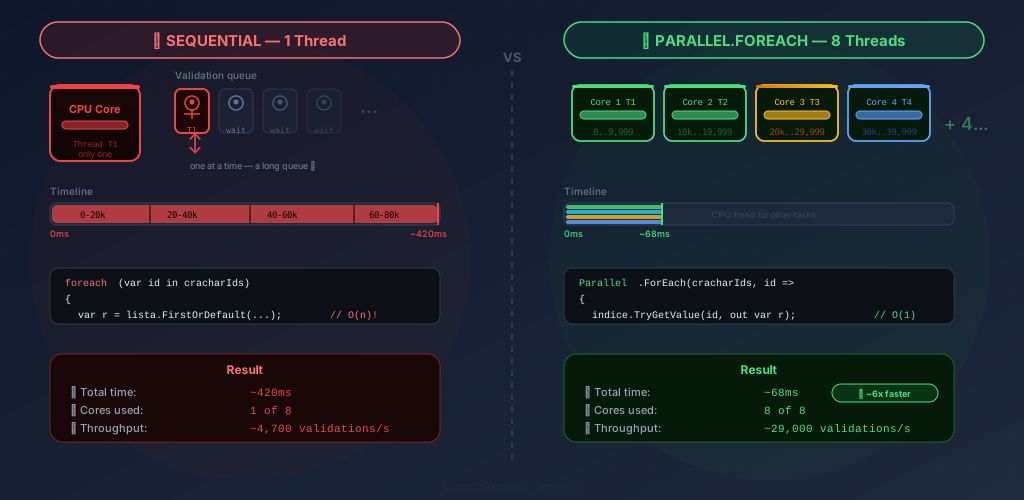
With 80,000 records and 2,000 validations arriving almost simultaneously, the foreach loop processes one at a time. This is a CPU-bound problem: the processor is working, not waiting — but it is working alone, on a single core.

💡 Tip: Tell the problems apart before choosing the solution. Ask yourself: “is my process waiting for data (I/O-bound) or processing data (CPU-bound)?” For I/O-bound, use async/await. For CPU-bound, use parallelism.


Asynchronous vs Parallel: the Difference That Changes Everything

It is essential to be clear about this distinction before moving on:

Asynchronous ProgrammingParallelism
SolvesWaiting bottlenecks (I/O)Processing bottlenecks (CPU)
HowReleases the thread while waitingUses multiple threads simultaneously
Toolasync/await, TaskParallel, PLINQ, Task.Run
ExampleDatabase queryProcessing 80k records in memory
Cores usedEfficient with 1 coreUses all available cores

In the turnstile problem:

  • Querying the database to load the records → asynchronous (ToListAsync())
  • Processing/validating the 80,000 records in memory → parallel (Parallel.ForEach)

Sequential processing (1 thread, ~420ms) vs Parallel.ForEach (8 threads, ~68ms) validating 80k employee records

Many real solutions combine both patterns, and you will see that throughout this article.


How Parallelism Works in .NET

.NET manages threads through the ThreadPool — a set of pre-allocated threads ready for use. When you use Parallel.ForEach or Task.Run, the runtime distributes the work among the threads available in the pool, mapping them to the physical CPU cores.

Automatic Partitioning

The biggest strength of Parallel in .NET is automatic partitioning: the runtime splits the collection into blocks (chunks) and hands each block to a different thread. This avoids the overhead of creating one thread per item.

1
2
3
4
CPU Core 1: Thread T1 → processes items [0 ... 19,999]
CPU Core 2: Thread T2 → processes items [20,000 ... 39,999]
CPU Core 3: Thread T3 → processes items [40,000 ... 59,999]
CPU Core 4: Thread T4 → processes items [60,000 ... 79,999]

On an 8-core machine, 80,000 records would be split into ~8 partitions of 10,000, reducing processing time by up to 8x (in practice a bit less due to synchronization overhead).


Parallel.ForEach — The Solution for the Turnstile

The most direct tool to parallelize a foreach is Parallel.ForEach. Here is how to transform the sequential code:

 1
 2
 3
 4
 5
 6
 7
 8
 9
10
11
12
13
14
15
16
17
18
19
20
21
22
23
24
25
26
27
28
using System.Collections.Concurrent;
using System.Threading.Tasks;

public class ValidadorDeAcessoParalelo
{
    private readonly List<RegistroFuncionario> _registros;

    public ValidadorDeAcessoParalelo(List<RegistroFuncionario> registros)
    {
        _registros = registros;
    }

    public ResultadoValidacao ValidarTodos(IEnumerable<string> cracharIds)
    {
        // ConcurrentBag: thread-safe collection for accumulating results
        var resultados = new ConcurrentBag<ResultadoCracha>();

        Parallel.ForEach(cracharIds, id =>
        {
            // Each iteration may run on a different thread simultaneously
            var registro = _registros.FirstOrDefault(r => r.CrachaId == id);
            var resultado = ProcessarValidacao(registro, id);
            resultados.Add(resultado); // Thread-safe: ConcurrentBag
        });

        return new ResultadoValidacao(resultados.ToList());
    }
}

⚠️ Warning: Note the use of ConcurrentBag<T> instead of List<T>. A regular List<T> is not thread-safe — multiple threads adding items simultaneously would cause data corruption or exceptions. Always use collections from the System.Collections.Concurrent namespace in parallel scenarios.

Controlling the Degree of Parallelism

By default, .NET uses all available cores. In production, that can be too aggressive — you may want to cap it so you do not saturate the server and impact other processes:

 1
 2
 3
 4
 5
 6
 7
 8
 9
10
11
12
13
14
15
16
17
18
public ResultadoValidacao ValidarComLimite(IEnumerable<string> cracharIds, int maxThreads = 4)
{
    var resultados = new ConcurrentBag<ResultadoCracha>();

    var opcoes = new ParallelOptions
    {
        MaxDegreeOfParallelism = maxThreads // Caps the number of simultaneous threads
    };

    Parallel.ForEach(cracharIds, opcoes, id =>
    {
        var registro = _registros.FirstOrDefault(r => r.CrachaId == id);
        var resultado = ProcessarValidacao(registro, id);
        resultados.Add(resultado);
    });

    return new ResultadoValidacao(resultados.ToList());
}

💡 Tip: A good starting point for MaxDegreeOfParallelism is Environment.ProcessorCount (the number of logical cores on the machine) or Environment.ProcessorCount / 2 to leave room for other processes.


Speeding Up the Lookup: The Right Data Structures

Before parallelizing, check whether the data structure is the bottleneck. In the turnstile example, FirstOrDefault on a List<T> has O(n) complexity — it walks the whole list until it finds the item. With 80,000 records, that is expensive.

The solution is to pre-index the data in a Dictionary<string, RegistroFuncionario>:

 1
 2
 3
 4
 5
 6
 7
 8
 9
10
11
12
13
14
15
16
17
18
19
20
21
22
23
24
25
public class ValidadorOtimizado
{
    // Dictionary allows O(1) lookup — constant time, regardless of size
    private readonly Dictionary<string, RegistroFuncionario> _indice;

    public ValidadorOtimizado(List<RegistroFuncionario> registros)
    {
        // Build the index only once at startup
        _indice = registros.ToDictionary(r => r.CrachaId);
    }

    public ResultadoValidacao ValidarTodos(IEnumerable<string> cracharIds)
    {
        var resultados = new ConcurrentBag<ResultadoCracha>();

        Parallel.ForEach(cracharIds, id =>
        {
            // O(1) instead of O(n) — dramatic improvement
            _indice.TryGetValue(id, out var registro);
            resultados.Add(ProcessarValidacao(registro, id));
        });

        return new ResultadoValidacao(resultados.ToList());
    }
}

ℹ️ Info: Dictionary<TKey, TValue> is not thread-safe for writes, but it is safe for concurrent reads when the dictionary is not being modified. Since the index is built once and only read in parallel, this pattern is correct. If you need concurrent writes, use ConcurrentDictionary<TKey, TValue>.


PLINQ: Parallelism with the Elegance of LINQ

PLINQ (Parallel LINQ) is a parallel version of traditional LINQ. Just add .AsParallel() to any LINQ query and the runtime automatically distributes processing across threads.

 1
 2
 3
 4
 5
 6
 7
 8
 9
10
11
12
13
14
15
16
17
18
19
20
21
22
23
public class ValidadorComPLINQ
{
    private readonly Dictionary<string, RegistroFuncionario> _indice;

    public ValidadorComPLINQ(Dictionary<string, RegistroFuncionario> indice)
    {
        _indice = indice;
    }

    public List<ResultadoCracha> ValidarTodos(IEnumerable<string> cracharIds)
    {
        return cracharIds
            .AsParallel()                           // Enables PLINQ
            .WithDegreeOfParallelism(4)             // Caps simultaneous threads
            .WithExecutionMode(ParallelExecutionMode.ForceParallelism) // Forces parallelism
            .Select(id =>
            {
                _indice.TryGetValue(id, out var registro);
                return ProcessarValidacao(registro, id);
            })
            .ToList();
    }
}

PLINQ with Ordering

An important point: PLINQ does not guarantee result order by default. If order matters (e.g. generating a report in arrival order), use .AsOrdered():

 1
 2
 3
 4
 5
 6
 7
 8
 9
10
11
12
13
public List<ResultadoCracha> ValidarOrdenado(IEnumerable<string> cracharIds)
{
    return cracharIds
        .AsParallel()
        .AsOrdered()               // Preserves input order
        .WithDegreeOfParallelism(4)
        .Select(id =>
        {
            _indice.TryGetValue(id, out var registro);
            return ProcessarValidacao(registro, id);
        })
        .ToList();
}

⚠️ Warning: .AsOrdered() has an additional synchronization cost — threads need to coordinate the order of the results. Use it only when really necessary.


Parallel.ForEachAsync — Combining Parallel and Asynchronous

The real turnstile scenario is richer: validation involves both in-memory processing and database queries. For that, .NET 6+ offers Parallel.ForEachAsync — which combines CPU parallelism with asynchronous I/O operations:

 1
 2
 3
 4
 5
 6
 7
 8
 9
10
11
12
13
14
15
16
17
18
19
20
21
22
23
24
25
public async Task<ResultadoValidacao> ValidarComBancoDeDadosAsync(
    IEnumerable<string> cracharIds,
    CancellationToken cancellationToken = default)
{
    var resultados = new ConcurrentBag<ResultadoCracha>();

    var opcoes = new ParallelOptions
    {
        MaxDegreeOfParallelism = 8,
        CancellationToken = cancellationToken // Propagates cancellation
    };

    await Parallel.ForEachAsync(cracharIds, opcoes, async (id, ct) =>
    {
        // Asynchronous part: database lookup (I/O-bound)
        var registro = await _repositorio.BuscarPorCrachaAsync(id, ct);

        // Parallel part: rule validation (CPU-bound)
        var resultado = ProcessarValidacao(registro, id);

        resultados.Add(resultado);
    });

    return new ResultadoValidacao(resultados.ToList());
}

This is the most powerful pattern: it does not block threads during I/O (asynchronous) and uses multiple cores for processing (parallel).


ConcurrentDictionary: Shared State without Manual Locks

Besides ConcurrentBag, ConcurrentDictionary<TKey, TValue> is one of the most useful structures in parallel scenarios. Imagine the turnstile needs to accumulate access statistics per site:

 1
 2
 3
 4
 5
 6
 7
 8
 9
10
11
12
13
14
15
16
17
18
19
20
21
22
23
24
25
26
27
public class EstatisticasDeAcesso
{
    // ConcurrentDictionary: thread-safe for simultaneous reads and writes
    private readonly ConcurrentDictionary<string, int> _acessosPorUnidade = new();

    public void RegistrarAcesso(string unidade)
    {
        // AddOrUpdate is atomic: no lock needed
        _acessosPorUnidade.AddOrUpdate(
            key: unidade,
            addValue: 1,
            updateValueFactory: (chave, valorAtual) => valorAtual + 1
        );
    }

    public void ProcessarEntradas(IEnumerable<EntradaFuncionario> entradas)
    {
        Parallel.ForEach(entradas, entrada =>
        {
            // Multiple threads calling AddOrUpdate simultaneously — safe!
            RegistrarAcesso(entrada.Unidade);
        });
    }

    public IReadOnlyDictionary<string, int> ObterEstatisticas()
        => _acessosPorUnidade;
}

💡 Tip: ConcurrentDictionary is far more efficient than a Dictionary with a manual lock in high read/write concurrency scenarios, because it uses lock striping internally — splitting the dictionary into independent segments to minimize contention.


Controlling Access to Limited Resources with SemaphoreSlim

In real life, turnstiles have physical limits — you cannot let 100 people through the same gate at once. The same applies to code: when you have a limited shared resource (database connections, external APIs, files), use SemaphoreSlim to control concurrent access:

 1
 2
 3
 4
 5
 6
 7
 8
 9
10
11
12
13
14
15
16
17
18
19
20
21
22
23
24
25
26
27
28
public class ValidadorComSemaforo
{
    // Caps at most 10 simultaneous validations against the external database
    private readonly SemaphoreSlim _semaforo = new SemaphoreSlim(initialCount: 10, maxCount: 10);
    private readonly IRepositorioAcesso _repositorio;

    public async Task ProcessarFilaDeEntradaAsync(
        IEnumerable<string> cracharIds,
        CancellationToken ct = default)
    {
        var tasks = cracharIds.Select(async id =>
        {
            await _semaforo.WaitAsync(ct); // Waits for a "slot" in the semaphore
            try
            {
                // Only 10 simultaneous executions get here
                var registro = await _repositorio.BuscarPorCrachaAsync(id, ct);
                return ProcessarValidacao(registro, id);
            }
            finally
            {
                _semaforo.Release(); // Frees the slot for the next Task
            }
        });

        await Task.WhenAll(tasks);
    }
}

The metaphor is accurate: SemaphoreSlim is literally a traffic light — it controls how many simultaneous “passages” are allowed. WaitAsync waits for a slot; Release frees one.


Thread Safety: Classic Pitfalls in Parallelism

When parallelizing code, the most common bugs are race conditions — situations where the result depends on the unpredictable order in which threads execute. Here are the most frequent cases:

Shared Counters

 1
 2
 3
 4
 5
 6
 7
 8
 9
10
11
12
13
14
15
// ❌ DANGER: counter++ is not atomic — guaranteed race condition
var totalAcessos = 0;
Parallel.ForEach(entradas, entrada =>
{
    if (ValidarAcesso(entrada))
        totalAcessos++; // Read + add + write: 3 non-atomic ops
});

// ✅ CORRECT: Interlocked.Increment is atomic
var totalAcessos = 0;
Parallel.ForEach(entradas, entrada =>
{
    if (ValidarAcesso(entrada))
        Interlocked.Increment(ref totalAcessos); // 1 atomic operation
});

Lists as Accumulators

 1
 2
 3
 4
 5
 6
 7
 8
 9
10
11
12
13
14
15
// ❌ DANGER: List<T> is not thread-safe
var aprovados = new List<string>();
Parallel.ForEach(entradas, entrada =>
{
    if (ValidarAcesso(entrada))
        aprovados.Add(entrada.Nome); // Data corruption under high concurrency
});

// ✅ CORRECT: use ConcurrentBag or ConcurrentQueue
var aprovados = new ConcurrentBag<string>();
Parallel.ForEach(entradas, entrada =>
{
    if (ValidarAcesso(entrada))
        aprovados.Add(entrada.Nome); // Thread-safe
});

Accessing External Resources (Databases, Files)

 1
 2
 3
 4
 5
 6
 7
 8
 9
10
11
12
13
14
15
16
17
// ❌ DANGER: EF Core DbContext is not thread-safe
var resultados = new ConcurrentBag<RegistroFuncionario>();
Parallel.ForEach(ids, id =>
{
    // DbContext shared across threads — guaranteed exception
    var reg = _context.Funcionarios.Find(id);
    resultados.Add(reg);
});

// ✅ CORRECT: create one scope per thread (factory pattern)
Parallel.ForEach(ids, id =>
{
    using var scope = _serviceProvider.CreateScope();
    var context = scope.ServiceProvider.GetRequiredService<AppDbContext>();
    var reg = context.Funcionarios.Find(id);
    resultados.Add(reg);
});

ℹ️ Info: Entity Framework Core’s DbContext was designed to be scoped (one per request). Never share a single DbContext across threads — that causes concurrency exceptions and incorrect results. In parallel code, create one DbContext per iteration using IServiceScopeFactory.


Parallel.For vs Parallel.ForEach vs PLINQ

Which one to use in each situation?

ScenarioRecommendation
Iterate a collection with an indexParallel.For(0, n, i => ...)
Iterate a collection of objectsParallel.ForEach(colecao, item => ...)
Transform a collection (projection)colecao.AsParallel().Select(...)
Filter and transformcolecao.AsParallel().Where(...).Select(...)
Requires async I/O + parallelismParallel.ForEachAsync(colecao, async (item, ct) => ...)
Control limited resourcesSemaphoreSlim + Task.WhenAll
 1
 2
 3
 4
 5
 6
 7
 8
 9
10
11
12
13
14
15
16
17
18
// Parallel.For — when the index matters
var resultados = new ConcurrentBag<string>();
Parallel.For(0, _registros.Count, i =>
{
    var registro = _registros[i];
    if (ValidarRegra(registro, i)) // 'i' available
        resultados.Add($"[{i}] {registro.Nome}");
});

// PLINQ — for complex transformation pipelines
var relatorio = _registros
    .AsParallel()
    .WithDegreeOfParallelism(Environment.ProcessorCount)
    .Where(r => r.Status == StatusFuncionario.Ativo)
    .Where(r => r.DataAdmissao.Year < 2020) // Employees with more than 5 years
    .Select(r => new EntradaRelatorio(r.Nome, r.Unidade, r.CrachaId))
    .OrderBy(r => r.Unidade) // Warning: implicit AsOrdered()
    .ToList();

Complete Example: Turnstile System in Production

Now I will put together the complete scenario with every pattern covered — from asynchronous loading from the database to parallel validation and the final report:

  1
  2
  3
  4
  5
  6
  7
  8
  9
 10
 11
 12
 13
 14
 15
 16
 17
 18
 19
 20
 21
 22
 23
 24
 25
 26
 27
 28
 29
 30
 31
 32
 33
 34
 35
 36
 37
 38
 39
 40
 41
 42
 43
 44
 45
 46
 47
 48
 49
 50
 51
 52
 53
 54
 55
 56
 57
 58
 59
 60
 61
 62
 63
 64
 65
 66
 67
 68
 69
 70
 71
 72
 73
 74
 75
 76
 77
 78
 79
 80
 81
 82
 83
 84
 85
 86
 87
 88
 89
 90
 91
 92
 93
 94
 95
 96
 97
 98
 99
100
101
102
103
104
public class SistemaDeAcesso
{
    private readonly IRepositorioFuncionarios _repositorio;
    private readonly IServiceScopeFactory _scopeFactory;
    private Dictionary<string, RegistroFuncionario> _indiceEmMemoria = [];

    public SistemaDeAcesso(
        IRepositorioFuncionarios repositorio,
        IServiceScopeFactory scopeFactory)
    {
        _repositorio = repositorio;
        _scopeFactory = scopeFactory;
    }

    // Step 1: Asynchronous data load (I/O-bound → async/await)
    public async Task CarregarRegistrosAsync(CancellationToken ct = default)
    {
        var registros = await _repositorio.ObterTodosAsync(ct);

        // Index in memory for O(1) lookups
        _indiceEmMemoria = registros.ToDictionary(r => r.CrachaId);

        Console.WriteLine($"[Sistema] {_indiceEmMemoria.Count:N0} records indexed.");
    }

    // Step 2: Parallel processing (CPU-bound → Parallel)
    public RelatorioDeAcesso ProcessarLoteDeCatracas(IReadOnlyList<string> cracharIds)
    {
        var permitidos = new ConcurrentBag<string>();
        var negados = new ConcurrentBag<string>();
        var totalProcessado = 0;

        var opcoes = new ParallelOptions
        {
            MaxDegreeOfParallelism = Environment.ProcessorCount
        };

        Parallel.ForEach(cracharIds, opcoes, id =>
        {
            // O(1) lookup in the in-memory index
            if (_indiceEmMemoria.TryGetValue(id, out var registro)
                && registro.AcessoPermitido)
            {
                permitidos.Add(registro.NomeFuncionario);
                RegistrarEntradaLocal(registro); // CPU-bound logic
            }
            else
            {
                negados.Add(id);
            }

            Interlocked.Increment(ref totalProcessado);
        });

        return new RelatorioDeAcesso(
            TotalProcessado: totalProcessado,
            Permitidos: permitidos.ToList(),
            Negados: negados.ToList()
        );
    }

    // Step 3: Asynchronous persistence with controlled parallelism (I/O + CPU)
    public async Task SincronizarComBancoAsync(
        IEnumerable<string> cracharIds,
        CancellationToken ct = default)
    {
        // SemaphoreSlim: caps at 20 simultaneous database calls
        var semaforo = new SemaphoreSlim(20, 20);

        var tasks = cracharIds.Select(async id =>
        {
            await semaforo.WaitAsync(ct);
            try
            {
                using var scope = _scopeFactory.CreateScope();
                var context = scope.ServiceProvider
                    .GetRequiredService<AppDbContext>();

                var log = new LogAcesso
                {
                    CrachaId = id,
                    Timestamp = DateTimeOffset.UtcNow,
                    Origem = "Catraca"
                };

                context.LogsDeAcesso.Add(log);
                await context.SaveChangesAsync(ct);
            }
            finally
            {
                semaforo.Release();
            }
        });

        await Task.WhenAll(tasks);
    }

    private void RegistrarEntradaLocal(RegistroFuncionario registro)
    {
        // Local CPU-bound operations (no I/O)
        AtualizarCacheDeEntradas(registro);
        ValidarHorarioPermitido(registro);
    }
}

When NOT to Use Parallelism

Parallelism is not a silver bullet. There are situations where it worsens performance:

1. Small collections: The overhead of creating and synchronizing threads can outweigh the benefit. For fewer than ~1,000 simple items, sequential code is usually faster.

2. Simple I/O-bound operations: If the bottleneck is the network or disk, adding threads does not help — the bottleneck remains external. Use async/await.

3. Operations that cannot be made thread-safe: If processing each item depends on the result of the previous ones (mandatory shared state), parallelism adds complexity without benefit.

4. Legacy code with hidden side effects: Global variables, singletons with mutable state, non-thread-safe logging — parallelizing code like this produces bugs that are hard to reproduce.

1
2
3
4
5
6
7
// ❌ Do not parallelize: each item depends on the previous one
var soma = 0;
foreach (var valor in numeros)
    soma += valor; // Cumulative sum: sequential dependency

// ✅ Use regular LINQ aggregation or Parallel.For with manual partitioning
var soma = numeros.Sum(); // Parallel LINQ does not help here anyway

Measuring the Difference: Benchmark

To feel the difference in practice, here is a simple benchmark using System.Diagnostics.Stopwatch:

 1
 2
 3
 4
 5
 6
 7
 8
 9
10
11
12
13
14
15
16
17
18
19
20
21
22
23
24
25
26
27
28
29
30
31
32
33
34
35
using System.Diagnostics;

var registros = GerarRegistros(80_000);
var indice = registros.ToDictionary(r => r.CrachaId);
var cracharParaValidar = GerarCrachars(2_000);

// Sequential benchmark
var sw = Stopwatch.StartNew();
var resultadoSeq = cracharParaValidar
    .Select(id =>
    {
        indice.TryGetValue(id, out var r);
        return ProcessarValidacao(r, id);
    })
    .ToList();
sw.Stop();
Console.WriteLine($"Sequential:  {sw.ElapsedMilliseconds}ms — {resultadoSeq.Count} items");

// Parallel benchmark (PLINQ)
sw.Restart();
var resultadoPar = cracharParaValidar
    .AsParallel()
    .WithDegreeOfParallelism(Environment.ProcessorCount)
    .Select(id =>
    {
        indice.TryGetValue(id, out var r);
        return ProcessarValidacao(r, id);
    })
    .ToList();
sw.Stop();
Console.WriteLine($"PLINQ ({Environment.ProcessorCount} cores): {sw.ElapsedMilliseconds}ms — {resultadoPar.Count} items");

// Typical results on an i7 (8 cores):
// Sequential:          420ms — 2000 items
// PLINQ (8 cores):      68ms — 2000 items  (~6x faster)

💡 Tip: For serious benchmarks, use the BenchmarkDotNet library — it controls variables such as JIT warm-up, GC and statistical variance, producing far more reliable results.


Summary: When to Use Each Tool

ToolBest ForAvoid When
Parallel.ForIndexed arrays, large volume, CPU-boundSmall collections
Parallel.ForEachObject collections, CPU-boundPure I/O operations
PLINQ (.AsParallel())Transformation/filter pipelinesWhen order matters (cost)
Parallel.ForEachAsyncCPU + I/O (async inside parallel)Simple pure CPU
Task.WhenAll + SemaphoreSlimControlling the rate of concurrent I/OHeavy CPU-bound
ConcurrentDictionaryShared state with many writesRead-only (use Dictionary)
InterlockedAtomic counters and flagsComplex structures

Conclusion

The corporate turnstile example is perfect to illustrate when and why parallelism matters. A century-old company cannot have employees waiting in line because the system processes one badge at a time. With Parallel.ForEach, PLINQ and .NET’s concurrent collections, you can turn processes that took hundreds of milliseconds into tens — or less.

The key points to remember:

  • Parallelism is for CPU-bound work — when the processor is working, not waiting
  • Combine it with async/await for scenarios involving I/O
  • Always use thread-safe collections (ConcurrentBag, ConcurrentDictionary) to accumulate results
  • Control the degree of parallelism with MaxDegreeOfParallelism — “maximum” is not always “better”
  • Use SemaphoreSlim to protect limited resources (connections, external APIs)
  • Measure before and after — poorly applied parallelism can be slower than sequential code

💡 Final Tip: C# and the .NET ecosystem offer one of the most complete and well-documented parallelism implementations on the market. The TPL (Task Parallel Library), PLINQ and the concurrent collections are part of the standard runtime — no external dependencies, no extra configuration. If you are building systems that need to scale, C# is an excellent choice thanks to its maturity in this area. To go deeper, also explore Channels and System.Threading.Tasks.Dataflow for high-performance pipelines.


Read Also


References