The problem LIKE does not solve#
You have a screen with a customer grid. The user starts typing “João Si” and expects to see “João Silva”, “João Silveira”, “João Simões”. Fast. While typing.
The most immediate solution is to use LIKE:
1
| SELECT * FROM Clientes WHERE Nome LIKE '%João Si%'
|
It works. For 100 records. For 500 thousand records in production, with several users typing at the same time, that LIKE '%...%' is a full table scan — the database reads every row of the table, one by one, without using an index. The query gets slow, the database suffers, and the user abandons the screen.
Full-Text Search (FTS) solves exactly that: an indexing and text search mechanism specially designed for text queries, with support for:
- Search by words and exact phrases
- Relevance and result ranking
- Word stems (stemming): “running” finds “run”
- Synonyms and stopwords
- Logical operators: AND, OR, NOT, NEAR
- Inverted indexes — the database does not read every row, it reads the index
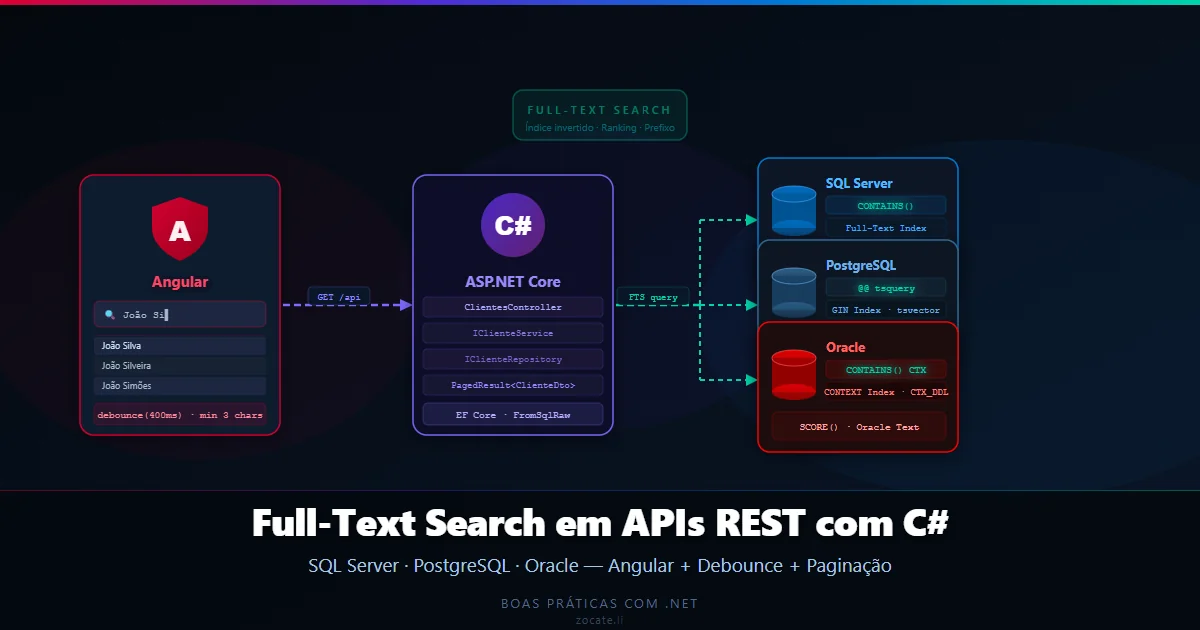
In this article I will implement the complete scenario: an Angular frontend with paginated reactive search that calls a C# REST API using Full-Text Search in the database — with examples for SQL Server, PostgreSQL and Oracle.
📦 Source code: The complete implementation of this article is in the blog-zocateli-sample repository on GitHub. Also see the Angular (search-ui) examples and the SQL scripts.
The scenario: Angular + REST API + Database via FTS#
 1
 2
 3
 4
 5
 6
 7
 8
 9
10
11
12
13
14
15
16
17
18
19
20
21
22
23
24
25
26
27
| ┌─────────────────────────────────────────────────────────────┐
│ Angular Grid (frontend) │
│ │
│ ┌─────────────────────────────────────────────┐ │
│ │ Type the customer name... │ │
│ └─────────────────────────────────────────────┘ │
│ ↓ debounce 400ms + minimum 3 characters │
│ ┌──────────────────────────────────────────────────────┐ │
│ │ Name | CPF | Email │ │
│ │ João Silva | 123.456.789 | [email protected] │ │
│ │ João Silveira | 987.654.321 | [email protected] │ │
│ └──────────────────────────────────────────────────────┘ │
│ Page 1 of 12 [< Previous] [Next >] │
└─────────────────────────────────────────────────────────────┘
│ GET /api/clientes?q=João+Si&pagina=1&tamanho=20
▼
┌─────────────────────────────────────────────────────────────┐
│ ASP.NET Core API │
│ ClientesController → ClienteService → IClienteRepository │
└─────────────────────────────────────────────────────────────┘
│ paginated Full-Text Search query
▼
┌──────────────┐ ┌──────────────┐ ┌──────────────┐
│ SQL Server │ │ PostgreSQL │ │ Oracle │
│ CONTAINS() │ │ to_tsquery │ │ CONTAINS() │
│ FT Index │ │ GIN Index │ │ CTX Domain │
└──────────────┘ └──────────────┘ └──────────────┘
|
Angular frontend: reactive search with debounce#
Why a SPA?
The “search while typing” pattern is native to SPA frameworks (Single-Page Applications) such as Angular, React and Vue. In these frameworks, all interaction logic runs in the browser, and the reactive programming model — with RxJS in Angular — provides the debounceTime, distinctUntilChanged and switchMap operators directly, without hacks.
In server-side frameworks (Razor Pages, Blazor Server, Thymeleaf, JSF…), the rendering flow is different: each interaction must go to the server and return updated HTML. To implement the same behavior, you depend on additional JavaScript (either handwritten or via HTMX, Turbo, Alpine.js, etc.) to capture the typing event, apply the debounce on the client and fire the asynchronous request — adding a layer of complexity that does not exist in the SPA model. The result works, but development is more laborious and maintenance more fragmented (logic split between the server and loose JS scripts).
If your project already uses a server-side framework, evaluate whether it is worth introducing an island of SPA interactivity (Angular Element, isolated React) just for this search component, or whether a lightweight JS script such as HTMX is enough for the use case.
Angular with RxJS makes the “search while typing” pattern elegant. The idea is simple: do not fire a request on every key press — that would overload the server. I use two filters:
- Minimum of 3 characters — avoid searches with very short text
- 400ms debounce — wait for the user to stop typing before sending
Search component#
 1
 2
 3
 4
 5
 6
 7
 8
 9
10
11
12
13
14
15
16
17
18
19
20
21
22
23
24
25
26
27
28
29
30
31
32
33
34
35
36
37
38
39
40
41
42
43
44
45
46
47
48
49
50
51
52
53
54
55
56
57
58
59
60
61
62
63
64
65
66
67
68
69
70
71
72
73
74
75
76
| // clientes-grid.component.ts
import { Component, OnInit, OnDestroy } from '@angular/core';
import { FormControl } from '@angular/forms';
import { Subject } from 'rxjs';
import {
debounceTime,
distinctUntilChanged,
filter,
switchMap,
takeUntil
} from 'rxjs/operators';
import { ClienteService } from './cliente.service';
import { PagedResult, ClienteDto } from './models';
@Component({
selector: 'app-clientes-grid',
templateUrl: './clientes-grid.component.html'
})
export class ClientesGridComponent implements OnInit, OnDestroy {
buscaControl = new FormControl('');
clientes: ClienteDto[] = [];
paginaAtual = 1;
totalPaginas = 1;
totalRegistros = 0;
carregando = false;
termoBusca = '';
private destroy$ = new Subject<void>();
constructor(private clienteService: ClienteService) {}
ngOnInit(): void {
this.buscaControl.valueChanges.pipe(
debounceTime(400), // waits 400ms after the last key
distinctUntilChanged(), // ignores it if the value did not change
filter(termo => !termo || termo.length === 0 || termo.length >= 3),
takeUntil(this.destroy$)
).subscribe(termo => {
this.termoBusca = termo ?? '';
this.paginaAtual = 1; // goes back to the first page on each new search
this.buscar();
});
// Loads the first page without a filter when the screen opens
this.buscar();
}
buscar(): void {
this.carregando = true;
this.clienteService
.listar(this.termoBusca, this.paginaAtual, 20)
.pipe(takeUntil(this.destroy$))
.subscribe({
next: (resultado) => {
this.clientes = resultado.itens;
this.totalPaginas = resultado.totalPaginas;
this.totalRegistros = resultado.totalRegistros;
this.carregando = false;
},
error: () => {
this.carregando = false;
}
});
}
irParaPagina(pagina: number): void {
if (pagina < 1 || pagina > this.totalPaginas) return;
this.paginaAtual = pagina;
this.buscar();
}
ngOnDestroy(): void {
this.destroy$.next();
this.destroy$.complete();
}
}
|
HTML template#
 1
 2
 3
 4
 5
 6
 7
 8
 9
10
11
12
13
14
15
16
17
18
19
20
21
22
23
24
25
26
27
28
29
30
31
32
33
34
35
36
37
38
39
| <!-- clientes-grid.component.html -->
<div class="grid-container">
<div class="search-bar">
<input
[formControl]="buscaControl"
placeholder="🔍 Type the customer name..."
class="input-busca"
/>
<span *ngIf="carregando" class="spinner">Searching...</span>
</div>
<table class="grid-tabela">
<thead>
<tr>
<th>Name</th>
<th>CPF/CNPJ</th>
<th>Email</th>
<th>City</th>
</tr>
</thead>
<tbody>
<tr *ngFor="let cliente of clientes">
<td>{{ cliente.nome }}</td>
<td>{{ cliente.cpfCnpj }}</td>
<td>{{ cliente.email }}</td>
<td>{{ cliente.cidade }}</td>
</tr>
<tr *ngIf="!carregando && clientes.length === 0">
<td colspan="4" class="sem-resultado">No customers found.</td>
</tr>
</tbody>
</table>
<div class="paginacao">
<span>{{ totalRegistros }} records | Page {{ paginaAtual }} of {{ totalPaginas }}</span>
<button (click)="irParaPagina(paginaAtual - 1)" [disabled]="paginaAtual <= 1">‹ Previous</button>
<button (click)="irParaPagina(paginaAtual + 1)" [disabled]="paginaAtual >= totalPaginas">Next ›</button>
</div>
</div>
|
Angular service#
 1
 2
 3
 4
 5
 6
 7
 8
 9
10
11
12
13
14
15
16
17
18
19
20
21
22
23
24
25
26
27
28
| // cliente.service.ts
import { Injectable } from '@angular/core';
import { HttpClient, HttpParams } from '@angular/common/http';
import { Observable } from 'rxjs';
import { PagedResult, ClienteDto } from './models';
@Injectable({ providedIn: 'root' })
export class ClienteService {
private readonly apiUrl = '/api/clientes';
constructor(private http: HttpClient) {}
listar(
q: string,
pagina: number,
tamanho: number
): Observable<PagedResult<ClienteDto>> {
let params = new HttpParams()
.set('pagina', pagina)
.set('tamanho', tamanho);
if (q?.trim()) {
params = params.set('q', q.trim());
}
return this.http.get<PagedResult<ClienteDto>>(this.apiUrl, { params });
}
}
|
 1
 2
 3
 4
 5
 6
 7
 8
 9
10
11
12
13
14
15
16
| // models.ts
export interface ClienteDto {
id: number;
nome: string;
cpfCnpj: string;
email: string;
cidade: string;
}
export interface PagedResult<T> {
itens: T[];
totalRegistros: number;
totalPaginas: number;
paginaAtual: number;
tamanhoPagina: number;
}
|
Why switchMap? switchMap cancels the previous request when a new one arrives. If the user types quickly and the server has not yet answered the first request, the second one cancels the first — with no risk of results arriving out of order.
REST API with ASP.NET Core#
Controller#
 1
 2
 3
 4
 5
 6
 7
 8
 9
10
11
12
13
14
15
16
17
18
19
| // ClientesController.cs
[ApiController]
[Route("api/clientes")]
public class ClientesController(IClienteService service) : ControllerBase
{
[HttpGet]
public async Task<ActionResult<PagedResult<ClienteDto>>> Listar(
[FromQuery] string? q,
[FromQuery] int pagina = 1,
[FromQuery] int tamanho = 20,
CancellationToken ct = default)
{
if (tamanho > 100) tamanho = 100; // maximum limit for safety
if (pagina < 1) pagina = 1;
var resultado = await service.ListarAsync(q, pagina, tamanho, ct);
return Ok(resultado);
}
}
|
Models and DTOs#
 1
 2
 3
 4
 5
 6
 7
 8
 9
10
11
12
13
14
15
16
17
18
19
20
21
22
23
24
25
| // PagedResult.cs
public record PagedResult<T>(
IReadOnlyList<T> Itens,
int TotalRegistros,
int TotalPaginas,
int PaginaAtual,
int TamanhoPagina);
// ClienteDto.cs
public record ClienteDto(
int Id,
string Nome,
string CpfCnpj,
string Email,
string Cidade);
// Cliente.cs (entity)
public class Cliente
{
public int Id { get; set; }
public string Nome { get; set; } = "";
public string CpfCnpj { get; set; } = "";
public string Email { get; set; } = "";
public string Cidade { get; set; } = "";
}
|
Service#
 1
 2
 3
 4
 5
 6
 7
 8
 9
10
11
12
13
14
15
16
| // ClienteService.cs
public class ClienteService(IClienteRepository repo) : IClienteService
{
public async Task<PagedResult<ClienteDto>> ListarAsync(
string? q, int pagina, int tamanho, CancellationToken ct)
{
var (itens, total) = await repo.BuscarAsync(q, pagina, tamanho, ct);
return new PagedResult<ClienteDto>(
Itens: itens.Select(c => new ClienteDto(c.Id, c.Nome, c.CpfCnpj, c.Email, c.Cidade)).ToList(),
TotalRegistros: total,
TotalPaginas: (int)Math.Ceiling((double)total / tamanho),
PaginaAtual: pagina,
TamanhoPagina: tamanho);
}
}
|
SQL Server: Full-Text Search#
What the Full-Text Index is in SQL Server#
SQL Server maintains a full-text catalog — an inverted index structure separate from the normal B-Tree indexes. It tokenizes the text of the indexed columns, applies stopwords (ignored words: “de”, “do”, “a”…) and stemming (word stem reduction) per language, and stores the tokens with their positions in the documents.
The search uses the CONTAINS and FREETEXT predicates:
CONTAINS(coluna, '"João Silva"') — literal or prefix searchCONTAINS(coluna, '"João*"') — prefix (João, Joãozinho, etc.)FREETEXT(coluna, 'João Silva') — natural language, more tolerant
Prerequisite: enabling Full-Text Search in SQL Server#
Full-Text Search is an optional feature of SQL Server — it must be installed on the instance before any CREATE FULLTEXT INDEX. In standard installations of SQL Server Developer, Express with Advanced Services or Enterprise it is already active; in minimal installations it may be missing.
Check whether it is active:
1
2
| -- Returns 1 if the feature is installed, 0 if it is not
SELECT FULLTEXTSERVICEPROPERTY('IsFullTextInstalled') AS FTInstalled;
|
If it returns 0, you need to add the feature via SQL Server Setup:
- Open the SQL Server Installation Center (setup.exe from the installation media)
- Choose “Add features to an existing instance”
- Select “Full-Text and Semantic Extractions for Search”
- Complete the wizard — there is no need to restart the instance
In addition, the auxiliary service SQL Full-text Filter Daemon Launcher (MSSQLFDLauncher) must be running. Check it in SQL Server Configuration Manager or via PowerShell:
1
| Get-Service -Name 'MSSQLFDLauncher*'
|
Complete reference: Get started with Full-Text Search — Microsoft Learn
Full-Text Index setup#
 1
 2
 3
 4
 5
 6
 7
 8
 9
10
11
12
13
14
15
16
17
18
19
| -- 1. Create the catalog (once per database)
CREATE FULLTEXT CATALOG catalogo_clientes AS DEFAULT;
-- 2. Create the FT index on the Clientes table
-- Requires the table to have a unique key column (usually the PK)
CREATE FULLTEXT INDEX ON Clientes
(
Nome LANGUAGE 'Brazilian',
Email LANGUAGE 'Brazilian',
Cidade LANGUAGE 'Brazilian'
)
KEY INDEX PK_Clientes
ON catalogo_clientes
WITH STOPLIST = SYSTEM;
-- 3. Check indexing progress (may take a while the first time)
SELECT name, is_enabled, crawl_status_description
FROM sys.fulltext_indexes fi
JOIN sys.tables t ON fi.object_id = t.object_id;
|
Repository — SQL Server#
 1
 2
 3
 4
 5
 6
 7
 8
 9
10
11
12
13
14
15
16
17
18
19
20
21
22
23
24
25
26
27
28
29
30
31
32
33
34
35
36
37
38
39
40
41
42
43
44
45
46
47
48
49
50
51
52
53
54
55
56
57
58
59
60
61
62
63
64
65
66
67
68
69
70
| // ClienteRepositorioSqlServer.cs
public class ClienteRepositorioSqlServer(AppDbContext db) : IClienteRepository
{
public async Task<(IReadOnlyList<Cliente> itens, int total)> BuscarAsync(
string? q, int pagina, int tamanho, CancellationToken ct)
{
// No filter: simple pagination
if (string.IsNullOrWhiteSpace(q))
return await BuscarSemFiltroAsync(pagina, tamanho, ct);
var termo = FormatarTermoSqlServer(q);
var offset = (pagina - 1) * tamanho;
// CONTAINS with prefix — supports partial search at the start of words
var sql = """
SELECT Id, Nome, CpfCnpj, Email, Cidade
FROM Clientes
WHERE CONTAINS((Nome, Email, Cidade), {0})
ORDER BY Nome
OFFSET {1} ROWS FETCH NEXT {2} ROWS ONLY
""";
var countSql = """
SELECT COUNT(*)
FROM Clientes
WHERE CONTAINS((Nome, Email, Cidade), {0})
""";
var itens = await db.Clientes
.FromSqlRaw(sql, termo, offset, tamanho)
.AsNoTracking()
.ToListAsync(ct);
var total = await db.Database
.SqlQueryRaw<int>(countSql, termo)
.FirstAsync(ct);
return (itens, total);
}
private static string FormatarTermoSqlServer(string q)
{
// Splits into words and uses the "*" prefix for partial search:
// "João Si" → '"João*" AND "Si*"'
var palavras = q.Trim()
.Split(' ', StringSplitOptions.RemoveEmptyEntries)
.Select(p => $'"{EscaparSqlServer(p)}*"');
return string.Join(" AND ", palavras);
}
private static string EscaparSqlServer(string palavra)
// Prevents injection in the CONTAINS predicate
=> palavra.Replace("\"", "\"\"").Replace("'", "''");
private async Task<(IReadOnlyList<Cliente>, int)> BuscarSemFiltroAsync(
int pagina, int tamanho, CancellationToken ct)
{
var offset = (pagina - 1) * tamanho;
var itens = await db.Clientes
.AsNoTracking()
.OrderBy(c => c.Nome)
.Skip(offset)
.Take(tamanho)
.ToListAsync(ct);
var total = await db.Clientes.CountAsync(ct);
return (itens, total);
}
}
|
Result example#
For the term “João Si”, SQL Server internally executes:
1
2
3
4
5
6
7
8
9
| -- Equivalent to what the FT engine executes:
SELECT Id, Nome, CpfCnpj, Email, Cidade
FROM Clientes
WHERE CONTAINS((Nome, Email, Cidade), '"João*" AND "Si*"')
ORDER BY Nome
OFFSET 0 ROWS FETCH NEXT 20 ROWS ONLY;
-- Returns: João Silva, João Silveira, João Simões, João Simplício...
-- Using the inverted index — no full table scan
|
Relevance ranking with SQL Server#
When ordering by relevance matters, use CONTAINSTABLE or FREETEXTTABLE, which return a RANK column:
1
2
3
4
5
6
7
8
| var rankSql = """
SELECT c.Id, c.Nome, c.CpfCnpj, c.Email, c.Cidade
FROM Clientes c
INNER JOIN CONTAINSTABLE(Clientes, (Nome, Email, Cidade), {0}) AS ft
ON c.Id = ft.[KEY]
ORDER BY ft.[RANK] DESC, c.Nome
OFFSET {1} ROWS FETCH NEXT {2} ROWS ONLY
""";
|
PostgreSQL: Full-Text Search with tsvector#
How FTS works in PostgreSQL#
PostgreSQL has native FTS support without additional extensions. The approach uses:
tsvector — normalized representation of the indexed text (tokens + positions)tsquery — compiled search expressionto_tsvector(idioma, texto) — converts text to tsvectorto_tsquery(idioma, query) — converts a search to tsquerywebsearch_to_tsquery — more tolerant, accepts user input directly- GIN index — efficient inverted index for tsvector
Prerequisite: enabling FTS in PostgreSQL#
PostgreSQL has included native Full-Text Search support since version 8.3 — there is no additional component to install and no separate license. The feature is available in any standard installation, including RDS, Azure Database for PostgreSQL and Cloud SQL.
Check which language configurations are available:
1
2
3
4
5
| -- Lists the installed text search dictionaries
SELECT cfgname, cfgparser::regproc
FROM pg_ts_config
ORDER BY cfgname;
-- Must contain 'portuguese' for use in Portuguese
|
For Portuguese text with accents, it is recommended to enable the unaccent extension, which normalizes accented characters during indexing (“João” and “Joao” become equivalent):
 1
 2
 3
 4
 5
 6
 7
 8
 9
10
| -- Extension included in PostgreSQL contrib — no external dependency
CREATE EXTENSION IF NOT EXISTS unaccent;
-- Variant of the portuguese dictionary that ignores accents:
CREATE TEXT SEARCH CONFIGURATION portuguese_unaccent (COPY = portuguese);
ALTER TEXT SEARCH CONFIGURATION portuguese_unaccent
ALTER MAPPING FOR hword, hword_part, word
WITH unaccent, portuguese_stem;
-- Use 'portuguese_unaccent' instead of 'portuguese' in the to_tsvector / to_tsquery functions
|
Complete reference: Full-Text Search — PostgreSQL Docs
FTS index setup#
 1
 2
 3
 4
 5
 6
 7
 8
 9
10
11
12
13
14
15
16
17
18
19
20
21
22
23
24
25
26
27
| -- 1. Add a tsvector column for indexing (alternative: compute on-the-fly)
ALTER TABLE clientes ADD COLUMN busca_fts TSVECTOR;
-- 2. Populate the column with the concatenated texts (different weights per field)
UPDATE clientes SET busca_fts =
setweight(to_tsvector('portuguese', coalesce(nome, '')), 'A') ||
setweight(to_tsvector('portuguese', coalesce(email, '')), 'B') ||
setweight(to_tsvector('portuguese', coalesce(cidade, '')), 'C');
-- 3. Keep the column updated automatically via trigger
CREATE OR REPLACE FUNCTION atualizar_busca_fts()
RETURNS TRIGGER AS $$
BEGIN
NEW.busca_fts :=
setweight(to_tsvector('portuguese', coalesce(NEW.nome, '')), 'A') ||
setweight(to_tsvector('portuguese', coalesce(NEW.email, '')), 'B') ||
setweight(to_tsvector('portuguese', coalesce(NEW.cidade, '')), 'C');
RETURN NEW;
END;
$$ LANGUAGE plpgsql;
CREATE TRIGGER tg_clientes_busca_fts
BEFORE INSERT OR UPDATE ON clientes
FOR EACH ROW EXECUTE FUNCTION atualizar_busca_fts();
-- 4. Create a GIN index (optimized for tsvector)
CREATE INDEX idx_clientes_busca_fts ON clientes USING GIN (busca_fts);
|
setweight and weights A, B, C, D: they let you give priority to fields. Results where the term appears in the name (A) get a higher ranking than where it appears in the city (C). The ranking is calculated by the ts_rank function.
Repository — PostgreSQL#
 1
 2
 3
 4
 5
 6
 7
 8
 9
10
11
12
13
14
15
16
17
18
19
20
21
22
23
24
25
26
27
28
29
30
31
32
33
34
35
36
37
38
39
40
41
42
43
44
45
46
47
48
49
50
51
52
53
54
55
56
| // ClienteRepositorioPostgres.cs
public class ClienteRepositorioPostgres(AppDbContext db) : IClienteRepository
{
public async Task<(IReadOnlyList<Cliente> itens, int total)> BuscarAsync(
string? q, int pagina, int tamanho, CancellationToken ct)
{
if (string.IsNullOrWhiteSpace(q))
return await BuscarSemFiltroAsync(pagina, tamanho, ct);
var offset = (pagina - 1) * tamanho;
// websearch_to_tsquery: accepts human input directly — safer
// Converts "João Si" into 'João:* & Si:*' internally
// The :* clause indicates a prefix (partial search)
var sql = """
SELECT id, nome, cpf_cnpj, email, cidade
FROM clientes
WHERE busca_fts @@ websearch_to_tsquery('portuguese', {0})
ORDER BY ts_rank(busca_fts, websearch_to_tsquery('portuguese', {0})) DESC,
nome
LIMIT {1} OFFSET {2}
""";
var countSql = """
SELECT COUNT(*)
FROM clientes
WHERE busca_fts @@ websearch_to_tsquery('portuguese', {0})
""";
var itens = await db.Clientes
.FromSqlRaw(sql, q.Trim(), tamanho, offset)
.AsNoTracking()
.ToListAsync(ct);
var total = await db.Database
.SqlQueryRaw<int>(countSql, q.Trim())
.FirstAsync(ct);
return (itens, total);
}
private async Task<(IReadOnlyList<Cliente>, int)> BuscarSemFiltroAsync(
int pagina, int tamanho, CancellationToken ct)
{
var offset = (pagina - 1) * tamanho;
var itens = await db.Clientes
.AsNoTracking()
.OrderBy(c => c.Nome)
.Skip(offset)
.Take(tamanho)
.ToListAsync(ct);
var total = await db.Clientes.CountAsync(ct);
return (itens, total);
}
}
|
Prefix search in PostgreSQL#
websearch_to_tsquery does not support prefixes natively. For search while typing where each word must be treated as a prefix, use to_tsquery with :*:
 1
 2
 3
 4
 5
 6
 7
 8
 9
10
11
12
| private static string FormatarTermoPostgres(string q)
{
// "João Si" → "'João':* & 'Si':*"
var palavras = q.Trim()
.Split(' ', StringSplitOptions.RemoveEmptyEntries)
.Select(p => $"'{EscaparPostgres(p)}':*");
return string.Join(" & ", palavras);
}
private static string EscaparPostgres(string p)
=> p.Replace("'", "''").Replace("\\", "\\\\");
|
 1
 2
 3
 4
 5
 6
 7
 8
 9
10
11
| // Usage with to_tsquery for prefix:
var sql = """
SELECT id, nome, cpf_cnpj, email, cidade
FROM clientes
WHERE busca_fts @@ to_tsquery('portuguese', {0})
ORDER BY ts_rank(busca_fts, to_tsquery('portuguese', {0})) DESC, nome
LIMIT {1} OFFSET {2}
""";
// Pass the formatted query:
var termo = FormatarTermoPostgres(q);
|
Alternative: FTS via LINQ with EF.Functions (Npgsql)#
The Npgsql provider for PostgreSQL offers native Full-Text Search support directly in LINQ, without needing FromSqlRaw. For simpler queries — without custom ranking or prefixes — this approach is cleaner and keeps strong typing:
 1
 2
 3
 4
 5
 6
 7
 8
 9
10
| // FTS search via pure LINQ — no raw SQL
// Requires: Npgsql.EntityFrameworkCore.PostgreSQL
var itens = await db.Clientes
.Where(c => EF.Functions.ToTsVector("portuguese", c.Nome + " " + c.Email + " " + c.Cidade)
.Matches(EF.Functions.WebSearchToTsQuery("portuguese", q)))
.OrderBy(c => c.Nome)
.Skip(offset)
.Take(tamanho)
.AsNoTracking()
.ToListAsync(ct);
|
⚠️ Warning: The LINQ approach with EF.Functions works well for simple searches, but does not support prefixes (:* / search while typing) and offers less control over ranking. For reactive search with autocomplete — like the scenario in this article — FromSqlRaw with to_tsquery and :* remains the best choice. To understand how EF Core abstracts data access and when to use LINQ vs raw SQL, see EF Core 8 Fluent API: Mapping, ORM and Decoupling.
Oracle: Full-Text Search with Oracle Text (CTX)#
How Oracle Text works#
Oracle uses Oracle Text (also called Oracle Context or CTX) for Full-Text Search. The indexes are created with CTXSYS.CONTEXT and searches use the CONTAINS() predicate, which returns a relevance score:
CONTAINS(coluna, 'João') — simple searchCONTAINS(coluna, 'João%') — prefix (right wildcard)CONTAINS(coluna, 'João AND Silva') — AND operatorCONTAINS(coluna, 'FUZZY(Joao, 60, 6, N)') — fuzzy search (tolerates spelling errors)
Prerequisite: enabling Oracle Text#
Oracle Text (formerly called Oracle ConText Cartridge or InterMedia Text) is included in all Oracle Database editions — Standard Edition 2, Enterprise Edition and Oracle Database Free (XE). It must be installed in the CTXSYS schema and the application user must have the correct privileges.
Check whether the component is installed:
1
2
3
4
5
| -- Requires access to DBA_REGISTRY (DBA or SELECT_CATALOG_ROLE)
SELECT comp_name, version, status
FROM dba_registry
WHERE comp_name = 'Oracle Text';
-- STATUS must be 'VALID'; if missing, the component is not installed
|
If it is not installed, run as SYS AS SYSDBA:
1
2
3
4
5
6
7
8
9
| -- Installs Oracle Text in the database (run only once)
-- ctxsys = user that owns Oracle Text
-- SYSAUX = default tablespace for the CTXSYS schema
-- TEMP = temporary tablespace
-- NOLOCK = does not lock the CTXSYS account after installation
@?/ctx/admin/catctx.sql ctxsys SYSAUX TEMP NOLOCK
-- Then compile invalid objects (if needed)
@?/rdbms/admin/utlrp.sql
|
Grant the required privileges to the application user:
1
2
3
4
5
6
| -- Option 1: CTXAPP role (covers CREATE INDEX, CTX_DDL, CTX_QUERY)
GRANT CTXAPP TO meu_usuario;
-- Option 2: granular privileges (production with least privilege principle)
GRANT EXECUTE ON CTXSYS.CTX_DDL TO meu_usuario;
GRANT EXECUTE ON CTXSYS.CTX_QUERY TO meu_usuario;
|
Check that the Oracle Text indexing service is active:
1
2
| -- The extproc / extjob process is required for the index synchronizer
SELECT program, status FROM v$process WHERE program LIKE '%extproc%';
|
Complete reference: Oracle Text Application Developer’s Guide · Oracle Text Reference
CTX index setup#
 1
 2
 3
 4
 5
 6
 7
 8
 9
10
11
12
13
14
15
16
17
18
19
20
21
22
23
24
| -- 1. Create language preferences (once)
BEGIN
CTX_DDL.CREATE_PREFERENCE('pref_clientes', 'BASIC_LEXER');
CTX_DDL.SET_ATTRIBUTE('pref_clientes', 'BASE_LETTER', 'YES'); -- ignores accents
CTX_DDL.SET_ATTRIBUTE('pref_clientes', 'MIXED_CASE', 'NO'); -- case insensitive
CTX_DDL.CREATE_PREFERENCE('wordlist_clientes', 'BASIC_WORDLIST');
CTX_DDL.SET_ATTRIBUTE('wordlist_clientes', 'PREFIX_INDEX', 'YES'); -- prefix search
CTX_DDL.SET_ATTRIBUTE('wordlist_clientes', 'PREFIX_MIN_LENGTH', '2');
CTX_DDL.SET_ATTRIBUTE('wordlist_clientes', 'PREFIX_MAX_LENGTH', '10');
END;
/
-- 2. Create a CONTEXT index on the Nome column
-- For multiple columns, create a computed column or use MULTI_COLUMN_DATASTORE
CREATE INDEX idx_clientes_fts ON clientes(nome)
INDEXTYPE IS CTXSYS.CONTEXT
PARAMETERS ('LEXER pref_clientes WORDLIST wordlist_clientes');
-- 3. Synchronize the index after inserts/updates (can be scheduled)
EXEC CTX_DDL.SYNC_INDEX('idx_clientes_fts');
-- For auto-synchronization (Oracle 12c+):
-- PARAMETERS ('... SYNC (ON COMMIT)')
|
Repository — Oracle#
 1
 2
 3
 4
 5
 6
 7
 8
 9
10
11
12
13
14
15
16
17
18
19
20
21
22
23
24
25
26
27
28
29
30
31
32
33
34
35
36
37
38
39
40
41
42
43
44
45
46
47
48
49
50
51
52
53
54
55
56
57
58
59
60
61
62
63
64
65
66
67
68
69
70
71
72
73
74
75
76
| // ClienteRepositorioOracle.cs
public class ClienteRepositorioOracle(AppDbContext db) : IClienteRepository
{
public async Task<(IReadOnlyList<Cliente> itens, int total)> BuscarAsync(
string? q, int pagina, int tamanho, CancellationToken ct)
{
if (string.IsNullOrWhiteSpace(q))
return await BuscarSemFiltroAsync(pagina, tamanho, ct);
var termo = FormatarTermoOracle(q);
var offset = (pagina - 1) * tamanho;
// CONTAINS returns a 0-100 score; > 0 means it found a match
// SCORE(1) is the score of the first CONTAINS call in the query
var sql = $"""
SELECT Id, Nome, CpfCnpj, Email, Cidade
FROM (
SELECT c.Id, c.Nome, c.CpfCnpj, c.Email, c.Cidade,
SCORE(1) AS relevancia,
ROW_NUMBER() OVER (ORDER BY SCORE(1) DESC, c.Nome) AS rn
FROM Clientes c
WHERE CONTAINS(c.Nome, :termo, 1) > 0
)
WHERE rn > :offset AND rn <= :limite
ORDER BY rn
""";
var countSql = """
SELECT COUNT(*)
FROM Clientes
WHERE CONTAINS(Nome, :termo, 1) > 0
""";
var itens = await db.Clientes
.FromSqlRaw(sql, new OracleParameter("termo", termo),
new OracleParameter("offset", offset),
new OracleParameter("limite", offset + tamanho))
.AsNoTracking()
.ToListAsync(ct);
var total = await db.Database
.SqlQueryRaw<int>(countSql, new OracleParameter("termo", termo))
.FirstAsync(ct);
return (itens, total);
}
private static string FormatarTermoOracle(string q)
{
// "João Si" → "João% AND Si%"
// The % in Oracle Text is a prefix wildcard (similar to LIKE 'Si%')
var palavras = q.Trim()
.Split(' ', StringSplitOptions.RemoveEmptyEntries)
.Select(p => $"{EscaparOracle(p)}%");
return string.Join(" AND ", palavras);
}
private static string EscaparOracle(string p)
=> p.Replace("'", "''").Replace("%", "\\%").Replace("_", "\\_");
private async Task<(IReadOnlyList<Cliente>, int)> BuscarSemFiltroAsync(
int pagina, int tamanho, CancellationToken ct)
{
var offset = (pagina - 1) * tamanho;
var itens = await db.Clientes
.AsNoTracking()
.OrderBy(c => c.Nome)
.Skip(offset)
.Take(tamanho)
.ToListAsync(ct);
var total = await db.Clientes.CountAsync(ct);
return (itens, total);
}
}
|
Registering the repositories per database#
In Program.cs, select the repository according to the configured database:
 1
 2
 3
 4
 5
 6
 7
 8
 9
10
11
12
13
14
15
16
17
18
19
20
21
22
23
24
25
26
| // Program.cs
var banco = builder.Configuration["DatabaseProvider"]; // "sqlserver" | "postgres" | "oracle"
builder.Services.AddScoped<IClienteService, ClienteService>();
builder.Services.AddScoped<IClienteRepository>(sp =>
{
var db = sp.GetRequiredService<AppDbContext>();
return banco switch
{
"postgres" => new ClienteRepositorioPostgres(db),
"oracle" => new ClienteRepositorioOracle(db),
_ => new ClienteRepositorioSqlServer(db) // default: SQL Server
};
});
// DbContext — selects the provider
builder.Services.AddDbContext<AppDbContext>(opt =>
{
if (banco == "postgres")
opt.UseNpgsql(builder.Configuration.GetConnectionString("Postgres"));
else if (banco == "oracle")
opt.UseOracle(builder.Configuration.GetConnectionString("Oracle"));
else
opt.UseSqlServer(builder.Configuration.GetConnectionString("SqlServer"));
});
|
Comparison of the three databases#
| Feature | SQL Server | PostgreSQL | Oracle |
|---|
| Mechanism | Full-Text Catalog + FT Index | tsvector + GIN Index | Oracle Text (CTX) |
| Search predicate | CONTAINS(), FREETEXT() | @@ (tsvector/tsquery operator) | CONTAINS() |
| Prefix search | "termo*" | 'termo':* | termo% |
| Native ranking | CONTAINSTABLE RANK | ts_rank() | SCORE() |
| Stemming | Per language (LANGUAGE) | Per language (dictionary) | Per lexer |
| Accents | Depends on collation | unaccent extension | BASE_LETTER = YES |
| Index update | Automatic (background) | Trigger on the column | Manual/SYNC or ON COMMIT |
| Setup | CREATE FULLTEXT INDEX | CREATE INDEX ... USING GIN | CTX_DDL.CREATE_PREFERENCE + CREATE INDEX INDEXTYPE CTXSYS.CONTEXT |
| Required license | Included in SQL Server | Native, no extra cost | Oracle Text (included) |
Good Practices and Precautions#
1. Protect against injection in the FTS predicate#
The CONTAINS and to_tsquery predicates are not immune to injection — they have their own syntax that can be manipulated. Always:
- Use parameters (
{0}, :param) when the provider supports them - Escape special characters before interpolating strings
- Limit the maximum length of the search term
1
2
3
4
5
6
| // Validation in the controller — rejects terms that are too long or contain control characters
if (q is { Length: > 100 })
return BadRequest("Search term too long.");
if (q?.Any(c => char.IsControl(c)) == true)
return BadRequest("Invalid search term.");
|
2. Index latency in Oracle#
Oracle Text does not index new records automatically by default. Configure synchronization:
1
2
3
4
5
6
7
| -- Optional in CREATE INDEX: updates the index on every commit
CREATE INDEX idx_clientes_fts ON clientes(nome)
INDEXTYPE IS CTXSYS.CONTEXT
PARAMETERS ('... SYNC (ON COMMIT)');
-- Or schedule via DBMS_JOB / DBMS_SCHEDULER for periodic sync:
EXEC CTX_DDL.SYNC_INDEX('idx_clientes_fts', '2M'); -- 2-minute memory window
|
3. Stopwords and short terms#
FTS ignores stopwords (“de”, “do”, “da”, “e”, “o”, “a”…). A search for a single stopword returns zero results, which can confuse the user. Handle it:
1
2
3
4
| // In the service: if the result is zero and the term has only stopwords,
// return a specific message or fall back to LIKE
if (total == 0 && TermoContemApenasStopwords(q))
return await ListarSemFiltroAsync(pagina, tamanho, ct);
|
4. Caching frequent results#
Searches with popular terms (“José”, “Maria”) can be cached in Redis with a short TTL:
1
2
3
4
5
6
7
| var cacheKey = $"clientes:fts:{q}:p{pagina}:t{tamanho}";
var cached = await cache.GetAsync<PagedResult<ClienteDto>>(cacheKey);
if (cached is not null) return cached;
var resultado = await repo.BuscarAsync(q, pagina, tamanho, ct);
await cache.SetAsync(cacheKey, resultado, TimeSpan.FromSeconds(30));
return resultado;
|
5. Minimum characters — in the API too#
Even with the filter in Angular, the API must validate:
1
2
| if (q is { Length: > 0 and < 3 })
return BadRequest("The search term must have at least 3 characters.");
|
Conclusion#
Full-Text Search is not a niche feature — it is the right path for any text search on tables with relevant volume. The difference between a LIKE '%termo%' and a CONTAINS() or @@ can be the difference between an 8-second query and a 40-millisecond one.
The complete flow I covered:
- Angular with
debounceTime and distinctUntilChanged — avoids a flood of requests - Minimum of 3 characters — both in the frontend and in the API
- ASP.NET Core with
CancellationToken — cancels queries if the client disconnects - Full-Text Index in the database — inverted index, not a full scan
- Prefix search (
"termo*" / 'termo':* / termo%) — natural “search while typing” behavior - Pagination — because even FTS with thousands of results needs pagination
The pattern repeats regardless of the database: create the database-specific inverted index, use the correct predicate and pass the formatted term. EF Core with FromSqlRaw is the integration point — flexible enough to use each database’s native feature without giving up C#’s strong typing.
Read Also#
References#
SQL Server#
PostgreSQL#
Oracle#
EF Core and Angular#
By commenting, you agree to our Privacy Policy, Terms of Use, Data Deletion Policy.