Introduction#
Building a “REST API” and building a truly RESTful API are very different things. Most teams deliver the former: URLs with verbs like /getPedidos, /createUsuario or /deletarProduto, HTTP methods used indiscriminately and parameters placed wherever is most convenient — not where they make semantic sense.
REST (Representational State Transfer) is not just a style; it is a set of architectural constraints formalized in RFCs. HTTP, the protocol REST relies on, has its own semantics defined in documents such as RFC 7231 (methods and status codes), RFC 5789 (PATCH), RFC 3986 (URIs) and RFC 7230 (message syntax).
The central point many people ignore: the action verb is already in the HTTP method. Putting it again in the URL is redundant, confusing and violates REST constraints.
In this article you will learn to model resources, not actions; to use each HTTP method according to the specification; to understand the ASP.NET Core binding attributes ([FromRoute], [FromQuery], [FromBody], [FromForm], [FromHeader]) and when each applies; and what the real URI length limits you need to respect are.
Prerequisites: basic C#, minimal ASP.NET Core, familiarity with HTTP.
📦 Source code: The complete implementation for this article is in the blog-zocateli-sample repository on GitHub. Clone it, explore it and adapt it to your context.
The RFCs That Define REST#
REST was proposed by Roy Fielding in his doctoral dissertation in 2000, but the technical specification lives in the IETF RFCs. Knowing the main ones avoids reinventing the wheel and makes communication with other developers easier:
| RFC | Title | Relevance for REST |
|---|
| RFC 3986 | Uniform Resource Identifier (URI) | URL structure and syntax |
| RFC 7230 | HTTP/1.1 Message Syntax | Request and response syntax |
| RFC 7231 | HTTP/1.1 Semantics | Methods, status codes, content negotiation |
| RFC 7232 | HTTP/1.1 Conditional Requests | ETags, If-None-Match (caching) |
| RFC 7234 | HTTP/1.1 Caching | Cache-Control, Expires |
| RFC 7235 | HTTP/1.1 Authentication | WWW-Authenticate, Authorization |
| RFC 5789 | PATCH Method for HTTP | Partial resource updates |
| RFC 5988 | Web Linking | Link header, HATEOAS |
For day-to-day design, RFC 7231 and RFC 5789 are the ones that most affect your decisions.
The Fundamental Principle: Resources, Not Actions#
The most common mistake in API design is modeling actions/procedures instead of resources. Compare:
❌ RPC API disguised as REST (verbs in the URL)#
1
2
3
4
5
6
| POST /api/getPedidos
POST /api/createUsuario
GET /api/deletarProduto?id=42
POST /api/updateStatusPedido
POST /api/buscarProdutosPorCategoria
GET /api/ativarConta?userId=10
|
Why it is wrong:
- The HTTP method already carries the verb (
GET, POST, DELETE). Repeating get, create, deletar in the URL is redundant. - Using
GET to delete (/deletarProduto) violates HTTP’s safety semantics — search engines and browser prefetch issue GETs freely. - It does not take advantage of HTTP’s status code system, which hurts interoperability.
- It makes correct use of caching, idempotency and middleware harder.
✅ REST API with resources#
 1
 2
 3
 4
 5
 6
 7
 8
 9
10
11
| GET /api/pedidos → lists orders
POST /api/pedidos → creates an order
GET /api/pedidos/{id} → gets an order by id
PUT /api/pedidos/{id} → replaces the whole order
PATCH /api/pedidos/{id} → partially updates the order
DELETE /api/pedidos/{id} → removes an order
GET /api/usuarios/{id} → gets a user
GET /api/usuarios/{id}/status → sub-resource: user status
GET /api/produtos?categoria=eletronicos → filter via query string
|
The golden rule: the URL identifies the resource (the “what”). The HTTP method indicates the action (the “how”). Never duplicate the HTTP method as a verb in the URL.
Naming conventions#
- Use plural nouns for collections:
/pedidos, /usuarios, /produtos - Use plural even for an individual resource:
/pedidos/{id} (not /pedido/{id}) - Use kebab-case:
/pedidos-itens (not /pedidosItens or /pedidos_itens) - Sub-resources express relationships:
/pedidos/{id}/itens, /usuarios/{id}/enderecos - Avoid deep hierarchies (more than 2 levels); prefer query strings:
GET /itens?pedidoId=42
HTTP Methods in Detail#
Before analyzing each method individually, two concepts from RFC 7231 need to be clear: safety and idempotency. They define how clients, proxies and browsers may behave with each method — and ignoring them causes subtle bugs that are hard to track down.
What Is Idempotency?#
Idempotency is the property of an operation that, when executed multiple times, produces exactly the same result as if it had been executed only once. The term comes from mathematics (idempotent operators such as |x| or x * 1), but in HTTP its meaning is practical: the final state of the server must be identical, regardless of how many times the request is sent.
Analogy: pressing an elevator’s close-door button once or ten times has the same effect — the door closes. That is idempotent. Pressing a floor button has an effect on every press — it is not idempotent.
Why does this matter in practice?
- Automatic retry: clients and proxies can resend idempotent requests after a network failure without the risk of duplicated side effects. With a
PUT, you can safely try again. With a POST, each attempt may create a new resource. - Caching and prefetch: browsers preload links (
GET) precisely because GET is safe and idempotent — the operation changes nothing on the server. - Circuit breakers and retry policies: libraries such as Polly configure automatic retry only for idempotent methods by default.
 1
 2
 3
 4
 5
 6
 7
 8
 9
10
11
12
13
14
| // ✅ PUT is idempotent: sending it 3 times has the same effect as sending it once
// Order 42 ends up with status "cancelado" in every case
PUT /api/pedidos/42 → { "status": "cancelado" }
PUT /api/pedidos/42 → { "status": "cancelado" } // same result
PUT /api/pedidos/42 → { "status": "cancelado" } // same result
// ❌ POST is NOT idempotent: each call creates a new order
POST /api/pedidos → { "id": 100, ... }
POST /api/pedidos → { "id": 101, ... } // DIFFERENT resource created
POST /api/pedidos → { "id": 102, ... } // DIFFERENT resource created
// ⚠️ PATCH may or may not be idempotent — it depends on the semantics:
PATCH /api/pedidos/42 → { "status": "processando" } // ✅ idempotente
PATCH /api/pedidos/42 → { "tentativas": "+1" } // ❌ not idempotent
|
Idempotency ≠ same response: a DELETE /api/pedidos/42 is idempotent because the final state (order 42 does not exist) is the same on every call, even if the second one returns 404 instead of 204. What matters is the server state, not the return code.
Essential method properties (RFC 7231)#
| Method | Safe¹ | Idempotent² | Cacheable³ | Request body | Response body |
|---|
| GET | ✅ | ✅ | ✅ | ❌ No | ✅ Yes |
| HEAD | ✅ | ✅ | ✅ | ❌ No | ❌ No (headers only) |
| POST | ❌ | ❌ | ⚠️ Rarely | ✅ Yes | ✅ Yes |
| PUT | ❌ | ✅ | ❌ | ✅ Yes | ✅ Optional |
| PATCH | ❌ | ⚠️ Depends | ❌ | ✅ Yes | ✅ Optional |
| DELETE | ❌ | ✅ | ❌ | ⚠️ Rarely | ✅ Optional |
| OPTIONS | ✅ | ✅ | ❌ | ❌ | ✅ Yes |
¹ Safe: causes no side effects on the server; browsers may call it without asking for confirmation.
² Idempotent: calling it N times has the same effect as calling it once.
³ Cacheable: the response may be cached by proxies and browsers.
GET — Reading Resources#
GET is safe and idempotent: it must never modify state on the server. It returns a representation of the resource.
Expected status codes:
200 OK — resource found404 Not Found — resource does not exist304 Not Modified — cached response has not changed (with ETags)
 1
 2
 3
 4
 5
 6
 7
 8
 9
10
11
12
13
14
15
16
17
18
19
20
21
22
23
24
25
26
27
28
29
30
31
32
33
34
35
36
37
38
39
40
41
42
43
44
45
46
47
48
49
50
51
52
53
54
55
56
57
| [ApiController]
[Route("api/[controller]")]
public class PedidosController : ControllerBase
{
private readonly IPedidoService _service;
public PedidosController(IPedidoService service) => _service = service;
/// GET /api/pedidos?pagina=1&tamanhoPagina=20&status=aberto
[HttpGet]
[ProducesResponseType<PagedResult<PedidoDto>>(StatusCodes.Status200OK)]
public async Task<IActionResult> Listar(
[FromQuery] int pagina = 1,
[FromQuery] int tamanhoPagina = 20,
[FromQuery] string? status = null,
CancellationToken ct = default)
{
var resultado = await _service.ListarAsync(pagina, tamanhoPagina, status, ct);
return Ok(resultado);
}
/// GET /api/pedidos/42
[HttpGet("{id:int}")]
[ProducesResponseType<PedidoDto>(StatusCodes.Status200OK)]
[ProducesResponseType(StatusCodes.Status404NotFound)]
public async Task<IActionResult> ObterPorId(
[FromRoute] int id,
CancellationToken ct = default)
{
var pedido = await _service.ObterPorIdAsync(id, ct);
return pedido is null ? NotFound() : Ok(pedido);
}
/// GET /api/pedidos/42/itens
[HttpGet("{id:int}/itens")]
[ProducesResponseType<IEnumerable<ItemPedidoDto>>(StatusCodes.Status200OK)]
public async Task<IActionResult> ListarItens(
[FromRoute] int id,
CancellationToken ct = default)
{
var itens = await _service.ListarItensAsync(id, ct);
return Ok(itens);
}
/// GET /api/pedidos/buscar?termo=notebook — free-text filter
[HttpGet("buscar")]
[ProducesResponseType<IEnumerable<PedidoDto>>(StatusCodes.Status200OK)]
public async Task<IActionResult> Buscar(
[FromQuery] string termo,
CancellationToken ct = default)
{
if (string.IsNullOrWhiteSpace(termo))
return BadRequest("The 'termo' parameter is required.");
var resultados = await _service.BuscarAsync(termo, ct);
return Ok(resultados);
}
}
|
Warning: GET /api/pedidos/buscar uses a static sub-path. Place it before GET /api/pedidos/{id} or use route constraints ({id:int}) to avoid conflicts.
POST — Creating Resources#
POST is not idempotent: two identical calls may create two distinct resources. It is the correct method for creating a new resource in a collection. The server determines the identity of the new resource.
Expected status codes:
201 Created + Location: /api/pedidos/42 header — resource created successfully400 Bad Request — invalid payload409 Conflict — uniqueness conflict (e.g. duplicate e-mail)422 Unprocessable Entity — structurally valid but semantically incorrect data
 1
 2
 3
 4
 5
 6
 7
 8
 9
10
11
12
13
14
15
16
17
18
19
20
21
22
23
24
25
26
27
28
29
30
31
32
33
| /// POST /api/pedidos
/// Body: { "clienteId": 1, "itens": [...] }
[HttpPost]
[ProducesResponseType<PedidoDto>(StatusCodes.Status201Created)]
[ProducesResponseType(StatusCodes.Status400BadRequest)]
[ProducesResponseType(StatusCodes.Status422UnprocessableEntity)]
public async Task<IActionResult> Criar(
[FromBody] CriarPedidoRequest request,
CancellationToken ct = default)
{
if (!ModelState.IsValid)
return UnprocessableEntity(ModelState);
var pedido = await _service.CriarAsync(request, ct);
// 201 + Location header is the REST standard for creation
return CreatedAtAction(nameof(ObterPorId), new { id = pedido.Id }, pedido);
}
/// POST /api/pedidos/42/itens — adds an item to the order (sub-resource)
[HttpPost("{id:int}/itens")]
[ProducesResponseType<ItemPedidoDto>(StatusCodes.Status201Created)]
[ProducesResponseType(StatusCodes.Status404NotFound)]
public async Task<IActionResult> AdicionarItem(
[FromRoute] int id,
[FromBody] AdicionarItemRequest request,
CancellationToken ct = default)
{
var item = await _service.AdicionarItemAsync(id, request, ct);
return item is null
? NotFound()
: CreatedAtAction(nameof(ListarItens), new { id }, item);
}
|
POST can also be used for actions that do not fit pure CRUD, such as /api/pedidos/42/cancelar or /api/pagamentos/processar. In these situations, use it sparingly and document it well — it is a tolerated exception, not the rule.
PUT — Full Resource Replacement#
PUT is idempotent: sending the same request N times has the same result as sending it once. It replaces the entire resource — if you omit a field, it will be erased (or reset to its default). Never use PUT for partial updates.
Expected status codes:
200 OK — resource updated, returns the updated resource204 No Content — resource updated, no response body404 Not Found — resource does not exist400 / 422 — invalid payload
 1
 2
 3
 4
 5
 6
 7
 8
 9
10
11
12
13
14
15
16
17
18
19
20
21
22
23
24
25
26
27
28
29
30
| /// PUT /api/pedidos/42
/// Body: complete order (ALL fields must be present)
[HttpPut("{id:int}")]
[ProducesResponseType<PedidoDto>(StatusCodes.Status200OK)]
[ProducesResponseType(StatusCodes.Status404NotFound)]
[ProducesResponseType(StatusCodes.Status400BadRequest)]
public async Task<IActionResult> Substituir(
[FromRoute] int id,
[FromBody] SubstituirPedidoRequest request,
CancellationToken ct = default)
{
if (id != request.Id)
return BadRequest("The URL id does not match the payload id.");
var atualizado = await _service.SubstituirAsync(id, request, ct);
return atualizado is null ? NotFound() : Ok(atualizado);
}
/// PUT /api/usuarios/10 — full replacement of the user
[HttpPut("{id:guid}")]
[ProducesResponseType(StatusCodes.Status204NoContent)]
[ProducesResponseType(StatusCodes.Status404NotFound)]
public async Task<IActionResult> SubstituirUsuario(
[FromRoute] Guid id,
[FromBody] UsuarioRequest request,
CancellationToken ct = default)
{
var existe = await _usuarioService.SubstituirAsync(id, request, ct);
return existe ? NoContent() : NotFound();
}
|
PUT vs POST for creation: Some designs allow PUT /api/pedidos/{id} to create a resource with a predefined ID (upsert). This is valid under RFC 7231, but it must be explicitly documented. A PUT on a resource that does not exist yet may return 201 Created.
PATCH — Partial Update (RFC 5789)#
PATCH was formalized in RFC 5789 precisely because PUT is inadequate for partial updates. With PATCH, you send only the fields you want to modify; the others remain untouched.
PATCH is not guaranteed to be idempotent — it depends on the implementation. A PATCH { "views": "+1" } is not idempotent; a PATCH { "status": "ativo" } is.
Two common payload formats:
1. Merge Patch (RFC 7396) — simpler, sends only the delta as regular JSON:
1
2
3
4
| PATCH /api/pedidos/42
Content-Type: application/merge-patch+json
{ "status": "cancelado", "motivoCancelamento": "Cliente solicitou" }
|
2. JSON Patch (RFC 6902) — an array of explicit operations (add, remove, replace, move, copy, test):
1
2
3
4
5
6
7
| PATCH /api/pedidos/42
Content-Type: application/json-patch+json
[
{ "op": "replace", "path": "/status", "value": "cancelado" },
{ "op": "add", "path": "/motivoCancelamento", "value": "Cliente solicitou" }
]
|
Implementing it in ASP.NET Core:
 1
 2
 3
 4
 5
 6
 7
 8
 9
10
11
12
13
14
15
16
17
18
19
20
21
22
23
24
25
26
27
28
29
30
31
32
33
34
35
36
37
38
39
40
41
42
43
44
45
46
47
48
49
50
51
52
53
54
55
56
57
58
59
60
61
62
63
64
65
66
| // Install: dotnet add package Microsoft.AspNetCore.JsonPatch
// Install: dotnet add package Microsoft.AspNetCore.Mvc.NewtonsoftJson
// Program.cs — required for JSON Patch
builder.Services.AddControllersWithViews()
.AddNewtonsoftJson(); // JSON Patch requires Newtonsoft.Json
/// PATCH /api/pedidos/42 — Merge Patch (simple, recommended approach)
[HttpPatch("{id:int}")]
[ProducesResponseType<PedidoDto>(StatusCodes.Status200OK)]
[ProducesResponseType(StatusCodes.Status404NotFound)]
public async Task<IActionResult> AtualizarParcial(
[FromRoute] int id,
[FromBody] AtualizarPedidoRequest request, // Nullable fields only
CancellationToken ct = default)
{
var atualizado = await _service.AtualizarParcialAsync(id, request, ct);
return atualizado is null ? NotFound() : Ok(atualizado);
}
// DTO for Merge Patch: null fields = do not change
public record AtualizarPedidoRequest(
string? Status, // null = unchanged
string? MotivoCancelamento, // null = unchanged
decimal? Desconto // null = unchanged
);
// In the service: update only the fields with a value
public async Task<PedidoDto?> AtualizarParcialAsync(
int id, AtualizarPedidoRequest req, CancellationToken ct)
{
var pedido = await _db.Pedidos.FindAsync([id], ct);
if (pedido is null) return null;
if (req.Status is not null)
pedido.Status = req.Status;
if (req.MotivoCancelamento is not null)
pedido.MotivoCancelamento = req.MotivoCancelamento;
if (req.Desconto.HasValue)
pedido.Desconto = req.Desconto.Value;
await _db.SaveChangesAsync(ct);
return pedido.ToDto();
}
/// --- JSON Patch (RFC 6902) — using Microsoft.AspNetCore.JsonPatch ---
[HttpPatch("{id:int}/json-patch")]
[Consumes("application/json-patch+json")]
[ProducesResponseType(StatusCodes.Status204NoContent)]
[ProducesResponseType(StatusCodes.Status400BadRequest)]
public async Task<IActionResult> JsonPatch(
[FromRoute] int id,
[FromBody] JsonPatchDocument<PedidoUpdateModel> patch,
CancellationToken ct = default)
{
var pedido = await _service.ObterModelAsync(id, ct);
if (pedido is null) return NotFound();
patch.ApplyTo(pedido, ModelState);
if (!ModelState.IsValid)
return BadRequest(ModelState);
await _service.SalvarAsync(id, pedido, ct);
return NoContent();
}
|
DELETE — Removing Resources#
DELETE is idempotent: deleting a resource that no longer exists should return 404 (or 204 / 200 in more tolerant designs), but never 500.
Expected status codes:
204 No Content — removed successfully, no body200 OK — removed successfully, returns a confirmation in the body404 Not Found — resource does not exist409 Conflict — cannot be deleted because of dependencies (e.g. an order with items)
 1
 2
 3
 4
 5
 6
 7
 8
 9
10
11
12
13
14
15
16
17
18
19
20
21
22
23
24
25
26
27
28
29
30
31
32
33
34
35
36
37
38
39
40
41
42
43
44
45
46
| /// DELETE /api/pedidos/42
[HttpDelete("{id:int}")]
[ProducesResponseType(StatusCodes.Status204NoContent)]
[ProducesResponseType(StatusCodes.Status404NotFound)]
[ProducesResponseType(StatusCodes.Status409Conflict)]
public async Task<IActionResult> Remover(
[FromRoute] int id,
CancellationToken ct = default)
{
var resultado = await _service.RemoverAsync(id, ct);
return resultado switch
{
DeletarResultado.NaoEncontrado => NotFound(),
DeletarResultado.ConflitoDependencias =>
Conflict(new { error = "The order has linked items." }),
_ => NoContent()
};
}
/// DELETE /api/pedidos/42/itens/7 — sub-resource removal
[HttpDelete("{id:int}/itens/{itemId:int}")]
[ProducesResponseType(StatusCodes.Status204NoContent)]
[ProducesResponseType(StatusCodes.Status404NotFound)]
public async Task<IActionResult> RemoverItem(
[FromRoute] int id,
[FromRoute] int itemId,
CancellationToken ct = default)
{
var removido = await _service.RemoverItemAsync(id, itemId, ct);
return removido ? NoContent() : NotFound();
}
/// DELETE /api/produtos?ids=1,2,3 — batch soft delete (use with care)
[HttpDelete]
[ProducesResponseType(StatusCodes.Status204NoContent)]
public async Task<IActionResult> RemoverEmLote(
[FromQuery] int[] ids,
CancellationToken ct = default)
{
await _service.RemoverEmLoteAsync(ids, ct);
return NoContent();
}
// Helper enum
public enum DeletarResultado { Ok, NaoEncontrado, ConflitoDependencias }
|
Summary of the Methods in a Single Controller#
To visualize how the methods fit together in a real controller:
 1
 2
 3
 4
 5
 6
 7
 8
 9
10
11
12
13
14
15
16
17
18
19
20
21
22
23
24
25
26
27
28
29
30
31
| [ApiController]
[Route("api/produtos")]
public class ProdutosController : ControllerBase
{
// GET /api/produtos
[HttpGet]
public async Task<IActionResult> Listar(
[FromQuery] string? categoria,
[FromQuery] decimal? precoMax,
[FromQuery] int pagina = 1) { /* ... */ return Ok(); }
// GET /api/produtos/{id}
[HttpGet("{id:guid}")]
public async Task<IActionResult> ObterPorId([FromRoute] Guid id) { /* ... */ return Ok(); }
// POST /api/produtos
[HttpPost]
public async Task<IActionResult> Criar([FromBody] CriarProdutoRequest req) { /* ... */ return CreatedAtAction(nameof(ObterPorId), new { id = Guid.NewGuid() }, req); }
// PUT /api/produtos/{id} ← replaces the ENTIRE product
[HttpPut("{id:guid}")]
public async Task<IActionResult> Substituir([FromRoute] Guid id, [FromBody] ProdutoRequest req) { /* ... */ return Ok(); }
// PATCH /api/produtos/{id} ← updates ONLY the fields sent
[HttpPatch("{id:guid}")]
public async Task<IActionResult> AtualizarParcial([FromRoute] Guid id, [FromBody] ProdutoPatchRequest req) { /* ... */ return Ok(); }
// DELETE /api/produtos/{id}
[HttpDelete("{id:guid}")]
public async Task<IActionResult> Remover([FromRoute] Guid id) { /* ... */ return NoContent(); }
}
|
Parameter Binding: Where the Data Comes From in ASP.NET Core#
ASP.NET Core needs to know where to extract each parameter of an action from. This is done with binding attributes that map parts of the HTTP request to C# parameters.
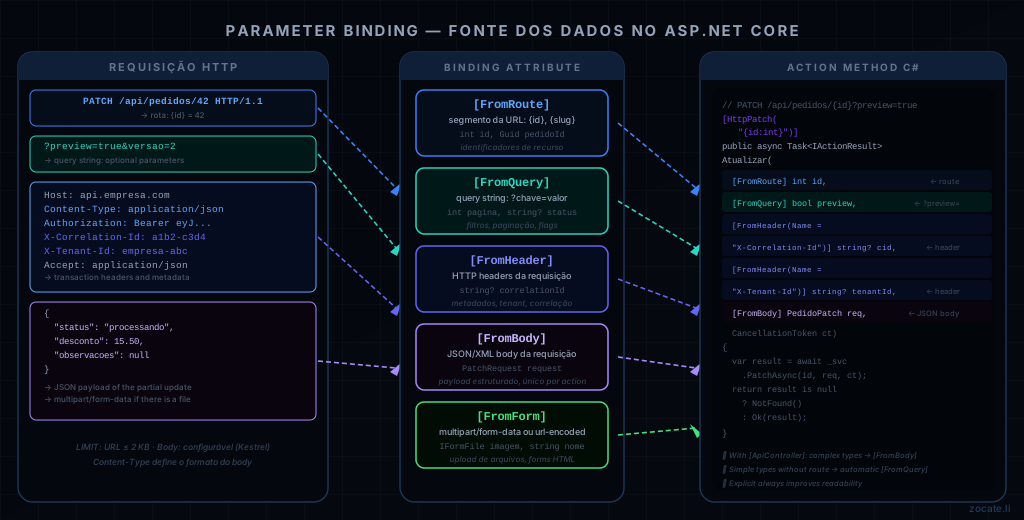
[FromRoute] — Parameter in the URL (path segment)#
Extracts values from route segments defined in the template with {name}.
When to use: resource identifiers in the URL — IDs, slugs, versions, locales.
 1
 2
 3
 4
 5
 6
 7
 8
 9
10
11
12
13
14
15
16
17
18
19
| // Route: GET /api/pedidos/{id}/itens/{itemId}
[HttpGet("{id:int}/itens/{itemId:int}")]
public async Task<IActionResult> ObterItem(
[FromRoute] int id, // extracts from {id}
[FromRoute] int itemId) // extracts from {itemId}
{ /* ... */ }
// Route: GET /api/v2/pedidos/{pedidoId}
[HttpGet("~/api/v{versao:int}/pedidos/{pedidoId:guid}")]
public async Task<IActionResult> ObterPedidoVersionado(
[FromRoute] int versao,
[FromRoute] Guid pedidoId)
{ /* ... */ }
// Type constraints in the route: :int, :guid, :long, :alpha, :regex(...)
[HttpGet("{id:guid}")]
// [FromRoute] is INFERRED for parameters that match route segments
public async Task<IActionResult> ObterPorGuid(Guid id)
{ /* ... */ } // automatic inference: works without [FromRoute]
|
Route constraints ({id:int}, {id:guid}, {id:min(1)}) prevent routes from “leaking” into the wrong actions before reaching the action method.
[FromQuery] — Parameter in the Query String#
Extracts values from the query string (?key=value&otherKey=value2). Ideal for filters, sorting, pagination and optional parameters.
When to use: filtering, searching, sorting, pagination, optional flags.
 1
 2
 3
 4
 5
 6
 7
 8
 9
10
11
12
13
14
15
16
17
18
19
20
21
22
23
24
25
26
27
28
29
30
31
32
33
34
35
36
37
38
| // GET /api/pedidos?pagina=2&tamanhoPagina=20&status=aberto&ordenarPor=dataCriacao
[HttpGet]
public async Task<IActionResult> Listar(
[FromQuery] int pagina = 1,
[FromQuery] int tamanhoPagina = 20,
[FromQuery] string? status = null,
[FromQuery] string ordenarPor = "id",
[FromQuery] bool crescente = true)
{ /* ... */ }
// Lists in the query string: GET /api/produtos?ids=1&ids=2&ids=3
// or with a separator: GET /api/produtos?ids=1,2,3
[HttpGet("batch")]
public async Task<IActionResult> ObterEmLote(
[FromQuery] int[] ids) // ASP.NET Core resolves both formats
{ /* ... */ }
// DTO for the query string — useful when there are many filter parameters
// GET /api/produtos?categoria=eletronicos&precoMin=100&precoMax=500&emEstoque=true
[HttpGet("pesquisar")]
public async Task<IActionResult> Pesquisar(
[FromQuery] FiltrosProdutoQuery filtros)
{ /* ... */ }
public record FiltrosProdutoQuery(
string? Categoria,
decimal? PrecoMin,
decimal? PrecoMax,
bool? EmEstoque,
string? Termo
);
// Parameter name different from the C# field via [FromQuery(Name = "...")]
[HttpGet("relatorio")]
public async Task<IActionResult> Relatorio(
[FromQuery(Name = "data_inicio")] DateOnly dataInicio,
[FromQuery(Name = "data_fim")] DateOnly dataFim)
{ /* ... */ }
|
Never use [FromQuery] for sensitive data (passwords, tokens). Query strings show up in server logs, browser history and Referer headers.
[FromBody] — Parameter in the Request Body#
Extracts the request body (usually JSON, but it can be XML or another content type) and deserializes it into the C# type. Only one parameter per action can have [FromBody].
When to use: creation (POST), replacement (PUT), partial update (PATCH), batch deletion via payload.
 1
 2
 3
 4
 5
 6
 7
 8
 9
10
11
12
13
14
15
16
17
18
19
20
21
22
23
24
25
26
27
28
29
30
31
32
33
34
35
36
37
| // POST /api/pedidos — creates an order
// Header: Content-Type: application/json
[HttpPost]
public async Task<IActionResult> Criar(
[FromBody] CriarPedidoRequest request) // deserializes JSON → C#
{ /* ... */ }
// Multiple fields in a DTO
public record CriarPedidoRequest(
[Required] int ClienteId,
[Required, MinLength(1)] List<CriarItemPedidoRequest> Itens,
string? Observacoes,
DateOnly? DataEntregaPrevista
);
// ASP.NET Core with System.Text.Json (default) + required properties
public record CriarItemPedidoRequest(
[Required] int ProdutoId,
[Required, Range(1, 9999)] int Quantidade,
decimal? DescontoUnitario
);
// Automatic validation with [ApiController]:
// If ModelState is invalid, it returns 400 Bad Request automatically
// No need to check ModelState manually
// Global serializer configuration:
builder.Services.AddControllers()
.AddJsonOptions(options =>
{
options.JsonSerializerOptions.PropertyNamingPolicy =
JsonNamingPolicy.CamelCase; // clienteId, not ClienteId
options.JsonSerializerOptions.DefaultIgnoreCondition =
JsonIgnoreCondition.WhenWritingNull; // omits null in the output
options.JsonSerializerOptions.Converters.Add(
new JsonStringEnumConverter()); // enum as string
});
|
[FromBody] with primitive types works, but it is rare and causes confusion. For a single simple value, prefer [FromQuery] or [FromRoute]. The body is suited to structured objects.
Extracts data from requests with Content-Type: multipart/form-data or application/x-www-form-urlencoded. Indispensable for file uploads (IFormFile).
When to use: file uploads, traditional HTML forms, APIs consumed directly by a <form>.
 1
 2
 3
 4
 5
 6
 7
 8
 9
10
11
12
13
14
15
16
17
18
19
20
21
22
23
24
25
26
27
28
29
30
31
32
33
34
35
36
37
38
39
40
41
42
43
44
45
46
47
48
49
| // POST /api/produtos/imagem — image upload with metadata
// Content-Type: multipart/form-data
[HttpPost("{id:int}/imagem")]
[Consumes("multipart/form-data")]
[ProducesResponseType(StatusCodes.Status200OK)]
[ProducesResponseType(StatusCodes.Status400BadRequest)]
[RequestSizeLimit(10 * 1024 * 1024)] // 10 MB maximum
public async Task<IActionResult> UploadImagem(
[FromRoute] int id,
[FromForm] IFormFile imagem, // file
[FromForm] string? altText, // form text field
[FromForm] bool isPrincipal = false, // form boolean flag
CancellationToken ct = default)
{
if (imagem.Length == 0)
return BadRequest("Empty file.");
var extensoes = new[] { ".jpg", ".jpeg", ".png", ".webp" };
var ext = Path.GetExtension(imagem.FileName).ToLowerInvariant();
if (!extensoes.Contains(ext))
return BadRequest($"Extension '{ext}' not allowed.");
await using var stream = imagem.OpenReadStream();
var url = await _storageService.UploadAsync(stream, imagem.ContentType, ct);
return Ok(new { url, altText });
}
// Uploading multiple files
[HttpPost("importar")]
[Consumes("multipart/form-data")]
public async Task<IActionResult> Importar(
[FromForm] IFormFileCollection arquivos, // file collection
[FromForm] string tipo,
CancellationToken ct = default)
{ /* ... */ }
// DTO for a complex form
[HttpPost("cadastro-completo")]
[Consumes("multipart/form-data")]
public async Task<IActionResult> CadastroCompleto(
[FromForm] CadastroCompletoRequest request)
{ /* ... */ }
public record CadastroCompletoRequest(
[Required] string Nome,
[Required, EmailAddress] string Email,
IFormFile? FotoPerfil // optional file field
);
|
[FromBody] and [FromForm] are mutually exclusive in the same action — both read the request body. Never combine the two in the same action.
Extracts values from request headers. Useful for transaction metadata, correlation, API version or custom authentication fields.
When to use: correlation ID, tenant ID, client version, custom API key, fields that are not resource data.
 1
 2
 3
 4
 5
 6
 7
 8
 9
10
11
12
13
14
15
16
17
18
19
20
21
22
23
24
25
26
27
28
29
30
31
32
33
34
35
36
37
38
39
40
41
42
43
44
45
46
47
| // GET /api/pedidos — with correlation and tenant headers
[HttpGet]
public async Task<IActionResult> Listar(
[FromHeader(Name = "X-Correlation-Id")] string? correlationId,
[FromHeader(Name = "X-Tenant-Id")] string? tenantId,
[FromQuery] int pagina = 1,
CancellationToken ct = default)
{
// Propagates the correlation ID for logging and distributed tracing
using var _ = _logger.BeginScope(new { correlationId, tenantId });
return Ok(await _service.ListarAsync(tenantId, pagina, ct));
}
// API with the version in a header (alternative to URL versioning)
// Header: X-Api-Version: 2
[HttpGet("~/api/relatorios")]
public async Task<IActionResult> Relatorio(
[FromHeader(Name = "X-Api-Version")] int versao = 1)
{ /* ... */ }
// Example with a custom API key (always prefer standard Authorization)
[HttpPost]
public async Task<IActionResult> WebhookReceber(
[FromHeader(Name = "X-Webhook-Secret")] string segredo,
[FromBody] WebhookPayload payload)
{
if (!_webhookService.ValidarSegredo(segredo))
return Unauthorized();
/* ... */
return Ok();
}
// Useful for Idempotency-Key (payments, critical operations)
[HttpPost("pagamentos")]
public async Task<IActionResult> ProcessarPagamento(
[FromHeader(Name = "Idempotency-Key")] string? idempotencyKey,
[FromBody] PagamentoRequest request,
CancellationToken ct = default)
{
if (idempotencyKey is not null)
{
var existente = await _cache.GetAsync(idempotencyKey, ct);
if (existente is not null)
return Ok(existente); // idempotent response
}
/* processes the payment... */
}
|
For authentication: always prefer the standard Authorization: Bearer <token> or Authorization: Basic ... header via ASP.NET Core Identity / JWT [Authorize], instead of custom headers.
Comparison Table: Which Attribute to Use When#
| Attribute | Source | Content-Type | Typically used for | Sensitive? |
|---|
[FromRoute] | Segment /path/{id} | Any | Resource identifiers | ⚠️ Moderate |
[FromQuery] | Query string ?k=v | Any | Filters, pagination, flags | ❌ Not recommended |
[FromBody] | Request body | application/json / application/xml | Creation, full update | ✅ Preferable |
[FromForm] | Request body | multipart/form-data / url-encoded | File uploads, forms | ✅ Preferable |
[FromHeader] | HTTP Header | Any | Metadata, correlation, tenant | ✅ Preferable |
Rule of thumb:
- The resource goes in the route:
[FromRoute] - Filters and options go in the query string:
[FromQuery] - Structured data (the payload) goes in the body:
[FromBody] - Files and HTML forms go in the form:
[FromForm] - Transport and context metadata go in the header:
[FromHeader]
Automatic inference (no attribute)#
In ASP.NET Core with [ApiController], binding is inferred automatically:
 1
 2
 3
 4
 5
 6
 7
 8
 9
10
11
12
13
14
15
16
| [ApiController]
[Route("api/exemplo")]
public class InferenciaController : ControllerBase
{
// ASP.NET Core infers automatically:
// - Guid id → [FromRoute] (matches {id} in the route)
// - Request request → [FromBody] (complex type = body by default with [ApiController])
[HttpPut("{id:guid}")]
public IActionResult Atualizar(Guid id, ProdutoRequest request)
{ /* ... */ return Ok(); }
// string categoria → [FromQuery] (simple type not in the route = query string)
[HttpGet]
public IActionResult Listar(string? categoria, int pagina = 1)
{ /* ... */ return Ok(); }
}
|
Inference works well for simple cases, but being explicit with the attributes improves readability and avoids surprises when route templates change.
URL / URI Length Limits#
This is one of the most practical and frequently ignored questions. The RFC 3986 specification does not define a maximum length for URIs, but every client and server implements its own limits — and they vary a lot.
Limits per layer#
| Layer | Default limit | Configurable? | Note |
|---|
| RFC 3986 | No defined limit | — | The specification only defines the syntax |
| Internet Explorer 11 | 2,083 bytes | ❌ No | Historical limit; IE discontinued |
| Chrome / Edge / Firefox | ~32,000–65,000 bytes | ❌ No | Practically unlimited for normal use |
| Safari | ~80,000 bytes | ❌ No | |
| Apache HTTP Server | 8,190 bytes (LimitRequestLine) | ✅ Yes | Default: 8 KB |
| Nginx | 8 KB (large_client_header_buffers) | ✅ Yes | Header buffer included |
| IIS (Kestrel) | 16,384 bytes (16 KB) | ✅ Yes | Includes request line + headers |
| ASP.NET Core (Kestrel) | 8,192 bytes | ✅ Yes | MaxRequestLineSize |
| Azure API Management | 4,096 bytes (4 KB) | ✅ Via policy | Significant for proxies |
| AWS ALB / CloudFront | 8,192 bytes | ✅ Yes | |
| CDNs in general | 2,048–8,192 bytes | Varies | Check per product |
The safe limit in practice#
Use at most 2,000 bytes (2 KB) for URLs if you want universal compatibility. For internal APIs without IE or aging CDNs, 8 KB is reasonable.
A URL is made of: scheme + host + path + query string + fragment. What grows fastest is the query string — especially when passing lists of IDs, combined filters or Base64 data.
1
2
3
4
| https://api.empresa.com/api/produtos/pesquisar
?ids=1,2,3,4,5,...,200 ← ⚠️ may exceed the limit
&filtros={"categoria":"...", "tags":["a","b",...]} ← ❌ never do this
&token=eyJhbGciOiJSUzI1NiIsInR5cCI6... ← ❌ never put a token in the URL
|
Configuring the limit in ASP.NET Core (Kestrel)#
 1
 2
 3
 4
 5
 6
 7
 8
 9
10
11
| // Program.cs — adjust the request line limit
builder.WebHost.ConfigureKestrel(options =>
{
options.Limits.MaxRequestLineSize = 16_384; // 16 KB (default: 8 KB)
options.Limits.MaxRequestHeadersTotalSize = 32_768; // 32 KB for headers
options.Limits.MaxRequestBodySize = 10 * 1024 * 1024; // 10 MB for the body
});
// For a specific endpoint with a higher limit:
app.MapPost("/api/importar", ImportarHandler)
.WithMetadata(new RequestSizeLimitAttribute(50 * 1024 * 1024)); // 50 MB
|
Strategies to avoid long URLs#
Problem: GET /api/pedidos?ids=1&ids=2&ids=3&...&ids=200 can easily exceed 2 KB.
 1
 2
 3
 4
 5
 6
 7
 8
 9
10
11
12
13
14
15
16
17
18
19
20
21
22
23
24
25
26
27
28
29
30
31
32
| // ❌ Problematic: GET with many IDs in the query string
// GET /api/pedidos?ids=1&ids=2&ids=3... (may exceed the limit)
// ✅ Solution 1: POST for complex searches (pragmatic, not pure REST)
// POST /api/pedidos/buscar
[HttpPost("buscar")]
public async Task<IActionResult> BuscarEmLote([FromBody] BuscarPedidosRequest req)
{ /* ... */ }
public record BuscarPedidosRequest(
int[]? Ids,
string? Status,
DateOnly? De,
DateOnly? Ate,
string[]? Tags
);
// ✅ Solution 2: Base64-encoded cursor token (for pagination)
// GET /api/pedidos?cursor=eyJpZCI6MTAwLCJkYXRhIjoiMjAyNi0wMS0wMSJ9
// The cursor carries the search criteria, serialized and opaque
[HttpGet]
public async Task<IActionResult> ListarComCursor(
[FromQuery] string? cursor,
[FromQuery] int limite = 20)
{ /* deserializes the cursor, applies the filter... */ }
// ✅ Solution 3: Batch endpoint with an explicit body
// POST /api/produtos/lote — fetches products by a list of IDs in the body
[HttpPost("lote")]
public async Task<IActionResult> ObterEmLote(
[FromBody] IEnumerable<int> ids)
{ /* ... */ }
|
Status Codes: REST Conventions#
HTTP semantics only work completely when status codes are used correctly:
| Range | Meaning | REST usage examples |
|---|
| 2xx | Success | |
200 OK | General success | GET, PUT, PATCH returning the resource |
201 Created | Resource created | Successful POST + Location header |
204 No Content | Success without body | DELETE, PUT/PATCH without return |
206 Partial Content | Partial content | Range download, streaming |
| 3xx | Redirection | |
301 Moved Permanently | URL changed permanently | API versioning |
304 Not Modified | Cache still valid | GET with ETag/If-None-Match |
| 4xx | Client error | |
400 Bad Request | Malformed request | Invalid parameters |
401 Unauthorized | Not authenticated | Missing or invalid token |
403 Forbidden | Authenticated, without permission | Access to the resource denied |
404 Not Found | Resource does not exist | GET/PUT/DELETE of a nonexistent ID |
405 Method Not Allowed | Method not supported | DELETE on a read-only resource |
409 Conflict | State conflict | Uniqueness violated, concurrency |
410 Gone | Resource permanently deleted | Resources with history |
415 Unsupported Media Type | Content-Type not supported | Non-JSON body on a JSON endpoint |
422 Unprocessable Entity | Semantically invalid entity | Business validation failed |
429 Too Many Requests | Rate limit reached | API throttling |
| 5xx | Server error | |
500 Internal Server Error | Unhandled error | Unexpected exception |
502 Bad Gateway | Upstream error | Proxy/gateway with a failing backend |
503 Service Unavailable | Service unavailable | Maintenance, overload |
Problem Details: Standardized Error Responses (RFC 7807)#
Beyond status codes, RFC 7807 defines a standard format for errors in HTTP APIs — application/problem+json:
 1
 2
 3
 4
 5
 6
 7
 8
 9
10
11
| {
"type": "https://api.empresa.com/errors/validacao",
"title": "Validation error",
"status": 422,
"detail": "One or more fields are invalid.",
"instance": "/api/pedidos",
"errors": {
"ClienteId": ["ClienteId is required."],
"Itens": ["The item list cannot be empty."]
}
}
|
ASP.NET Core supports this natively:
 1
 2
 3
 4
 5
 6
 7
 8
 9
10
11
12
13
14
15
16
17
18
19
20
| // Program.cs — enables Problem Details (default in .NET 7+)
builder.Services.AddProblemDetails();
// Return a problem directly
[HttpPost]
public IActionResult Criar([FromBody] CriarPedidoRequest req)
{
if (req.ClienteId <= 0)
return Problem(
title: "Invalid ClienteId",
detail: "ClienteId must be greater than zero.",
statusCode: StatusCodes.Status422UnprocessableEntity,
type: "https://api.empresa.com/errors/validacao");
/* ... */
}
// With ValidationProblemDetails for ModelState errors:
if (!ModelState.IsValid)
return ValidationProblem(ModelState); // returns 400 + standard errors map
|
REST Design Checklist#
Before publishing an endpoint, check:
Conclusion#
REST is not a technology — it is a design discipline. The difference between a REST API and an RPC API served over HTTP lies precisely in respecting the protocol’s semantics: URLs that identify resources, methods that express actions, status codes that communicate results, and parameters that arrive through the semantically correct channel.
The [FromRoute], [FromQuery], [FromBody], [FromForm] and [FromHeader] attributes in ASP.NET Core are not just syntactic conveniences — they document and enforce design intentions. A signature like:
1
2
3
4
5
| [HttpPatch("{id:int}")]
public Task<IActionResult> Atualizar(
[FromRoute] int id,
[FromHeader(Name = "X-Idempotency-Key")] string? idempotencyKey,
[FromBody] PedidoPatchRequest request)
|
…is self-explanatory: what identifies the resource, what is transport metadata and what is the data payload.
And about URL limits: respect the 2 KB for universal compatibility. If your query string grows beyond that, it is a sign that the data belongs in the body or the design needs to be revisited.
Read Also#
References#

By commenting, you agree to our Privacy Policy, Terms of Use, Data Deletion Policy.